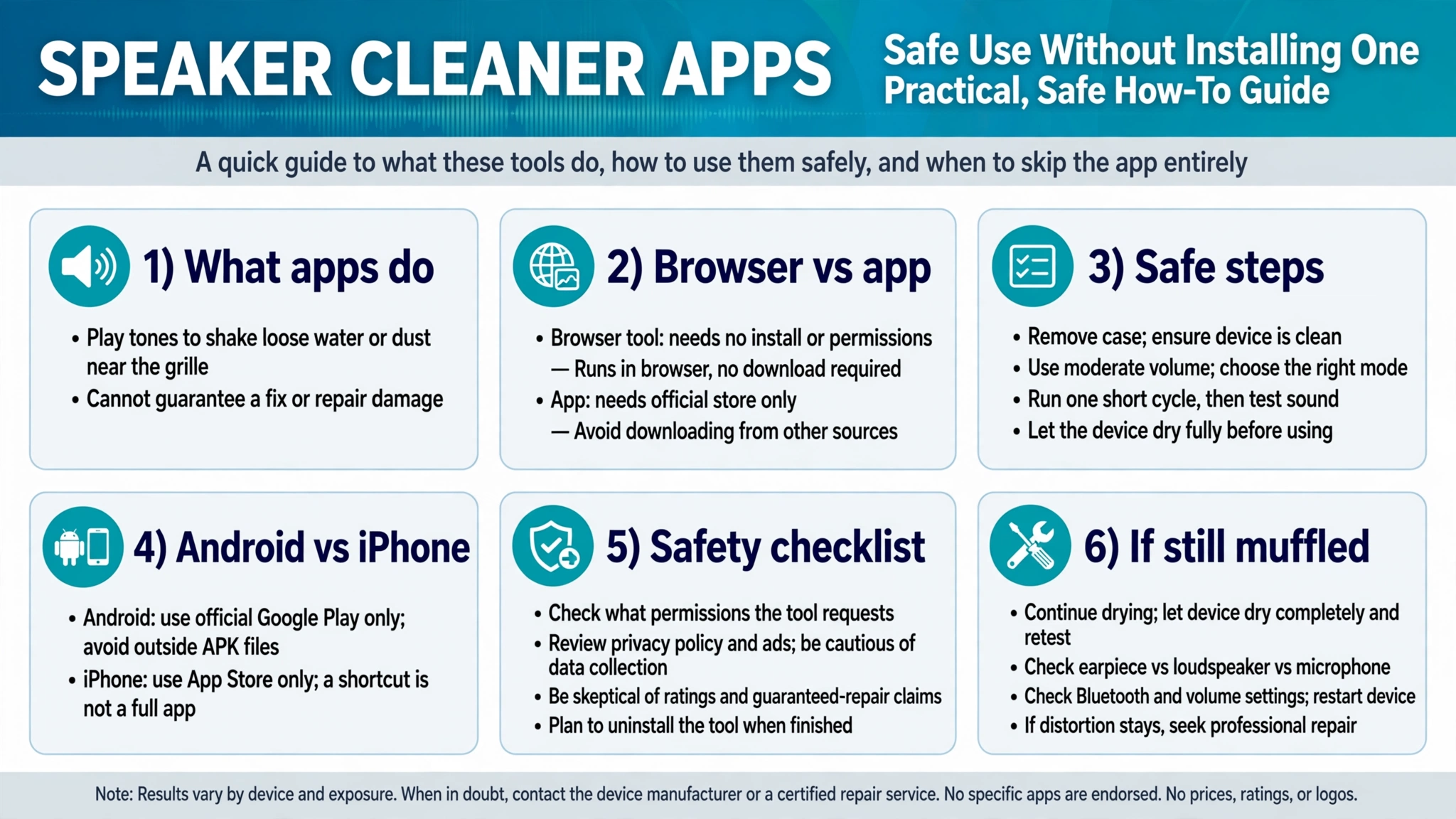
Most speaker cleaner apps play tones through your phone speaker to shake loose water or dust near the grille. They can sometimes help with light, surface-level muffling, but they cannot guarantee a fix, and they cannot repair a damaged speaker.
That distinction matters more than the download itself. If you understand what an app can and cannot do, you can decide in a few minutes whether to install one at all, what to check first, and what to try next if the sound stays muffled.
Who this guide is for
This guide is for anyone whose phone speaker sounds muffled, quiet, or crackly after water, dust, or lint, and who is searching for a speaker cleaner app to fix it. It is also for people who are unsure whether an app is safe, whether a free app is a good idea, or whether they need an app on Android or iPhone at all.
You do not need technical knowledge to follow it. You do need to be honest about the problem: a tone can move air at the speaker opening, but it cannot undo corrosion, a torn speaker, or damage inside the phone.
What a speaker cleaner app actually does
A typical speaker cleaner app plays a tone, a sweep of tones, or a vibration pattern through the loudspeaker. The movement of the speaker can push some water droplets or loose dust toward the grille and out of the opening. Some apps offer different modes for water, dust, or the earpiece. Others simply play one tone and let you repeat it.
That is the whole mechanism. The app does not open the phone, dry the inside, or clean the mesh by hand, and it does not diagnose hardware damage.
Separate four parts that people often mix up:
- Loudspeaker: the main speaker at the bottom or side of the phone. This is the part most cleaning tones target.
- Earpiece: the small speaker at the top used for calls. It needs gentler tones and different handling. Do not assume a loudspeaker mode is right for the earpiece.
- Microphone: the part that picks up your voice. Sound cannot push water out of a microphone in the same way, because a microphone does not move like a speaker. Air-drying and manufacturer guidance matter more here.
- Charging port: a separate opening. Do not insert objects, compressed air at high pressure, or liquid into it to clean it, and do not charge a phone that shows a liquid warning.
If your problem is mainly during calls, the earpiece is the likely focus. If music and videos sound muffled, the loudspeaker is the likely focus. If callers cannot hear you, the microphone may be the issue, and a speaker tone is not the right fix.
App versus browser tool: when installing makes sense
Many people search for a speaker cleaner app because they assume they need to download something. Often, they do not.
A browser tool runs on the site itself, with no install, no app permissions, and nothing to update later. The free browser tool on this site follows that model: you open the page, choose a mode, and play the tone. That simplicity is a real advantage when you need a quick check after a spill, and it avoids the privacy and ad questions that come with installing an app.
An installed app can make sense in narrower cases, for example if you want a tool you can open quickly without a browser. Offline access depends on the specific app and is not assumed here.
Use this comparison to decide:
| Question | Browser tool | Installed app |
|---|---|---|
| Do I need to install anything? | No | Yes |
| Does it ask for app permissions? | No app permissions | Check before installing |
| Can I try it once and leave? | Yes | You must uninstall it later if you do not want it |
| Does it work on both Android and iPhone? | In a modern browser, generally yes | Depends on the app and the store |
The right choice is not about which option sounds more powerful. It is about which option adds the least risk for the problem you have. For a one-time check after light water or dust, the browser tool is usually the simpler path.
How to use a speaker cleaner app safely, step by step
If you do install an app, follow these steps in order. They apply to any app in general; no specific app was tested for this guide.
- Prepare the phone first. Remove the case. Wipe the outside dry with a soft, lint-free cloth. Hold the speaker facing down so gravity helps any loose water move toward the opening.
- Start at a moderate volume. Do not begin at maximum volume. Raise the volume gradually, and stop if you hear harsh rattling or distortion that does not go away.
- Choose the right mode. Use a water mode for a recent spill, a dust mode for lint, and an earpiece mode for call problems. Do not use a loudspeaker mode for the earpiece.
- Run one short cycle, then test. Play a song or a voice recording you know well. Listen for clarity, balance, and distortion. Repeat only a few times if needed.
- Let the phone dry if needed. If the sound is still muffled, stop and let the phone air-dry with the ports facing down. Do not keep running tones at high volume in the hope that repetition will fix deeper water or damage.
- Clean the grille gently if lint remains. A soft brush can help with surface lint. Do not push objects into the grille, do not use sharp tools, and do not blow hard into the opening.
- Check the result with a speaker test. A test can help you hear whether one side is quieter, whether the sound is distorted, or whether the problem has changed. It cannot prove the speaker is fully repaired.
For a wet phone, follow the phone maker’s safety guidance first. That guidance takes priority over any app, tone, or guide, including this one. If the phone was fully submerged, keep it off if you can, do not charge it while a liquid warning is present, and let it dry. A cleaning tone is not a substitute for drying time or for repair.
Android versus iPhone: what actually differs
The basic idea is the same on both platforms, but the path to the tool is different.
On Android, speaker cleaner apps are typically found in Google Play, and the term APK also appears in searches. An APK is an Android install file. Downloading an APK from outside Google Play carries extra risk: the file may not be what it claims to be, it may ask for broad permissions, and it may be harder to update or remove safely. For most users, the official store is the safer route, and a browser tool avoids the APK question entirely.
On iPhone, apps come from the App Store, and some users also search for a speaker cleaner shortcut. A shortcut is not a full app. It is a small automation that can trigger a tone or open a tool, and its behavior depends on the phone, its settings, and how the shortcut was built. A shortcut can be convenient, but it does not add cleaning power by itself, and you should still check what it does before you run it at high volume.
On both platforms, check who published the app, what permissions it requests, what data it collects, and whether its listing promises a guaranteed repair or claims any frequency will work on any phone. A vague listing, a request for contacts or location with no clear link to playing a tone, or pressure to pay before trying a basic tone are reasons to stop and use the browser tool instead.
How to judge safety before you download
Use this checklist before you tap install.
- Use the official store. Avoid sideloaded APK files, modified apps, and links from unknown sites. Modified and premium-unlocked versions are not recommended.
- Read the permissions. A tone player should not need access to your contacts, messages, location, or files to play sound. If the request does not match the job, do not install it.
- Read the privacy description. Look for what data is collected, whether ads or tracking are involved, and whether you can use the basic function without creating an account. If that information is missing or unclear, treat that as a warning.
- Be skeptical of reviews and ratings. This guide does not cite ratings, because ratings can be gamed, can reflect an old version, and do not prove that an app cleaned a specific speaker. Use reviews only as a prompt to check permissions and behavior, not as proof.
- Watch for overpromising language. Be cautious of claims that a tone will always remove water or dust, repair damage, or work at frequencies far beyond what a small phone speaker can reproduce reliably. There is no single frequency that works for every phone, and no tone can guarantee a result.
- Check for ads and upsells. Free does not always mean simple. Some free apps rely on ads, subscriptions, or in-app purchases. Decide in advance whether you want that trade-off, or whether a free browser tool is cleaner for a one-time use.
- Plan to uninstall. If you install an app for one problem, remove it when you are done if you do not need it. That reduces future permissions, updates, and background activity.
If any step feels unclear or unsafe, stop. The browser tool on this site does not require an install, and it lets you test the basic idea without giving an app access to your phone.
If the sound stays muffled
A cleaning tone is only one step. If the sound does not improve, work through these checks before you assume the app failed or the speaker is broken.
First, repeat the test after drying time. Water deep inside the grille may need hours to dry. Second, check for packed lint. Sound can loosen loose particles, but it does not reliably remove embedded debris, so gentle physical cleaning is often more relevant for dust than another tone.
Third, test the earpiece and the loudspeaker separately. A problem only during calls points to the earpiece. A problem only with music points to the loudspeaker. A problem with callers hearing you points to the microphone, which needs a different approach.
Fourth, check simple settings: volume, mute, Bluetooth output, and whether sound is going to headphones or another device instead of the phone speaker. A tone will not help if the phone is sending audio elsewhere.
If the speaker still crackles, distorts at normal volume, stays quiet after drying, or shows signs of deeper water damage, seek repair. Do not keep raising the volume, do not open the phone yourself unless you are qualified, and do not use high-pressure air or liquid cleaners. A repair shop or the manufacturer can check for damage that no app can diagnose from a tone.
Safety limits to keep in mind
Sound cleaning has limits, and respecting them protects both your hearing and your phone. Use a moderate volume, stop if you feel discomfort, and stop if distortion persists. Do not use maximum volume as a first step, and do not assume that louder is more effective.
Do not try ultrasonic or very high-frequency tones as a shortcut. A small phone speaker cannot reliably reproduce frequencies such as 30,000, 50,000, or 100,000 Hz, and claims that such tones will clean better are not a safe basis for choosing an app. Audible tones in the range a phone speaker can actually play are the relevant range for this kind of tool.
Do not insert objects into the speaker, earpiece, microphone, or charging port. Do not use sharp tools, needles, or high-pressure air. Do not pour liquid into an opening to flush it out. For a wet device, manufacturer guidance comes first, and drying time matters more than repeated tones.
Conclusion
A speaker cleaner app is best understood as a convenience, not a repair. It can play tones that may help with light water or loose dust at the speaker opening, but it cannot guarantee a result or repair damage, and it should not be chosen from a ranking, a rating, or a promise that sounds too strong.
For most one-time problems, the simpler choice is a free browser tool with no install and no app permissions. If you do install an app, use the official store, check permissions and privacy first, start at a moderate volume, use the right mode for the loudspeaker or earpiece, and seek repair if the sound stays distorted or quiet after drying.
FAQ
1. Do speaker cleaner apps work?
They may help with light water or loose dust near the speaker opening, because speaker movement can push some droplets or particles toward the grille. They do not guarantee a fix, and they cannot repair damage, corrosion, or a torn speaker.
2. Is a speaker cleaner app safe?
It can be safe if it comes from an official store, asks only for permissions that match playing a tone, and is used at a moderate volume. It is not automatically safe. Avoid sideloaded or modified APK files, broad permissions, and apps that promise a guaranteed repair.
3. Do I need to download an app, or can I use a browser tool?
You do not always need an app. A browser tool can play the same kind of tone without an install or app permissions, which is simpler for a one-time check. An app may suit you if you want a tool you can open quickly, but it does not add cleaning power by itself.
4. Can a speaker cleaner app remove dust?
It may help with loose dust at the surface, but sound does not reliably remove embedded debris. For packed lint, gentle physical cleaning of the grille and drying time are often more relevant than another tone.
5. Can I use maximum volume to clean faster?
No. Start at a moderate volume and raise it gradually. Stop if you hear persistent distortion or feel discomfort. Louder is not automatically more effective, and high volume can make distortion worse.
6. Can sound repair water damage?
No. If liquid ingress is suspected, follow the phone maker’s guidance, keep the phone off if you can, do not charge it while a liquid warning is present, and let it dry. If the problem persists, seek repair.
7. What is different about a speaker cleaner shortcut on iPhone?
A shortcut is a small automation, not a full app. It may trigger a tone, but its behavior depends on the phone and its settings. Check what it does before running it, and use the same volume and safety limits as for any tone.
8. Should I download an APK instead of using the store?
No, not as a first choice. APK files from outside Google Play carry extra risk, including malware and misrepresented apps. Use the official store, or use a browser tool and avoid the APK question entirely.
Related tools on this site
Related tools:
- Speaker Cleaner
- Water Eject
- Dust Cleaner
- Ear Speaker Cleaner
- Speaker Test
- Tone Generator
- Mic Test
- Volume Booster
- Headphone Test
- Noise Generator
- Bluetooth Latency Test
- Sound Meter
- Earbuds Cleaner
- Bass Test
- Hearing Test
- Android Water Eject
- iPhone Water Eject
Related guides:
Leave a Reply