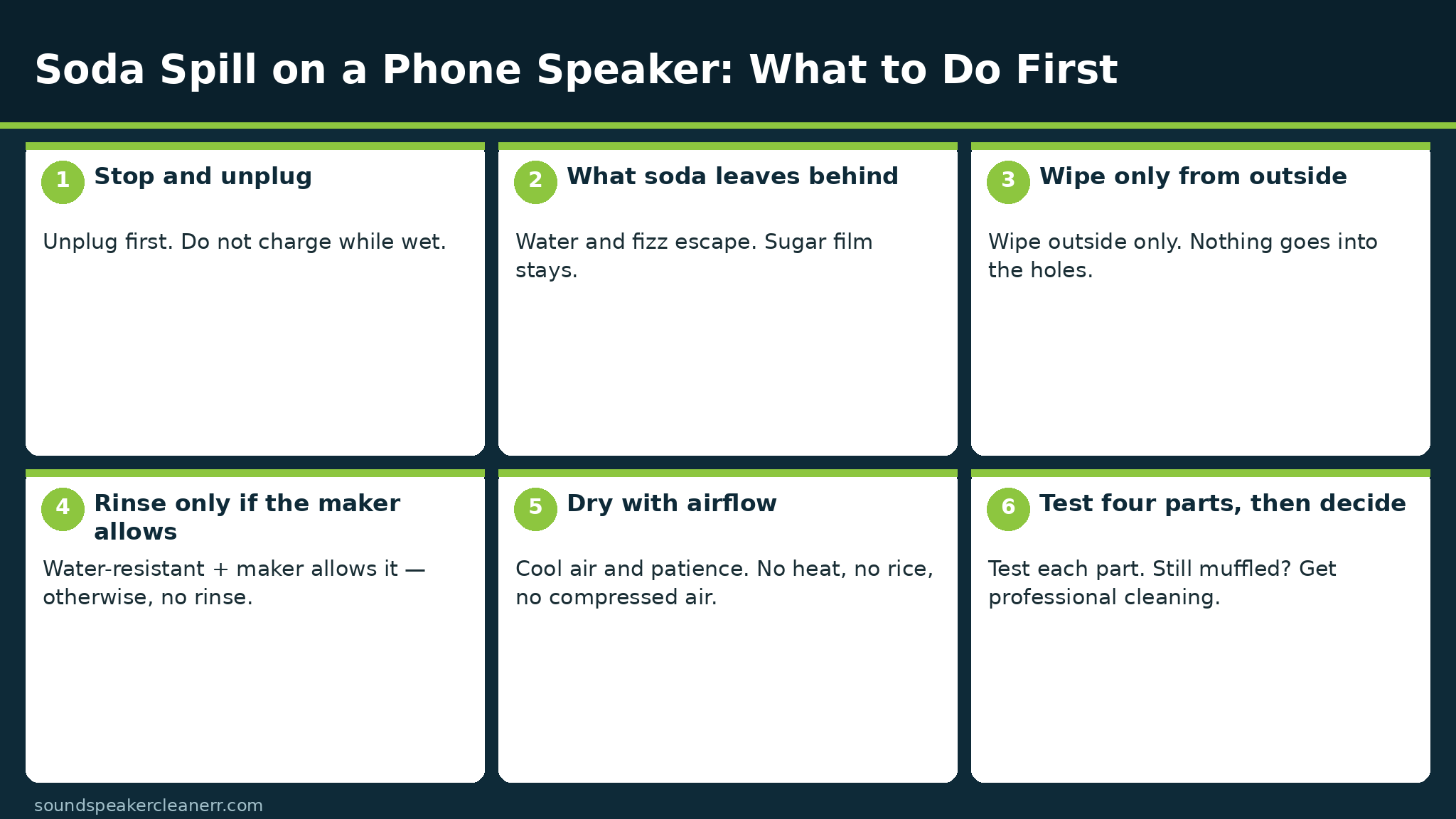
Unplug the phone, wipe the outside promptly, dry it fully with airflow before charging, and rinse only if the phone is water-resistant and the maker allows a rinse. Soda is stickier trouble than plain water: when the water and fizz escape, its sugars stay behind as a tacky film across the speaker mesh.
Why soda is different from plain water
Plain water evaporates and, in a light splash, may leave little behind. Soda leaves a residue by design: the parts that make it sweet and flavorful do not evaporate. As moisture dries, sugars concentrate and then crystallize into a thin, sticky layer that coats the mesh and the port surround. That layer attracts dust and lint, so a grille that was only wet can become progressively more blocked over days. That is why a phone can sound almost normal on the day of the spill and duller a few days later, once the film has hardened and collected debris.
Carbonation adds a spreading effect. Fizzing liquid bubbles and creeps, and a freshly opened or shaken drink can push droplets into small openings more readily than still water. The acids in soda — the sharp, tangy components in colas and citrus sodas — add a second concern: if left on metal contacts and port pins, acids can contribute to corrosion over time. Coloring is a third, mostly cosmetic concern: dark sodas can stain a light-colored case or grille surround, but the stain is less important than the film underneath. Do not try to bleach or scrub a stain away with a household cleaner; the goal is to remove residue safely, not to restore a perfect appearance at the cost of the mesh.
Diet and sugar-free sodas are not a free pass. They still carry acids, flavorings, coloring, and sweeteners that leave residue, even if the film is thinner than a full-sugar drink's. The first response is the same for every soda variant, and the same rule applies: remove the residue where the maker allows it, rather than assuming a "lighter" drink leaves nothing behind.
First steps: unplug, wipe, and do not charge
Unplug every cable and accessory immediately. Do not plug in a charger to test the phone, and do not use a cable while any opening is wet. A working speaker does not prove the charging port is dry, and charging through a wet connector can corrode pins and cause permanent damage, as Apple's liquid-detection guidance warns. This matters more for soda than for water, because the liquid in the port is acidic and sugary, not just wet.
Remove the case and wipe the outside with a soft, lint-free cloth, using light strokes across the speaker grille, the earpiece slot at the top, and the microphone opening. Wipe from the outside only, and wipe the case separately, since soda pooled under a case can keep re-wetting the grille. Do not insert a pin, needle, toothpick, cotton swab, or paper towel into any opening. Objects pushed into the mesh can dent it, push soda deeper, and damage seals that protect against future splashes. Do not shake the phone violently and do not blow into the openings; gentle tapping with the connector facing down, as Apple describes for removing excess liquid, is different from vigorous shaking, which can move liquid from the speaker cavity toward other parts.
Power the phone off if it is a model where that is straightforward and safe to do. If the phone is not water-resistant, has a cracked screen or a loose back, was submerged rather than splashed, or shows screen problems, restarts, or heat, stop home steps and arrange professional inspection. Those signs point beyond a surface film on the mesh.
The rinse decision: only where the maker allows it
Do not pour water or any liquid into a speaker to rinse it. That is not what a rinse means here, and it is not recommended unless the phone's maker guidance allows it. A maker-allowed rinse, where it applies, means a gentle flow of clean water over the outside of the affected area of a water-resistant phone with intact seals, to carry away soda while it is still soluble — never a jet into the openings, never a long soak, and never a rinse of a phone that was never sealed for water.
The condition matters most for soda because timing matters. Sugar dissolves readily while wet and hardens as it dries, so a prompt maker-allowed rinse can prevent a film that later needs professional removal. But the same rinse that helps a sealed phone can harm an unsealed one, pushing soda deeper. If the phone is water-resistant, check the maker's page for that exact model before rinsing, and follow its wording on which liquids may be rinsed and how. If the phone is not water-resistant, if its seals may be damaged, or if you cannot confirm its rating, do not rinse it. Wipe the outside only, keep it powered off, and seek professional cleaning.
Do not add soap, detergent, vinegar, alcohol, or any cleaning product to a rinse, and do not use soda, juice, or another drink to "flush" the speaker. Adding another substance adds another residue. Clean water, used only as the maker directs, is the only rinse liquid in this guide, and for many phones the correct answer is no rinse at all — just wiping and drying, followed by professional help if the sound does not recover.
Drying: airflow, patience, and separate parts
After wiping, and after any maker-allowed rinse, place the phone speaker-side down on a lint-free cloth in a dry area with airflow. A fan blowing cool air toward the openings can help evaporation. Do not use a hair dryer, oven, microwave, or radiator, and do not put the phone in rice. Heat can bake a sugar film onto the mesh instead of removing it, and rice does not remove sugar residue; grains and starch dust can enter the port and grille. A sealed container also cuts airflow, which is the very thing that helps drying.
Apple's liquid-detection page, read directly on 2026-10-28, describes retrying a cable after at least 30 minutes and notes that full drying can take up to a day. Huawei's guidance for a small amount of liquid in speaker or microphone holes suggests waiting around 2 to 3 days for evaporation before judging whether the issue is resolved. These are different situations and different makers, so do not treat either figure as a guarantee for your phone. Follow your own maker's guidance, and do not charge until the phone and the port are both dry and no liquid alert is showing.
Test the four parts separately once the phone is dry. The loudspeaker at the bottom handles music and speakerphone. The earpiece at the top handles normal calls and contributes to stereo playback on many models. The microphone is tested by recording and playing back a voice note. The charging port is checked in good light and by confirming a cable seats fully. Sound does not clean the microphone or the port, so a clear loudspeaker does not clear those parts. Soda can reach all four, especially when it pools along the bottom edge, so test each one rather than assuming a single test covers the phone.
Cleaning the mesh after drying: what is safe and what is not
Once the phone is dry, a light dry cleaning of the outside grille can help if a faint film or lint remains. Use a dry, soft brush with light outward strokes across the grille, and wipe with a dry, lint-free cloth. Work grille-down so loosened material falls out rather than inward. If the surface feels tacky, a piece of adhesive tape pressed lightly over the grille and peeled away can lift surface stickiness and lint; do not press tape hard, do not use strong adhesive, and do not expect tape to reach film dried inside the mesh.
Do not use a wet cloth soaked in soapy water to clean the speaker, do not apply alcohol, solvents, or household cleaners into the openings, and do not use compressed air at close range. Compressed air can drive moisture and residue deeper, and makers warn against it for drying phones. If the mesh still looks filmed or feels tacky, or if brushing does not change the sound, stop. A film that has dried inside the mesh, or soda that reached internal parts, needs professional cleaning, not stronger home scrubbing.
A short water-eject tone at moderate volume may help move light moisture near a speaker opening after drying. Use the site's water-eject tool with the speaker facing down, run one short cycle, wipe away any droplets, rest the phone, and test again with a spoken-word clip at moderate volume. Do not repeat loud cycles. A tone does not dissolve sugar film, does not remove acids or coloring residue, and does not repair a damaged speaker, and repeated high-volume playback can stress a speaker that is already muffled.
Why the speaker can still sound dull after drying
If the sound improves and then stays slightly dull, sugar film is a likely remaining cause, especially if the phone was never rinsed where a rinse was allowed. The film may be thin enough to miss visually but thick enough to change airflow through the mesh, and lint stuck to the film can add to the blockage. Test without the case, since a case that covers part of the grille can make the problem seem worse than it is.
Other causes should also be checked before assuming soda is the only issue. Bluetooth may still be routing sound to earbuds or a car system, media volume may be low while call volume is fine, and Do Not Disturb can silence calls and alerts while music still plays. Test with Bluetooth off, with two different apps, and with both a normal call and speakerphone, so a settings problem is not mistaken for a film problem.
If dullness persists after wiping, drying, dry brushing, and a short tone, or if crackling appears at low volume, the film may be inside the mesh or the speaker may be damaged. That is the point to stop home steps and seek qualified service. A technician can inspect the mesh under magnification and clean or replace the speaker without damaging seals.
Everyday soda exposures to watch for
Not every soda exposure is a knocked-over can. A cup in a car holder, a bottle in a bag, a restaurant table, a party, and a phone used as a music controller with wet hands are all common routes. A small splash can still reach the grille, and soda left on a phone in a warm bag can dry into a film before anyone notices the spill.
Prevention is straightforward. Keep the phone away from open soda containers, use a sealed pouch if it must be near drinks, and wipe it promptly after any soda contact, even if it never fell in liquid. Do not assume a water-resistant rating covers soda: ratings are tested in fresh water, and soda is a different liquid with sugars, acids, and coloring. A quick wipe after contact is far easier than removing a dried film later, and it costs nothing.
When to seek professional cleaning
Seek service promptly if the phone is not water-resistant, if it was submerged in soda, if charging fails or a liquid alert persists, if the phone will not power on, or if sound stays muffled or distorted after wiping, full drying, and light dry brushing. Tell the technician what the drink was — cola, citrus, diet, or another soda — how long the exposure lasted, whether you rinsed, and which parts sound wrong: loudspeaker, earpiece, microphone, or charging.
Soda does not have to ruin a phone, but it does need one step that plain-water advice often skips: dealing with the sugar film, not just the water. Wipe promptly, rinse only where the maker allows it, dry with cool airflow and patience, test each part separately, and let a professional handle any film or damage that home steps cannot shift. That order protects the mesh, the port, and the speaker itself, and avoids turning a drink spill into a permanent muffle.
FAQ
Can soda permanently damage a phone speaker?
It can, but a light splash does not always do so. Liquid trapped in the grille often causes temporary muffling, while a dried sugar film or liquid that reached internal parts can cause lasting damage. If sound does not recover after wiping, full drying, and light dry brushing, have the phone inspected rather than repeating home steps.
Should I rinse soda off my phone?
Only if the phone is water-resistant with intact seals and the maker's guidance for that model allows a rinse. A maker-allowed rinse means a gentle flow of clean water over the outside of the affected area, never pouring water into the openings and never a long soak. If the phone is not water-resistant or you cannot confirm its rating, do not rinse it; wipe the outside only and seek professional help.
Why does my phone speaker feel sticky after a soda spill?
Soda sugars dry into a tacky film across the mesh that attracts lint and dust. The film may be thin enough to miss visually but thick enough to muffle sound. If the phone was not rinsed where a rinse was allowed, dry-brush lightly and seek professional cleaning if the stickiness or dullness persists.
Can a water-eject tone remove soda from a speaker?
No. A short tone at moderate volume may help move light moisture near an opening after drying, but it does not dissolve sugar film or remove acid and coloring residue, and it does not repair damage. Treat the tone as a finishing check after drying, not as a cleaning method for soda.
Is diet soda safer for a phone speaker than regular soda?
Not meaningfully. Diet soda still carries acids, flavorings, coloring, and sweeteners that leave residue, even if the film is thinner than a full-sugar drink's. Use the same first steps: unplug, wipe, dry fully, rinse only where the maker allows it, and seek help if sound does not recover.
Can I charge my phone once the speaker sounds clear?
Not necessarily. A clear loudspeaker does not prove the charging port is dry. Follow your maker's guidance and do not charge until the phone and the port are both dry and no liquid alert is showing. If a liquid alert appears, unplug immediately and allow more drying time.
What should I not do after a soda spill?
Do not charge while wet, do not use heat, rice, or compressed air, do not insert objects into the grille or port, do not shake the phone violently, and do not add soap or another cleaner into the openings. Each of these can push soda deeper, damage the mesh, or corrode the port.
When is it time to stop trying at home?
Stop if the phone is not water-resistant, was submerged, will not power on, shows screen problems or restarts, fails to charge, or stays muffled or distorted after wiping, drying, and dry brushing. Note the drink type and the affected parts, and take that information to a qualified technician.
Leave a Reply