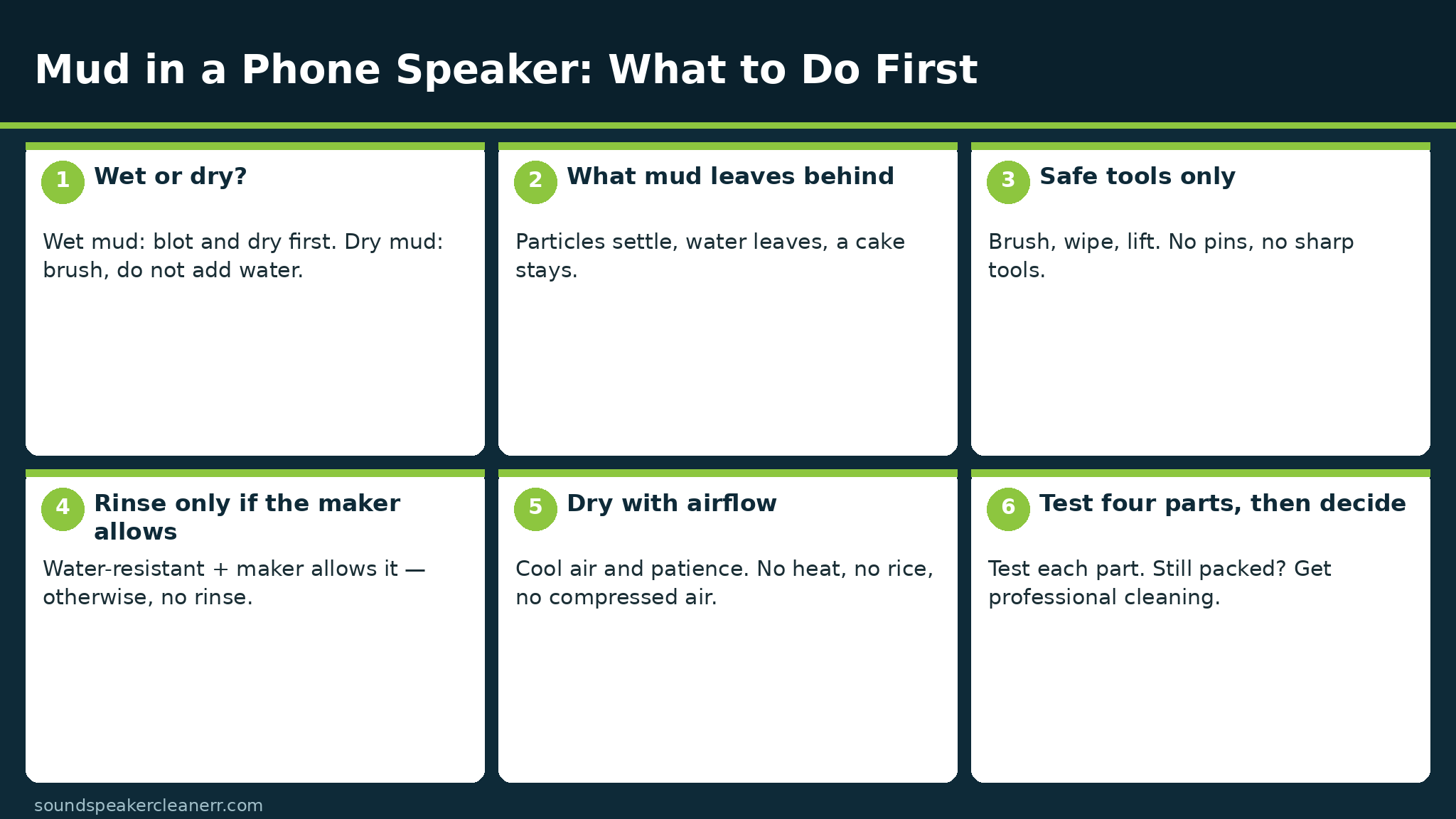
For wet mud, blot the outside gently and let the phone dry fully with airflow before brushing; for dry mud, brush and lift it dry without adding water. Mud is a two-stage problem: wet mineral particles in water, then a dried cake across the grille, and treating the wrong stage first can push grit deeper.
Why mud is different from dust or water alone
Dust is light and dry, and it usually lifts with a brush or tape. Water is liquid, and it usually drains or evaporates. Mud combines both: fine mineral particles carried by water into the grille, where they settle and, as the water evaporates, bind together and to the mesh. The result can be a thin crust that looks like dirt on the surface but behaves like a plug in the holes, changing how air moves through the mesh so music sounds muffled and voices lose clarity.
Grit size matters. Fine silt can coat the mesh evenly and dull all sound. Coarser sand-like grains can lodge individually in holes and cause uneven sound or crackling at certain volumes. Either way, the particles are hard: unlike lint, they do not compress, and unlike sugar film, they do not dissolve in a rinse. That hardness is why tools matter so much. A soft brush lifts; a hard point packs. A gentle wipe removes; a scrub grinds.
Mud also rarely arrives alone. A dropped phone in mud usually has mud on the case, the screen edges, the charging port surround, and the microphone opening as well. Cleaning only the loudspeaker grille while leaving grit in the port or microphone opening leaves half the problem in place, and forcing a charging cable into a gritty port can damage pins. Treat the whole bottom edge and the top earpiece slot as one job, and check each part separately at the end.
First steps: stop, assess wet or dry, and do not charge
First, decide whether the phone is wet, dry, or both. If the mud is wet and the phone was dropped in wet ground or a puddle, treat it as a liquid exposure: unplug every cable and accessory immediately, and do not charge while any opening is wet. A working speaker does not prove the charging port is dry, and charging through a wet or gritty connector can damage pins, as Apple's liquid-detection guidance warns.
If the mud is already dry and the phone was never submerged or soaked — for example, dried splashes from a trail — there is no liquid emergency, but the same care applies to tools. Do not plug in a cable until you have checked the port for grit in good light, and do not use the phone's speaker at high volume to "blow" the mud out before cleaning; a muffled speaker driven hard is not a cleaning method.
Remove the case and wipe the outside with a dry, soft, lint-free cloth, using light strokes that lift material away from the grille rather than scrubbing across it. For wet mud, blot gently first: press the cloth lightly to lift the wettest material, then let the phone air-dry before any brushing, since brushing wet mud smears it. For dry mud, skip the wet cloth entirely at this stage and go to dry brushing. Do not insert a pin, needle, toothpick, SIM tool, or cotton swab into any opening. Do not blow hard into the grille with your mouth, since that adds moisture, and do not use compressed air at close range, which can drive grit deeper.
Power the phone off if it is wet or if it is a model where that is straightforward and safe to do. If the phone is not water-resistant and was soaked in wet mud, if it shows screen problems, restarts, or heat, or if the charging port is visibly packed with grit, stop home steps and arrange professional inspection.
Wet mud: dry first, then clean the surface
Wet mud needs patience before precision. Place the phone speaker-side down on a lint-free cloth in a dry area with airflow, and let the surface mud dry enough to lift rather than smear. A fan blowing cool air toward the openings can help evaporation. Do not use a hair dryer, oven, microwave, or radiator, and do not put the phone in rice. Heat can damage seals, adhesives, and the battery, and rice does not remove grit; grains and starch dust can enter the port and grille.
Apple's liquid-detection page, read directly on 2026-10-28, describes retrying a cable after at least 30 minutes and notes that full drying can take up to a day. Huawei's guidance for a small amount of liquid in speaker or microphone holes suggests waiting around 2 to 3 days for evaporation before judging whether the issue is resolved. These are different situations and different makers, so do not treat either figure as a guarantee for your phone. Follow your own maker's guidance, and do not charge until the phone and the port are both dry, free of visible grit, and no liquid alert is showing.
Only after the surface is dry should you brush. Use a dry, soft brush — a clean, soft toothbrush or paintbrush — with light outward strokes across the grille, working grille-down so loosened material falls out rather than inward. Follow with adhesive putty or tape pressed lightly over the grille and peeled away to lift surface particles. Repeat gently rather than pressing harder; if material stops coming away, the remaining grit is likely inside the mesh, not on it.
The rinse decision: only where the maker allows it
Do not pour water or any liquid into a speaker to rinse mud out. That is not recommended unless the phone's maker guidance allows it, and even then a maker-allowed rinse means a gentle flow of clean water over the outside of the affected area of a water-resistant phone with intact seals — never a jet into the openings, never a long soak, and never a rinse of a phone that was never sealed for water. Rinsing can help carry away surface mud from a sealed phone, but it can also carry fine particles deeper into an unsealed one, turning a surface problem into an internal one.
For dry mud with no liquid exposure, a rinse is usually unnecessary and unhelpful: dry brushing and tape lift the material without adding moisture. Adding water to dry mud recreates wet mud inside the grille, which is exactly the stage that smears and packs. So the rule is simple: dry mud, dry methods; wet mud on a water-resistant phone, a maker-allowed gentle exterior rinse only if the maker's page for that model permits it, followed by full drying; wet mud on any other phone, wipe the outside only and seek professional cleaning.
Do not add soap, detergent, vinegar, alcohol, or any cleaning product to a rinse, and do not use a pressure washer, shower jet, or garden hose on a phone. Those are not gentle flows, and they can defeat seals and drive grit inward. Clean water, used only as the maker directs, is the only rinse liquid in this guide, and for many phones the correct answer is no rinse at all.
Cleaning the mesh after drying: what is safe and what is not
Once the phone is dry, the safe toolkit is small: a dry soft brush, a dry lint-free cloth, and adhesive putty or tape for surface particles. Brush lightly, wipe lightly, and lift with putty or tape. Check your progress in good light after each pass, and test sound at moderate volume with a spoken-word clip, with Bluetooth off, so you are judging the built-in speaker rather than another device.
Do not use a wet cloth soaked in soapy water to clean the speaker, do not apply alcohol, solvents, or household cleaners into the openings, and do not use compressed air at close range. Compressed air can drive grit deeper, and makers warn against it for drying phones. Do not use a vacuum at high suction on the grille either; strong suction can stress the thin speaker membrane. If the mesh still looks packed, if grains remain visible in the holes, or if brushing and tape stop improving the sound, stop. Packed grit inside the mesh needs professional tools — magnification, controlled air, and, if needed, mesh replacement — not stronger home force.
A short dust-clean tone at moderate volume may help shake loose surface dust after dry cleaning. Use the site's dust-cleaner tool with the speaker facing down, run one short cycle, wipe away loosened material, and test again. Do not repeat loud cycles. A tone does not reliably clear packed grit or a dried mud cake, and it does not repair a damaged speaker, and repeated high-volume playback can stress a speaker that is already muffled.
Why the speaker can still sound dull after cleaning
If the surface looks clean but sound stays dull, grit may remain inside the mesh or in the cavity behind it, where no brush or tape can reach. A thin crust can also remain across part of the mesh even after loose grains are gone, changing airflow enough to muffle sound without being obvious in a quick look. Shine a light across the grille at an angle rather than straight on; a crust often shows as a dull patch against the surrounding holes.
Other causes should also be checked before assuming mud is the only issue. Bluetooth may still be routing sound to earbuds or a car system, media volume may be low while call volume is fine, and Do Not Disturb can silence calls and alerts while music still plays. Test with Bluetooth off, with two different apps, and with both a normal call and speakerphone, so a settings problem is not mistaken for a grit problem.
If dullness persists after drying, dry brushing, tape, and a short tone, or if crackling appears at low volume, the grit may be inside the mesh or the speaker may be damaged. That is the point to stop home steps and seek qualified service. A technician can inspect the mesh under magnification and clean or replace the speaker without damaging seals.
Test the four parts separately
Mud rarely affects only the loudspeaker. Test the loudspeaker at the bottom for music and speakerphone, the earpiece at the top for normal calls, the microphone by recording and playing back a voice note, and the charging port by looking in good light and confirming a cable seats fully without grit resistance. Sound does not clean the microphone or the port, so a clear loudspeaker does not clear those parts. If the microphone recording sounds muffled or the cable does not seat cleanly, note that separately for the technician rather than forcing the cable or repeating grille cleaning.
Everyday mud exposures to watch for
Not every mud exposure is a phone dropped in a field. Trail running, hiking, gardening, construction work, playgrounds, and rainy commutes all put phones near mud, and a phone in a pocket or bag with muddy hands can collect grit without ever falling. A phone used as a camera in rain can collect splashes that dry into a film of fine particles over days.
Prevention is straightforward. Keep the phone in a closed pocket or sealed pouch outdoors, wipe hands before handling it, and wipe the phone promptly after outdoor use, even if no mud is obvious. Do not assume a water-resistant rating covers mud: ratings are tested in fresh water, and mud is a different mixture with hard particles. A quick dry wipe after contact is far easier than removing a dried cake later, and it costs nothing.
When to seek professional cleaning
Seek service promptly if the phone is not water-resistant and was soaked in wet mud, if it was submerged, if charging fails or a liquid alert persists, if the phone will not power on, or if sound stays muffled or distorted after drying, dry brushing, and tape. Tell the technician whether the mud was wet or dry, how long the exposure lasted, whether you rinsed, and which parts sound wrong: loudspeaker, earpiece, microphone, or charging.
Mud does not have to ruin a phone, but it does need the right sequence: do not smear it wet, do not pick at it with hard tools, and do not add water where the maker does not allow it. Dry first, lift gently from the surface, test each part separately, and let a professional handle any grit that home steps cannot shift. That order protects the mesh, the port, and the speaker itself, and avoids turning a trail accident into a permanent muffle.
FAQ
Should I clean mud off a phone speaker while it is wet or after it dries?
Remove loose wet mud from the outside by gentle blotting, then let the phone dry with airflow before brushing. Brushing wet mud smears it into the holes. Once dry, use a dry soft brush and tape or putty with light strokes. If the phone is wet inside or not water-resistant, seek professional help rather than continuing at home.
Can I rinse mud off my phone?
Only if the phone is water-resistant with intact seals and the maker's guidance for that model allows a rinse, applied as a gentle flow of clean water over the outside of the affected area — never poured into the openings and never a long soak. For dry mud with no liquid exposure, a rinse is usually unnecessary; dry methods are safer. If the phone is not water-resistant or you cannot confirm its rating, do not rinse it.
Can a water-eject or dust-clean tone remove mud?
Not reliably. A short tone at moderate volume may shake loose surface dust after dry cleaning, but it does not reliably clear packed grit or a dried mud cake, and it does not repair damage. Treat the tone as a finishing check after dry cleaning, not as a mud-removal method.
Is it safe to use a pin or toothpick on mud in the grille?
No. Sharp objects can dent the mesh, scratch coatings, and push grit deeper into the speaker. Use a dry soft brush and adhesive putty or tape for surface material, and seek professional cleaning for grit that remains in the holes.
Why does my phone still sound muffled after the mud looks gone?
Grit or a thin crust may remain inside the mesh or in the cavity behind it, where brushes and tape cannot reach. Shine a light across the grille at an angle to check for dull patches, test without the case, and seek professional cleaning if dullness persists after drying and gentle surface cleaning.
Can I charge my phone once the mud is off the speaker?
Only if the phone and the charging port are both dry and free of visible grit, and no liquid alert is showing. Check the port in good light and confirm a cable seats fully without resistance. If grit remains in the port or a liquid alert appears, do not force the cable; allow more drying time or seek service.
What should I not do after a mud exposure?
Do not charge while wet, do not scrub wet mud, do not use pins or sharp tools, do not use heat, rice, or compressed air at close range, and do not add soap or another cleaner into the openings. Each of these can pack grit deeper, damage the mesh, or harm the port.
When is it time to stop trying at home?
Stop if the phone is not water-resistant and was soaked, was submerged, will not power on, shows screen problems or restarts, fails to charge, has a port packed with grit, or stays muffled or distorted after drying, brushing, and tape. Note whether the mud was wet or dry and which parts are affected, and take that information to a qualified technician.
Leave a Reply