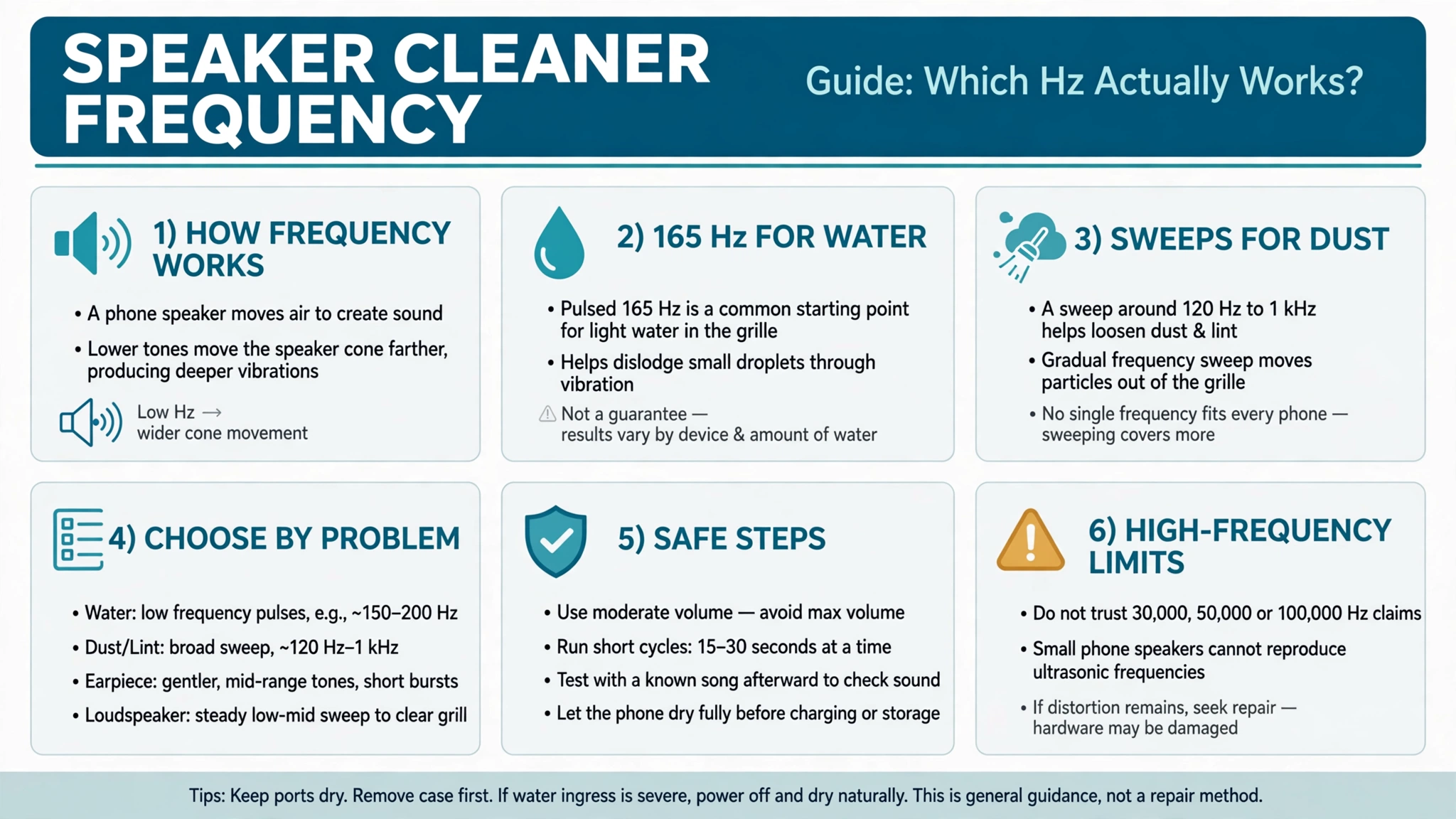
There is no single best speaker cleaner frequency. A low tone moves the speaker cone farther and can help push light water near the grille, a sweep across many tones can help loosen loose dust, and a gentler mid-range tone suits the small earpiece. Higher is not better, and a tone cannot repair damage.
Large numbers online sound more powerful, but a typical phone speaker cannot reliably reproduce 50,000 Hz or 1,000,000 Hz at all. Chasing them wastes time and misses the steps that sometimes help: dry the phone, use moderate volume, play the right tone, test, and stop if the sound gets worse.
Who this guide is for
This guide is for anyone whose phone speaker sounds muffled, quiet, or crackly after water, lint, or dust, and who wants to try a browser tone before paying for a repair. It is also for readers who have seen a specific frequency online – often 10,000 Hz, 20,000 Hz, or 50,000 Hz – and want to know whether that number means anything.
You do not need an app, a download, or special equipment. You need a phone with a working speaker and a willingness to stop if the sound gets worse.
Before you play anything
Do the simple physical steps first. They matter more than the exact frequency. Remove the case, wipe the phone with a soft, lint-free cloth, and hold it with the speaker facing down and tap it gently. Do not insert anything into the grille, blow hard into it, or use compressed air or a sharp object; those actions can push debris deeper or damage the mesh.
If the phone was fully submerged, shows a liquid warning, or will not charge, do not start with a cleaning tone. Turn it off if you can do so safely, let it air-dry, and follow the phone maker’s guidance for liquid exposure. A tone is for light water at the speaker opening and loose surface dust. It is not a treatment for liquid inside the phone.
Check which speaker is the problem first. The loudspeaker is larger and louder; the earpiece at the top is smaller and used for calls. The microphone is not a speaker, and sound cannot push water out of it in the same way. The charging port is also separate.
How frequency works in a phone speaker
Frequency, measured in hertz (Hz), is how many times per second a sound wave cycles: a 165 Hz tone cycles 165 times per second, a 1,000 Hz tone 1,000 times. In general, lower tones move the speaker cone farther, while higher tones move it less far but faster. That movement is the idea behind a cleaner tone: cone movement moves air, which can help shift a drop of water or loose particle near the grille. Amplitude – how strong the movement is – is linked to volume, but volume alone does not make a bad frequency useful, and maximum volume can make distortion worse.
A sine wave is a smooth, single-frequency tone. A sweep moves across a range of frequencies. A fixed tone gives steady movement at one frequency; a sweep is useful when you do not know where loose dust is sitting, because it shakes the mesh at many frequencies in turn. Neither can reach debris packed into the mesh or damage already in the driver.
Human hearing also has limits, and phone hardware limits are often tighter. Most adults hear up to roughly 20,000 Hz in ideal conditions, and many hear less. A small phone speaker is designed for calls and media, not for accurate reproduction at the edge of hearing or above it. That is why a claim that depends on 30,000 Hz or higher should be treated with doubt.
The frequencies this site actually uses
This site does not use one frequency for everything. Its homepage tools use different settings for different jobs, and this guide follows that same split:
| Job | Setting | Why it is used |
|---|---|---|
| Water on the loudspeaker | Steady 165 Hz pulsing tone | Low, steady movement that can help push light water toward the grille |
| Dust and lint | Fast sweeps from 120 Hz to 1 kHz | Many frequencies in turn, to loosen loose particles in different spots |
| Earpiece calls | Gentle 300 to 700 Hz tones | A mid-range tone suited to the small earpiece speaker |
| Last drops after cleaning | 60 Hz pulses plus vibration, where supported | Very low pulses for a final check, not a stronger cleaning mode |
Those settings are starting points, not guarantees. If a water tone does not help after two or three cycles, drying time, a gentle brush of the outside of the grille, and a proper test are more useful than a new number.
How to choose a frequency for your problem
Match the tone to the problem and to the speaker, not to the largest number you find.
If the loudspeaker sounds muffled after water, start with the water setting: a steady low tone around 165 Hz, at moderate volume, speaker facing down. Run one short cycle, test with music or a voice recording, and repeat only two or three times. If the problem is lint or dust, start with a dust sweep from 120 Hz to 1 kHz rather than a single high tone; after the sweep, brush the outside of the grille very gently with a soft, dry brush if maker guidance allows it, and test again.
If callers sound quiet or crackly but loudspeaker music sounds normal, the earpiece is likely the problem. Use the gentler 300 to 700 Hz earpiece range, not the loudspeaker water tone at full strength.
If you do not know the cause, start with a test, not a cleaning tone. Play music and try a call, and note whether the problem is in the loudspeaker, the earpiece, both, or only at high volume. A crackle only at high volume may be distortion or damage, not dust.
How to use a cleaner tone, step by step
For the loudspeaker:
- Remove the case, wipe the phone dry, and hold it with the loudspeaker facing down.
- Set the volume to a moderate level first, not maximum. You can raise it gradually if the tone is clean and comfortable.
- Choose the water tone for wet sound or the dust sweep for lint. Play one short cycle, usually about 60 seconds on this site’s tools.
- Stop the tone and play a familiar song or voice clip. Listen for clarity, not just loudness.
- If it sounds better, stop. If it sounds the same, you may repeat the same setting once or twice more, with a short pause between cycles.
- If it sounds worse, distorted, or rattling, stop at once. Let the phone air-dry and do not keep raising the volume.
For the earpiece:
- Make sure the problem is in calls, not in music from the loudspeaker.
- Use the earpiece setting, in the 300 to 700 Hz range, at a moderate volume. Do not hold the phone to your ear at high volume while testing a cleaning tone.
- Play a short cycle, then make a test call or play a voice message through the earpiece.
- Repeat only if the sound is clean and improving. If the earpiece stays quiet, crackly, or silent, the problem may be blockage, a setting, or damage, and it needs a different check, not a higher frequency.
Keep sessions short. A few careful cycles with testing are more useful than a long, loud session, and if nothing changes after three cycles and drying, further tones are unlikely to help.
How to test whether it helped
Test with sounds you know: a song with clear vocals, a voice message, and, if needed, a call. Test both speakers separately; a better loudspeaker does not prove the earpiece is fixed.
Use the site’s speaker test to check for distortion, rattling, or dropouts. If the test tone itself sounds distorted at a moderate volume, that points to a speaker problem rather than a simple blockage, and cleaning tones should stop. Note briefly what you tried and what changed, so you do not repeat the same extreme frequency expecting a different result.
Device and browser caveats
iPhone and Android phones both work with browser tones, but speaker placement, water resistance, and audio settings vary by model and operating system version, so no single setting works the same on every phone. Follow your phone maker’s guidance for water exposure and grille cleaning if it differs from a general tip here.
Vibration support also varies by device and browser. Treat vibrate mode as an extra check, not a stronger cleaner; if it is unavailable, that does not mean the tone failed. Bluetooth speakers, earbuds, and laptops are different hardware – do not assume a phone setting works the same on them, and do not test a cleaning tone at high volume through earbuds.
What high frequencies can and cannot do
A 10,000 Hz tone is high but audible, and it can be part of a sweep or test – but hearing it does not prove it is cleaning anything, and a high tone moves the cone less far than a low tone, so it is not automatically stronger. A 20,000 Hz tone sits at or above the hearing limit for many adults; silence there does not prove your speaker is broken, and hearing it does not prove it cleaned anything.
A 30,000 Hz, 50,000 Hz, 90,000 Hz, or 100,000 Hz tone is above the normal audible range. A typical phone speaker cannot reliably reproduce those frequencies, and no cleaning benefit should be assumed. A file labeled with one of those numbers may play something audible, nothing useful, or a lower tone than claimed. The label alone is not evidence.
A 1,000,000 Hz tone, and numbers far larger, are not realistic phone speaker settings and should be ignored, even in search suggestions. The same applies to ‘ultrasonic cleaner’ claims for a phone: ultrasound may be real in industrial equipment, but a phone speaker is not that equipment. The useful question is not ‘what is the highest frequency I can find?’ but ‘what audible, moderate-volume tone or sweep matches my problem, and does a careful test show improvement?’ If not, the next step is drying, gentle cleaning, settings checks, or repair – not a higher number.
Troubleshooting
Still muffled after water: Air-dry for a few hours, speaker facing down, then try one more water cycle. If a liquid warning is showing, do not charge until it clears and maker guidance allows charging.
Crackling or rattling: Stop the tone. Crackling at moderate volume can mean debris, distortion, or damage. Do not raise the volume to push through it; try a gentle external clean and seek repair if the crackle stays.
No sound from one speaker: Test loudspeaker and earpiece separately, check volume and mute settings, and restart if needed. A silent earpiece during calls but normal music may point to a call setting or earpiece issue, not a frequency problem.
Sound is low but clear: Check volume limits, accessibility settings, and any case blocking the grille. Low but clear sound may not need a cleaning tone at all.
Tone plays but nothing changes: That is a useful result, not a reason to try an extreme frequency. It suggests packed debris, a setting, deeper water, or damage. Move to drying, physical checks, and repair advice.
Safety limits and when to seek repair
Sound can help with light water at the speaker opening and loose dust. It cannot repair a torn driver, corrosion, a blocked charging port, or a damaged microphone, or undo water damage inside the phone.
Seek repair, or contact the maker or a qualified shop, if the phone was submerged for a long time, will not turn on or charge, shows a persistent liquid warning, stays distorted or silent after drying and testing, or shows swelling, heat, or a damaged port. Do not open the phone yourself unless qualified, and do not use heat, high pressure, or liquid cleaners inside the speaker.
Keep volume moderate. Stop if you hear harsh distortion, feel discomfort, or notice the sound getting worse. Do not test cleaning tones at maximum volume through earbuds, and do not hold the earpiece to your ear while a cleaning tone is playing.
Conclusion
Choose a cleaner frequency by the job, not by the size of the number. Use a low, steady tone for light water, a sweep for loose dust, and a gentler tone for the earpiece. Test after each cycle, keep volume moderate, and stop on distortion or no change. High-frequency labels above the audible range do not make a cleaner stronger, and they should not replace drying, gentle cleaning, and maker guidance. When those steps do not help, repair is the next step, not another tone.
FAQ
What frequency cleans speakers?
There is no universal best frequency. A low tone around 165 Hz can help with light water, a sweep from 120 Hz to 1 kHz can help with loose dust, and a gentler 300 to 700 Hz range suits the earpiece. The right choice depends on the problem and the speaker.
Is a 50,000 Hz speaker cleaner real?
Not as a reliable phone cleaning tool. A typical phone speaker cannot reliably reproduce 50,000 Hz, which is well above normal hearing. A file with that label does not prove the phone is actually producing that frequency or cleaning anything.
Can a speaker cleaner remove dust?
It may help with loose dust near the grille, especially with a sweep, but sound does not reliably remove embedded debris. Packed lint usually needs gentle physical cleaning of the outside of the grille, and sometimes repair, rather than a louder or higher tone.
Can I use maximum volume?
No. Start at a moderate volume and raise it only gradually if the tone stays clean. Stop if you hear distortion, rattling, or discomfort. Maximum volume does not make an unsuitable frequency work, and it can make damage worse.
Can sound repair water damage?
No. Sound may help move light water at the speaker opening, but it cannot repair liquid damage inside the phone. If liquid ingress is suspected, stop using the device as directed by the maker, let it air-dry, and seek repair if problems persist.
Does a speaker cleaner really work?
It can help in limited cases: light water at the speaker opening and loose dust. It is not a repair guarantee. If the speaker stays muffled, distorted, or silent after drying and a few careful cycles, the cause is likely deeper than a tone can reach.
Should the earpiece and the loudspeaker use the same tone?
No. The earpiece is smaller and is used for calls, so it needs a gentler 300 to 700 Hz range at moderate volume. The loudspeaker can use the water or dust settings described above. Test each speaker separately.
Related tools on this site
Related tools:
- Speaker Cleaner
- Water Eject
- Dust Cleaner
- Ear Speaker Cleaner
- Speaker Test
- Tone Generator
- Mic Test
- Volume Booster
- Headphone Test
- Noise Generator
- Bluetooth Latency Test
- Sound Meter
- Earbuds Cleaner
- Bass Test
- Hearing Test
- Android Water Eject
- iPhone Water Eject
Related guides:
Leave a Reply