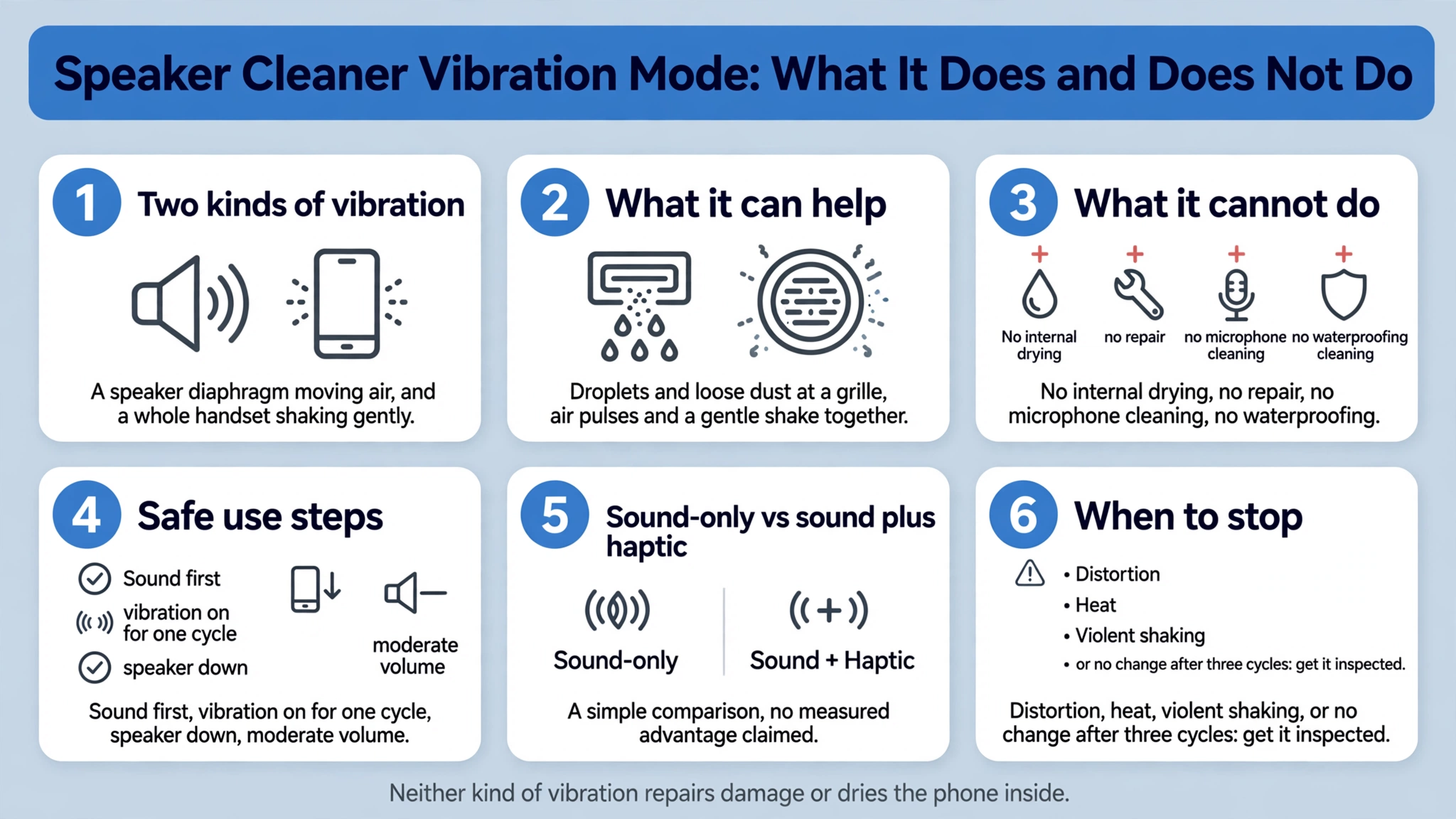
Speaker cleaner vibration mode usually means one of two things: the speaker diaphragm vibrating as it plays a tone, or the phone’s own vibration motor shaking the handset in time with that tone. Some tools use both at once. Vibration can help loosen water or dust near the grille, but it cannot repair damage, dry the inside of a phone, or guarantee a clean speaker.
The confusion is understandable, because tool descriptions rarely say which kind of vibration they mean. Once you separate the two, the feature becomes much easier to judge: one kind is unavoidable — every tone vibrates the speaker — and the other is an optional extra whose effect is plausible but unmeasured. This guide explains both, how to use them safely, and when to stop.
Two kinds of vibration, and why the difference matters
1. Speaker vibration: the tone itself
Every sound a speaker makes is vibration. The diaphragm moves back and forth, pushing air, and that is what you hear. A low tone moves the diaphragm farther per cycle; a higher tone moves it faster over a smaller distance. A cleaning tone or sweep is therefore already a "vibration mode" in this sense, whether or not a tool labels it that way.
This is the vibration that does the actual work near the grille: the diaphragm’s movement pushes pulses of air through the speaker chamber and out through the grille, and those pulses can break the grip holding a water droplet or shake a loose dust particle. If a tool has no separate vibration toggle, it still vibrates the speaker whenever it plays a tone.
2. Haptic vibration: the phone’s vibration motor
Separately, most phones contain a small vibration motor — the same part that makes the phone buzz for a call or a notification. Some cleaner tools pulse that motor in time with the cleaning tone, so the whole handset shakes gently while the tone plays.
The idea is straightforward: the speaker’s air pulses work on the grille from the inside, while the body’s shake adds a mechanical jolt that may help dislodge a particle or droplet that air alone did not move. It is a reasonable idea, but it is important to be honest about the evidence: no source found for this draft measured whether adding haptic vibration improves cleaning, or by how much. The claim that it "helps" is a toolmaker’s description, not a measured result, and this guide does not present it as proven.
There is also a practical limit: haptic vibration is not available everywhere. Browser-based vibration depends on the phone and the browser, and some combinations do not support it at all. On a phone or browser without support, the tool will simply play the tone without the extra shake. That is normal, and it does not mean the sound part has failed.
What vibration mode can plausibly help with
Vibration — in either sense — is aimed at the same narrow problem: water droplets or loose, dry particles sitting at or near the speaker grille, where air movement and shaking can reach them.
- Water near the grille: the diaphragm’s air pulses can push droplets outward, especially with the speaker facing down so gravity helps. A gentle body shake may help a droplet that is clinging to the mesh shift into a position where the next air pulse can move it.
- Loose dust or lint near the grille: changing vibration patterns can shake loose particles free, especially when combined with a sweep that varies the pattern over time.
- A quick check after cleaning: if sound is clearer after a vibration-assisted cycle, that is consistent with loose material having moved — but it is not proof of what moved, or that everything is clear.
Notice what is not on this list: anything inside the phone, anything stuck firmly, and anything damaged. Vibration works at the surface, where the grille meets the air. It does not reach deeper parts, and it does not change the condition of the speaker itself.
What vibration mode does not do
This section matters more than the feature description, because vibration is often sold as if it were a deep clean.
- It does not repair a damaged speaker. A torn diaphragm, a corroded connection, or a speaker damaged by water will not be fixed by shaking, however long the mode runs.
- It does not dry the inside of a phone. Shaking may move droplets at the grille, but moisture deeper inside needs drying time with airflow, and in some cases professional inspection. Follow the phone maker’s drying guidance, and do not charge until completely dry.
- It does not clean the microphone, the earpiece, or the charging port. Those are different openings with different parts behind them. The loudspeaker’s vibration does not clean them, and the body’s shake is not a targeted cleaning method for them. The earpiece in particular needs gentler handling, not a loudspeaker vibration cycle.
- It does not remove packed lint or sticky debris. Lint pressed into the mesh, or debris held by stickiness, often needs gentle physical cleaning of the grille’s outside — for example, a soft brush used carefully — and even then, some blockages need professional cleaning. Sound and shaking alone will not clear everything.
- It does not make a phone waterproof, water-resistant, or safe to submerge. Vibration mode is a cleaning aid for a phone that has already gotten wet or dusty. It does not add protection, and it does not restore water resistance that wear or damage has reduced.
- It does not diagnose anything. A phone that vibrates during a cleaning cycle is not "confirming" a problem or a fix. Only a before-and-after listening check — with normal audio, after drying — tells you whether the sound actually improved.
How to use vibration mode safely
If you decide to try it, keep the session short, moderate, and controlled.
- Start with the sound mode first. Run the appropriate sound pattern — water eject for water, dust mode for dust — at moderate volume, with the speaker facing down and Bluetooth disconnected. Vibration is an addition to that pattern, not a replacement for it.
- Turn vibration on only if the tool offers it clearly. If the tool has a vibration toggle, switch it on for one cycle. If the tool has no toggle, do not assume vibration is running, and do not look for a separate setting to force it.
- Hold the phone loosely, speaker down, on a soft surface or in your hand. Do not press the phone against your ear, your face, or a hard surface during the cycle. The point is a gentle shake, not an impact.
- Keep the cycle short. Follow the tool’s own cycle length, and do not repeat the cycle many times in a row. One to three cycles, with a listening check between them, is a sensible limit.
- Listen after each cycle. Play normal audio — music, a voice recording, or a ringtone — and compare it with before. If the sound is unchanged after two or three cycles, further vibration is unlikely to help.
- Stop at any warning sign. Stop if you hear harsh distortion, rattling, or buzzing that was not there before, if the phone feels unusually hot, or if the vibration feels violent rather than gentle. A cleaning cycle should never feel like the phone is being shaken hard.
For the earpiece, do not use a loudspeaker vibration cycle. Use the dedicated ear-speaker tool at low volume, or skip vibration entirely for the earpiece. The earpiece is smaller and more delicate than the loudspeaker, and a mode designed for the loudspeaker is not automatically safe for it.
Vibration mode vs. sound-only mode: a fair comparison
Because no measured comparison was found for this draft, this table compares the mechanisms honestly, without inventing an effectiveness score.
| Feature | Sound-only (speaker vibration) | Sound plus haptic vibration |
|---|---|---|
| What moves | Speaker diaphragm, pushing air through the grille | Diaphragm plus the whole handset shaking gently |
| Available on | Every phone that can play audio | Only phones and browsers that support vibration; some do not |
| Best suited to | Water or loose dust near the grille, in most cases | The same cases, where a gentle extra shake may help a clinging droplet or particle shift |
| Evidence for extra benefit | Well-understood mechanism: air pulses move surface droplets | Plausible mechanism, but no measured comparison found for this draft |
| Main risks if overused | Distortion from excessive volume or duration | Same, plus discomfort or annoyance from prolonged shaking; no evidence of extra cleaning from longer runs |
| Sensible use | One to three cycles at moderate volume, speaker down | Same, with vibration as an optional extra for one cycle, not a longer session |
The practical conclusion is modest: if your tool offers vibration mode, trying it for one cycle is reasonable. If it does not, you are not missing a proven cleaning method — the sound pattern itself is the main mechanism either way.
Common misunderstandings
- "Vibration mode means the phone is shaking the water out from inside." No. The shake reaches the grille area and the phone body. It does not pump water out of internal components, and it does not dry the phone.
- "Stronger vibration means a deeper clean." No. A violent shake risks discomfort and tells you nothing about cleaning. Gentle, short cycles are the safe pattern; stronger is not better.
- "If the phone does not vibrate, the cleaner is not working." Not necessarily. The sound pattern may be running normally while vibration is unsupported on that phone or browser. Judge the tool by the listening check afterward, not by whether you felt a buzz.
- "Vibration mode can replace drying." No. Drying guidance comes first for a wet phone: wipe with a soft, lint-free cloth, leave the phone in a dry area with airflow, and do not charge until completely dry. A vibration cycle does not shorten that process.
- "I can use vibration mode on earbuds the same way." Earbuds are a different case. Remove earbuds from your ears before any cleaning tone, keep sessions short, and use an earbud-specific mode if one is offered. Do not run a phone loudspeaker vibration cycle with earbuds in your ears.
When to stop and get help
Stop vibration cycles and seek professional advice if any of these apply: the speaker stays muffled, distorted, or silent after drying, a grille check, a settings check, and two or three careful cycles; the phone was submerged or exposed to salt water, soapy water, or another liquid and the sound has not returned after drying; the phone has visible damage, swelling, or a cracked grille; or the vibration motor itself behaves abnormally — for example, it runs continuously, feels violent, or does not stop when the cycle ends. In the last case, close the tool and restart the phone; if the problem persists, get the phone inspected rather than running more cycles.
A vibration mode is a small, optional extra on top of a sound pattern. Used gently, for one short cycle, with the speaker down and the volume moderate, it is a reasonable thing to try for water or loose dust near the grille. It is not a deep clean, not a repair, and not a substitute for drying — and once you know which kind of vibration a tool means, you can judge its claims without being misled by the label.
FAQ
What is speaker cleaner vibration mode?
It can mean two things: the speaker diaphragm vibrating as it plays a cleaning tone, or the phone’s vibration motor shaking the handset in time with that tone. Some tools use both. Check what your tool actually does before assuming vibration mode means one or the other.
Does vibration mode clean a phone speaker better than sound alone?
That has not been measured in any source found for this draft. The speaker’s air pulses are the main mechanism; adding a gentle body shake is plausible as an extra help for a clinging droplet or particle, but no effectiveness figure is claimed here. Try it for one cycle if offered, and judge by the listening check afterward.
Why does my phone not vibrate during a cleaning cycle?
Vibration support depends on the phone and the browser. Some combinations do not support it, or require a user action first. A missing vibration effect does not mean the sound pattern has failed — test the speaker with normal audio afterward to judge the result.
Can vibration mode damage my phone?
A short, gentle cycle at moderate volume is ordinary use. Risk rises with prolonged, violent, or repeated cycles, and with maximum volume. Stop if the vibration feels violent, the phone feels unusually hot, or you hear new distortion or rattling.
Should I use vibration mode for the earpiece?
No — not a loudspeaker vibration cycle. The earpiece is smaller and more delicate. Use a dedicated ear-speaker mode at low volume, or skip vibration for the earpiece entirely, and never hold the phone to your ear during a cleaning cycle.
Does vibration mode dry a wet phone?
No. It may help move droplets near the grille, but it does not dry the inside of the phone. Follow the phone maker’s drying guidance, leave the phone in a dry area with airflow, and do not charge until completely dry.
How many vibration cycles should I run?
One to three cycles, with a listening check after each one, is a sensible limit. If the sound is unchanged after three cycles, further cycles are unlikely to help, and the problem is more likely blockage that sound cannot reach, a settings issue, or damage.
Can vibration mode fix a blown or damaged speaker?
No. Vibration and sound can only help with water or loose debris near the grille. A torn diaphragm, corroded connection, or internal water damage needs professional repair, not more cycles.
Leave a Reply