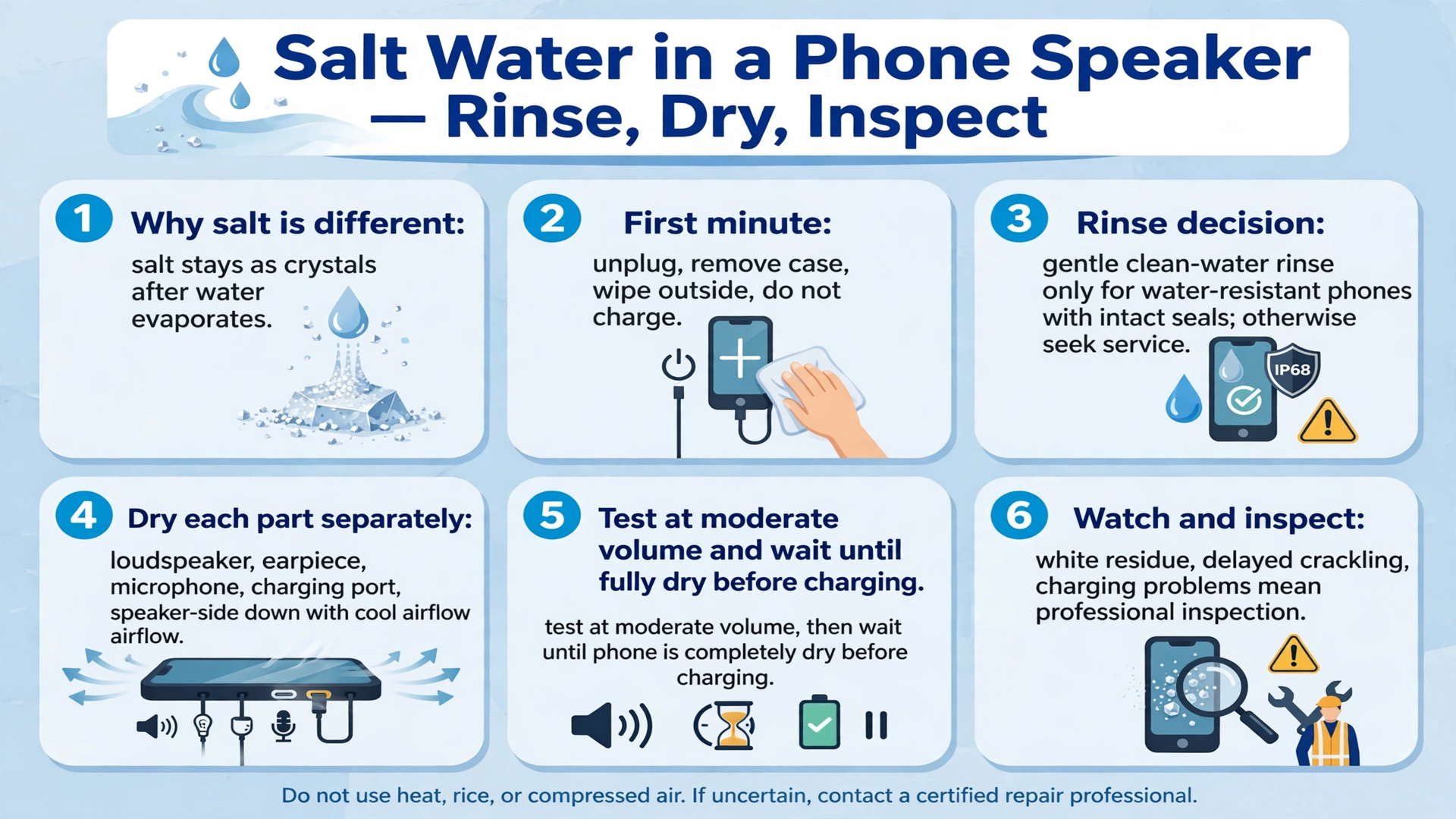
Salt water is not just wet. When sea water dries, the water evaporates and the salt stays behind as crystals on the speaker mesh, in the earpiece slot, around the microphone opening, and on charging contacts, where it can block sound, attract more moisture, and corrode metal over time. That is why the first step after salt-water exposure is different from a fresh-water splash: for a water-resistant phone, remove the salt promptly with a fresh-water rinse if your maker allows it, then dry the phone fully before charging or testing it hard. A tone alone cannot dissolve salt, and a phone that sounds better for an hour is not proof the salt is gone.
Why salt water is different from fresh water
Fresh water, once dried, leaves little behind. Salt water leaves a residue that is easy to miss. A thin film on the speaker grille can look clean in daylight and still muffle sound, because the mesh holes are small and a partial blockage changes how the diaphragm moves air. Salt is also hygroscopic, meaning it attracts moisture from humid air, so a phone left in a damp bag or a humid room can stay slightly damp at the grille long after the visible water is gone.
Corrosion is the slower risk. Salt plus moisture plus metal contacts is a recipe for gradual oxidation, especially at the charging port and inside openings that are hard to wipe. The damage may not appear on day one. A speaker that recovers after drying can crackle again days later if salt remains in the mesh or corrosion spreads at a contact. That delayed pattern is the reason maker guidance stresses rinsing residue away rather than simply waiting, and inspection even when the phone appears to work.
Salt water also differs from a single splash of pool water or soapy water. Pool water brings chemicals, soapy water brings a film, but sea water brings both a drying crystal and a corrosion risk, often combined with sand at the beach. If sand is also present, do not start with rinsing or tones until you have read the sand steps: solid grains need dry removal first, or water can carry them deeper into the mesh.
First 60 seconds: stop, unplug, and do not charge
Unplug every cable and accessory at once. Do not plug in a charger to “check” whether the phone still works, and do not connect headphones or a cable while any opening is wet. Charging a wet port can short contacts and accelerate corrosion, and a working speaker says nothing about whether the charging port is dry.
Remove the case and wipe the outside with a soft, lint-free cloth. Do not shake the phone violently, do not blow into the speaker, and do not insert a pin, toothpick, cotton swab, or paper towel into any opening. Shaking can move liquid from the speaker cavity toward other parts, and objects pushed into the mesh can dent it, push salt deeper, or damage the water-resistant seals.
If the phone is still on and working normally, you can leave it on for the rinse and wipe steps on a water-resistant model, but power it off if you suspect liquid inside, if the screen behaves oddly, or if the phone is not water-resistant. For a non-water-resistant phone, the rinse advice in the next section does not apply: turn it off, wipe the outside, and seek professional inspection as soon as possible.
The rinse decision: only for water-resistant phones
This is the step people get wrong in both directions. Some never rinse, letting salt dry into crystals. Others rinse a phone that was never rated for water, making the damage worse. The rule is simple: rinse only if your phone is rated water-resistant and its seals are intact, and follow your own maker’s wording.
Samsung’s guidance for a water-resistant Galaxy exposed to salt water, soap water, or other dirty liquids is to rinse the device in clean water for 1 to 3 minutes to remove residue or salt, then wipe it with a soft, clean cloth and dry it completely, without connecting a charger until fully dry. Apple’s guidance for iPhone 7 and later is similar in spirit: if a liquid other than water splashes on the phone, rinse the affected area with tap water and wipe it with a soft, lint-free cloth.
Use clean, cool, fresh tap water, not hot water, not sea water again, and not a high-pressure jet. A gentle rinse under a tap or a pour over the affected area is enough; do not submerge the phone for a long soak to “wash” it, and do not use soap, detergents, or cleaning products as part of the rinse. The goal is to dissolve and carry away salt while it is still soluble, not to add a new chemical film.
If your phone has a cracked screen, a loose back, a damaged seal, or a previous repair that opened the device, treat it as not reliably water-resistant. Skip the rinse, wipe the outside only, power it off if you can do so safely, and get it inspected. The same applies if you do not know your phone’s rating: do not guess. Check your maker’s specifications first, or choose the safer path and seek service.
Drying the speaker, earpiece, microphone, and port separately
These four parts dry differently, and confusing them causes bad decisions. The loudspeaker is usually at the bottom edge and plays music and speakerphone calls. The earpiece is the smaller slot at the top used for normal calls. The microphone is a separate opening that records your voice; sound cannot clean a microphone, and a muffled microphone needs a different diagnosis. The charging port is a fourth part that sound does not dry at all.
After rinsing, tap the phone gently against your hand with the connector facing down to remove excess liquid, as Apple describes, then place the phone speaker-side down on a lint-free cloth in a dry area with airflow. A fan blowing cool air toward the openings can help; heat from a hair dryer, radiator, or oven must not be used, because heat can damage adhesives, seals, and the battery. Do not put the phone in rice. Rice grains and starch dust can enter the port and grille, and a sealed bag of rice reduces the airflow that actually helps evaporation.
Apple states to allow at least 5 hours before charging with a cable after liquid exposure, and that complete drying can take longer. That figure is for iPhones under Apple’s guidance; other makers give their own wording, so follow the guidance for your exact phone rather than copying one brand’s number to another. Wait until the phone and the port are both dry, with no liquid-detection alert, before charging. Wireless charging is only an option once the outside is dry and your maker allows it.
While drying, check each part separately. Play a short spoken-word clip at moderate volume, with Bluetooth disconnected, and note whether music, speakerphone, and normal calls are affected differently. Record a short voice note and play it back to test the microphone. Look at the charging port in good light and check whether a cable clicks fully into place, but do not insert anything to clean it yet. If one part is clearly worse than the others, that narrows where salt or moisture remains.
When a short tone may help, and when it will not
After the phone is dry on the outside and the port is dry, a short water-eject tone at moderate volume may help move remaining moisture near a speaker opening. Use the site’s water-eject tool, hold the speaker facing down, run one short cycle, wipe away any droplets, and then rest the phone before testing again. Keep the volume moderate: loud, repeated playback does not dissolve salt and can stress a speaker that is already struggling.
A tone will not remove dried salt crystals, will not reverse corrosion, and will not dry the charging port or the microphone. If the sound improves slightly and then worsens, or if crackling appears at low volume, stop repeating tones and let the phone dry longer. If the phone was submerged in sea water, exposed for a long time, or shows any charging problem, skip repeated tone cycles and arrange inspection instead. A tone is a check for light, near-surface moisture, not a repair for salt damage.
Signs of salt residue and corrosion to watch for
White, crusty deposits around the speaker grille, earpiece slot, or charging port are the most visible sign, but salt can also be invisible. Watch for a speaker that sounds muffled only on certain sounds, a call that is quiet through the earpiece but fine on speakerphone, a microphone that makes your voice sound distant, or a cable that no longer seats cleanly. A faint white or green discoloration at a metal contact is a warning sign, not something to scrape at home.
Also watch over days, not just hours. Salt damage can be delayed: a phone that sounds fine on the beach evening can develop crackling later as residue absorbs humidity or corrosion spreads. If the sound changes again after an initial recovery, if the phone restarts, heats up unusually, or shows a liquid alert that will not clear, stop using it for charging and calls that matter, and seek qualified service. Do not open the phone yourself to clean inside it; internal cleaning needs tools and handling that protect the battery and seals.
Beach habits that prevent the next salt problem
Prevention is simpler than any rinse. Keep the phone in a sealed pouch at the beach when you are not using it, and do not set it directly on wet sand. Wipe it with a clean, dry cloth after beach use even if it never went in the water, because sea spray alone can leave salt on the grille. Do not charge the phone at the beach while it is damp or sandy, and do not store a damp phone in a sealed bag, where trapped humidity keeps salt active.
After any beach day, check the speaker, earpiece, microphone, and port openings in good light before the next day’s use. A quick wipe and a short sound test at moderate volume can catch a blocked mesh early, when dry brushing of the outside grille is still enough. If you swim or surf regularly, consider a dedicated waterproof pouch rated for your activity, and remember that even a pouch does not make a phone safe to rinse if its own seals are damaged.
When to seek professional inspection
Seek inspection promptly if the phone was fully submerged in sea water, if it is not water-resistant, if charging fails or a liquid alert persists, if the phone will not power on, or if sound stays muffled or distorted after full drying and a short tone. Samsung explicitly recommends inspection even if the device appears to work normally after water exposure, and that advice is worth following after salt water in particular, because internal residue cannot be judged from the outside.
At a service center, technicians can check liquid indicators, inspect for corrosion under magnification, and clean internal contacts safely. Bring a clear description: when the exposure happened, whether it was sea water or spray, whether you rinsed, and which parts sound wrong. That history helps the technician decide whether cleaning, a speaker replacement, or a port check is needed, and it avoids repeating a rinse or tone that has already been tried.
Salt water does not automatically mean a dead phone, but it does mean the job is not finished when the outside looks dry. Rinse promptly where your maker allows it, dry with airflow and patience, test each part separately at moderate volume, and get the phone inspected if anything stays wrong. That sequence gives the speaker its best chance and avoids the two common mistakes: leaving salt to crystallize, and forcing a wet phone back into use too soon.
FAQ
Can salt water permanently damage a phone speaker?
It can, but it does not always do so. Salt residue can block the mesh and corrode contacts over time, so prompt rinsing where the maker allows it, full drying, and inspection if sound stays wrong give the best chance of recovery. No home step can guarantee a full recovery.
Should I rinse my phone after it falls in the sea?
Only if it is water-resistant with intact seals and your maker allows rinsing. Samsung advises a 1 to 3 minute clean-water rinse for water-resistant Galaxy phones exposed to salt water, and Apple advises rinsing the affected area with tap water for iPhone 7 and later. If the phone is not water-resistant, do not rinse it; turn it off and seek service.
Does a water-eject tone remove salt?
No. A tone may help move liquid near a speaker opening, but it does not dissolve salt crystals or stop corrosion. Rinsing, drying, and inspection are the salt-specific steps; a tone is only a later check for light moisture.
How long should I wait before charging after salt-water exposure?
Until the phone and charging port are completely dry, with no liquid alert. Apple states at least 5 hours before cable charging for iPhones after liquid exposure, and complete drying can take longer. Follow your own maker’s guidance, and do not charge a wet port to test it.
Why does my speaker sound fine, then muffled again days later?
Salt residue can absorb moisture from humid air, and corrosion can spread gradually at contacts. A delayed return of muffling, crackling, or a charging problem after salt exposure is a reason to seek inspection rather than repeating tones.
Can I use rice to dry a salt-water phone?
No. Rice does not remove salt, and grains and starch dust can enter the port and grille. Airflow in a dry, ventilated place, with the speaker facing down on a lint-free cloth, is the safer drying method.
What if sand got in the speaker along with salt water?
Remove loose sand dry first, with light outward brushing, before any rinse or tone, so water does not carry grains deeper. If sand is packed in the mesh or sound stays muffled, seek professional cleaning rather than pushing objects into the grille.
Is a water-resistant rating a promise that sea water is safe?
No. Ratings are tested in fresh water under controlled conditions and can decrease with drops, age, and wear. Treat sea water as a higher-risk exposure even for a rated phone, and rinse and dry promptly.
Related tools on this site
Related tools:
- Water Eject
- iPhone Water Eject
- Android Water Eject
- Ear Speaker Cleaner
- Speaker Test
- Tone Generator
- Mic Test
Related guides:
Leave a Reply