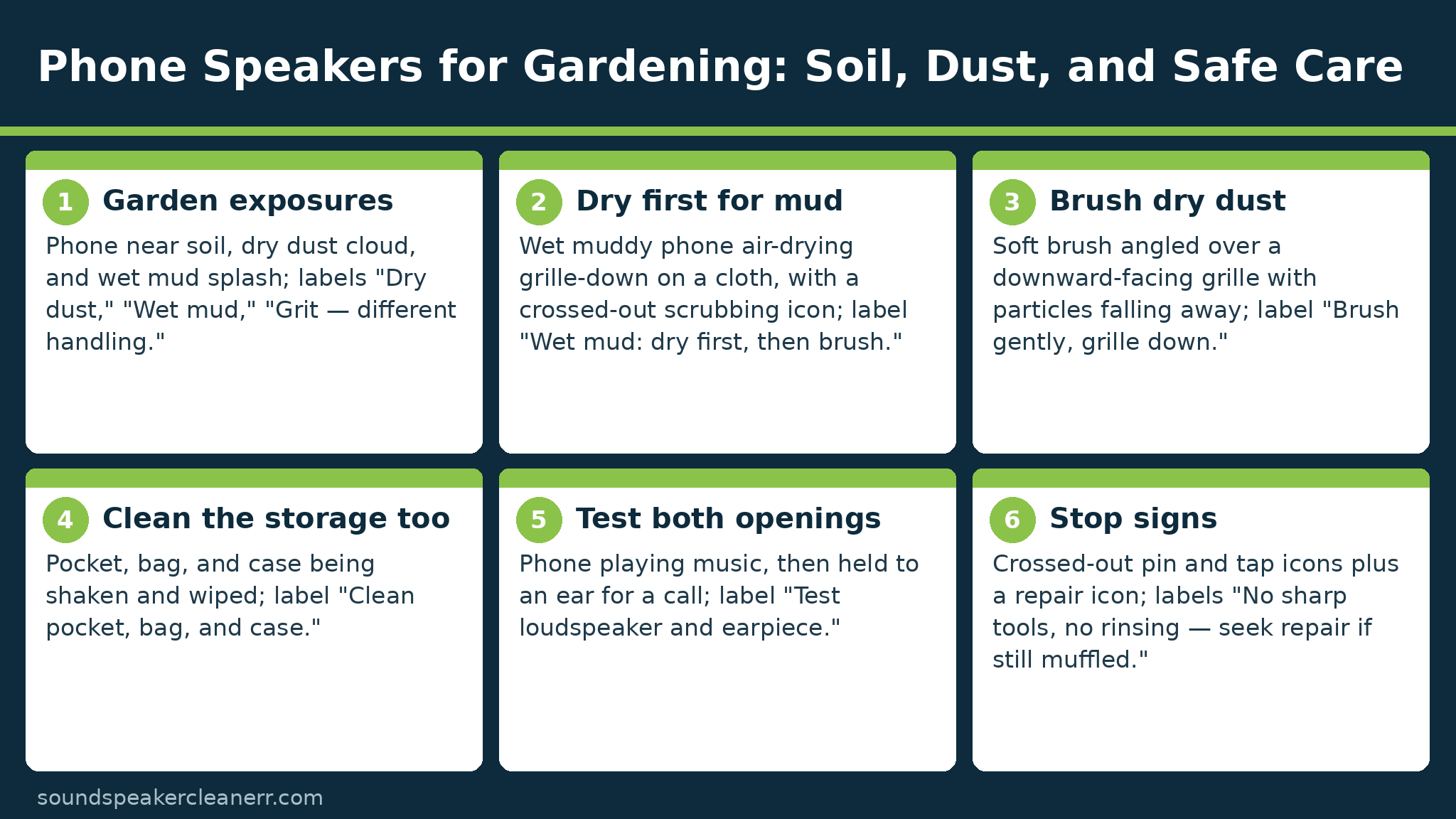
A phone speaker that sounds muffled after gardening usually has dry soil dust or fine grit on its grille, not a broken speaker. Brush the grille gently with a soft dry brush, holding the phone grille-down, wipe with a clean dry cloth, and test at moderate volume. If the phone got muddy and wet, let it air-dry fully first.
Why gardening soil is different from ordinary dust
Garden soil is not one substance. Dry soil dust is fine, light, and easily airborne when you dig, rake, or pour from a bag. It settles into grille openings the way household dust does, but it often carries tiny grit particles that are harder and sharper than lint. Wet soil and mud are heavier and stickier: they cling to the grille, dry into a crust, and hold moisture against the mesh while they dry. Both forms muffle sound, but they need different handling, and confusing them causes damage.
Dry dust should be removed dry. Brushing a dry grille with a soft dry brush, grille-down, lets particles fall away. Adding water to dry soil dust turns it into mud inside the openings, which is exactly the wrong direction. Wet mud, by contrast, should not be scrubbed while wet, because wet grit dragged across the mesh can scratch or press into the openings. Let wet mud dry fully first, then brush the dried residue away gently. That dry-first rule for mud is the single most important difference between this guide and a generic dust guide.
Soil also travels. It gets onto hands, gloves, pockets, bags, and cases, and then onto the phone again after the phone itself is clean. A phone brushed clean and put straight back into a soil-dusted pocket will collect the same dust again. Cleaning the phone without cleaning the pocket, bag compartment, and case is only half the job, and it explains why some gardeners feel their speaker "keeps clogging" no matter how often they clean it.
Dry soil dust, wet mud, and grit
Dry soil dust usually arrives on wind, from disturbed beds, or from handling dry compost and potting mix. It is fine enough to sit across the mesh without being visible at a glance, and the first sign is often slightly duller music rather than an obviously dirty grille. A soft brush and a dry wipe are usually enough. Hold the phone grille-down, brush at an angle with light strokes, and wipe the loosened dust away with a clean dry cloth. A gentle bulb blower at a distance can help move what brushing loosened, as long as air is directed so dust leaves the grille rather than being driven into it.
Wet mud arrives from kneeling, from a splash while watering, or from handling the phone with muddy hands or gloves. Do not brush wet mud vigorously and do not rinse the phone under a tap to wash it off as a routine. Wipe the worst of the wet soil from the outside of the phone with a dry cloth, without pressing into the grille, and set the phone grille-down on a dry cloth in a ventilated spot to air-dry fully. Only when the residue is dry should you brush it gently away. If mud entered the charging port, that port needs its own care and the phone must not be charged until fully dry, following the maker's guidance for wet devices.
Grit deserves special care. Small stones and coarse sand can sit in or across grille holes and resist a soft brush. Do not dig grit out with a pin, needle, or toothpick. Those tools can tear the mesh or push the grit deeper, and a torn mesh leaves the speaker unprotected afterwards. A light adhesive putty pressed gently onto the surface and lifted away can lift surface grit without entering the holes, but do not press putty deep into the grille. If grit stays lodged after gentle brushing and putty, leave it for a professional rather than forcing it out.
Gloves, pockets, and where the phone sits in the garden
Most garden soil reaches a phone through hands and storage, not through a direct fall into soil. Gloved hands are the main route: a gardener checks a plant guide or changes a podcast with soil on their gloves, and the grille picks up that soil from direct contact. The simplest prevention is a habit, not a product: take gloves off, or wipe hands, before handling the phone, and keep the phone in a clean, closed pocket or a clean bag compartment rather than loose on soil, on a wall, or on a bench where dust settles.
Where the phone sits matters as much as how it is handled. A phone lying face-down on soil, on a dusty bench, or beside a bag of potting mix collects dust directly on its grille. A phone face-up on a clean, dry surface, or in a clean pocket with the grille not pressed against fabric, collects far less. If the phone must stay outdoors during work, a clean zip pocket or a clean pouch that is itself free of soil is better than an open pocket that already holds soil dust from earlier sessions.
After gardening, empty and shake out the pocket or bag compartment before the phone goes back in. Wipe the inside of the case, since cases trap soil dust against the grille and re-soil a clean phone. Check the case fit too: a case that partly covers the speaker holes muffles sound regardless of grille cleanliness, so test with the case off before assuming the speaker is at fault.
The gardening-speaker cleaning routine
Do this routine after gardening if the speaker sounds muffled, and follow the dry-or-wet branch that matches what actually happened. First, remove the case and wipe the case separately. Second, look at the grille in good light and decide whether the residue is dry dust or wet mud. This decision shapes everything that follows.
For dry dust: brush gently with a soft, dry brush, such as a clean soft toothbrush, holding the phone grille-down and brushing at an angle so particles fall away. Wipe with a clean dry cloth. If surface dust remains, press adhesive putty lightly onto the grille and lift it away, without pressing deep. Finish with a gentle bulb blower at a distance if you have one, then wipe again.
For wet mud: wipe the outside of the phone with a dry cloth without pressing into the grille, set the phone grille-down on a dry cloth, and let it air-dry fully in a ventilated spot at room temperature. Do not use a hair dryer, direct heat, or a sealed container of rice. Once the residue is dry, brush it gently away as above. Do not charge the phone while it or its port is wet, and follow the maker's guidance for wet devices.
Third, test at moderate volume: a familiar song through the loudspeaker, then a short call to test the earpiece if calls sound muffled. The earpiece, the narrow slot near the top, collects soil when the phone is held to a dusty ear or stored earpiece-down in a soiled pocket, so test it separately from the loudspeaker. The microphone is a different opening again: if others say you sound muffled, the microphone may be blocked, not the speaker. Keep the three openings distinct in your checks.
When sound can help, and when it cannot
After brushing and drying, a short browser-based speaker cleaner cycle at moderate volume may help move light moisture and loose dust near the grille. Use it only after the surface is brushed and mostly dry, with the speaker facing down on a soft dry cloth, and stop when sound is clear. Sound is a follow-up to brushing, not a replacement for it, and it will not remove dried mud crust or lodged grit on its own.
Sound cannot repair a torn mesh, a damaged speaker, or corrosion from repeated wet-soil exposure, and it cannot dry the inside of a phone. If the speaker is completely silent, sound cannot help, because a silent speaker is not vibrating. If crackling grows louder with each cycle, if the phone gets warm, or if sound cuts in and out, stop and seek professional help. Repeated cycles for a gardening phone usually mean the pocket, bag, or case is re-soiling the grille; clean the storage, not just the speaker.
Garden habits that keep the speaker clear
A short routine prevents most garden speaker problems. Keep a clean cloth in the garden shed or by the back door and wipe the phone before it goes back indoors. Keep the phone's pocket or pouch clean and soil-free, and shake it out after gardening sessions. Wash or wipe gardening gloves before handling the phone, or set the phone down on a clean surface before putting gloves back on.
During dry, dusty work such as raking or emptying potting mix, keep the phone in a closed clean pocket rather than on an open surface downwind of the dust. During watering, keep the phone away from splash zones and off wet surfaces. After any session where the phone got muddy, let it air-dry before putting it in a closed bag or pocket, since a damp phone sealed in a bag stays damp and lets residue harden against the grille.
Check the speaker weekly during gardening season, not only when sound fails. A quick brush and a moderate-volume test once a week catches fine dust before it builds into a crust, and it lets you notice whether one opening — loudspeaker or earpiece — is consistently worse. If the same opening keeps clogging despite a clean case and pocket, look for the source: a particular bag compartment, a dusty shed shelf, or a case edge that traps grit. Changing the source beats cleaning the symptom every week.
What not to do with a soil-exposed phone
Do not rinse a muddy phone under a tap as a routine, even if the model is water resistant. Water resistance is model-specific and is not a washing guarantee, and rinsing can drive soil deeper into the grille. Do not scrub wet mud, do not use abrasive cloths or scouring pads, and do not use household cleaners or solvents on the grille. Do not push pins, needles, toothpicks, or metal tools into the grille to dig out grit.
Do not blow hard into the grille with your mouth, since breath adds moisture to dust. Do not use canned compressed air at close range, which can force soil deeper or discharge liquid. Do not use heat to dry a muddy phone. Do not charge a wet phone. If sound stays muffled, distorted, or absent after the gentle routine, if the mesh looks torn, or if the phone was dropped into water or deep mud rather than dusted, treat that as a repair question and get the phone checked.
FAQ
Can garden soil damage a phone speaker?
Dry soil dust usually only blocks the grille and brushes away, but wet mud that dries into a crust, coarse grit forced into the openings, or moisture reaching internal parts can cause lasting problems. Gentle dry brushing, full air-drying for wet mud, and never using sharp tools protect the mesh and speaker.
Should I brush wet mud off my phone speaker right away?
No. Wipe the outside gently without pressing into the grille, then let the phone air-dry fully. Brushing wet grit can scratch the mesh or push soil deeper. Once the residue is dry, brush it gently away with a soft dry brush held grille-down.
How is garden soil different from ordinary household dust?
Garden soil often includes coarse grit and, when wet, sticky mud that dries into a crust — both harder to remove than lint or fine household dust. It also travels on gloves, pockets, bags, and cases, so cleaning the phone alone may not stop re-soiling.
Can I rinse a muddy phone under a tap?
No, not as a routine. Water resistance is model-specific and is not a washing guarantee, and rinsing can drive soil deeper into the grille. Wipe the outside, air-dry fully, then brush dried residue gently. Seek professional advice if sound does not recover.
Why does my speaker keep clogging every gardening session?
The pocket, bag compartment, or case is probably re-soiling the grille. Shake out pockets, wipe the inside of the case, and keep the phone in a clean closed pocket or pouch. If the storage is clean and clogging continues, check the case fit and whether the grille itself is damaged.
How do I tell if the earpiece or the loudspeaker is blocked by soil?
Play music through the loudspeaker, then test a normal call held to your ear. If only calls are muffled, the earpiece is the likely problem. If only music and speakerphone are muffled, the loudspeaker is the likely problem. Test both at moderate volume.
Is it safe to charge my phone after gardening if it got wet?
Not while the phone or charging port is still wet. Let the phone air-dry fully first and follow your phone maker's guidance for wet devices. Charging while wet risks damage far more serious than a muffled speaker.
What should I do if grit stays stuck in the speaker grille?
Leave it for a professional. Do not dig it out with a pin, needle, or toothpick, and do not press putty deep into the grille. A torn mesh leaves the speaker unprotected, and forced grit can damage the speaker behind it.
Related tools on this site
Related guides on this site
- How to Clean Phone Speakers
- Phone Speaker Muffled
- Phone Speaker Crackling
- Does Speaker Cleaner Work?
- Clean Dust from Phone Speaker
- Clean Ear Speaker
- Phone Fell in Water
- Dry Phone Without Rice
- Water in Charging Port
- Clean Charging Port Lint
- Speaker Cleaner Apps: Safe Use Without Installing One
- Speaker Cleaner Frequency
- Phone Speaker Troubleshooting
Leave a Reply