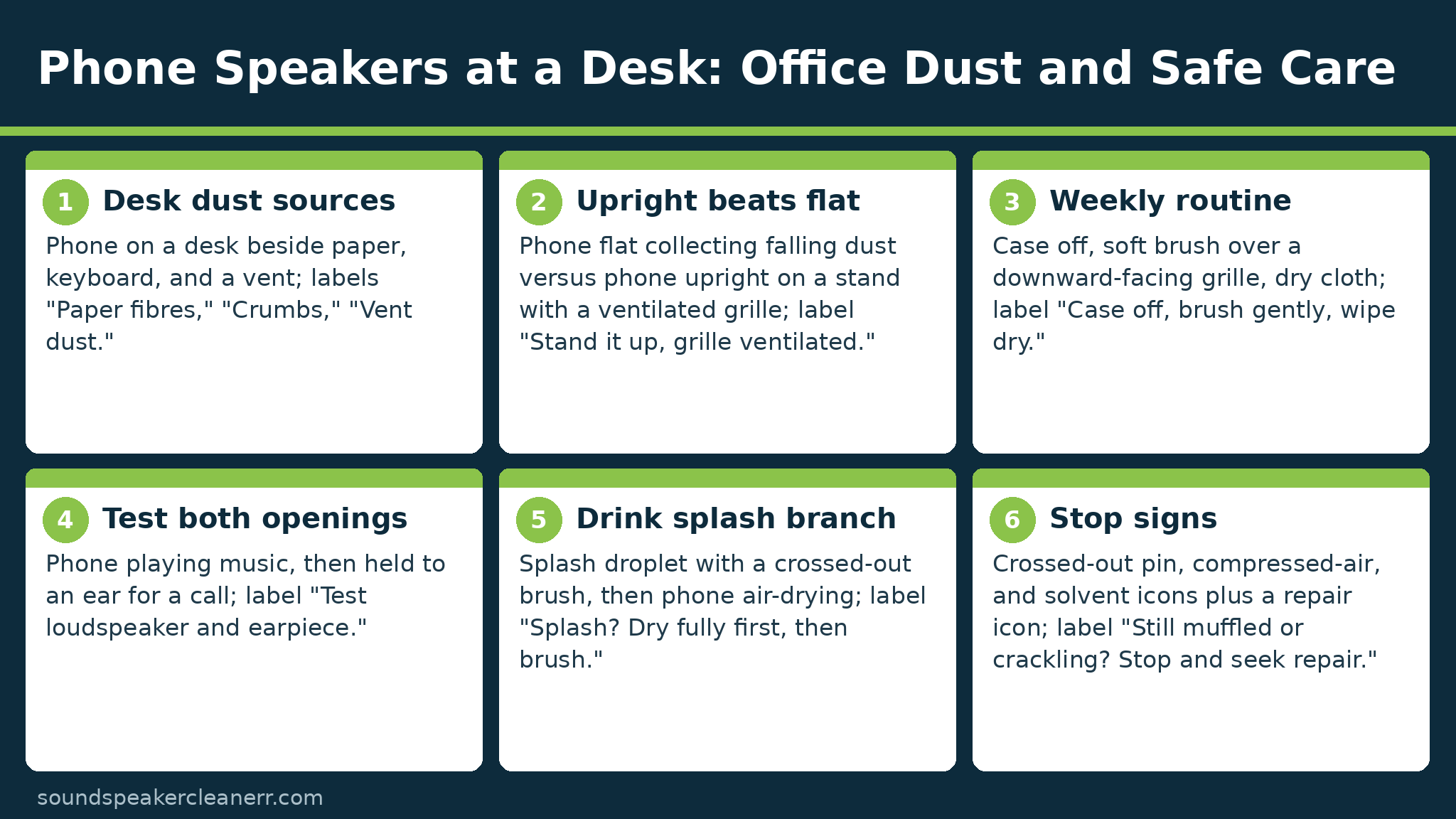
A phone speaker that sounds dull after months on a desk usually has office dust, paper fibres, and crumbs on its grille, not a broken speaker. Brush the grille gently with a soft dry brush, holding the phone grille-down, wipe with a clean dry cloth, and test at moderate volume. If sound stays muffled afterwards, stop and seek repair.
Why a desk collects speaker dust
A desk looks clean, but it is a steady dust environment. Paper sheds fibres every time sheets are moved, filed, or torn. Keyboards collect crumbs and skin particles that transfer to anything placed nearby. Printers and air vents circulate fine dust across the desk surface all day. A phone that sits face-up on that surface for eight hours, day after day, collects a thin, even layer of that dust directly on its grille — especially if the grille faces up toward falling dust.
The idle time is the key difference from commuting or gardening. A commuter's phone moves and is handled; a gardener's phone gets dusty in bursts. A desk phone sits still, grille exposed, for long stretches, and dust settles on it undisturbed. That undisturbed settling lets fine particles work into the mesh rather than being shaken off by movement. The result is a gradual dulling that is easy to blame on the phone ageing, when the grille is actually just dusty.
Desk placement makes it worse in specific ways. A phone lying flat beside a keyboard collects crumbs flicked from typing. A phone under or beside a paper stack collects fibres from every sheet moved above it. A phone near an air vent or a fan collects a constant stream of fine dust. A phone face-down on a dusty desk presses its earpiece and screen against that dust. None of these placements damages a phone on its own, but together, over weeks, they produce a grille that needs a routine, not a repair.
Paper fibres, crumbs, and vent dust
Desk dust is not uniform, and the three main kinds need slightly different handling. Paper fibres are soft and light, similar to lint. They brush away easily with a soft dry brush and can be lifted with light adhesive putty pressed gently onto the surface and peeled away. Do not press putty deep into the grille. Paper fibres are also the kind most likely to cling after a wipe, because a damp cloth can press them flat against the mesh; for desk dust, a dry cloth is usually better than a damp one.
Keyboard crumbs are larger and harder. Crumbs from food eaten at a desk, plus small particles from packaging, can sit across grille holes and resist a light brush. Do not dig crumbs out with a pin, toothpick, or metal tool. Brush gently with the grille facing down, tap the phone lightly to shake loosened particles off, and use putty lightly for surface crumbs. If a crumb stays lodged after gentle brushing and putty, leave it for a professional rather than forcing it out and tearing the mesh.
Vent and printer dust is the finest of the three, more like a film than particles. It may not be visible, and the first sign is often slightly duller speakerphone sound on calls. Brushing grille-down, followed by a dry wipe, followed by a second light brush, removes this film better than any single pass. A gentle bulb blower at a distance can help between brushing and wiping, as long as air is directed so dust leaves the grille rather than being driven into it. Avoid canned compressed air at close range, which can force fine dust deeper.
The desk-side cleaning routine
This routine takes a few minutes and fits a desk without special equipment. Do it once a week, or whenever speakerphone calls or music sound duller than usual. Do it away from the keyboard and paper stacks if you can, so you are not adding dust as fast as you remove it.
First, remove the case and check the case edge and speaker holes. Desk dust collects on case edges too, and a case whose holes do not line up with the phone's speaker openings muffles sound no matter how clean the grille is. Wipe the case with a dry cloth. Second, brush the grille gently with a soft, dry brush, such as a clean soft toothbrush, holding the phone grille-down and brushing at an angle so particles fall away from the phone. Wipe with a clean, dry microfiber cloth kept for the phone — not a cloth used for the desk, which may carry crumbs and dust back onto the grille.
Third, test at moderate volume in a quiet moment: a familiar song through the loudspeaker, then a short call to test the earpiece if calls sound muffled. The earpiece, the narrow slot near the top, collects dust when the phone lies face-down on a desk or when paper is moved over it. Test it separately from the loudspeaker, since a blocked earpiece affects calls while music sounds normal. The microphone is a different opening again: if colleagues say you sound muffled on calls, the microphone may be blocked, not the speaker. Keep the three openings distinct.
If sound is clear, the routine is done. If sound is still dull, one gentle repeat after checking the case and the desk spot is reasonable. Do not escalate to sharp tools, liquids, solvents, or canned compressed air. Desk dust is dry and fine, and it does not need aggressive methods. Aggressive methods risk the mesh for no benefit.
Desk habits that keep the grille clear
Placement is the most effective prevention. Keep the phone on a clean, dry part of the desk away from the keyboard crumb zone, away from paper stacks that are moved often, and away from direct air-vent airflow. A phone stand that holds the phone upright, with the grille ventilated and not pressed against the desk surface, collects less dust than a phone lying flat. If a stand is not practical, a clean desk mat under the phone, wiped regularly, is better than a bare dusty surface.
Keep the desk itself cleaner around the phone's spot. Wipe the phone's area with a dry cloth regularly, shake out keyboard crumbs away from the phone, and avoid eating directly over the phone. Keep a clean microfiber cloth in a desk drawer for the phone only, separate from general desk cloths that carry dust and crumbs. When the phone is not in use, a closed drawer or a clean pouch protects the grille better than an open desk surface under a vent, especially overnight and over weekends when dust settles undisturbed.
Check the case weekly as well. A case that traps dust against the grille, or whose edges collect paper fibres, re-soils a clean phone every time it goes back on. Wipe the inside of the case, check the hole alignment, and test with the case off if sound seems dull despite a clean grille. If sound improves with the case off, the case is the problem, not the speaker.
Coffee, drinks, and the desk phone
Drinks are the desk's wet risk, and they need different handling from dry dust. A coffee or water splash on the phone is not a dust problem, and brushing a wet grille can press liquid and particles into the openings. If a drink splashes on the phone, wipe the outside at once with a dry cloth, remove the case, hold the affected grille facing down on a dry cloth, and let the phone air-dry fully in a ventilated spot before any brushing. Do not use a hair dryer, direct heat, or a sealed container of rice. Do not charge a wet phone, and follow your phone maker's guidance for wet devices if any liquid warning appears.
Sugary or milky drinks leave stickier residue than water, and that residue can harden into a film that dulls sound after drying. Once the phone is fully dry, brush gently as above. If sound stays muffled after drying and gentle brushing, seek professional advice rather than rinsing the phone or using household cleaners on the grille. A splash into the charging port is a separate concern from a splash on the speaker, and charging while wet must wait until the phone is fully dry.
Prevention for drinks is simple: keep cups away from the phone's spot, use a lid where possible, and do not place the phone beside a drink that is moved often. A small change in desk layout — phone on one side, drink on the other, with space between — removes most splash risk without any new habit to remember.
When sound can help, and when it cannot
After brushing and wiping, a short browser-based speaker cleaner cycle at moderate volume may help move loose dust near the grille. Use it only after the surface is brushed, with the speaker facing down on a soft dry cloth, and stop when sound is clear. Sound is a follow-up to brushing, not a replacement for it, and it will not remove a crumb lodged in the grille, a film of vent dust that needs wiping, or a misaligned case.
Sound cannot repair a torn mesh or a damaged speaker, and it cannot dry the inside of a phone. If the speaker is completely silent, sound cannot help, because a silent speaker is not vibrating. If crackling grows louder with each cycle, if the phone gets warm, or if sound cuts in and out, stop and seek professional help. A desk phone that needs a sound cycle every day is signalling a source problem — a dusty vent spot, a crumb-heavy keyboard zone, or a case that traps fibres — and moving the phone's spot matters more than adding cycles. A clean, dry speaker gains nothing from extra cleaning sounds.
What not to do to a desk phone
Do not push a pin, needle, toothpick, or metal tool into the grille to dig out crumbs or fibres. Those tools can tear the mesh or push debris deeper, turning a cleaning job into a repair. Do not use canned compressed air at close range, which can force fine desk dust deeper or discharge liquid. Do not blow hard into the grille with your mouth, since breath adds moisture to dust. Do not pour water over the phone to wash off dust, and do not use household cleaners, solvents, or abrasive cloths on the grille.
Do not use a vacuum cleaner nozzle directly against the grille at high suction, which can stress the mesh. Do not charge a wet phone after a drink splash. Do not ignore warning signs: a speaker that stays muffled after brushing, wiping, and one short sound cycle; a speaker that crackles, buzzes, or cuts out; or a phone that was submerged rather than dusted. Those are repair questions, not cleaning questions, and continued loud tones will not fix them.
FAQ
Why does my phone speaker sound dull after months on my desk?
Office dust, paper fibres, and fine crumbs settle on the grille during long idle hours face-up on the desk, gradually narrowing the openings sound passes through. A gentle brush grille-down and a dry wipe usually restore clarity if the mesh is undamaged.
How is desk dust different from pocket lint or outdoor dust?
Desk dust includes paper fibres from sheets, crumbs from keyboards, and very fine vent and printer dust. Paper fibres brush away like lint, crumbs may resist a light brush and must never be dug out, and vent dust forms a thin film that needs brushing followed by a dry wipe.
How often should I clean a desk phone speaker?
Once a week is enough for most desk phones, plus a wipe after any drink splash once the phone is fully dry. Daily deep cleaning is unnecessary. If sound stays clear between weekly checks, the routine is working.
Should I use a damp cloth on a dusty desk phone speaker?
Usually no. Desk dust is dry, and a damp cloth can press paper fibres flat against the mesh. Use a clean dry microfiber cloth for dust. A barely damp cloth on the surface only is for a grease or drink film, and only if your phone maker's guidance allows it, followed by immediate drying.
Can a phone stand help my speaker?
Yes. A stand that holds the phone upright, with the grille ventilated and not pressed against the desk, collects less settling dust than a phone lying flat beside a keyboard or under paper stacks. Keep the phone away from direct vent airflow as well.
How do I tell if the earpiece or the loudspeaker is blocked?
Play music through the loudspeaker, then test a normal call held to your ear. If only calls are muffled, the earpiece is the likely problem. If only music and speakerphone are muffled, the loudspeaker is the likely problem. Test both at moderate volume in a quiet moment.
What should I do if coffee splashed on my phone speaker?
Wipe the outside at once, remove the case, hold the grille facing down on a dry cloth, and let the phone air-dry fully before brushing. Do not charge a wet phone. If sound stays muffled after drying and gentle brushing, seek professional advice rather than rinsing or using cleaners on the grille.
What if the speaker still crackles after cleaning?
Stop and seek professional help. Crackling that persists after brushing, wiping, drying, and one short sound cycle can mean mesh or speaker damage, and repeated loud tones will not repair it.
Related tools on this site
Related guides on this site
- How to Clean Phone Speakers
- Phone Speaker Muffled
- Phone Speaker Crackling
- Does Speaker Cleaner Work?
- Clean Dust from Phone Speaker
- Clean Ear Speaker
- Clean Charging Port Lint
- Water in Charging Port
- Dry Phone Without Rice
- Phone Fell in Water
- Speaker Cleaner Apps: Safe Use Without Installing One
- Speaker Cleaner Frequency
- Phone Speaker Troubleshooting
- Phone Speaker Volume Low
Leave a Reply