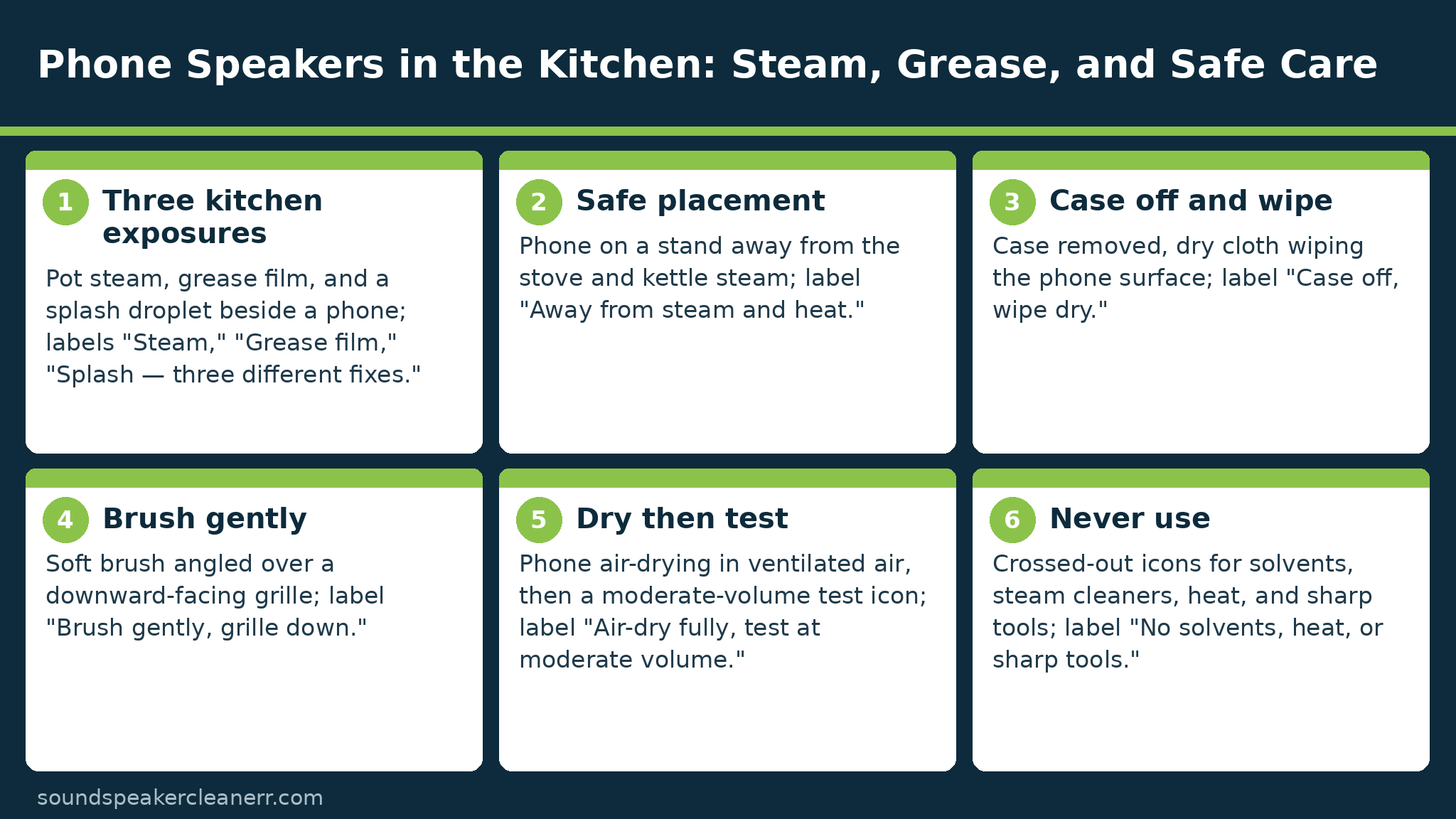
A phone speaker that sounds muffled after cooking usually has steam condensation or a thin grease film on its grille, not a broken speaker. Move the phone away from steam, wipe it dry, brush the grille gently, and let it air-dry fully before testing at moderate volume. If sound stays muffled afterwards, stop and seek repair.
Why the kitchen is a special case
A kitchen combines three exposures that rarely occur together elsewhere: airborne steam, airborne grease, and liquid splashes. Steam from a pot or kettle condenses on any cool surface, including a phone screen and grille. Cooking oil produces a fine airborne film that settles on surfaces near the stove. A splash from washing, a drink, or a wet hand can add liquid directly to the openings. Each exposure behaves differently, and treating them all as "water damage" leads to the wrong fix.
Steam is the most underestimated of the three. It does not look like a spill, so it is easy to leave a phone beside a boiling pot and assume no harm was done. Yet condensation can form inside the grille openings as steam cools, and that thin moisture layer muffles sound in the same way a splash does. The muffling may clear as the phone dries, or it may linger if grease or dust was already on the grille and the moisture helped it stick.
Grease is the most persistent. Unlike dust, which brushes away dry, a grease film is sticky. It holds dust and lint against the grille and resists a dry wipe. That stickiness is why a kitchen phone can sound progressively duller over weeks even without any single dramatic spill. The fix is still gentle: surface wiping and brushing, not solvents poured onto the grille. Solvents and harsh kitchen cleaners can damage coatings, seals, and the mesh itself, and they can leave residues that are worse than the grease.
Steam, grease, and splashes are three different problems
Separating the three exposures keeps the routine safe. Steam means condensation: the phone was near boiling water, a kettle, a dishwasher vent, or a steaming pot. The right response is distance and drying. Move the phone away from the steam source, wipe the outside dry, and let it air-dry in a ventilated spot. Do not hold the phone over steam to "clear" it, and never aim a steam cleaner at a phone. Steam directed at electronics is a hazard, not a cleaning method.
Grease means film: the phone was near frying or roasting, or it was handled with oily hands. The right response is a gentle surface wipe. Wipe the phone with a clean dry microfiber cloth first. If a film remains and your phone maker's guidance allows a slightly damp wipe, use a cloth that is barely damp, wipe only the surface around and across the grille, and dry immediately. Never apply cooking degreasers, solvents, or abrasive pads to the grille. If the film does not lift with a gentle wipe, leave it for a professional rather than escalating to a stronger chemical.
A splash means liquid: water, stock, sauce, or a drink reached the phone. The right response depends on how much liquid and where it went. Wipe it off at once, hold the phone with the affected grille facing down on a dry cloth, remove the case, and let the phone air-dry fully before charging. A splash into the charging port is a separate concern from a splash on the speaker, and charging while wet must wait until the phone is fully dry and the maker's guidance for wet devices has been followed. Sauce or sugary liquid is stickier than water and should not be rinsed off under a tap as a routine; wipe the surface and seek advice if sound does not recover after drying.
Where to put the phone while you cook
Placement prevents most kitchen speaker problems. Keep the phone away from the stove, the kettle spout, and the dishwasher vent, where steam and grease are strongest. A spot on a dry counter away from the cooking zone, propped upright with the speaker grille not pressed against a damp surface, is better than a spot flat beside a pot. If you follow a recipe, a stand that holds the phone upright and away from steam keeps both the screen readable and the grille ventilated.
Wet hands are a second placement problem. Handling a phone with wet or oily hands transfers moisture and film directly onto the grille and the earpiece area. Dry your hands before picking up the phone, or use voice control and timers without touching the phone until your hands are dry. If the phone must be used with damp hands, wipe it afterwards rather than letting that moisture dry in place on the grille.
Heat is a quieter risk. A phone left beside a hot oven, on top of a warm appliance, or in direct sun through a kitchen window can warm up while damp, which keeps moisture in contact with the grille longer. Move the phone to a cool, dry, ventilated spot after cooking rather than leaving it in the warmest part of the kitchen. Do not put a damp phone in an oven, near a burner, or under a hair dryer to dry it faster. Room-temperature air and time are the safe drying method.
The kitchen-speaker cleaning routine
Do this routine after cooking if the speaker sounds muffled, and do the steps in order. First, move the phone away from steam and heat. Second, remove the case, because cases trap grease film and steam condensation against the grille. Wipe the case separately with a dry cloth and let it dry; a greasy case will re-soil a clean grille.
Third, wipe the phone with a clean, dry microfiber cloth, wiping across the grille rather than pressing into it. If a grease film remains and the maker's guidance allows it, follow with a barely damp cloth on the surface only, then dry immediately with a dry section of cloth. Work on the loudspeaker grille on the bottom edge and, if calls sound muffled, the earpiece slot at the top. Keep the microphone opening and charging port distinct: a muffled call for the other person points to the microphone, while muffled sound for you points to a speaker.
Fourth, brush gently with a soft, dry brush, such as a clean soft toothbrush, holding the phone grille-down so loosened particles fall away. Use light strokes at an angle. Never push a pin, needle, toothpick, or metal tool into the grille. Fifth, let the phone air-dry fully in a ventilated spot before charging or sealing it in a pocket or bag. If the phone shows a liquid warning, do not charge it until it is fully dry and you have followed the maker's guidance.
Sixth, test at moderate volume: a familiar song through the loudspeaker, then a short call for the earpiece. Moderate volume is enough to judge clarity. If sound is clear, the routine is done. If a light grease film still dulls sound after wiping and brushing, do not escalate to solvents. One more gentle wipe after further drying is reasonable; a chemical attack on the grille is not.
When sound can help, and when it cannot
After wiping and drying, a short browser-based speaker cleaner cycle at moderate volume may help move light moisture and loose dust near the grille. Use it only after the surface is wiped and mostly dry, with the speaker facing down on a soft dry cloth, and stop when sound is clear. Sound is an aid to a cleaning routine, not a substitute for removing grease film, which vibration alone will not dissolve.
Sound cannot repair a torn mesh, a damaged speaker, or corrosion, and it cannot dry the inside of a phone. If the speaker is completely silent, sound cannot help, because a silent speaker is not vibrating. If crackling grows louder with each cycle, if the phone gets warm, or if sound cuts in and out, stop and seek professional help. Repeated cycles for a kitchen phone usually mean the grease film is still there or the phone keeps returning to the same steamy spot; fix the placement and the film, not the number of cycles.
Kitchen habits that keep the speaker clear
A few habits remove most of the risk. Use a phone stand away from the stove rather than laying the phone flat beside a pot. Keep the phone out of the steam path of kettles and dishwashers. Wipe the phone after cooking sessions where steam or grease was heavy, even if sound still seems fine, so film does not build up week by week. Clean the case regularly, since a greasy case edge is a constant source of re-soiling.
Keep kitchen cloths separate. A cloth used for wiping counters may carry grease and food residue that transfers straight onto the grille. Use a clean, dry microfiber cloth kept for the phone, and wash it regularly. Avoid using paper towels on the grille repeatedly, since they can shed fibres into the openings. Finally, check the case fit: a case that partly covers the speaker holes will muffle sound no matter how clean the grille is. Test with the case off before assuming the speaker is at fault.
What never to use on a kitchen phone speaker
Do not use oven cleaner, degreaser, bleach, vinegar, or any harsh household cleaner on or near the speaker grille. Do not use abrasive pads or scouring powder. Do not pour water over the phone to wash off grease, and do not hold the phone under a running tap as a routine, even if the model is water resistant. Water resistance is model-specific and is not a washing guarantee.
Do not use a steam cleaner, a hair dryer, or direct heat on the phone. Do not blow into the grille with your mouth, since breath adds moisture. Do not use canned compressed air at close range, which can force grease and debris deeper or discharge liquid. Do not charge a wet phone. If liquid entered the charging port, wait until the phone is fully dry and follow the maker's guidance. If sound stays muffled, distorted, or absent after the gentle routine, or if the phone was submerged rather than steamed or splashed, treat that as a repair question and get the phone checked.
FAQ
Can steam from cooking damage my phone speaker?
Steam can condense on and inside the grille and muffle sound temporarily, and repeated steam exposure with grease and dust can let a sticky film build up. Move the phone away from steam, wipe it dry, and let it air-dry fully. Steam does not automatically mean permanent damage, but a speaker that stays muffled after drying should be checked.
How do I remove a grease film from a phone speaker grille?
Wipe the surface gently with a clean dry microfiber cloth first. If film remains and your phone maker's guidance allows it, use a barely damp cloth on the surface only and dry immediately, then brush gently with a soft dry brush. Never use degreasers, solvents, or abrasive pads on the grille.
Should I rinse my phone if sauce splashed on the speaker?
No, not as a routine. Wipe the surface at once, hold the grille facing down on a dry cloth, remove the case, and let the phone air-dry fully. Sugary or oily residue that keeps sound muffled after drying is a reason to seek professional advice, not to rinse the phone under a tap.
Where is the safest place for my phone while I cook?
On a dry counter away from the stove, kettle spout, and dishwasher vent, propped upright with the grille ventilated — not flat beside a boiling pot or on a damp surface. A stand away from the cooking zone keeps the screen readable and the grille out of the steam path.
Can a speaker cleaner sound remove grease?
No. Sound vibration may help move light moisture and loose dust near the grille, but it does not dissolve a grease film. Wiping and gentle brushing are the methods for film; sound is only a short follow-up after the phone is wiped and mostly dry.
Is it safe to charge my phone after steam or a splash in the kitchen?
Not while the phone or charging port is still wet. Let the phone air-dry fully first and follow your phone maker's guidance for wet devices. Charging while wet risks damage far more serious than a muffled speaker.
Why does my phone sound worse weeks after I started cooking with it nearby?
Grease film builds gradually and holds dust and lint against the grille, so sound dulls slowly rather than after one session. A regular wipe after heavy cooking sessions, plus a clean case, prevents that slow buildup from becoming a muffled speaker.
What if the speaker still sounds muffled after wiping and drying?
Stop and seek professional help, especially if sound is distorted, crackling, or absent. Persistent muffling after the gentle routine can mean film deep in the mesh or speaker damage, and solvents, sharp tools, or repeated loud tones will not repair it.
Related tools on this site
Related guides on this site
- How to Clean Phone Speakers
- Phone Speaker Muffled
- Phone Speaker Crackling
- Does Speaker Cleaner Work?
- Clean Dust from Phone Speaker
- Clean Ear Speaker
- Phone Fell in Water
- Dry Phone Without Rice
- Water in Charging Port
- Clean Charging Port Lint
- Speaker Cleaner Apps: Safe Use Without Installing One
- Speaker Cleaner Frequency
- Phone Speaker Troubleshooting
Leave a Reply