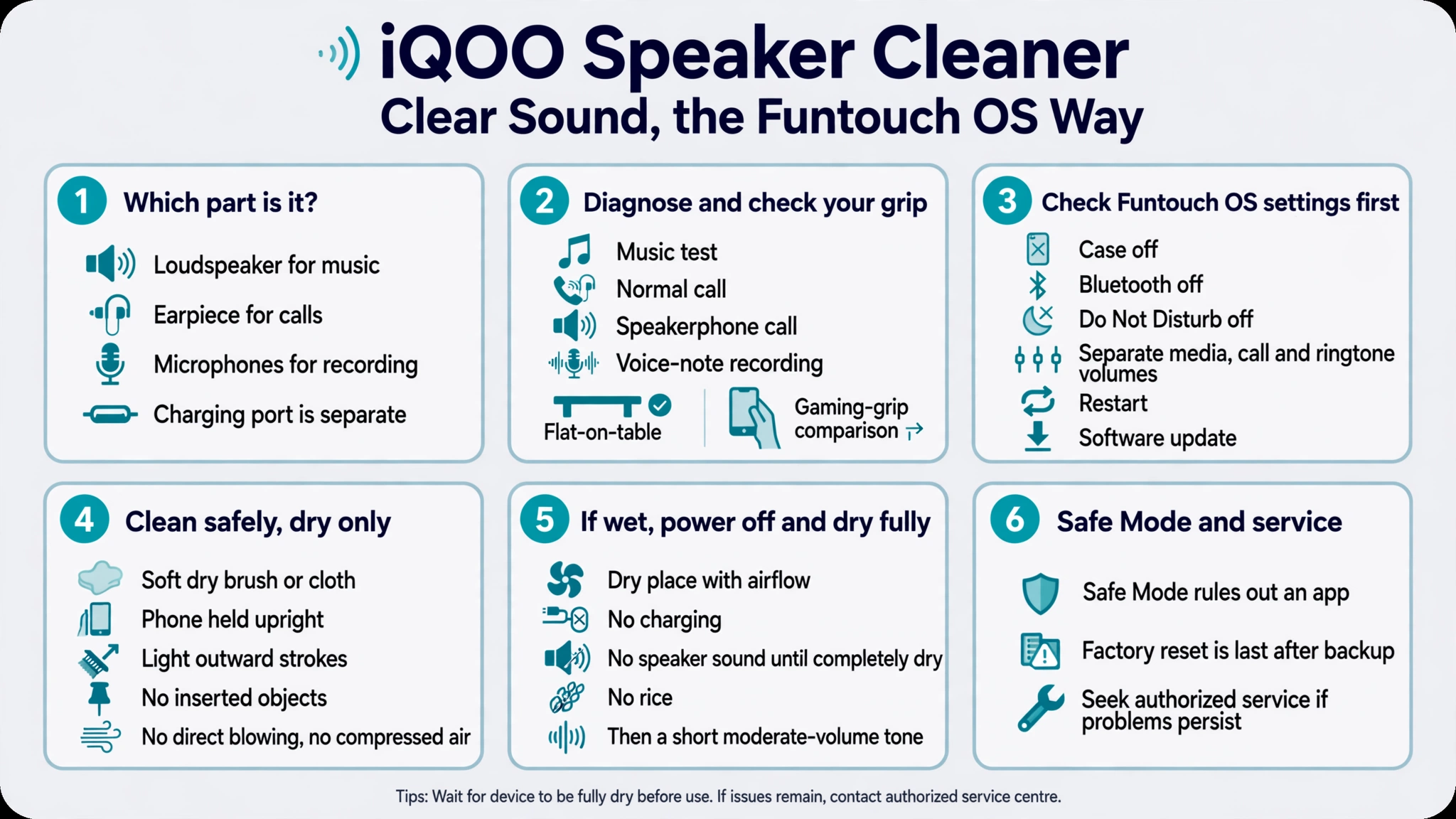
iQOO phones follow the same safe speaker approach as other Android phones, with two iQOO-specific checks first: your grip during gaming, and whether moisture — not dust — is the real cause. This guide covers number-series, Neo, and Z-series models together.
Who this guide is for
This guide is for anyone whose iQOO phone sounds muffled, quiet, crackly, or silent, whether after dust, moisture, gaming, a new app, or a software update. It does not replace iQOO’s or vivo’s instructions for your exact model. If a menu name below differs on your phone, search your Settings app for the setting name. Menu names vary by Funtouch OS version.
It is not a repair manual. If your phone was fully submerged, will not charge, shows a liquid warning, or smells of burning, follow iQOO and vivo service guidance and seek authorized service instead of repeating cleaning tones. No verified iQOO maker speaker-cleaning procedure was found in this research, so this guide does not invent one; it gives the safe general method and labels third-party moisture guidance as third-party where it is used.
The iQOO speakers and microphones, in plain terms
An iQOO phone normally has a loudspeaker, usually along the bottom edge, and a smaller earpiece at the top for normal calls. Many iQOO models use both together for stereo media sound. It also has more than one microphone: one near the bottom for calls, and others used for noise cancellation and video. Those parts fail differently, and testing them separately is the fastest way to avoid a wrong fix.
Music that sounds muffled points to the loudspeaker. Callers who sound quiet while speakerphone sounds fine point to the earpiece. Callers who cannot hear you while you hear them fine point to a microphone. A cable that will not click in, or charging that only works at an angle, points to the charging port, which sound does not clean. Keep those four parts separate before you clean anything.
Diagnose first: test each part separately, and check your grip
Do these tests in a quiet room, with no Bluetooth device connected and the case removed, so a case or film cannot hide the result.
Play music or a video at a moderate volume and note whether it is muffled, crackly, quiet, or silent. Then use the Speaker Test tool on this site to check for distortion or dropouts. Make a normal call without speakerphone and listen through the earpiece, then switch the same call to speakerphone and listen through the loudspeaker. Record a short voice note and play it back to test the microphone. If only one test fails, you have narrowed the problem to that part.
Then do the grip check, which matters more on gaming-focused phones: hold the phone the way you hold it during a game, then hold it flat on a table with nothing covering either end, and compare the sound. User-feedback summaries for iQOO number-series models note that sound can get muffled when the phone is held horizontally during gameplay. If sound is clear on the table but muffled in your hands, your grip — not the speaker — is blocking a grille, and no cleaning step is needed.
Check the Funtouch OS settings that mimic a broken speaker
Funtouch OS settings can silence a healthy speaker, so check them before you clean. First, remove any case, screen protector, or film that covers a speaker or microphone opening, and test again. A case that sits over a grille is one of the most common causes of muffled sound.
Next, turn Bluetooth off in Settings, because sound may be routing to earbuds, a car system, or a Bluetooth speaker instead of the phone, and unplug any headphones or USB-C audio dongle. Check Do Not Disturb in Quick Settings and in Settings, since it can silence calls and notifications even though music still plays. Check volumes separately: media, call, and ringtone volumes are separate sliders, and in-call volume can only be adjusted during a call, using the side volume keys.
Restart the phone and test again: a restart clears temporary software glitches that affect audio. If sound fails in only one app, check that app’s permissions and mute controls before changing phone-wide settings, and test with a second app and a locally saved file so a streaming problem does not confuse the result. Also check for a software update in Settings, since updates frequently include audio fixes; the exact update menu name varies by Funtouch OS version.
Clean an iQOO speaker safely
Dry cleaning only, and nothing inserted into any opening. Use a soft brush or a clean, dry cloth to gently clean the speaker grille, and hold the phone upright while cleaning so dust does not move inside — that upright-hold detail comes from third-party iQOO repair guidance and is good practice for any grille. Use light outward strokes across the grille. For the earpiece, use the same light strokes across its slot. Do not press a brush into any opening, and never use a pin, needle, or toothpick. For a microphone hole, wipe around the opening and brush lightly outward; do not insert anything, blow air directly into it, or use liquid, because a microphone membrane is delicate.
If the speaker still sounds muffled after dry cleaning, try a short browser tone at moderate volume, with the speaker facing down, using this site’s speaker cleaning tool. Play one short cycle, then test with music. Repeat only once or twice more if the sound is clean and improving. Sound may help with light water or loose dust near a speaker opening. It is not a guarantee, and it does not repair a torn, corroded, or electrically damaged speaker. Do not use canned compressed air: high-pressure air at close range can push debris deeper or damage a mesh. If packed dirt does not shift with brushing, stop; that is a service-center job.
If an iQOO phone got wet
Water changes the order, and third-party iQOO repair guidance is clear on the sequence — labeled here as third-party, not maker, guidance. Power the phone off immediately if it was exposed to moisture. Keep it in a dry place with airflow, avoid charging, and do not use speaker sound until the phone feels completely dry. That guide’s wording is to avoid charging for a few hours; no maker charging-wait hour figure is claimed here, and no Apple charging-wait figure is given anywhere in this guide. Do not put the phone in rice, and do not charge while any liquid warning is shown. Do not assume a splash rating covers your model: this guide claims no water-resistance rating for any iQOO model, because ratings vary by model.
Only after the phone feels completely dry, and only if there is no liquid warning, test the loudspeaker at moderate volume with a short tone. If sound is still muffled after drying, or the phone was fully submerged or exposed to salt or soapy water, seek authorized service. Audio often returns to normal after drying, according to that third-party guide, but “often” is not a guarantee, and persistent muffling after drying is a repair sign, not a reason to play louder tones.
Use Safe Mode to test for an app problem
To test for an app problem, use Android Safe Mode through your phone’s power menu options — the exact gesture varies by Funtouch OS version — then play music and make a test call. If the speaker works normally in Safe Mode but fails in normal mode, a downloaded app is the likely cause. Restart normally to exit Safe Mode, then uninstall the most recently installed or updated audio-related apps one at a time, testing after each removal. If the speaker still fails in Safe Mode, the cause is more likely a setting, blockage, water, or hardware.
If Safe Mode does not identify an app, a settings reset is a later step, and a factory reset after backing up data is the last resort. Do not start with a factory reset. A reset will not fix a blocked grille, water damage, or a damaged speaker.
Troubleshooting
Still muffled after dust: brush again with the phone held upright and light outward strokes, then try one short tone. Do not insert anything into the grille. Muffled only while gaming: check your grip first, then the case, before any cleaning step. Crackling or rattling: stop the tone. Crackling at moderate volume can mean debris, distortion, or damage. Do not raise the volume to push through it. Callers sound quiet, speakerphone sounds fine: check the earpiece, in-call volume during a call, and any case or film covering the earpiece. Callers cannot hear you: check microphone permissions, a case covering a mic hole, and Bluetooth routing, then test with a voice recording. Sound low but clear: check media volume separately from ringtone volume, and whether a case blocks the grille. Works in Safe Mode only: uninstall recently added audio apps one at a time. Tone plays but nothing changes: that suggests packed debris, a setting, deeper water, or damage, not a need for a higher frequency.
When to seek repair
Seek iQOO or vivo authorized service or a qualified repair shop if sound stays distorted after gentle cleaning and drying; a speaker stays silent in Safe Mode; the phone was fully submerged or exposed to salt or soapy water; or you see corrosion, swelling, a cracked screen near a speaker, or a liquid warning that will not clear. Third-party repair listings for iQOO models agree that diagnosis comes before any part replacement, and a speaker that is faulty — rather than blocked — needs professional replacement, not louder tones. Bring a clear description: when it started, whether water, dust, or gaming grip was involved, what you already tried, and what Safe Mode showed.
Conclusion
For an iQOO phone, the safe order is: remove the case and films, test loudspeaker, earpiece, and microphone separately, check your gaming grip, check Bluetooth, Do Not Disturb, and separate volumes, restart, clean only the outside of the grille with a dry brush while holding the phone upright, power off and air-dry fully after any moisture before any tone, use Safe Mode to rule out an app, and stop on distortion or no change. That order avoids the two most common mistakes: cleaning the wrong part, and playing louder tones at a wet or damaged phone.
FAQ
Does iQOO have a built-in speaker cleaner?
No built-in cleaning tone or maker cleaning procedure was verified for iQOO in this research, and none is claimed here. Use the browser tool on this site for the short tone test, and check your own phone’s Settings menus, since menu names vary by Funtouch OS version.
How do I clean an iQOO speaker safely?
Use a soft brush or a clean, dry cloth with light outward strokes, holding the phone upright while cleaning so dust does not move inside. Do not insert anything, blow air directly into the speaker, use liquid, or use canned compressed air.
Why does my iQOO phone sound muffled only during games?
Check your grip first: user-feedback summaries note sound can get muffled when the phone is held horizontally during gameplay. Test the same audio with the phone flat on a table and nothing covering either end.
My iQOO phone got wet. What should I do first?
Power it off immediately, keep it in a dry place with airflow, and do not charge or play speaker sound until the phone feels completely dry. That sequence comes from third-party iQOO repair guidance, not a maker procedure, so follow iQOO and vivo service guidance for your model if they differ.
Can a 50,000 Hz tone clean an iQOO speaker better?
No. A typical phone speaker cannot reliably reproduce 50,000 Hz, and a high-frequency label does not make a tone stronger. Use an audible, moderate-volume tone, and judge by a careful test afterwards.
What does Safe Mode prove on an iQOO phone?
If sound works in Safe Mode but fails normally, a downloaded app is the likely cause. If sound still fails in Safe Mode, the cause is more likely a setting, blockage, water, or hardware.
Should I factory reset an iQOO phone for a speaker problem?
Only as a last step, after backing up your data. A reset will not fix a blocked grille, water damage, or a damaged speaker.
Does speaker cleaner really work?
It can help in limited cases: light water or loose dust near a speaker opening. It is not a repair guarantee, it does not reliably remove embedded debris, and it does not fix a microphone or a charging port.
Related tools on this site
Related tools:
Related guides:
- Speaker Cleaner Apps: Safe Use Without Installing One
- Speaker Cleaner Frequency
- Speaker and Microphone Cleaning
- iPhone Speaker Cleaner: A Safe Guide to Clearer Sound
- Does Speaker Cleaner Work?
- How to Clean Phone Speakers
- Phone Speaker Muffled
- Phone Speaker Crackling
- Phone Speaker Volume Low
- How to Test Speakers
- Clean Dust from Phone Speaker
- Clean Ear Speaker
- Phone Microphone Not Working
- Clean Charging Port Lint
- Phone Fell in Water
- Dry Phone Without Rice
- Vivo Speaker Cleaner: A Safe Guide to Clear Sound
Leave a Reply