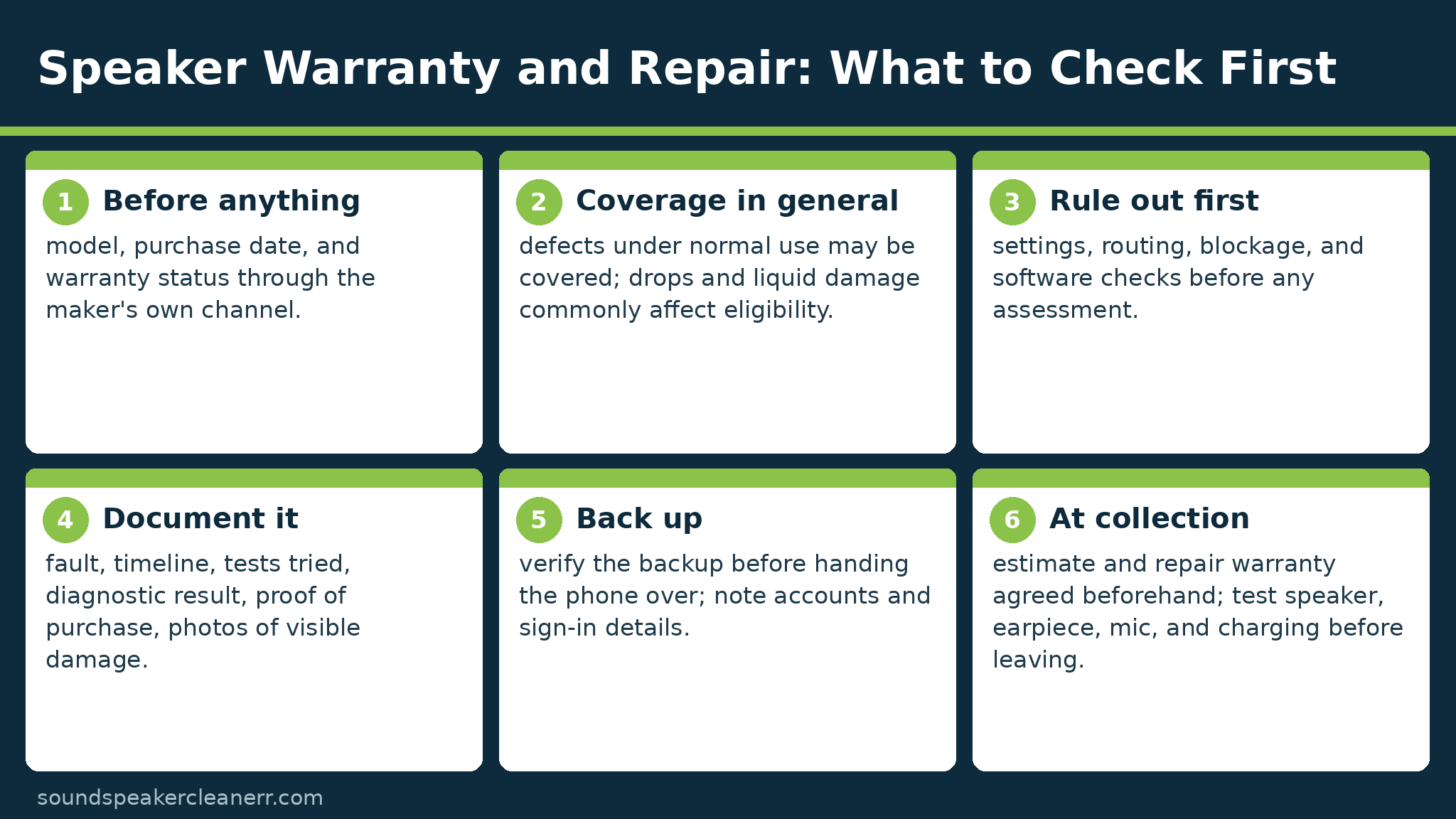
Before any speaker repair, check whether your warranty period is still open, whether the phone's condition affects coverage, and back up all your important data first. This general checklist helps you arrive prepared, without promising that any particular fault is covered.
That distinction — preparation versus promise — matters, because warranty coverage is decided case by case by the maker or the protection plan provider, under terms that vary by device, region, and purchase. No article can tell you that your speaker is covered. What an article can do is make sure you do not lose your data, do not waste a visit on a problem that is actually a setting or a blocked grille, and do not hand over a phone without a record of its fault. Those three preparations cost nothing and help in every scenario, covered or not.
Step 1: confirm the basic facts about your phone
Start with facts you can verify yourself. What is the phone's maker and model? When did you buy it, and do you still have proof of purchase, such as a receipt or an order confirmation? Is there a protection plan in addition to the standard warranty, and if so, what does its own documentation say?
Many makers let you check warranty status through their official support site or a support tool on the phone, using the device's serial number or a similar identifier. Use the maker's own channel for this, not a third-party checker. Note the result in plain words — for example, whether the standard period appears open or closed — but treat it as a starting point, not a final decision, because condition and cause also matter.
If you bought the phone second-hand, check whether any remaining coverage transfers to you. Transfer rules vary, and assuming coverage that does not transfer leads to a wasted visit. The seller's receipt and the maker's support page are the two sources that settle this; do not rely on a listing description alone.
Step 2: understand what warranty usually covers — and what it usually does not
In general, a standard manufacturer warranty covers defects in materials or workmanship that appear under normal use during the warranty period. A speaker that fails on its own, without damage or misuse, is the kind of case that may fall in that category — but "may" is doing real work in that sentence, because the maker decides after inspection.
What standard warranties commonly do not cover is damage caused by the user or by accidents: drops, cracked screens, liquid damage, and damage from unauthorized modification or repair. Cosmetic damage alone, such as a scratched frame, may not disqualify a claim, but physical or liquid damage connected to the fault often does. Water resistance is also widely misunderstood: resistance to splashes under specific conditions is not the same as being waterproof, and liquid damage is commonly excluded even on phones marketed as water resistant.
Protection plans and accidental-damage cover are separate from the standard warranty and have their own terms, including their own exclusions and claim processes. If you hold such a plan, read its documentation rather than assuming it mirrors the standard warranty. If you do not hold one, do not assume one exists — check.
The practical takeaway is not to argue coverage in advance, but to know which category your case plausibly falls into before you seek an assessment. A speaker that failed quietly, with no drop or liquid exposure, is a different conversation from a speaker that failed the day after the phone went swimming.
Step 3: rule out the non-repair causes first
A surprising number of phones taken in for "repair" do not need repair at all. Before you seek any assessment, rule out the causes that a repair cannot fix and that a technician will check first anyway.
Check volume, mute, Do Not Disturb, and Bluetooth routing, and disconnect Bluetooth and wired audio devices. Check the audio balance setting if one side sounds weaker. Clean the grille gently with a soft, dry brush or cloth, and remove the case. Test the loudspeaker and the earpiece separately, in more than one app, and test with headphones to see whether the problem is specific to the built-in speaker.
Also consider timing. Did the problem begin after a software update or a new app? If so, run the gentler software checks first — restart, settings, safe-mode testing on Android, and an official system update check — before concluding that hardware is at fault. A repair assessment that begins with "I already ruled out settings, routing, blockage, and apps" moves faster than one that begins with a vague complaint.
If the phone was wet, let it dry fully following the maker's guidance and do not charge it while wet. If it was dropped or shows swelling, heat, or visible internal damage, stop using it normally and follow the maker's safety guidance. Those are not repair-checklist items; they are safety items, and they come first.
Step 4: document the fault properly
Good documentation helps every later step, whether the outcome is a warranty claim, a paid assessment, or a decision not to repair. Write down the fault in plain words: which speaker, what it sounds like, when it began, and what happened just before it. Note whether it is constant or intermittent, and whether it changes with volume or with the app being used.
Record what you have already tried: restart, settings checks, routing checks, cleaning, safe-mode result, and update status. If a built-in diagnostic tool on your phone reports a result for the speaker, note that result and the date. Take a clear photo of any visible damage, such as a cracked screen or a dent near the speaker, because condition is part of any coverage decision and a dated record prevents disputes about when damage appeared.
Keep proof of purchase and any protection-plan documents together with this note. If the phone's purchase date matters — and it usually does — you will be asked for it, and hunting for a receipt during an assessment wastes everyone's time.
Step 5: back up before you hand the phone over
Back up your data before any repair assessment, even if you expect the phone back the same day. Repair work can involve resetting the device, replacing parts, or, in some cases, replacing the phone itself, and any of those can erase data. A backup made after the fault is documented, and verified as complete, is the only protection you have.
Back up photos, videos, contacts, messages, and important files to your maker's cloud backup, your computer, or another storage location you trust. Verify that the backup completed before you proceed. Note your accounts and sign-in details, because a repaired or replacement phone will ask for them, and some devices require the previous account credentials during setup.
Also consider what is on the phone that you would rather not hand over. Remove or secure sensitive material according to your own judgment before an assessment, and follow the maker's guidance about screen locks and device-finding features if an assessor asks you to change them. Only change security settings when the maker's own guidance asks for it, and restore them afterward.
Step 6: decide what kind of assessment to seek
In general, there are two broad routes: the maker's own support and assessment channel, and independent repair assessment. The maker's channel is the natural first stop for a possible warranty claim, because only the maker or its authorized assessor can decide warranty coverage. An independent assessment may be appropriate when the warranty period is closed, when the maker has no convenient channel, or when you want a second opinion — but an unauthorized repair can affect remaining warranty, so check that consequence before authorizing work on a phone that might still be covered.
This guide deliberately names no service, gives no price, and provides no booking route, because those details vary by region, model, and provider, and a wrong recommendation is worse than a general one. Use the maker's official support site or store locator for your brand and region to find its own channel, and treat any other route with the same caution: ask what the assessment covers, what it costs if anything, and what warranty applies to the repair work itself, before handing the phone over.
Ask for an estimate before authorizing work, and ask what the repair warranty covers and for how long. Those two questions — estimate and repair warranty — are reasonable in every context, and a provider that will not answer them is a reason to pause.
Step 7: at the assessment — and when you collect the phone
When you present the phone, share your documentation: the fault description, the timeline, the tests you ran, the diagnostic result if any, and the proof of purchase. Be honest about drops, liquid exposure, and any previous repair attempts, including any time the phone was opened. Concealing a drop or a liquid incident does not help a claim; assessors can usually tell, and dishonesty damages your credibility for the rest of the conversation.
Ask for a job sheet or reference for the assessment, and keep it. It records what was received, what was reported, and what was agreed, and you will need it to collect the phone or to follow up.
When you collect the phone, test it before leaving. Play sound through the loudspeaker and the earpiece, make a short test call if the earpiece was involved, check that the microphone works, and check the screen, charging, and other basic functions. If anything is not right, raise it on the spot, while the job sheet is still open, rather than discovering it at home. Keep the job sheet and any repair documentation afterward; they matter if the same fault returns.
When repair may not be worth it
Not every speaker fault justifies a repair, and that is an honest outcome, not a failure. Consider the phone's age, its overall condition, whether other parts are also failing, and whether a replacement device is more sensible than repairing an old one. A speaker fault on a phone that is otherwise healthy is a different decision from the same fault on a phone with a failing battery, a cracked screen, and a worn charging port.
Also consider the fault's impact. A mildly quiet earpiece that only matters on occasional calls is different from a silent loudspeaker that affects alarms, calls, and media every day. Weigh the disruption, not just the fault in isolation, and do not let urgency push you into authorizing work before you have checked warranty, backed up, and documented the problem. Those preparations take an hour at most, and they protect you in every outcome.
A checklist to use before any repair
In short: confirm the phone's model, purchase date, and warranty status through the maker's own channel; understand that standard coverage generally concerns defects under normal use, while drops and liquid damage commonly affect eligibility; rule out settings, routing, blockage, and software causes; document the fault, the timeline, and the tests you ran; back up and verify; ask for an estimate and a repair warranty before authorizing work; and test the phone before leaving after any work. That checklist does not promise coverage, and it does not name a provider — but it ensures that whatever route you take, you take it informed, prepared, and with your data safe.
FAQ
Is a faulty phone speaker always covered by warranty?
No. Coverage depends on the warranty period, the phone's condition, and the cause of the fault, and it is decided by the maker or plan provider after inspection. A speaker that fails under normal use during the period may be covered; damage from drops or liquid commonly affects eligibility.
What should I check before taking my phone in for a speaker repair?
Check the warranty period and proof of purchase through the maker's own channel, rule out settings, routing, blockage, and software causes, document the fault and what you tried, and back up your data and verify the backup.
Does water resistance mean liquid damage is covered?
No. Water resistance under specific conditions is not the same as being waterproof, and liquid damage is commonly excluded from standard warranty coverage. Follow the maker's guidance for wet devices and be honest about liquid exposure during an assessment.
Will an unauthorized repair affect my remaining warranty?
It can. Unauthorized opening or repair may affect remaining warranty coverage, so check that consequence before authorizing work on a phone that might still be covered. The maker's own assessment channel is the natural first stop for a possible warranty claim.
Should I back up even if I expect the phone back the same day?
Yes. Repair work can involve resetting the device, replacing parts, or replacing the phone, and any of those can erase data. Back up before handing the phone over and verify the backup completed.
What should I ask before authorizing repair work?
Ask for an estimate, ask what the repair warranty covers and for how long, and ask for a job sheet or reference. Keep that documentation for collection and for any follow-up if the fault returns.
What should I test when I collect the phone?
Test the loudspeaker and the earpiece, make a short test call if the earpiece was involved, check the microphone, screen, and charging, and raise any problem on the spot while the job sheet is still open.
My warranty period is closed. Is repair still an option?
Yes, in general, through a paid assessment route, but the decision becomes a value judgment: weigh the phone's age, overall condition, other faults, and the impact of the speaker problem before authorizing work. This guide names no provider or price, since both vary by region and model.
Leave a Reply