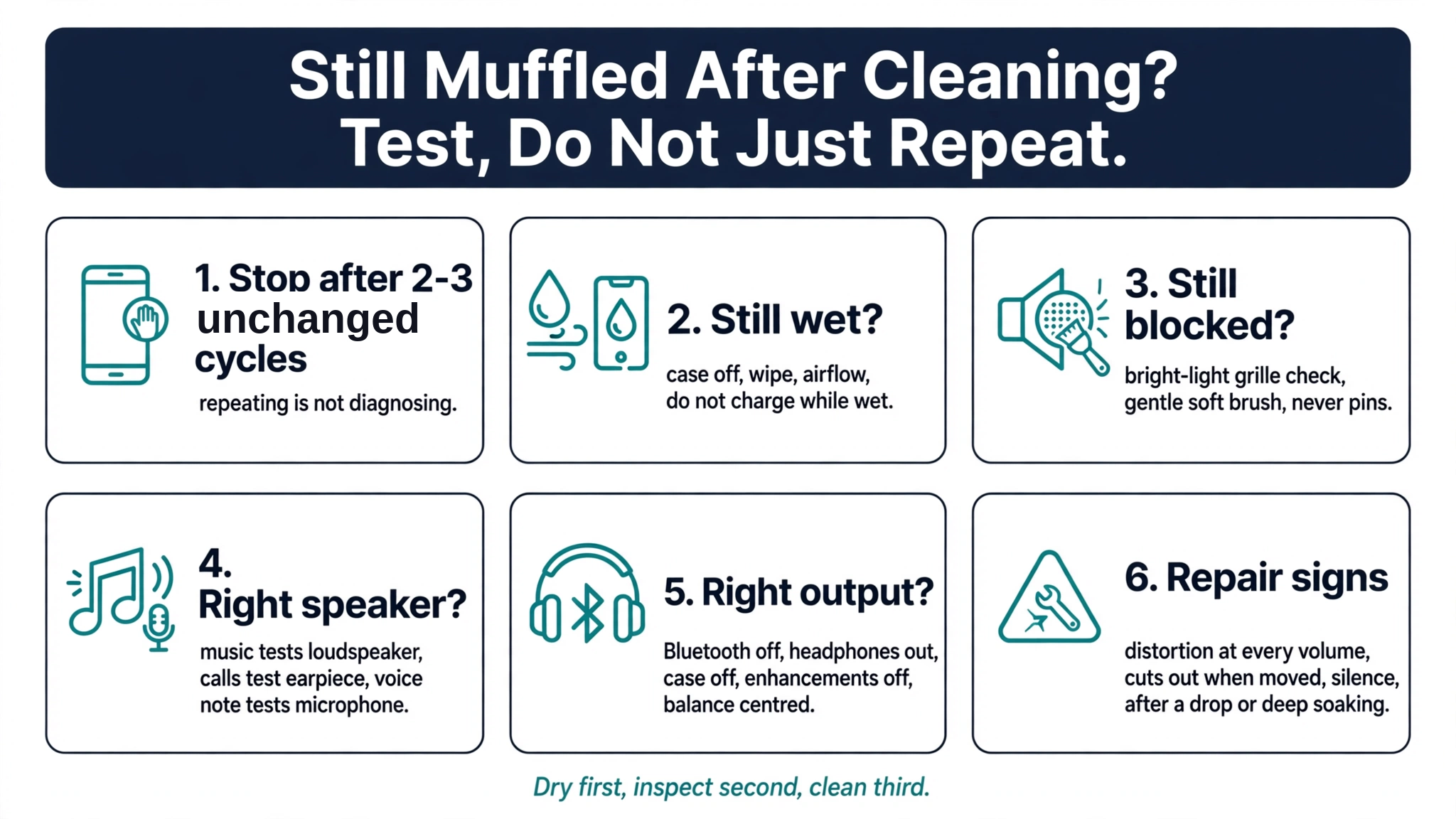
If your speaker is still muffled after cleaning, the cleaning probably did not fail in the way you think. More often, the real cause was never one a tone could reach: water still drying inside the grille, lint packed too tightly for sound to move, the wrong speaker being tested, or damage that cleaning cannot repair.
The next steps are therefore tests, not more cycles. Work through them in order, and the pattern that emerges will tell you which cause you are dealing with.
First, stop repeating the same cycle
It is tempting to run the cleaner again, louder and longer, when the first attempt disappoints. Resist that. If two or three short cycles made no noticeable difference, further cycles at the same setting are unlikely to change the result. They can also mask the real diagnosis: while you keep cleaning, you are not drying, inspecting, or testing anything else.
A useful rule is to treat cleaning as one experiment with a clear result. Run one short cycle at a moderate volume, test with a song or voice recording you know well, and note the result. Improving with each cycle means cleaning is helping, and one or two more short cycles are reasonable. No change after two or three cycles means the cause lies elsewhere, and the sections below are the next experiments.
Do not hold the phone against your ear while a cleaning tone plays, and stop if the sound becomes harsh or worse. A tone that makes the sound worse is information, not a reason to push harder.
Step 1: Is the phone truly dry?
Moisture is the most common reason a speaker stays muffled after cleaning. A cleaning tone can move water near the grille, but it cannot reach water deeper inside the phone, and it cannot replace drying time. A speaker can sound muffled for hours after a spill even when the outside feels dry, because a thin film of water across the mesh muffles sound very effectively.
If the phone recently got wet — rain, a splash, a shower, a sweaty pocket, or a drop in water — assume drying is incomplete until proven otherwise. Remove the case, wipe the outside with a soft, lint-free cloth, and leave the phone in a dry area with airflow, speaker facing down where that is practical. Do not charge a wet phone, and follow the phone maker's guidance for wet devices, which takes priority over any guide or tool.
Do not use rice, a hair dryer, or external heat to speed drying. Rice dust can add to grille clogging, and heat can damage seals and the battery. Do not use compressed air at close range either; a strong blast can push water and debris deeper or damage the thin speaker membrane.
Test again only after a proper drying period, with ordinary music rather than another cleaning cycle. If the sound has improved on its own during drying, moisture was the cause. If it is exactly as muffled as before, move to the next step.
Step 2: Is the grille truly clear?
Sound loosens light, loose dust near the grille, but it does not reliably remove packed lint, sticky residue, sand, or debris lodged in the mesh. A grille that looks clean from a distance can still be blocked at the level of the tiny holes, especially after months in a pocket or bag.
Inspect the grille in bright light, at an angle, and look for a dull, matted, or discoloured mesh rather than open holes. Brush it very gently with a clean, dry, soft-bristled brush, using light strokes across the opening, then wipe the outside with a dry, soft cloth. A small piece of tape dabbed lightly on the grille can lift loose surface lint, but press gently and never force anything into the holes.
Do not use pins, needles, toothpicks pushed into the holes, or sharp objects of any kind. The mesh and the speaker membrane behind it are delicate, and a puncture turns a cleaning problem into a repair problem. Do not pour liquid cleaners into the opening, and do not blow hard into it with your mouth, which adds moisture.
Test again with ordinary audio after gentle brushing. If the sound is clearly better, packed debris was the cause, and a regular gentle brushing routine will matter more than future cleaning tones. If there is no change, the blockage may be deeper than surface cleaning can reach, or the cause may not be blockage at all.
Step 3: Are you testing the right speaker?
Phones have more than one sound part, and muffling in one does not mean the others are affected. Testing the wrong part after cleaning can make a successful cleaning look like a failure.
- Loudspeaker: the main speaker used for music, videos, ringtones, and speakerphone calls. Most cleaning tones target this part.
- Earpiece: the small speaker at the top used for calls held to the ear. If calls sound muffled but music is clear, the earpiece is the likely focus, and a loudspeaker cleaning cycle may not have addressed it at all.
- Microphone: the part that picks up your voice. If callers say you sound muffled, the microphone may be the issue, and a speaker tone is not the right fix.
- Charging port: a separate opening. It does not produce sound, and cleaning it with objects can cause damage.
Test each part separately. Play music for the loudspeaker, make a normal call for the earpiece, and record and play back a voice note for the microphone. Note which tests are muffled and which are clear. A single failed test narrows the problem far better than a general feeling that "the phone sounds bad."
Also check the case. A thick, poorly fitted, or damaged case can cover part of the speaker opening and make audio sound quieter and duller, even after perfect cleaning. Remove the case entirely and test again. If the sound improves without the case, the case was the cause, and the speaker was never the problem.
Step 4: Is the sound going to the right output?
A phone that is still connected to headphones, earbuds, a Bluetooth speaker, a car system, or a watch may send audio there instead of to its own speaker. The phone speaker then sounds quiet or muffled simply because it is not the speaker being used.
Turn Bluetooth off for the test, disconnect wired headphones, and check the media output selector on your phone. Play ordinary audio and confirm it comes from the phone speaker itself before judging the cleaning result. This check takes less than a minute, and it resolves a surprising number of "still muffled" complaints.
Also check the volume balance and sound settings. A balance control pushed to one side, a mono-audio setting, an equalizer preset, or a bass boost can all change how the speaker sounds. Temporarily turn sound enhancements and equalizer presets off, set any balance control to the centre, and test again. If the sound clears up, a setting was shaping the audio, not the speaker.
Step 5: Did something else change at the same time?
If the muffling began right after a software update, a new app installation, or a drop, that timing is a clue. Check for a newer software update that addresses audio issues, and restart after installing it. If the problem began after installing an audio-related app, remove that app and test again. On Android, safe mode — where only system apps run — can show whether a third-party app is interfering; if the sound is normal in safe mode, an installed app is the likely cause.
If the problem began immediately after a hard drop, treat hardware damage as a leading possibility rather than a last resort. A drop can loosen a connection or damage the speaker module even when the outside looks fine, and no amount of cleaning will reseat a loose part.
When muffled means damaged
Some speakers stay muffled because they are damaged, and recognising that early saves wasted effort. Seek professional inspection if any of these apply:
- The sound is distorted or muffled at low volume as well as high volume, after full drying and gentle cleaning.
- The sound cuts in and out when you move the phone.
- The speaker is silent for some or all audio, not merely muffled.
- The problem began immediately after a hard drop or a deep liquid exposure.
- The phone shows other signs of liquid exposure, such as charging problems or a liquid warning that will not clear after drying.
Water that gets inside a phone can cause corrosion over time, even if the sound returns for a while. That is why a speaker that "got better on its own" after a soaking still deserves attention if anything about it seems off, and why a professional internal check is the right next step when home checks stop changing the result.
Do not open the phone yourself unless you are qualified to do so. A repair shop or the manufacturer can test the speaker module directly, which no browser tone or home cleaning routine can do.
A maintenance routine that prevents the next round
Once the current muffling is resolved, a small routine reduces the chance of it returning. Brush the grille gently from time to time, keep the phone out of pockets full of loose lint and sand where practical, remove the case and wipe the phone after rain or a splash, and run a speaker test occasionally so gradual changes are noticed early. If the phone gets wet again, dry it first and clean second; that order matters more than any single tool.
The goal is not to clean more often, but to clean for the right reason. Light dust responds to gentle brushing and, sometimes, a short tone. Deep water needs drying time. Packed lint needs careful physical cleaning. Damage needs repair. Knowing which one you have is the whole skill, and it is what turns a frustrating "still muffled" into a clear next step.
FAQ
Why is my speaker still muffled after cleaning?
The most common reasons are remaining moisture, packed lint the tone could not move, the wrong speaker being tested, a case blocking the opening, a wrong audio output, a sound setting, or hardware damage. Work through drying, gentle grille inspection, part-by-part testing, and settings checks before concluding the speaker is damaged.
How long should I wait for a wet speaker to dry before testing again?
Let the phone air-dry in a dry area with airflow and do not charge it while wet, following the phone maker's guidance. Drying time varies with how wet the phone became, so test with ordinary music after a proper drying period rather than running more cleaning cycles. If the sound improves during drying, moisture was the cause.
Should I run the cleaner again if the first cycles did not help?
If two or three short cycles made no noticeable difference, stop repeating them and switch to drying, debris, routing, and settings checks. More cycles will not fix a drying problem, packed lint, a wrong output, or hardware damage.
Can a case make my speaker sound muffled after cleaning?
Yes. A thick, poorly fitted, or damaged case can cover part of the speaker opening and make audio sound quieter and duller. Remove the case entirely and test again; if the sound improves, the case was the cause.
Why are calls muffled but music sounds fine after cleaning?
That pattern points to the earpiece, the small top speaker used for calls, rather than the main loudspeaker. A loudspeaker cleaning cycle may not have addressed the earpiece at all. Test calls and music separately, and clean the earpiece opening gently if it is blocked.
Is it safe to use a pin to clear a blocked speaker grille?
No. Pins, needles, and other sharp objects can puncture the mesh or damage the speaker membrane behind it. Use only a clean, dry, soft-bristled brush and gentle wiping for surface debris.
When is a still-muffled speaker a repair problem?
Seek repair if the sound stays distorted or muffled at every volume after full drying and gentle cleaning, cuts in and out when you move the phone, is silent for some or all audio, or began after a hard drop or deep liquid exposure. Those patterns point to hardware rather than surface water or dust.
Can water damage appear later even if the sound came back?
Yes, water inside a phone can cause corrosion over time even if the sound returns for a while. If anything about the sound, charging, or behaviour still seems off after a soaking, a professional internal check is the safer next step.
Leave a Reply