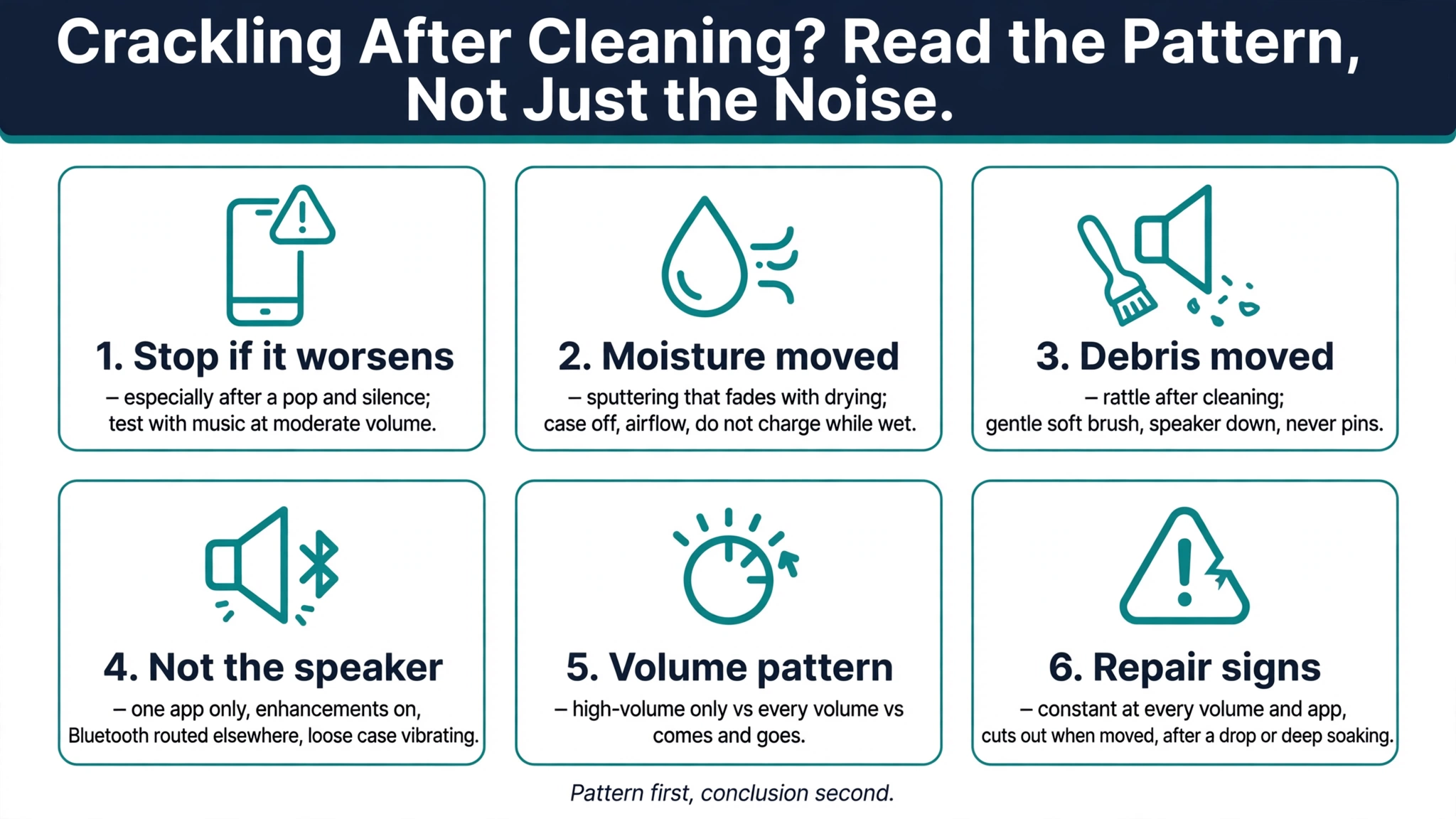
Crackling after cleaning does not automatically mean cleaning damaged your speaker. More often it means cleaning changed something: it moved moisture or debris into a position where it vibrates, it cleared muffling that was hiding an existing fault, or a setting, app, or case is producing a sound that only resembles speaker damage.
The way to tell these apart is the pattern. Crackling that fades with drying, crackling only at high volume, crackling only in one app, and crackling at every volume in every app are different stories, and they lead to different next steps.
First, stop and protect the speaker
If the crackling appeared during a cleaning cycle, or got sharply worse during one, stop the cycle. Do not run the tone again at a higher volume to "push through" the crackling. If you heard a loud pop followed by silence, stop immediately and do not continue playing tones; that pattern suggests the speaker has reached a mechanical limit, and further tones will not help.
Lower the volume to a moderate level and test with ordinary audio — a song or voice recording you know well — rather than another cleaning tone. Note exactly what you hear: a light rattle, a sputtering or bubbly quality, a harsh distortion, or a popping sound. Note also when it happens: at all volumes or only loud ones, in all apps or only one, on the loudspeaker or only on calls. Those four observations are the diagnostic material for the rest of this guide.
Do not hold the phone against your ear while testing a crackling speaker at high volume, and do not insert anything into the grille to investigate the crackle. The grille and the membrane behind it are delicate, and probing them can turn a minor debris problem into a puncture.
What cleaning can move: moisture and loose debris
The most reassuring explanation is also the most common after a wet phone. Droplets on or near the speaker membrane vibrate as the speaker moves, and that vibration sounds like crackling or sputtering. As the phone dries, the crackling typically fades cycle by cycle, or hour by hour, rather than staying constant.
If the phone recently got wet, treat drying as the treatment. Remove the case, wipe the outside with a soft, lint-free cloth, and leave the phone in a dry area with airflow, speaker facing down where that is practical. Do not charge a wet phone, and follow the phone maker's guidance for wet devices. Do not use rice, a hair dryer, or external heat, and do not use compressed air at close range. Test with ordinary music after a drying period, not with repeated cleaning tones. Crackling that fades as the phone dries was moisture, and it resolves with time, not with more volume.
Loose debris behaves similarly. A cleaning tone can shake a particle of dust, lint, or sand loose without fully removing it, and the loosened particle then rattles against the membrane. This often sounds worse immediately after cleaning than before it, which is frightening but not necessarily serious. Brush the grille very gently with a clean, dry, soft-bristled brush, wipe the outside with a dry, soft cloth, and test again. If gentle brushing reduces the crackling, debris was the cause. If brushing pushes the particle deeper or the crackling stays identical, stop and move to the next checks rather than brushing harder.
Sand deserves special care. Sand grains are hard and can sit in the mesh or against the membrane. Do not shake the phone violently, do not blow hard into the grille, and do not use sharp objects to dig grains out. Gentle brushing and gravity — speaker facing down — are the safe methods. If sand crackling persists after gentle cleaning and drying, professional inspection is safer than deeper home attempts.
What cleaning can expose: damage that was already there
A muffled speaker can hide a damaged one. When muffling is caused by water or packed lint, the dull sound masks distortion; once cleaning clears some of the muffling, the underlying distortion becomes audible for the first time. The cleaning did not necessarily cause the damage. It removed the muffling that was covering it.
This is the explanation to consider when crackling is consistent: it happens at low volume as well as high volume, in every app, on both music and calls, and it does not change after full drying and gentle cleaning. A damaged membrane or voice coil typically crackles across the whole range rather than at one volume or in one app. If that pattern fits, further cleaning will not repair it, and the right next step is professional inspection rather than another cycle.
A hard drop before or around the time of cleaning points the same way. A drop can loosen an internal connection or damage the speaker module even when the outside looks fine. If crackling began immediately after a drop, treat hardware damage as a leading possibility, and do not keep running tones in the hope that the connection will reseat itself.
When the speaker is not the source at all
Several non-speaker causes sound exactly like speaker crackling, and cleaning cannot fix any of them — which is why the crackling "survives" cleaning.
One app only. Play audio from at least three different sources: a local music file, a video, and a voice recording or call. If only one app crackles, that app, its audio processing, or its content is the likely cause. Clear that app's cache or reinstall it, and check its own equalizer or enhancement settings. If every source crackles, the problem is in the phone's audio path or the speaker itself.
Equalizer and sound enhancement settings. An equalizer preset that pushes bass hard, a bass boost, or a sound enhancement feature can distort audio at high volume in a way that sounds like a damaged speaker. Temporarily turn equalizer presets and sound enhancements off, set any balance control to the centre, and test again at a moderate volume. If the crackling disappears, a setting was overdriving the speaker, and the fix is the setting, not the speaker.
Bluetooth and routing. A half-connected earbud, a car system, or a Bluetooth speaker can cause stuttering audio that reads as crackling. Turn Bluetooth off completely, disconnect wired headphones, and confirm ordinary audio comes from the phone speaker itself before judging the crackle.
The case. A loose case, a cracked case edge, or grit trapped between the case and the phone can vibrate against the body at certain frequencies, and that buzz sounds as if it comes from the speaker. Remove the case entirely and test again. If the crackling disappears without the case, clean the case seating area and check the case for cracks. This is a quick test, and it resolves a surprising number of "speaker" crackles.
The volume pattern: what it suggests
Volume is a useful clue, but it is a clue, not proof. Treat it as a way to prioritise checks, not as a diagnosis on its own:
- Crackling only at high volume, clean at low volume: often debris on the membrane, moisture resisting large speaker movement, or an amplifier or enhancement pushing the speaker too hard. Try drying, gentle brushing, and turning enhancements off, and test at a moderate volume.
- Crackling at all volumes, in all apps: more often a damaged membrane or internal fault, especially if it does not change after drying and gentle cleaning. This pattern deserves professional inspection.
- Crackling that comes and goes: often loose debris moving with vibration, or a loose internal connection. If it changes when you move the phone, or appears and disappears without any change in app or volume, do not ignore it; a loose connection needs professional attention.
- Crackling only on calls, not music: points to the earpiece rather than the loudspeaker, or to a call-specific processing setting. Test calls and music separately before concluding the main speaker is damaged.
- Crackling that fades with each drying period: points to moisture. Let drying finish before judging anything else.
No single pattern proves a cause. Use the pattern to choose the next test, and let the test results, not the first guess, decide.
Cleaning mistakes that can make crackling worse
Most cleaning mistakes are mistakes of force, not of method. Pushing a pin or needle into the grille can puncture the mesh or the membrane. Blowing hard into the grille or using compressed air at close range can drive debris deeper or damage the membrane. Running cleaning tones repeatedly at maximum volume can stress a speaker that is already damaged. Pouring liquid cleaners into the opening can leave residue or add moisture to a problem that began as moisture.
The safe version of each is gentler: a soft, dry brush with light strokes; gravity with the speaker facing down; moderate volume; short cycles with tests between them; and drying time instead of heat. If any cleaning step makes the crackling worse, stop that step. Worse after a step is information about that step, not a reason to repeat it harder.
When to seek repair
Seek professional inspection if any of these apply:
- Crackling is consistent at all volumes and in all apps, and does not change after full drying and gentle cleaning.
- The sound cuts in and out when you move the phone.
- You heard a loud pop followed by silence during a cleaning cycle.
- The crackling began immediately after a hard drop or a deep liquid exposure.
- The speaker is also quiet, silent for some audio, or shows other signs of liquid exposure, such as charging problems.
Do not open the phone yourself unless you are qualified to do so. A repair shop or the manufacturer can test the speaker module and the audio circuit directly, which no home test can do. Bring the pattern notes from this guide — volume, apps, part, and timing — because they help a technician narrow the fault faster than a general report of "it crackles."
What crackling after cleaning usually means, in short
Crackling after cleaning most often means something moved, something was revealed, or something other than the speaker is making the noise. Moisture and loose debris move and then settle; damage revealed by clearer sound stays constant; settings, apps, cases, and routing problems survive cleaning because cleaning was never aimed at them. Work through the pattern — drying, gentle brushing, app and setting checks, case removal, and part-by-part testing — and the cause will usually declare itself before any repair decision is needed. When it does not, and the crackling is constant across volumes and apps, that constancy is itself the answer: stop cleaning, and get the speaker inspected.
FAQ
Did cleaning damage my speaker?
Not necessarily. Cleaning can move moisture or debris into a position where it vibrates, which sounds like new crackling, or it can clear muffling that was hiding existing damage. Crackling that fades with drying or gentle brushing points to moisture or debris. Crackling that is constant at all volumes and in all apps after drying and cleaning points more to damage.
Why does my speaker crackle only at high volume after cleaning?
High volume moves the speaker membrane further, so debris or moisture on the membrane resists that movement more noticeably, and an equalizer or enhancement can overdrive the speaker at high volume. Try drying, gentle brushing, turning enhancements off, and testing at a moderate volume.
Why does my speaker crackle in one app but not others?
If only one app crackles, that app, its audio processing, or its content is the likely cause. Clear the app's cache or reinstall it, and check its equalizer or enhancement settings. If every source crackles, the problem is in the phone's audio path or the speaker itself.
Can a phone case cause crackling after cleaning?
Yes. A loose case, a cracked case edge, or grit trapped between the case and the phone can vibrate at certain frequencies and sound like speaker crackle. Remove the case entirely and test again; if the crackling disappears, the case was the source.
Should I keep running the cleaner if the crackling is getting worse?
No. Stop the cycle, lower the volume, and test with ordinary audio. If you heard a loud pop followed by silence, stop all cleaning tones. Worsening crackling is a reason to switch to drying, gentle inspection, and settings checks, not to run more cycles at higher volume.
Is it safe to use a pin to remove debris causing crackling?
No. Pins, needles, and other sharp objects can puncture the mesh or damage the speaker membrane behind it. Use only a clean, dry, soft-bristled brush with light strokes, and gravity with the speaker facing down.
When is crackling after cleaning a repair problem?
Seek repair if crackling is constant at all volumes and in all apps after full drying and gentle cleaning, cuts in and out when you move the phone, followed a loud pop and silence, or began after a hard drop or deep liquid exposure.
Why are calls crackling but music sounds fine?
That pattern points to the earpiece, the small top speaker used for calls, rather than the main loudspeaker, or to a call-specific processing setting. Test calls and music separately, and check the earpiece opening gently before concluding the main speaker is damaged.
Related tools on this site
- Water Eject
- Dust Cleaner
- Ear Speaker Cleaner
- Speaker Test
- Tone Generator
- Android Water Eject
- iPhone Water Eject
Leave a Reply