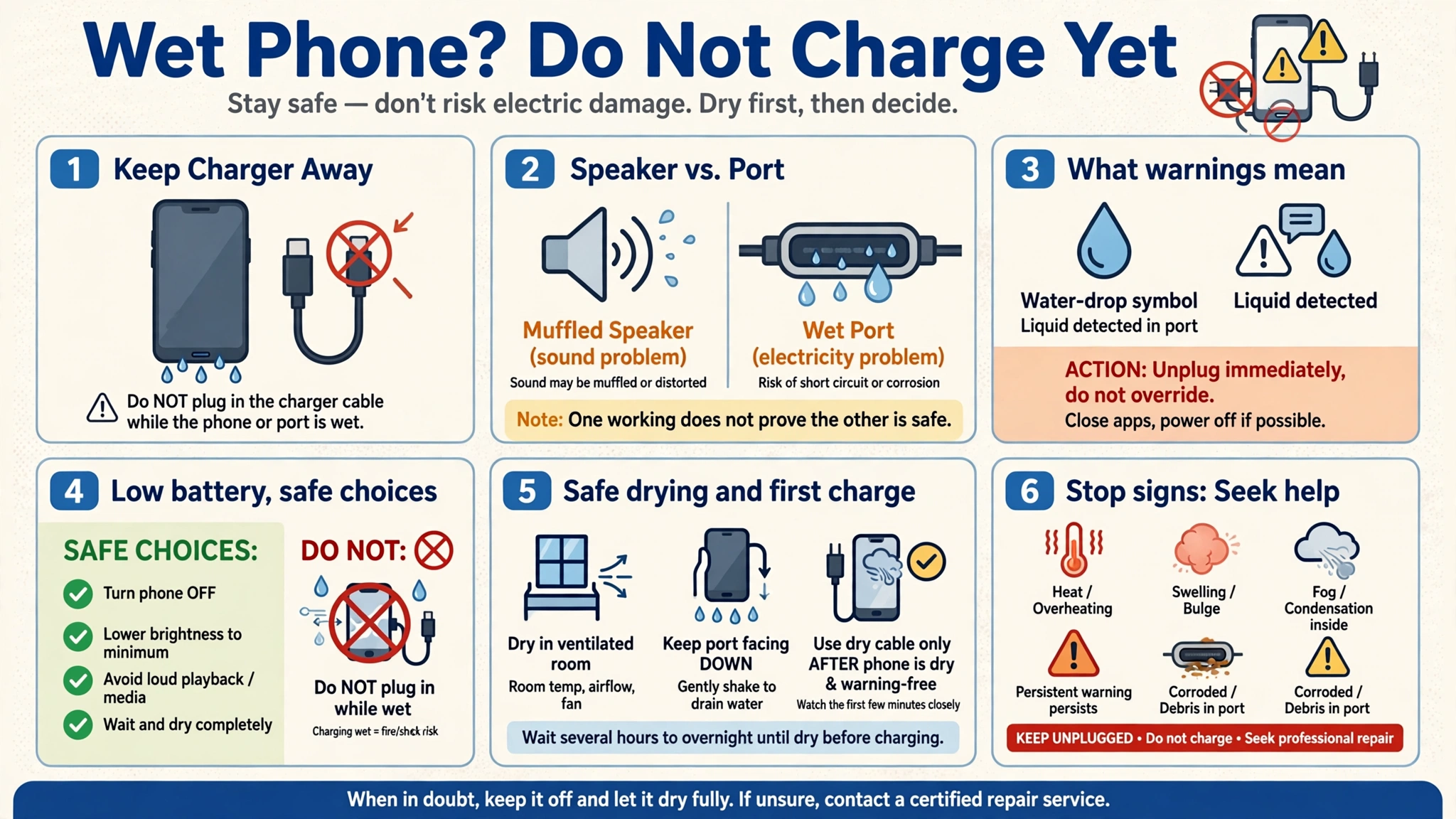
If your phone speaker sounds wet and your battery is low, do not plug in a charger. Charging through a wet port can cause corrosion or a short, even when the speaker itself would recover. Wait until the phone and port are fully dry and no warning appears.
That advice is frustrating when the battery percentage is falling, so it helps to understand why the phone is stopping you. A charging port has exposed metal contacts. Water, especially salt, pool, or soapy water, can bridge those contacts, start corrosion, and in some cases cause a short. Manufacturers therefore build in moisture detection that blocks wired charging when liquid is present. The block is not the phone being difficult; it is the phone refusing a connection that could damage it. Overriding that protection, or repeatedly plugging and unplugging to see whether the warning has gone, works against the very protection that is trying to help.
Separate the speaker from the port
A wet speaker and a wet port often arrive together, but they need different checks. The speaker problem is about sound: water on the mesh or behind it makes audio muffled, quiet, or crackly. The port problem is about electricity: water on the charging contacts makes charging unsafe. A speaker that sounds clearer after wiping does not prove the port is dry, because the port is a deeper, narrower opening where water can linger out of sight. Likewise, a port that looks dry on the outside can still hold moisture inside.
Keep the two tests separate in your mind. Test the speaker by listening at a moderate volume after the phone has dried. Test the port by waiting until it is dry, checking for any warning, and only then connecting a dry cable. Never use a successful speaker test as permission to charge, and never use a successful charge as proof the speaker is fine. Each needs its own evidence.
The earpiece, loudspeaker, microphone, and charging port are also different openings. The earpiece is the small speaker at the top used for calls. The loudspeaker is the larger speaker at the bottom used for media and speakerphone. The microphone is a separate small opening that can also trap water and make your voice sound distant on calls. A water-eject tone played through the loudspeaker does not dry the charging port, and it does not prove the microphone is dry. Check each one on its own.
What the warnings actually mean
Different phones phrase the warning differently, but the meaning is the same: liquid or moisture has been detected where charging current would flow, so wired charging is blocked. On some phones you will see a water-drop icon. On others you will see "liquid detected," "moisture detected," or a message telling you to disconnect the charger. Some phones sound an alarm until the charger is disconnected. In every case, the correct response is the same: unplug immediately, do not force the connection, and do not try a different cable in the same wet port hoping for a different result.
A warning that appears once after a splash and then clears after drying is usually a sign the protection worked. A warning that returns every time you plug in a dry cable, after the phone has had a long drying period, is a different signal. It can mean moisture remains, residue is present, the port is damaged, or the cable itself is damp. In that case, stop testing with cables, try a different dry cable only after further drying time, and seek repair or manufacturer support if the warning persists. Do not keep cycling cables through a port that keeps warning you.
Also check the cable and charger, not just the phone. A wet cable, a damp adapter, or a cable that was lying in a puddle can trigger a warning or carry moisture into a dry port. Dry the cable fully, inspect it for damage, and use a different dry cable if you have any doubt. Do not charge with wet hands, and do not charge in a wet area, such as a bathroom sink edge or a poolside table with splashes nearby.
The low-battery problem, handled safely
A wet phone with a low battery creates real pressure, but the safe options are about conserving what you have, not about charging sooner. Turn the phone off if you can. A powered-off phone uses no battery for calls, apps, or screen time, and it also removes electrical current from wet internal parts, which is safer while drying. If you need the phone for an emergency, keep it on only as long as necessary, lower the brightness, turn off unnecessary connections, and avoid playing media through the wet speaker at high volume.
Do not use the phone as a music player while it dries. Loud playback through a wet speaker is unpleasant, it drains the battery you are trying to save, and it does not dry the phone. If you need sound, use a separate device once the phone is safe to handle, or wait. The same logic applies to calls: a short essential call is different from a long call through a wet earpiece, and if your voice sounds muffled to the other person, the microphone may also be wet.
If the battery dies while the phone is still drying, that is not a failure of the plan. Let the phone finish drying, then charge it normally once it is dry and shows no warning. A dead battery is recoverable; a port damaged by charging while wet may not be. Patience here protects both the battery and the data on the phone.
What about wireless charging?
Wireless charging is often mentioned as a way around a wet port, and manufacturer guidance does describe it as a separate path, because it does not use the port contacts. That does not make it safe for a wet phone in general. Samsung's guidance, for example, says to dry the device thoroughly before placing it on a wireless charger, and that wireless charging is not affected by moisture in the port itself — a narrow statement about the port, not a blanket approval to charge a soaked phone.
Apply a simple rule: wireless charging is only a consideration after the outside of the phone is fully dry, the phone shows no warning, and the phone is not hot, swollen, foggy inside, or behaving strangely. If the phone was submerged, exposed to salt or pool water, or shows any other symptom beyond a muffled speaker, do not use wireless charging as a shortcut. Wait for a full drying period and, if in doubt, seek advice first. A wireless pad still sends energy into the phone, and energy plus trapped moisture is a combination to avoid until the phone is genuinely dry.
The safe drying and charging routine
Unplug everything first. Remove the case, wipe the outside with a soft, dry, lint-free cloth, and hold the phone with the port and speaker facing down so gravity helps droplets leave rather than travel deeper. Tap gently against your palm; do not shake hard, and do not insert anything into the port or speaker grille. A soft cloth can wipe the rim of the port, but objects pushed inside can damage contacts or push water further in.
Place the phone in a dry, well-ventilated room at normal room temperature, port facing down on a dry cloth, away from direct sun and heaters. A gentle room fan at a distance can help airflow. Do not use a hair dryer, do not place the phone in rice, and do not seal it in a bag while wet. Rice dust can enter openings, and a sealed bag traps humid air around the phone.
Wait. How long depends on the exposure, but plan on hours for a light splash and at least a full day for a submersion, with longer for salt, pool, or soapy water. Check periodically for visible moisture, fog inside the camera or screen, or any unusual heat or smell, without plugging anything in. When the phone looks and feels dry, and no warning appears when you wake it, you can try a short moderate-volume speaker test. Only after that, and only with a dry cable, should you attempt wired charging — and watch the first minutes for any warning, heat, or strange behavior. If anything appears, unplug immediately and allow more drying time or seek help.
If the phone was exposed to liquid other than clean fresh water, the rinse question must be handled before the drying clock is trusted. Manufacturer guidance for water-resistant models generally describes rinsing with clean fresh water after other liquids, but only for models rated for it and only as the manufacturer describes. Never rinse a phone that was never rated as water-resistant, or one with a cracked screen or damaged seal. When in doubt, wipe the outside, keep the phone off and unplugged, and seek advice.
Stop signs: when charging must wait indefinitely
Do not attempt to charge, wired or wireless, if the phone is hot, swollen, smells unusual, shows fog or condensation inside the screen or camera, will not turn on, restarts repeatedly, or behaves erratically after getting wet. Do not charge if the port looks corroded, discolored, or physically damaged, or if a liquid warning returns after a long drying period. These are signs of possible internal damage that charging could worsen. Keep the phone unplugged, back up data only if the phone can be used safely without charging, and arrange a professional inspection, telling the technician what liquid was involved and how long the phone was wet.
The same caution applies to a phone that charges but sounds wrong. Charging success does not mean the speaker has recovered, and a speaker that recovers does not mean the port is safe. Keep the two checks separate until both have passed on their own terms.
A note on water resistance
A water-resistance rating describes how a new phone behaved in laboratory conditions with fresh water. It does not guarantee that an older phone, a dropped phone, or a phone with a worn seal will behave the same way, and it does not mean the phone is safe to charge while wet. Ratings also do not cover salt, pool, or soapy water in the same way as fresh water. Treat the rating as background information, not as permission to plug in a wet phone.
Charging safety after water exposure is ultimately simple, even when it is inconvenient: unplug, dry, wait, test the speaker and the port separately, and only then charge with a dry cable. The warning on your screen is not an obstacle to work around. It is the phone telling you, in plain terms, that this is not yet a safe time to charge.
FAQ
Can I charge my phone if only the speaker sounds wet?
No, not until you know the port is dry too. A muffled speaker and a wet port often arrive together, and the port can stay wet after the speaker sounds better. Wait until the phone is fully dry and no warning appears before connecting a charger.
What does "liquid detected" or "moisture detected" mean?
It means the phone has detected liquid or moisture in or near the charging port and is blocking wired charging to prevent damage and corrosion. Unplug immediately, do not override the warning, and let the phone dry completely before trying again.
Is wireless charging safe for a wet phone?
Only after the phone is thoroughly dry on the outside and shows no warning or other symptom. Wireless charging does not use the port contacts, but it still sends energy into the phone, so it is not a shortcut for a soaked, hot, swollen, or otherwise abnormal phone. When in doubt, wait and seek advice.
My battery is almost dead and my phone is wet. What should I do?
Turn the phone off to save battery and remove current from wet parts. Avoid media playback and long calls through the wet speaker. If the battery dies during drying, let the phone finish drying and charge it normally afterward, once it is dry and shows no warning.
The warning will not go away even though the phone looks dry. What now?
Give it more drying time in a ventilated room, check that your cable is fully dry, and try a different dry cable only after further drying. If the warning returns persistently, stop testing and seek repair or manufacturer support, since residue, port damage, or internal moisture may be involved.
Can I use a different cable to get around the warning?
No. Trying cable after cable in a wet port does not make charging safe, and repeated insertion can push moisture deeper or damage contacts. Dry the phone and the cable fully, and respect a warning that returns.
Does a water-eject tone dry the charging port?
No. A tone played through the loudspeaker may help move droplets from the speaker grille, but it does not dry the charging port, the microphone, or the inside of the phone. Treat the port and the speaker as separate checks.
When should I seek repair instead of waiting longer?
Seek help promptly if the phone is hot, swollen, foggy inside, will not turn on, restarts repeatedly, or shows a warning that persists after a long drying period, or if the port looks corroded or damaged. Keep the phone unplugged until it has been inspected.
Leave a Reply