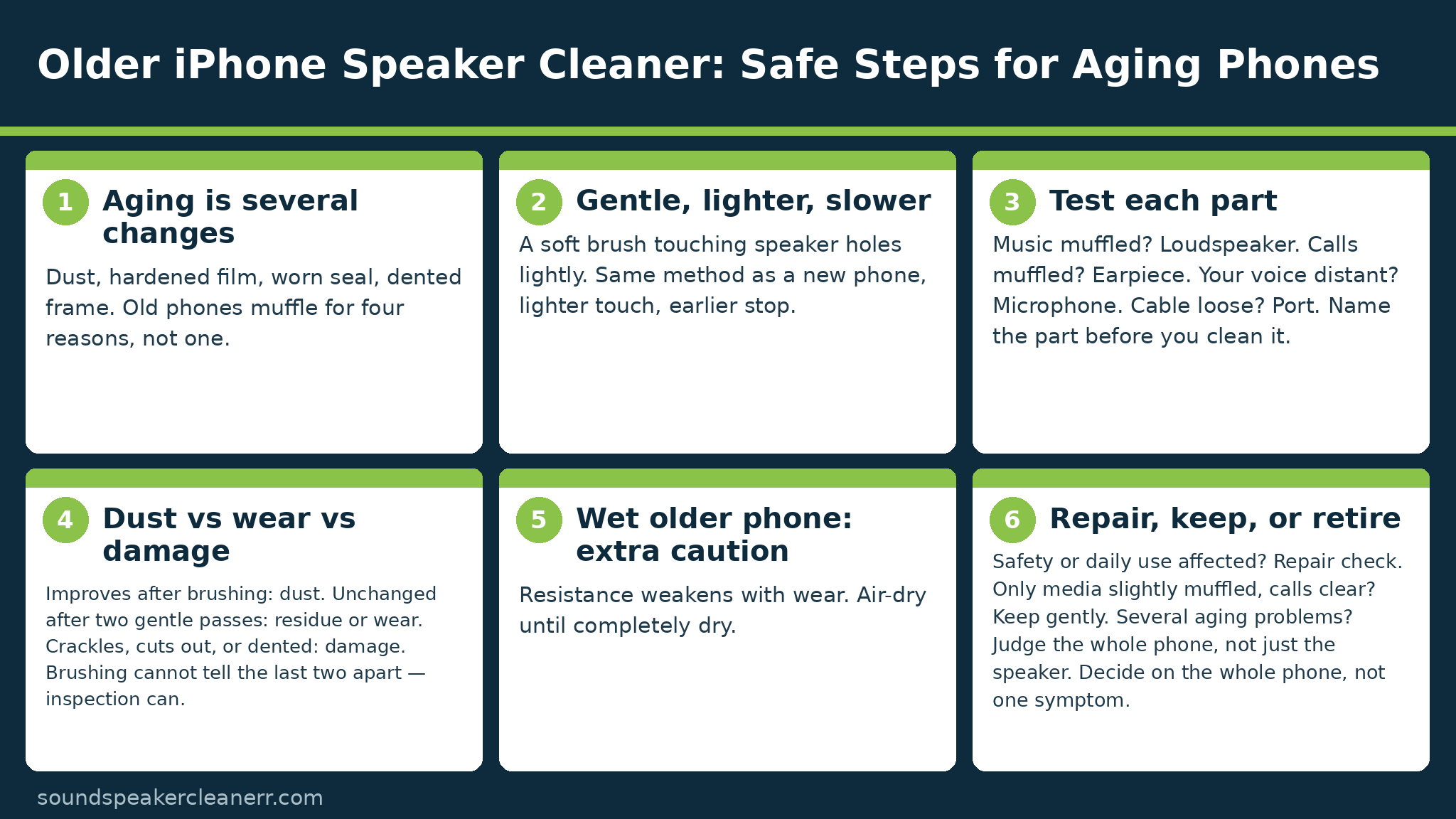
An older iPhone needs gentler cleaning than a new one, because its seals, coatings, and mesh have years of normal wear. Power off, brush grilles lightly with a dry soft brush, keep liquids and sharp tools out of openings, and test carefully: if gentle cleaning does not help, wear, residue, or damage is more likely than surface dust.
That short answer is the whole philosophy of this guide. On a new phone, a muffled speaker usually means dust. On an older phone, dust is only one of four possibilities, and the other three — residue that has hardened behind the mesh, a frame or mesh that has been bent by drops, and a seal that no longer keeps dust and moisture out — do not respond to brushing, no matter how thorough. Cleaning gently first, then diagnosing honestly, protects a phone that may already be fragile.
What aging actually does to an iPhone speaker
Aging is not one change but several slow ones, and each affects sound differently. First, the speaker mesh itself collects years of pocket lint, skin flakes, dust, and oils. The earpiece slit is hit hardest, because it sits against the ear and face every day; voices sound distant or hollow first, because the fine mesh blocks the higher parts of speech before it blocks everything. Second, past liquid exposure leaves residue. A splash that dried years ago may have left a thin film behind the mesh that hardened over time, and that film does not brush away like fresh dust. Third, water and dust resistance weakens. Apple states that resistance is not permanent and might decrease as a result of normal wear, and that it was tested under controlled laboratory conditions when the phone was new. An older phone therefore lets dust and moisture travel deeper than a new phone would, even without any single dramatic wet event.
Fourth, the phone's structure wears. Drops dent the frame, a dent can pinch a grille or crack a mesh, and a worn case can let grit sit against the speaker holes for months. Fifth, the screen's oleophobic coating wears with normal use, and cleaning products and abrasive materials will further diminish it and may scratch the phone — so an older phone's screen needs a lighter touch too, even though the screen is not the speaker. None of these changes means the phone is finished. Together, though, they mean that an older phone deserves a slower, lighter cleaning routine and a quicker decision to seek a professional check when gentle steps do not help.
Cleaning an older iPhone safely: lighter, slower, tested
Work on a clean table in good light, with the phone powered off and all cables unplugged. Remove the case and look at the phone before you touch it: check the frame for dents, the speaker holes for visible grit, the earpiece slit for buildup, and the case itself for trapped sand or moisture. Clean the case separately according to its own maker's instructions and let it dry before refitting it, because a dirty case will re-dirty a clean phone within a day.
Brush the bottom speaker holes lightly with a clean, dry, soft-bristled brush, stroking outward so loosened dust falls away from the phone rather than toward the port. Brush the earpiece slit with the same light touch. Wipe the surrounding frame with a dry lint-free cloth. Use a slightly damp lint-free cloth only on outside surfaces, kept away from openings, exactly as Apple's cleaning guidance describes. On an older phone, "lightly" is not a suggestion but the method: the mesh may already be thin or fragile, and pressure that a new mesh would tolerate can tear an old one.
Do not use compressed air. Apple advises against it for iPhone cleaning, and on an older phone a strong blast can drive dust past a worn mesh or into a port whose seal no longer holds. Do not drip water, soap, or cleaning liquid onto the speaker holes or the earpiece slit, and do not press a damp cloth into the openings. Do not use a needle, pin, SIM-eject tool, or metal pick to clear a hole. Do not open the phone yourself to clean the speaker more thoroughly; opening an older phone risks its remaining seals and can cause further damage, and it is a job for a trained repairer.
Retest after one gentle pass, using the same short, familiar voice message at a comfortable volume, with Bluetooth and wired headphones disconnected. If the sound improves, you are done. If it improves only slightly, one more gentle pass is reasonable. If two gentle passes change nothing, stop. A third, harder pass will not fix residue, corrosion, or a bent frame, and it risks the mesh.
Telling dust from residue, wear, or damage
Before you decide what to do next, run the same split test used throughout this batch: music versus calls, loudspeaker versus earpiece, speaker versus microphone versus port. Then add the aging checks. Muffled sound that improves as the phone dries fits light moisture. Muffled sound that stays exactly the same after full drying and two gentle cleanings fits dust packed deeper inside, hardened residue, or wear — and brushing cannot distinguish those three, which is why the next step is a professional inspection rather than a harder tool. Crackling, buzzing, cutting out, or absent sound fits damage or a deeper fault, not dust. Sound that changes when you press gently near the speaker or port fits a loose or damaged part, not a dirty grille. A visible dent, crack, bent frame edge, or torn mesh fits structural damage, and no cleaning routine will straighten it.
Check the case and screen protector as well, because on an older phone they are often older than the phone's last cleaning. A case edge that has warped over time can creep over part of the bottom speaker holes, and a protector edge can sit over the earpiece slit. Remove both before you judge the sound. If the sound clears with the case off, the case was the problem, and replacing the case is cheaper and safer than any speaker work.
Check the simple software causes too, because an older phone is more likely to have accumulated settings changes, paired Bluetooth devices, and Focus modes that imitate a broken speaker. Disconnect Bluetooth, check the volume and silent settings on your iOS version, and retest. Battery health and low-power states can also change how a phone behaves, though they do not directly muffle a speaker; treat a phone that also restarts, overheats, or shuts down early as a phone with a broader health question, not just a speaker question.
What to do if an older iPhone gets wet
Older phones need the most caution after liquid exposure, precisely because their resistance has weakened. Disconnect cables, remove the case, wipe the outside with a soft lint-free cloth, and place the phone speaker-side down on a dry lint-free cloth in a room with good airflow. Do not charge it, do not use a hairdryer or other external heat, do not use compressed air, do not insert a cotton swab or paper towel into the charging port, and do not put the phone in a bag of rice. If you see a liquid-detection alert when you later connect a cable, unplug both ends and wait until the phone and cable are completely dry before trying again, following Apple's liquid-detection guidance for your model. This draft deliberately gives no hour figure, because secondary sources disagree and the maker's rule is the safe one: completely dry.
Do not judge an older phone's wetness by its speaker alone. A speaker that sounds clear does not prove a charging port is dry, and a wet port is a separate safety problem from a muffled speaker. Dry and test each part separately, and if the phone shows charging warnings, overheating, restarts, or screen problems alongside muffled sound, stop all home steps and seek a professional check. Those are signs of deeper liquid effects, not a dirty grille.
Can a cleaning tone help an older iPhone speaker?
A cleaning tone is a sound played through the speaker, and it may help move loose moisture or dust sitting near the grille. It is not a repair, it does not remove hardened residue or corrosion, it does not straighten a bent frame or repair a torn mesh, and it does not dry the charging port. Use it only after the outside of the phone is dry, only at a moderate volume, and only for one short cycle with the phone on a table.
On an older phone, the moderate-volume rule matters even more. A speaker that is already struggling can be hurt by sustained high volume, and a tone played loudly in the hope of clearing a blocked mesh can finish off a failing driver. If one short, moderate cycle does not improve the sound, stop. Return to gentle brushing, retest with a familiar voice message, and consider a professional check if the sound stays muffled, crackles, or cuts out. The site's own water-eject and dust-cleaner tools follow this same moderate-volume, short-cycle idea, and they are a safer first try than any improvised loud test.
Repair, keep using, or retire: an honest decision
Not every older iPhone with a muffled speaker needs a repair, and not every one should simply be kept as it is. Use three questions. First, does the problem affect safety or daily use? A phone that is also overheating, restarting, or showing charging warnings needs attention regardless of its speaker. A phone whose only problem is slightly muffled music may be perfectly usable with a Bluetooth speaker or headphones for media, as long as calls through the earpiece are clear. Second, does gentle cleaning change anything? If two gentle passes and one short, moderate tone cycle change nothing, the cause is deeper than surface dust, and only an inspection can name it. Third, what is the phone's broader condition? A phone with a healthy battery, a sound frame, and clear calls is a better repair candidate than a phone with several aging problems at once, because a speaker repair does not fix a failing battery or a dented frame.
If you do seek repair, back up the phone before service if you can do so safely, and tell the repairer about any liquid exposure, any drops, and the phone's age and history. That history helps the repairer judge wear against damage and helps you judge whether the repair is worthwhile. If you decide to keep using the phone as it is, keep the gentle routine: a dry brush when you notice dust, a clean case, and no sharp tools. An older phone kept gently will often keep sounding acceptable for a long time, even if it never sounds new again — and accepting that, rather than chasing a new-phone sound with harder tools, is the safest care an aging phone can get.
FAQ
Why does my older iPhone sound muffled even though it looks clean?
Because aging works inside the phone, not just on the surface. Years of lint and oils, hardened residue from past liquid exposure, worn seals that let dust travel deeper, and a frame dented by drops can all muffle sound without any visible dirt. Gentle cleaning helps surface dust; it does not fix residue, corrosion, or structural wear.
Is it safe to clean an older iPhone speaker the same way as a new one?
The method is the same — dry soft brush, lint-free cloth, no liquids in openings, no sharp tools, no compressed air — but the pressure must be lighter and the stopping point earlier. An older mesh may already be fragile, so stop after two gentle passes if nothing improves, rather than pressing harder.
How do I tell dust from damage on an aging iPhone?
Dust that brushing can fix improves after one or two gentle passes. Sound that stays exactly the same after full drying and two gentle passes, sound that crackles or cuts out, sound that changes when you press near the speaker, or a visible dent or torn mesh all point to deeper wear or damage, and need a professional inspection.
Should I use compressed air on my older iPhone?
No. Apple's iPhone cleaning guidance advises against compressed air, and on an older phone a strong blast can drive dust past a worn mesh or into a port whose seal no longer holds. Use a dry soft brush and a lint-free cloth instead.
Will a cleaning tone restore my older iPhone speaker?
Only sometimes, and only for loose moisture or dust near the grille. A cleaning tone cannot remove hardened residue or corrosion, repair a torn mesh, straighten a bent frame, or dry the charging port. Use one short cycle at moderate volume after the phone is dry on the outside, and stop if it does not help.
My older iPhone got wet. Is its water resistance still good?
Do not assume so. Apple states that water and dust resistance is not permanent and might decrease as a result of normal wear, and that it was tested under controlled laboratory conditions when the phone was new. Treat any wet older iPhone as needing full drying and a careful retest, regardless of its original rating.
When should I repair an older iPhone speaker, and when should I leave it?
Repair is worth considering when gentle cleaning changes nothing, when sound is distorted or absent, or when the phone has other warning signs such as overheating or charging warnings. Keeping the phone as it is can be reasonable when only media sound is slightly muffled, calls are clear, and the phone is otherwise healthy — especially with headphones or an external speaker for media.
Can I open my older iPhone to clean the speaker more thoroughly?
No. Opening the phone yourself risks its remaining seals and can cause further damage. Seek a professional inspection if gentle external cleaning does not help.
Related tools on this site
Related guides on this site
- How to Clean Phone Speakers
- How to Clean iPhone Speakers the Safe Way
- Clean Dust from Phone Speaker
- Clean Ear Speaker
- Phone Speaker Muffled
- Phone Speaker Crackling
- Phone Speaker Volume Low
- Phone Microphone Not Working
- Clean Charging Port Lint
- Speaker Cleaner Apps: Safe Use Without Installing One
- Does Speaker Cleaner Work?
Leave a Reply