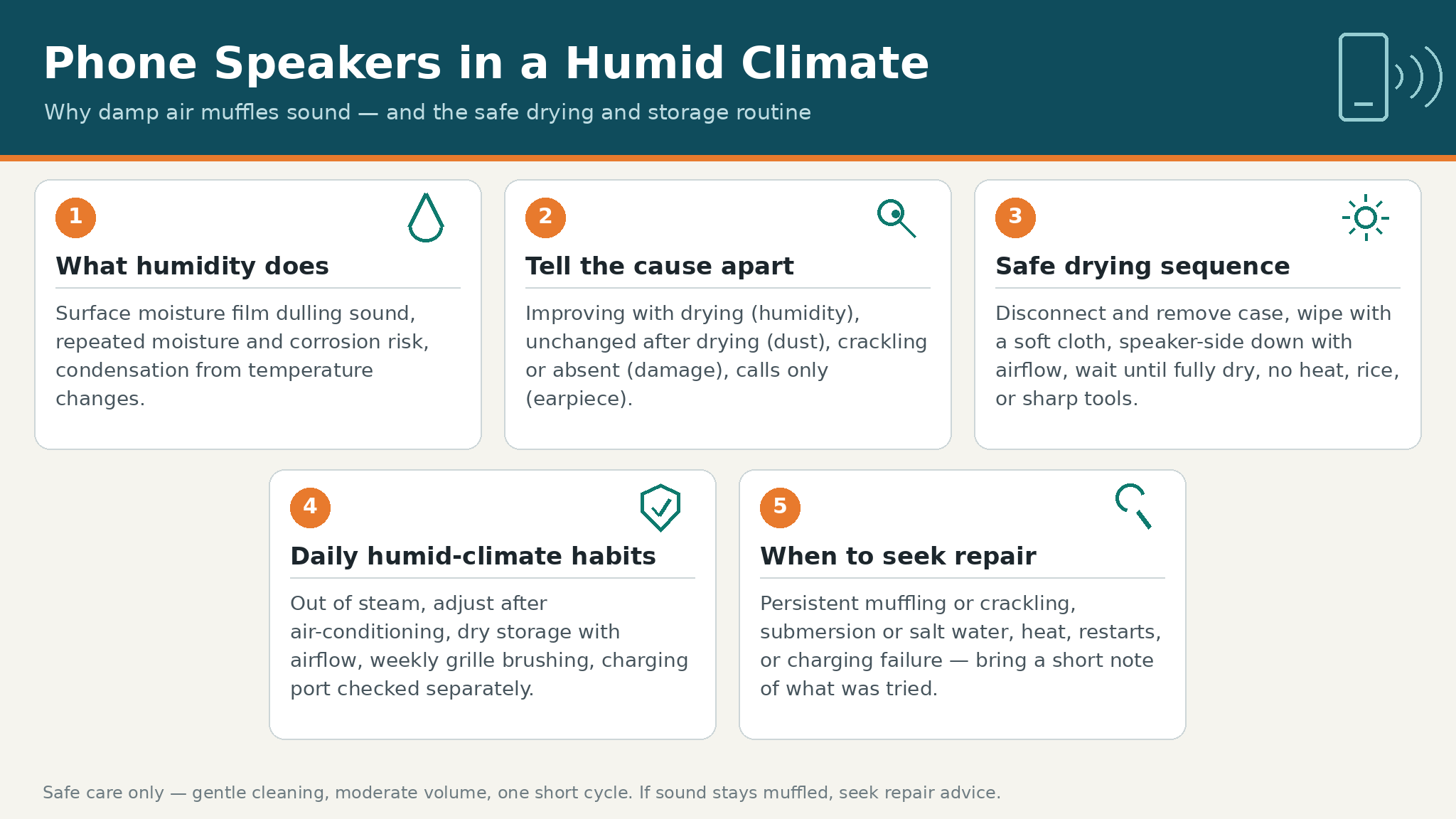
Humidity alone rarely ruins a phone speaker in a day, but repeated damp air, steam, and condensation can leave speakers sounding muffled and can corrode circuits over time. Keep the phone dry, let it air-dry fully after any moisture, and never charge a wet phone.
That short answer is reassuring and cautionary at once. A humid climate does not mean your phone is doomed, and it does not mean a muffled speaker is automatically damaged. It does mean daily habits matter more than any single rescue step. This guide explains what humidity does, how to tell it apart from dust or damage, and what routine keeps a phone sounding clear through a wet season.
What humidity does to a phone speaker
A phone speaker produces sound by moving a thin diaphragm behind a fine mesh grille. Moisture affects that system in three ways:
Surface moisture dulls sound. A thin film of condensation on or behind the grille adds weight to the moving parts and blocks tiny holes. Voices sound muffled, as if heard through cloth. This kind of muffling often improves as the phone dries, which is why patience matters more than volume.
Repeated moisture encourages corrosion. Humidity and liquids can carry minerals that corrode electronic circuits over time. Corrosion does not happen in an afternoon, and it is not visible from outside, but it is the reason repeated damp exposure is worse than a single dry day. Salt air near the coast is harsher than inland humidity, because salt residue attracts and holds moisture.
Condensation forms when temperature changes quickly. Moving from an air-conditioned room into hot, humid outdoor air — or the reverse — can condense moisture on and inside a phone, just as glasses fog up. The phone may look dry while moisture sits in the grille, earpiece, or charging port. That is why a phone that was "never dropped in water" can still sound muffled after a humid day.
Water resistance ratings do not remove this concern. A rating describes laboratory test conditions for a new device, and resistance can weaken with age, drops, and worn seals. Treat any rating as a safety margin, not permission to ignore moisture.
How to tell humidity muffling from dust or damage
Before doing anything, run a simple comparison. Play the same short voice message you know well, at a comfortable volume, with Bluetooth disconnected, and note exactly what you hear:
- Muffled, but improving as the phone dries. This fits humidity or light surface moisture. Let the phone dry fully and retest before trying anything else.
- Muffled and unchanged after full drying. This fits dust, lint, or residue blocking the grille. Gentle physical cleaning is the next step.
- Crackling, buzzing, cutting out, or absent sound. This fits damage or a deeper fault. Stop cleaning attempts and seek repair advice.
- Muffled only on calls, with music sounding fine. This points to the earpiece, the small speaker at the top, rather than the main loudspeaker. The earpiece and loudspeaker are different parts and need different handling.
- Muffled plus charging warnings, overheating, restarts, or screen problems. Stop all DIY steps. These are signs of deeper liquid effects, not a dirty grille.
Keep the distinction between parts in mind throughout: the loudspeaker plays media and speakerphone calls; the earpiece plays normal calls; the microphone captures your voice; the charging port carries power. Moisture in one does not mean moisture in all, and a working speaker does not prove a wet charging port is safe.
Safe drying: what to do after moisture exposure
If the phone got splashed, steamed up, or shows condensation, follow this sequence:
- Disconnect cables and remove the case. Cases trap moisture against the phone and hide it. Do not charge the phone.
- Wipe the outside with a soft, lint-free cloth. Dab gently; do not rub hard around openings.
- Place the phone speaker-side down on a dry, lint-free cloth in a room with good airflow. Gravity and airflow help moisture leave the grille. For an iPhone, this speaker-side-down position is the one Apple describes in its water-resistance guidance.
- Wait until fully dry. Do not rush this step, and follow your phone maker's guidance for wet devices. This draft deliberately gives no universal hour count, because maker guidance varies and a charging port can stay damp after the speaker sounds fine.
- Do not use heat, rice, compressed air, or sharp objects. Hairdryers can push water deeper and damage diaphragms and adhesives. Rice dust can enter openings and does little to dry the inside. Compressed air is advised against for iPhone cleaning and can force moisture deeper on other phones. Sharp objects can puncture the speaker mesh.
- Retest only when the phone is safe to use. Play the same voice message at a comfortable volume. If sound is clear, you are done. If it is still muffled, try gentle physical cleaning next — not louder volume.
A cleaning tone may help only after the phone is dry on the outside, and only for loose moisture or dust near the grille. Run one short cycle at moderate volume with the phone on a table, speaker-side down or facing away from you, in an empty room. Sound does not always move moisture, it cannot dry a charging port, it cannot remove corrosion, and it cannot repair damage. If one short cycle does not help, stop rather than repeating it louder or longer.
Daily habits for a humid climate
Emergency drying matters, but routine habits prevent most humid-climate problems:
Keep the phone out of steam. Do not take the phone into a steamy bathroom during a shower, and do not leave it beside a kettle, a pot of boiling water, or a running humidifier. Steam reaches openings that a splash never would, and it condenses inside as the phone cools.
Mind the air-conditioning transition. When moving between air-conditioned rooms and humid outdoors, give the phone a few minutes to adjust before judging its sound. If condensation appears, wipe the outside and let it air-dry before charging or playing audio loudly.
Carry it wisely. A pocket traps sweat and body heat against the phone. A bag compartment or a belt pouch with airflow is kinder than a tight, sweaty pocket, especially on long walks. Avoid leaving the phone in a damp bag, a wet towel, or a car that heats up and cools down through the day.
Store it dry. At home, store the phone in a dry room with airflow, not in a bathroom cabinet, a damp drawer, or a sealed plastic bag that traps moisture inside. A sealed bag only helps if the phone and the bag are both dry to begin with; sealing a damp phone inside a bag makes drying slower, not faster.
Clean the grille on a schedule. In a humid climate, dust and moisture combine into a sticky film that plain drying will not remove. Once a week, brush the speaker grille lightly with a clean, dry, soft-bristled brush and wipe the phone with a dry cloth. In coastal areas, wipe more often, because salt residue holds moisture against the grille.
Check the charging port separately. Lint plus humidity can pack into a charging port and hold moisture there. Inspect it in good light, remove lint only with a gentle, maker-approved method, and never charge through a wet or visibly damp port. A phone that plays music fine can still have a damp port, so judge charging safety by the port, not by the speaker.
Watch the case. Cases that cover or nearly cover the speaker holes trap humidity and lint. Choose a case with clear, aligned speaker openings, and remove the case regularly to clean and dry underneath it. A case that fits badly can cause more muffling than the climate does.
Coastal and monsoon variations
Coastal humidity deserves extra attention. Salt air leaves residue that attracts moisture and encourages corrosion, so wipe the phone more often and never rinse a phone with water unless the maker explicitly says that is safe for your model. Rinsing a non-sealed phone to remove salt can do more harm than the salt itself.
During monsoon or prolonged rainy periods, the same rules intensify: keep a dry cloth handy, dry the phone after every outdoor trip, and do not judge the speaker until the phone has had airflow time indoors. If rain exposure was heavy, treat it as a wet-device event — disconnect, dry, wait, retest — rather than as ordinary humidity.
When muffled sound needs repair, not drying
Seek repair advice if any of these apply:
- Sound stays muffled, crackles, buzzes, or cuts out after full drying and gentle cleaning.
- The phone was submerged, exposed to salt water or soapy water, or shows a liquid warning.
- The phone gets unusually hot, restarts, shows screen problems, or will not charge.
- The speaker works only on speakerphone, or only one side produces sound.
- Muffling returns within hours of drying, again and again, which can indicate moisture trapped deeper than the grille.
Bring a short note: when the muffling started, whether the phone got wet, what drying and cleaning you already tried, and whether charging is affected. That note helps a repairer distinguish a blocked grille from deeper liquid effects without repeating your steps.
FAQ
Does humidity damage a phone speaker?
Repeated humidity and condensation can dull sound and, over time, encourage corrosion of circuits, especially in salty coastal air. A single humid day rarely causes permanent damage, but repeated damp exposure without drying and cleaning adds up. Keep the phone dry, let it air-dry after moisture, and clean the grille regularly.
Why does my phone speaker sound muffled on humid days?
Condensation or a moisture film on the speaker grille adds weight to the moving parts and blocks tiny holes, so voices sound as if heard through cloth. This often improves as the phone dries. If muffling persists after full drying, dust or residue blocking the grille is more likely than humidity alone.
How long should I let a wet phone dry?
Until it is fully dry, following your phone maker's guidance. This guide gives no universal hour count because maker guidance varies and a charging port can stay damp after the speaker sounds fine. Do not charge until the phone is fully dry, and do not use heat or rice to rush drying.
Can I use a speaker cleaner tone for humidity muffling?
Only after the phone is dry on the outside, as one short cycle at moderate volume with the phone on a table. A tone may help move loose moisture or dust near the grille, but it does not always work, cannot dry a charging port, cannot remove corrosion, and cannot repair damage.
Should I store my phone in a sealed bag in a humid climate?
No, not unless both the phone and the bag are fully dry. A sealed bag traps moisture inside and slows drying. Store the phone in a dry room with airflow, and remove the case regularly to clean and dry underneath it.
Is a water-resistant phone safe in humidity?
A resistance rating is a laboratory safety margin for a new device, not a guarantee. Resistance can weaken with age, drops, and worn seals, and it does not cover all liquids or steam. Treat a rated phone with the same drying and storage habits as any other phone.
Why does my phone fog up when I go outside?
Moving from cool air-conditioning into hot, humid air condenses moisture on and inside the phone, just as glasses fog up. Give the phone a few minutes to adjust, wipe the outside, and let it air-dry before charging or judging its sound.
When should I stop drying and seek repair?
When sound stays muffled, crackles, or is absent after full drying and gentle cleaning; when the phone was submerged or exposed to salt or soapy water; or when it gets hot, restarts, shows screen problems, or will not charge. Those signs point to deeper liquid effects, not a dirty grille.
Related tools on this site
Related guides on this site
- How to Clean Phone Speakers
- Clean Dust from Phone Speaker
- Phone Speaker Muffled
- Phone Speaker Troubleshooting
- Phone Fell in Water
- Water in Charging Port
- Dry Phone Without Rice
- Clean Charging Port Lint
- IP67 vs IP68: What Water Resistance Really Means for Your Phone
- Phone Speaker After Rain: A Safe Drying Guide
Leave a Reply