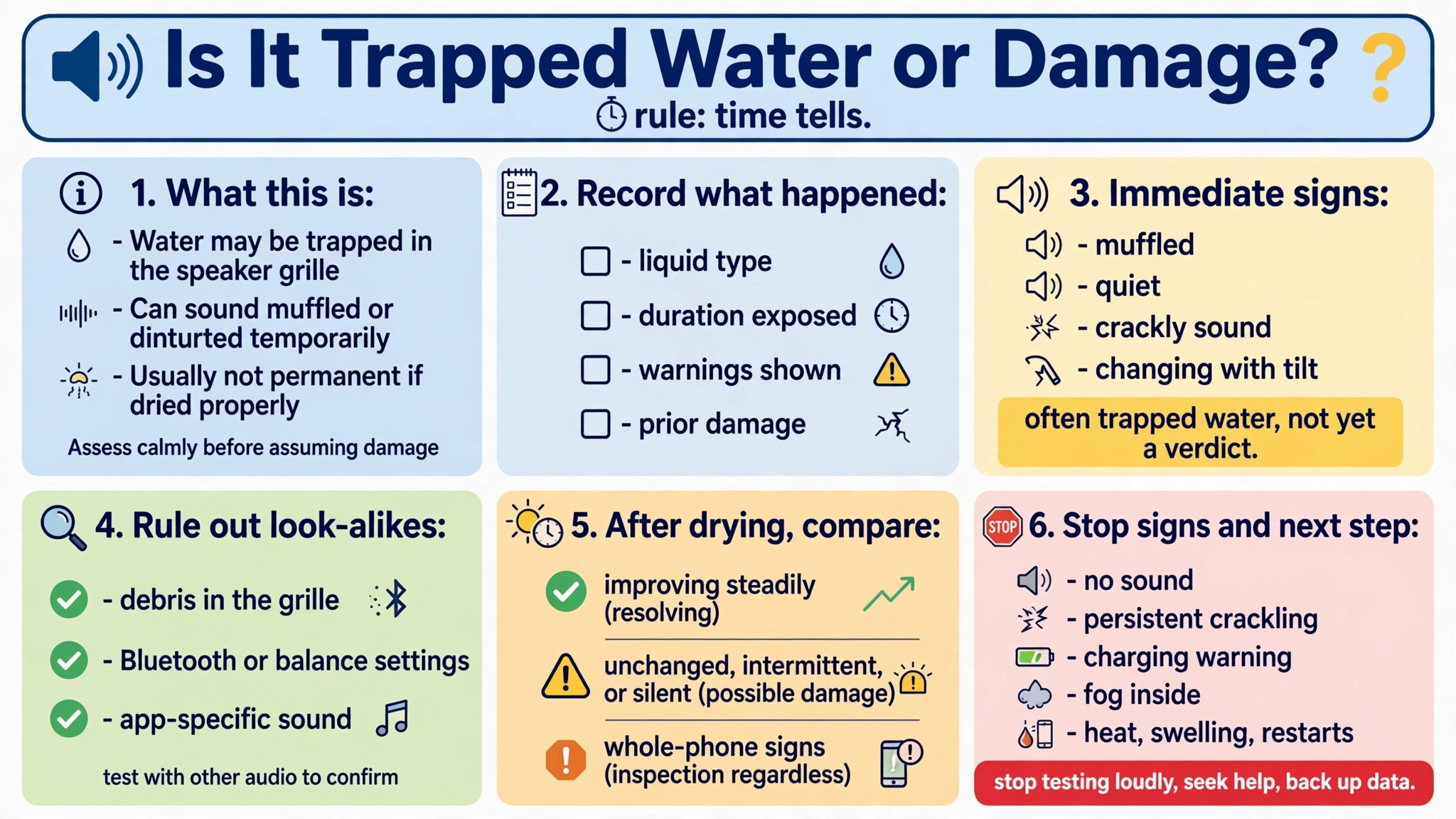
A water-affected phone speaker usually sounds muffled, quiet, crackly, or distorted, and time is the key test: trapped water improves steadily as the phone dries, while lasting damage stays the same after full drying. If sound is still distorted or absent afterward, seek inspection rather than waiting longer.
That distinction matters because the first hours after water exposure are noisy with false clues. A speaker can sound terrible ten minutes after a splash and recover completely by the next day. It can also sound almost normal at first and develop crackling days later as residue dries or corrosion begins. A single listen is not a diagnosis. A structured check — right away, after drying, and again days later — gives a much clearer picture than any one symptom alone.
Start with what happened, not just what you hear
Before testing sound, write down the facts that change the risk. What liquid was it: clean fresh water, salt water, pool water, soapy water, or a sugary drink? How long was the phone wet: a splash, a brief drop, or a longer submersion? Was the phone on or off? Is the screen cracked, or has the phone been dropped before, which can weaken seals? Did any warning appear, such as a liquid or moisture alert when charging was attempted?
These facts matter more than the volume of the first test. Clean fresh water from a brief splash is the lowest-risk case. Salt, pool, and soapy water leave residue that can continue to affect sound and contacts after the water itself is gone. A longer submersion increases the chance that water reached beyond the speaker grille. A cracked screen or damaged seal increases the chance that water reached inside the phone. Keep this history ready if you later speak to a repair technician, because it changes what they check first.
The immediate signs: trapped water in the grille
The most common immediate sign is muffled sound, as if the phone were covered with a cloth or heard through a pillow. Music loses clarity, voices sound distant, and bass may seem weaker. The sound often changes when you tilt the phone, because water moves inside the grille. You may also hear a slight crackle or fizz on louder passages, or notice that the speaker sounds quieter than usual even at a higher volume setting.
These immediate signs, on their own, usually point to trapped water rather than a broken driver. Water on the mesh changes how the thin diaphragm moves, so sound is damped and uneven. The important question is not how bad it sounds now, but how it changes over the next hours and days. If you have just wiped and drained the phone, do not run a long series of loud tests. A short, moderate-volume check is enough to establish a baseline, and then the phone should be left to air-dry.
Also check which speaker is affected. Play the same familiar recording through the loudspeaker, then make a short test call or voice recording to check the earpiece and microphone separately. The earpiece is the small speaker at the top used for calls; the loudspeaker is the larger speaker at the bottom used for media and speakerphone. If only the earpiece sounds muffled, the problem is likely localized to that mesh. If both sound wrong, water may have affected more than one opening, or the phone may have had a broader exposure. If callers say your voice sounds distant while you hear them fine, the microphone — a separate opening — may be the wet part, not the speaker at all.
Signs that point away from water
Not every muffled speaker after a wet day is water damage. Rule out three common look-alikes before concluding the speaker is damaged. First, debris: dust, lint, or sand in the grille can muffle sound gradually, and a wet day may simply be when you first noticed it. Look at the grille in good light for visible buildup, and compare with how the speaker sounded before the exposure if you can remember. Second, settings: a phone connected to Bluetooth headphones, a Bluetooth speaker, or a car system will play sound elsewhere, and a balance setting pushed to one side or a silent mode can mimic a speaker fault. Disconnect Bluetooth, check the volume and balance, and test again. Third, a software or app issue: if sound is wrong in one app but normal in another, or normal for calls but not for media, the cause may be software rather than the speaker.
A simple comparison helps. Test the same recording at the same moderate volume through the phone speaker, then through a known-good output if available, then back through the phone speaker. If the phone speaker is the only output that sounds wrong, the problem is more likely in the phone. If every output sounds wrong, check settings and the source recording first.
After drying: the signs that matter most
The drying period is the real diagnostic test. Wipe the phone, remove the case, keep it off or unused while wet, do not charge while wet, and air-dry it speaker-down in a well-ventilated room at normal room temperature. Do not use heat, rice, or sharp objects in the grille. After an appropriate wait — hours for a light splash, at least a full day for a submersion, longer for salt, pool, or soapy water — test again at a moderate volume with the same recording you used for the baseline.
Sound that has improved clearly, and keeps improving on a second test the next day, points to trapped water that is resolving. Sound that is unchanged after full drying points away from simple trapped water and toward debris, residue, or hardware damage. Sound that improves and then worsens again is also a warning sign: it can mean moisture is still shifting inside, or residue is drying and stiffening on the mesh or diaphragm. Do not keep waiting indefinitely in that pattern; seek advice.
The strongest signs of lasting speaker damage after drying are: no sound at all from a speaker at any volume, while other outputs work; distortion or crackling that remains at low as well as high volumes; sound that cuts in and out when you move or tilt the phone; and a speaker that sounds noticeably quieter than before the exposure even though the grille looks clean and settings are normal. These patterns are consistent with a damaged driver or a damaged connection, not with water still sitting on the mesh. A tone played through the speaker will not repair a damaged driver, and repeated loud cycles will not improve it. Stop testing loudly and arrange an inspection.
Whole-phone signs that change the answer
A speaker assessment is incomplete if you ignore the rest of the phone. Water damage is rarely limited to one mesh when the exposure was significant, and whole-phone signs should override a "speaker sounds better" conclusion. Watch for fog or condensation inside the camera lens or under the screen, a charging warning that returns every time a dry cable is plugged in, a phone that restarts, heats up unusually, or loses battery much faster than before, a touchscreen that behaves erratically, or a camera that fogs or fails. Any of these after water exposure means the phone needs professional attention, even if the speaker has improved.
Also watch for delayed signs over the following days and weeks. Corrosion can develop slowly, so a phone that sounds fine on day two can develop crackling, charging problems, or battery changes later, especially after salt or pool exposure. Back up important data as soon as the phone can be used safely, and keep a simple note of any change: date, symptom, and what you were doing. That note is useful for a technician and for deciding whether a later symptom is new or part of the same incident.
Visible clues around the openings are also worth checking, with care. Look for dried white or crusty residue around the speaker grille, charging port, or SIM tray after salt or pool exposure, for discoloration around the port, or for a musty or unusual smell. Do not poke into openings to investigate, and do not open the phone yourself unless you have the skills and accept the risks, including warranty effects. Visible residue or discoloration is information for a technician, not an invitation to scrape it away.
A step-by-step assessment you can use
First, record the exposure: liquid, duration, warnings, and any prior damage. Second, wipe, drain, and remove the case, and note a short baseline: loudspeaker, earpiece, and microphone, each at a moderate volume. Third, rule out Bluetooth, balance, volume, and app-specific causes. Fourth, air-dry for the appropriate period without charging, and do not use heat, rice, or sharp objects. Fifth, repeat the same three tests after drying, and again the next day, using the same recording and volume. Sixth, compare: improving steadily means trapped water resolving; unchanged after full drying, intermittent with movement, or absent at all volumes means possible damage; any whole-phone sign means inspection regardless of speaker sound.
If the assessment points to trapped water resolving, continue gentle use and re-check over the following days, especially after salt or pool exposure. If it points to debris, clean the grille gently with a dry soft brush, without pushing anything into the mesh, and test again. If it points to settings, fix the setting and test again. If it points to damage or whole-phone involvement, stop home testing and seek repair or manufacturer support, bringing your exposure notes.
When to stop waiting
Seek help promptly if sound stays distorted, intermittent, or absent after full drying; if a charging warning persists; if the phone shows fog inside, unusual heat, swelling, or an unusual smell; if the phone will not turn on, restarts repeatedly, or loses battery rapidly after exposure; or if the exposure involved salt, pool, or soapy water and the phone could not be handled safely afterward. Also seek help if you are unsure: a professional inspection can check for internal moisture and corrosion that no listening test can see, and it is better than a phone that fails later with data still on it.
Water damage signs are, in the end, a story told over time. A single muffled playback is a clue, not a verdict. A pattern — how sound changes with drying, whether other functions change, and whether symptoms return days later — is what separates trapped water from lasting damage, and it is what a technician will want to hear.
FAQ
How can I tell if my phone speaker has water damage?
Listen over time, not just once. Trapped water usually improves steadily as the phone dries, while lasting damage stays distorted, intermittent, or silent after full drying. Check the loudspeaker, earpiece, and microphone separately, and watch for whole-phone signs such as charging warnings, fog inside, heat, or restarts.
Does muffled sound always mean water damage?
No. Muffled sound right after water exposure most often means trapped water on the mesh, which can resolve with drying. It can also mean debris in the grille, a Bluetooth or balance setting, or an app issue. Rule out settings and debris before concluding the speaker is damaged.
Why does my speaker sound worse a few days after getting wet?
Moisture can shift inside the phone, and residue from salt, pool, or soapy water can dry and stiffen on the mesh or contacts. Corrosion can also develop slowly. A speaker that worsens after initially improving should be inspected rather than left to dry indefinitely.
What does crackling after drying mean?
Crackling that remains at low and high volumes after the phone is fully dry points more toward a damaged driver or connection than toward trapped water. Stop running loud tones, note when the crackling occurs, and seek a professional assessment.
Can a speaker test app prove my speaker is damaged?
No. A test tone can show that sound is muffled, quiet, or distorted, which is useful information, but it cannot prove the internal cause or rule out damage. Use tests as a comparison tool across days, not as a final diagnosis.
Should I check the microphone and charging port too?
Yes. The microphone and charging port are separate openings with their own symptoms. A distant voice on calls points to the microphone, and a charging warning points to the port. A speaker test alone does not clear the whole phone.
Is it safe to keep using a phone that sounds normal after drying?
If the exposure was brief and clean, and sound, charging, camera, and battery behavior stay normal over the following days, gentle use with periodic re-checks is reasonable. If the exposure was long or contaminated, or any symptom returns, get the phone inspected and back up data early.
When is repair the right choice instead of more drying?
When sound stays distorted, intermittent, or absent after full drying, when a charging warning persists, when fog, heat, swelling, or restarts appear, or when the phone was exposed to salt, pool, or soapy water and cannot be confirmed dry inside. A technician can check for internal moisture and corrosion that home drying cannot see.
Related tools on this site
Related guides on this site
- Phone Speaker Muffled
- Phone Speaker Crackling
- Phone Speaker Troubleshooting
- Dust vs Blown Speaker
- Phone Speaker Volume Low
- How to Fix a Water-Damaged Phone: A Calm, Step-by-Step Guide
- Phone Fell in Water
- Dry Phone Without Rice
- Water in Charging Port
- Phone Microphone Not Working
- How to Test Speakers
- IP67 vs IP68: What Water Resistance Really Means for Your Phone
Leave a Reply