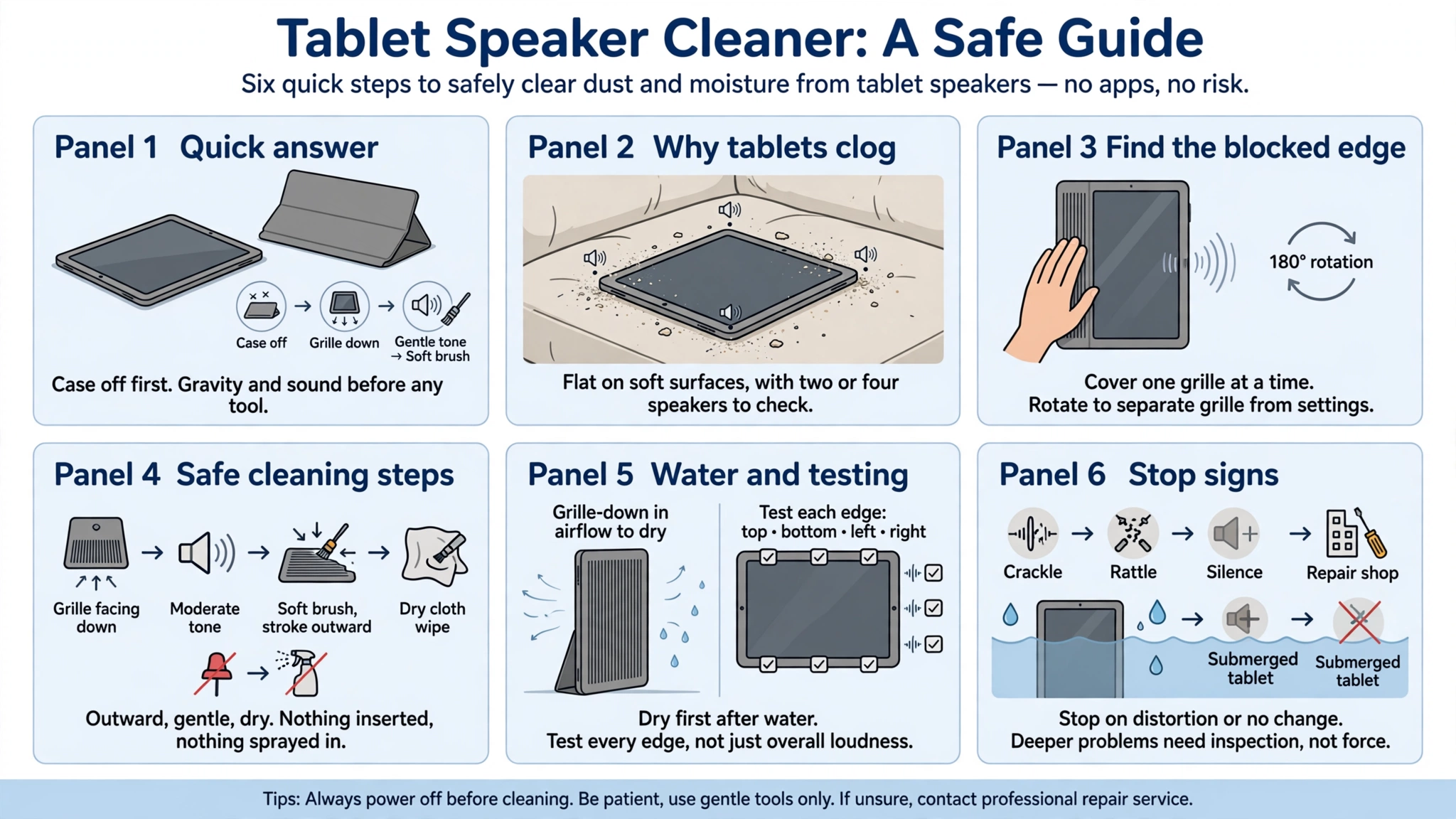
A muffled tablet speaker is usually a blocked grille, a covered grille, or a settings problem, not a broken speaker. Remove the case, find which speaker is quiet, and clean in this order: gravity and a gentle tone first, then a soft dry brush outward along the grille.
Test each side separately, keep volume moderate, and stop if the sound crackles, rattles, or gets worse.
That order matters on a tablet. Tablet grilles are wide, thin, and easy to press inward, and tablets collect crumbs, pet hair, and sofa dust precisely because they spend their lives flat on soft surfaces. Pushing a tool into the grille, blasting air straight into it, or scrubbing hard can push debris deeper or damage the mesh. A careful sequence does more, with less risk, than a forceful one.
Why tablet speakers clog differently
A phone lives in a pocket, where lint is the main problem. A tablet lives on a sofa cushion, a bed, a kitchen counter, or a child's lap. It is face-up while a recipe plays, face-down on carpet while a child plays, and propped against a cushion while a show runs. Every one of those positions puts a grille against fabric, crumbs, or dust.
Tablets also have more speakers to check. A budget tablet may have one or two speakers on a single edge. Many standard tablets have two speakers at each short end, and premium tablets have four, one near each corner. That is why "my tablet sounds quiet" is often really "one edge sounds quiet." If you clean only the grille you can see, you may miss the blocked one entirely.
Cases add a third difference. A folio, bumper, or kids' case can cover a grille partly or fully, and a thick bumper can trap crumbs against the grille even when the tablet looks clean. Always take the case off before you judge the sound. A case problem is free to fix; a grille problem is not, and confusing the two wastes time.
Finally, tablet speakers are not phone earpieces. Microphone holes, usually single pinholes rather than a row of grille holes, are separate: do not clean a microphone hole as if it were a speaker grille, and do not expect a speaker tone to clear a microphone.
Find which speaker is the problem
Start by looking, not cleaning. With the case off, look along all four edges in good light. Tablet grilles are rows of small holes or slots on the metal or plastic edge. Microphone holes are usually single small pinholes. Note which edges have speaker grilles before you play anything.
Next, play speech, not music, at a moderate volume. Speech makes a quiet side easier to hear than bass-heavy music. While it plays, cover one grille at a time with a fingertip and listen. If covering one grille changes almost nothing, that grille may already be blocked, or that speaker may not be producing sound. If covering a grille makes the sound clearly duller, that speaker is working.
Rotate the tablet 180 degrees and listen again. If the quiet side follows the physical edge of the tablet rather than the left or right of the screen, the problem is that edge's grille or speaker. If the quiet side stays on the same screen side after rotation, check the audio balance setting first, because the sound may be panned to one side in software rather than blocked in hardware. This rotation test is the simplest way to separate a grille problem from a settings problem, and it takes less than a minute.
Note which edge is affected and whether the problem is muffled, quiet, crackly, or silent.
Rule out the easy causes first
Before any cleaning, check four easy causes. First, the case: play the same speech with the case off. If the sound returns, the case was the problem. Clean the case separately, check its grille cutouts, and do not cut or enlarge a case opening yourself unless the maker provides for it.
Second, volume and mute: check the tablet volume, any mute switch or on-screen mute, and any volume limit in accessibility or parental settings. A kids' tablet in particular may have a volume limit that makes every speaker sound quiet, which no cleaning will fix.
Third, output route: make sure sound is actually coming from the tablet speakers, not from a paired Bluetooth speaker, headphones, or a nearby smart speaker that has taken over playback. Disconnect Bluetooth audio and unplug headphones, then test again. A tablet that is silent is sometimes simply sending sound elsewhere.
Fourth, balance and mono audio: check the balance slider in accessibility or sound settings and make sure it is centered, and check whether mono audio is on. An off-center balance can make one side sound dead even when both speakers work. If any of these checks fixes the sound, stop there. Cleaning a working speaker will not improve it.
Clean a tablet speaker, step by step
Work in this order, and stop as soon as the sound is clear.
- Remove the case, folio, and any screen cover that overlaps an edge. Wipe the outside of the tablet with a soft, dry, lint-free cloth.
- Stand the tablet on its edge, or prop it so the blocked grille faces down toward the floor. Gravity helps loose debris fall out instead of deeper in.
- Play a gentle cleaning tone at a moderate volume through the tablet's own speakers, not through headphones or a Bluetooth speaker. Use the site's dust mode for dust and lint, or the water mode only if the problem followed water. Run one short cycle, usually about a minute, then stop.
- Brush outward along the grille with a clean, dry, soft-bristled brush, such as a soft toothbrush or small paintbrush. Brush along the grille and outward, away from the openings, not inward and not in hard circles. Use light strokes. The goal is to lift debris off the mesh, not to scrub it through the mesh.
- Wipe the edge again with a dry cloth, and if you use tape or putty to lift fine particles, press it lightly only on the surface of the grille, then lift it straight off. Do not press tape or putty into the holes, and check that no sticky residue remains. Residue left in a hole can muffle sound worse than the dust did.
- Play the same speech again and compare it with your earlier note. If it sounds clear, stop. If it is better but still dull, you may repeat the tone and brush once more. If it is unchanged after two careful cycles, further cleaning is unlikely to help, and the next step is troubleshooting, not harder scrubbing.
Use compressed air only with caution, if at all: hold the can upright, use short bursts from a distance, and angle air across the grille, not into it. Never blast at close range, never use high-pressure air, and never use it on a wet tablet. Skipping it is always safer.
Do not use liquids on the grille, do not spray cleaner into the speaker, and do not insert pins, needles, toothpicks, or cotton swabs into the holes. A tablet grille is not a vent to be poked clear. Anything inserted can tear the mesh, push debris inward, or damage the driver behind it.
What to do after water or a spill
Water changes the order. If the tablet was splashed, rained on, or had a drink spilled near it, power it off if you can do so safely, remove the case, and do not charge it. Wipe the outside with a soft, dry cloth, stand it on edge with the wet grille facing down in a dry place with airflow, and let it air-dry. Do not use external heat, a hair dryer, or a hot surface to speed drying, and do not put it in rice, which can leave grains and dust near openings.
Only after the outside is dry and the tablet has had drying time should you run a short water tone at a moderate volume, grille facing down, followed by a test. If the sound is still muffled after drying and one or two tone cycles, leave it to dry longer rather than running tone after tone. Sugary drinks, salt water, and soapy water leave residue and carry a higher risk of corrosion than fresh water, so a spill of anything other than fresh water deserves extra drying time and, if problems persist, professional advice. Sound may help move light water near the grille, but it cannot repair liquid damage inside the tablet, and it cannot undo corrosion.
If the tablet will not turn on, will not charge, shows a liquid warning, or smells unusual, stop. Do not keep testing it. Follow the tablet maker's guidance for liquid exposure and seek repair.
Test each speaker separately
Testing is what turns cleaning into a result. Play the same speech clip you used at the start, at the same moderate volume, and listen to each edge in turn. Cover grilles one at a time again and compare. A successful clean should make the previously quiet edge sound close to the other edges, not merely louder overall.
Also test with a song with clear vocals, because speech alone can hide a rattle or distortion. Muffling that improves with cleaning points to blockage; distortion or rattling that stays points to hardware, not dirt. If your tablet has four speakers, test in landscape and portrait, because some tablets change channels when rotated.
Troubleshooting
Quiet on one side only: Recheck balance, rotate the tablet, and retest with the case off. If the quiet side follows the physical edge, clean that edge again gently. If it follows the screen side, it is a settings or channel problem, not a grille problem.
Still muffled after two cycles: The debris may be packed into the mesh, the grille may be damaged, or the driver may be at fault. Do not escalate to sharp tools, liquids, or high pressure. Seek repair advice instead.
Crackling or rattling: Stop cleaning tones at once. Crackling at moderate volume can mean debris touching the driver, distortion, or damage. A gentle external brush is the most you should try; if the crackle stays, the speaker needs inspection.
Sound comes and goes: Check for a loose case pressing on an edge, a Bluetooth device reconnecting and stealing audio, or a headphone jack or port with debris. Intermittent sound is often a connection or routing problem, not a dirty grille.
No sound at all: Check mute, volume, output route, and balance before assuming damage. Restart the tablet, then test again. If every speaker is silent but headphones work, the problem is with the tablet speakers or their settings, and cleaning alone is unlikely to fix it.
Worse after cleaning: Stop. You may have pushed debris deeper, left residue, or damaged the mesh. Do not try to fix it with more force. Let the tablet rest, retest once with the case off, and seek repair if the worsening persists.
What not to do
Do not use a pin, needle, or SIM tool in a speaker grille. Do not use a vacuum cleaner at full suction directly on a grille, which can stress thin mesh. Do not spray cleaning liquid, disinfectant, or water into the speaker. Do not use an abrasive cloth, a scouring pad, or a hard brush. Do not play a cleaning tone at maximum volume through the tablet for a long session, and never test a cleaning tone through headphones or earbuds at high volume. Do not open the tablet yourself unless you are qualified, and do not follow a phone earpiece guide for a tablet, because the grille layout and speaker count are different.
Also do not chase extreme frequencies. A tone labeled with a very high number, far above normal hearing, is not a stronger tablet cleaner. A typical tablet speaker cannot reliably reproduce such frequencies, and a label alone is not evidence that the speaker is producing that frequency or cleaning anything. Use an audible, moderate-volume tone or sweep designed for dust or water, test, and stop.
When to seek repair
Seek repair, or contact the tablet maker or a qualified shop, if the tablet was submerged, will not turn on or charge, stays distorted, rattling, or silent after drying and two careful cleaning cycles, shows swelling, heat, or a damaged grille, or had a sugary or salt-water spill and still sounds wrong after full drying. Bring your note: which edge, which symptom, what you tried, and whether rotation or balance changed anything. That note saves diagnostic time and prevents a shop from repeating a cleaning you already did carefully.
Conclusion
Tablet speaker cleaning is mostly diagnosis, then gentle work in the right order: find the blocked edge, rule out case, balance, and output, then use gravity, a moderate tone, and a soft outward brush. Test each side, stop on distortion or no change, and get a speaker that stays muffled checked rather than pushing harder.
FAQ
Why does my tablet speaker sound muffled?
Most often, dust, crumbs, or fabric lint has packed into the grille, or a case is partly covering it. Less often, the balance is off-center, sound is routed to Bluetooth or headphones, or the speaker itself is damaged. Remove the case, check balance and output, then clean the grille gently.
How do I find which tablet speaker is blocked?
Play speech at a moderate volume and cover one grille at a time. The grille whose covering changes almost nothing is the suspect. Rotate the tablet 180 degrees: if the quiet side follows the physical edge, that edge is the problem; if it follows the screen side, check balance and settings.
Can I use a phone speaker cleaner tone on a tablet?
Yes, with care, if the tone plays through the tablet's own speakers at a moderate volume. A tablet is not a phone, though: it may have two or four speakers, so test each edge separately, and do not assume a phone earpiece method applies. Keep sessions short and stop on distortion.
Is compressed air safe for tablet speakers?
It can be risky. If used at all, hold the can upright, use short bursts from a distance, and angle air across the grille, not straight into it. Never blast at close range or use high-pressure air, and never use it on a wet tablet. Most tablet grilles can be cleaned without it.
Can I clean a tablet speaker with tape or putty?
Lightly, on the surface only. Press tape or putty gently onto the grille surface and lift it straight off to pick up fine particles. Do not press it into the holes, use heavy pressure, or leave residue behind, because residue in a hole can muffle sound worse than dust.
What should I do if my tablet speaker got wet?
Power it off if safe, remove the case, do not charge it, wipe the outside dry, and stand it grille-down in dry airflow to air-dry. Do not use heat or rice. Only after drying, try a short water tone and test. If it stays muffled, distorted, or silent, seek repair rather than repeating tones.
When should I stop cleaning and seek repair?
Stop if the sound crackles, rattles, or gets worse, if two careful cycles change nothing, if the tablet was submerged or had a sugary or salt-water spill and still sounds wrong after drying, or if it will not turn on or charge. Those signs point beyond surface dirt.
Leave a Reply