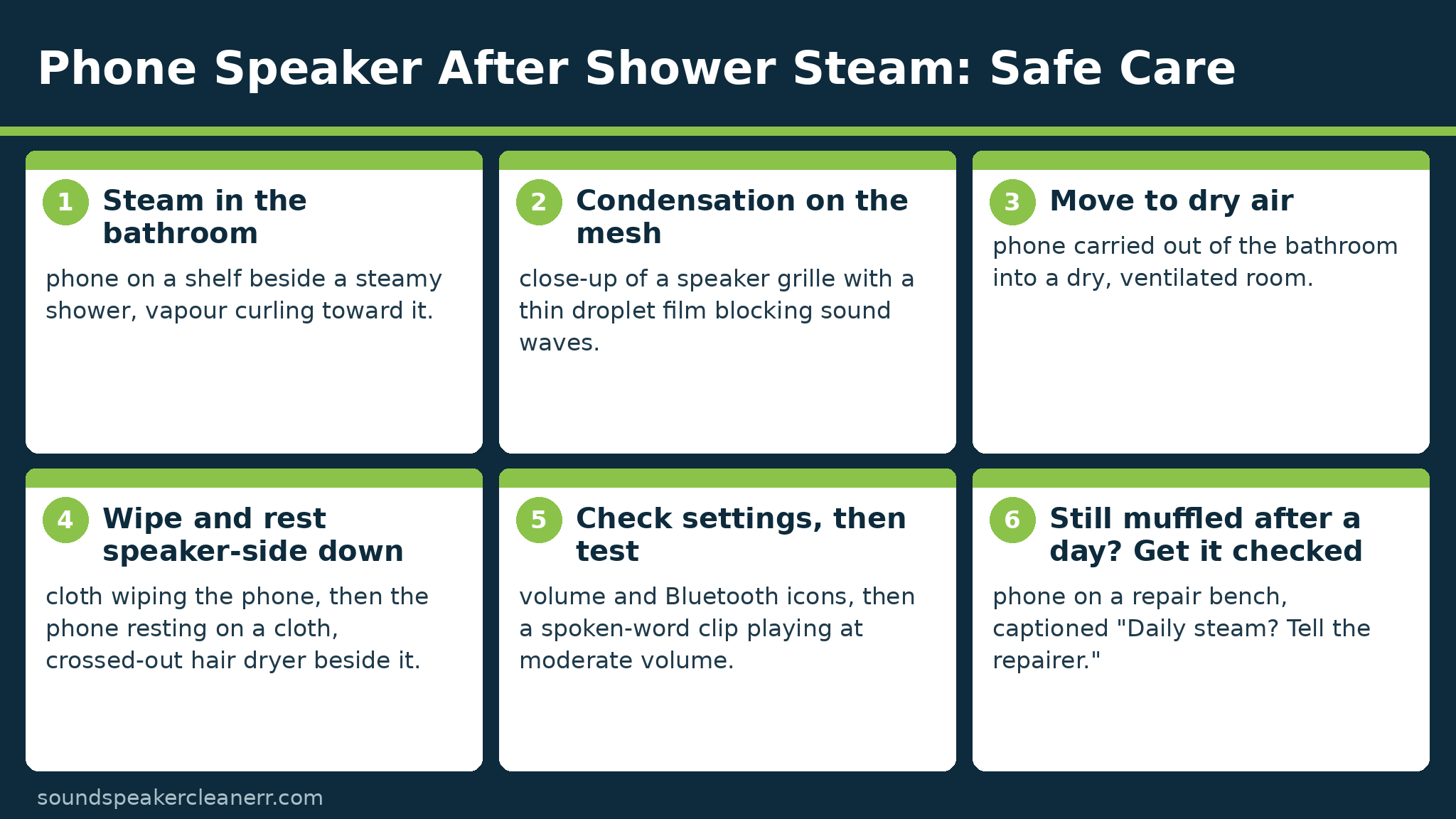
Shower steam can leave your phone speaker sounding muffled, because warm condensation settles as a thin film on the speaker mesh and blocks sound. Move the phone to dry air, wipe the outside, let it dry fully, and do not use heat to speed it up.
How steam is different from a splash or a soak
A splash is liquid water hitting the phone from outside. A soak is the phone sitting in liquid. Steam is neither, and that difference matters for how you respond.
When you run a hot shower, the bathroom fills with warm, humid air. That air carries water vapour, which condenses — turns back into tiny liquid droplets — on any surface cooler than the air, including your phone. The droplets are very small, and they do not flood the phone the way a dropped phone floods. Instead, they form a thin, even film across the speaker mesh, the earpiece slot, the screen, and the camera lens. You may not even see the film on the speaker, because the mesh holes are tiny, but you can hear it: sound waves have to pass through a wet screen, and they come out quieter, duller, and less clear.
Steam can also reach places a splash cannot. Vapour travels through small gaps and seams more easily than liquid droplets, so repeated steam exposure can leave moisture in the speaker chamber and around internal parts even when the phone was never directly splashed. One shower rarely causes serious damage, but daily steam exposure — a phone on the bathroom shelf every morning, or a phone in a pocket while showering — can build up moisture over weeks. That slow build-up is why a speaker that sounds slightly muffled after every shower, and then a little worse each month, deserves attention even though no single incident seems dramatic.
Steam is also not pure water. Bathroom air can carry soap, shampoo, and cleaning-product residue in fine droplets, and those residues can dry on the mesh and leave a thin coating. That coating may keep the speaker slightly muffled even after the water itself has evaporated, which is one reason a steam-affected speaker sometimes does not clear as quickly as a rain-affected one.
First steps: get the phone into dry air
The first step is simple: take the phone out of the steamy bathroom and into a dry room. Do not leave it on the bathroom shelf "to dry" while the room is still humid, because it will keep collecting condensation as long as the air around it is wet. Open a door, run an extractor fan, or move the phone to another room with normal indoor air.
Remove the case, since a case traps humid air and condensation against the phone. Wipe the outside gently with a soft, lint-free cloth, including the area around the speaker holes and the earpiece slot. Wipe, do not blow: blowing into the openings can push droplets further in. Do not insert anything into the speaker holes, and do not use compressed air.
If the phone is otherwise working normally — the screen responds, calls work, and there is no sign of liquid in the charging port — you do not need to panic or power it off entirely. But if the phone was actually splashed, left in a puddle of water, or shows any sign of trouble, treat it as a wet phone: power it off, do not charge it, and follow wet-phone guidance rather than steam guidance. The distinction matters: steam alone rarely requires a full power-off, but a splash or soak does.
Place the phone speaker-side down on a clean, dry, lint-free cloth in a ventilated spot at room temperature, and leave it there for a while. Gravity helps any surface droplets drain, and moving air helps the thin film evaporate. How long depends on how steamy the bathroom was and how muffled the sound is, but a few hours of dry air is a reasonable starting point for a single shower exposure. If the sound clears within that time, the problem was almost certainly surface condensation.
What not to do after steam exposure
Do not use a hair dryer. This is the most common mistake with steam, because a hair dryer feels like the obvious way to clear condensation. The problem is that a hair dryer blows hot, forceful air, which can push moisture deeper, stress seals and adhesives, and overheat the battery. The same applies to radiators, heaters, and ovens: heat adds risk without solving the underlying problem, which is a thin film that evaporates on its own in dry air.
Do not put the phone in rice. Rice is a poor match for steam condensation: the moisture is a thin film, not a pool of water, so sealing the phone in a container of rice does not target the problem, and rice dust can enter the speaker mesh and create a second blockage. Silica gel packets are less messy, but they are also unnecessary for a single steam exposure that will clear with ordinary air drying.
Do not charge the phone if there is any chance the charging port is damp. A steamy bathroom can leave condensation in the port as well as on the speaker, and charging through a damp port risks corrosion. If you are unsure, wait until the phone has had time in dry air, and check the port visually before plugging in a cable. Follow your phone maker's guidance for a wet device, which always takes priority over general advice.
Do not play sound at maximum volume to "blast out" the steam. A cleaning tone at a moderate volume may help move loose surface droplets from the grille once the phone is dry, but loud, repeated playback will not evaporate condensation faster, and it can strain a speaker that is already muffled. Patience and dry air do more than volume.
How to tell steam muffling from dust, settings, or damage
Not every muffled speaker after a shower is caused by steam, and checking the other causes saves wasted effort. Start with the simplest test: does the muffling appear right after a shower and fade over a few hours in dry air? If yes, steam is the likely cause. If the muffling is constant, day after day, regardless of showers, dust or residue on the mesh is more likely.
Check your settings before you assume damage. Make sure the volume is up, that Do Not Disturb or a silent mode is not limiting alerts, and that sound is playing through the phone's own speaker rather than a connected Bluetooth device or headphones. Disconnect Bluetooth and remove headphones, then play the same short spoken-word clip you use for comparison. A settings problem will usually affect all sounds equally and will not change as the phone dries.
Check for visible blockage. Look at the speaker grille and the earpiece slot in good light. Dust, lint, and dried residue look like a grey or dull coating across the holes, while steam condensation may be invisible once it has partly evaporated. If you see dust or lint, gentle dry brushing with a soft brush, flicking outward away from the holes, is the safe approach — never poke into the holes.
If the sound is distorted, crackling, or rattling rather than simply muffled, or if it does not improve after a full day in dry air, the problem may be deeper than surface condensation. Repeated steam exposure can affect the speaker driver or leave residue inside the mesh, and that needs a repairer's assessment rather than more home drying.
When a cleaning tone helps, and when it does not
Once the phone is dry, a short cleaning tone at a moderate volume may help move any remaining loose droplets from the speaker grille. Use the phone's own speaker, not headphones or Bluetooth, place the phone speaker-side down, and run one short cycle. Then play a normal clip and listen. If the sound is clearer, one or two more short cycles may help. If there is no improvement after a few cycles, stop. Further cycles will not clear dried residue or repair a damaged speaker.
A tone cannot dry moisture inside the phone, remove soap or cleaning-product residue from inside the mesh, stop corrosion, or repair damage from repeated steam exposure. It is a helper for surface droplets, not a treatment for internal moisture. If the phone was ever submerged, or if it shows charging problems, screen problems, or overheating, skip the tone entirely and get the phone checked.
It is also worth noting what a tone cannot tell you. A tone that sounds clear does not prove the phone is fully dry inside, and a tone that sounds muffled does not prove the speaker is broken. Use normal speech and music at a comfortable volume as your real test, and treat the tone as a brief aid, not a diagnosis.
When to get a professional check
Get a professional check if the speaker stays muffled after a full day in dry air, if the muffling gets worse over weeks despite keeping the phone out of the bathroom, if the sound is distorted or crackling rather than just quiet, if the microphone or charging port shows problems at the same time, or if the phone has been exposed to steam daily for a long time and you are unsure about internal moisture.
Tell the repairer about the steam pattern: how often the phone is in the bathroom, whether it sits on a shelf or in a pocket, and how long the muffling lasts after each shower. That history helps them distinguish a simple mesh coating from deeper moisture damage, and it helps them advise you on prevention.
Water and moisture damage is commonly excluded from standard warranties, so ask about inspection cost before work starts. A mesh clean is usually straightforward; a speaker replacement is more involved. A reputable repairer will explain which one your phone needs rather than promising a guaranteed fix.
Preventing steam problems
The best prevention is also the simplest: keep the phone out of the bathroom during showers. Leave it in another room, or at least outside the steam zone, rather than on a shelf beside the shower. If you need music in the bathroom, use a speaker designed for that environment, or a device you do not rely on as your main phone.
If the phone must be in the bathroom — for example, if you use it as an alarm — keep it as far from the shower as possible, keep the extractor fan running, and open the door or a window to reduce humidity. Wipe the phone after a steamy shower, and do not put it straight into a pocket or a closed case while it is still damp, since that traps moisture against the speaker.
Finally, treat a water-resistance rating as limited protection, not a guarantee against steam. Ratings are tested under controlled conditions with clean water, not in a hot, humid, soapy bathroom over months of daily showers. Keeping the phone dry in the first place is far more reliable than relying on a rating after the fact.
FAQ
Can shower steam really damage a phone speaker?
Yes, mainly through condensation. Warm vapour condenses as a thin film on the speaker mesh and blocks sound, and repeated daily exposure can leave moisture and residue that build up over time, even without a direct splash.
How long should I let a steamy phone dry?
For a single shower exposure, a few hours in dry, ventilated air at room temperature is a reasonable starting point. If the sound has not cleared after a full day, the problem may be residue or deeper moisture, not surface condensation.
Should I use a hair dryer on a phone after a shower?
No. A hair dryer blows hot, forceful air that can push moisture deeper and stress seals, adhesives, and the battery. Dry air at room temperature is safer and sufficient for steam condensation.
Does rice help with steam condensation?
No. Rice does not target a thin condensation film, and rice dust can enter the speaker mesh and create a new blockage. Ordinary air drying in a dry room is the better approach.
Can a speaker cleaning tone clear steam from a speaker?
Only in a limited way. Once the phone is dry, a moderate-volume tone may help move loose surface droplets from the grille. It cannot evaporate internal moisture, remove dried residue, or repair damage.
How do I know if the muffling is steam or dust?
Steam muffling appears after a shower and fades over hours in dry air. Dust or residue muffling is constant, day after day, and the grille often looks grey or coated in good light. Settings and Bluetooth connections should be checked first in both cases.
Is it safe to charge a phone after a steamy shower?
Only once you are confident the charging port is dry. Steam can condense in the port as well as on the speaker, so wait until the phone has had time in dry air, check the port, and follow your phone maker's wet-device guidance.
Will a water-resistance rating protect my phone from shower steam?
Not reliably. Ratings are tested under controlled conditions with clean water, not in a hot, humid bathroom over months of daily showers, and seals can weaken over time.
Leave a Reply