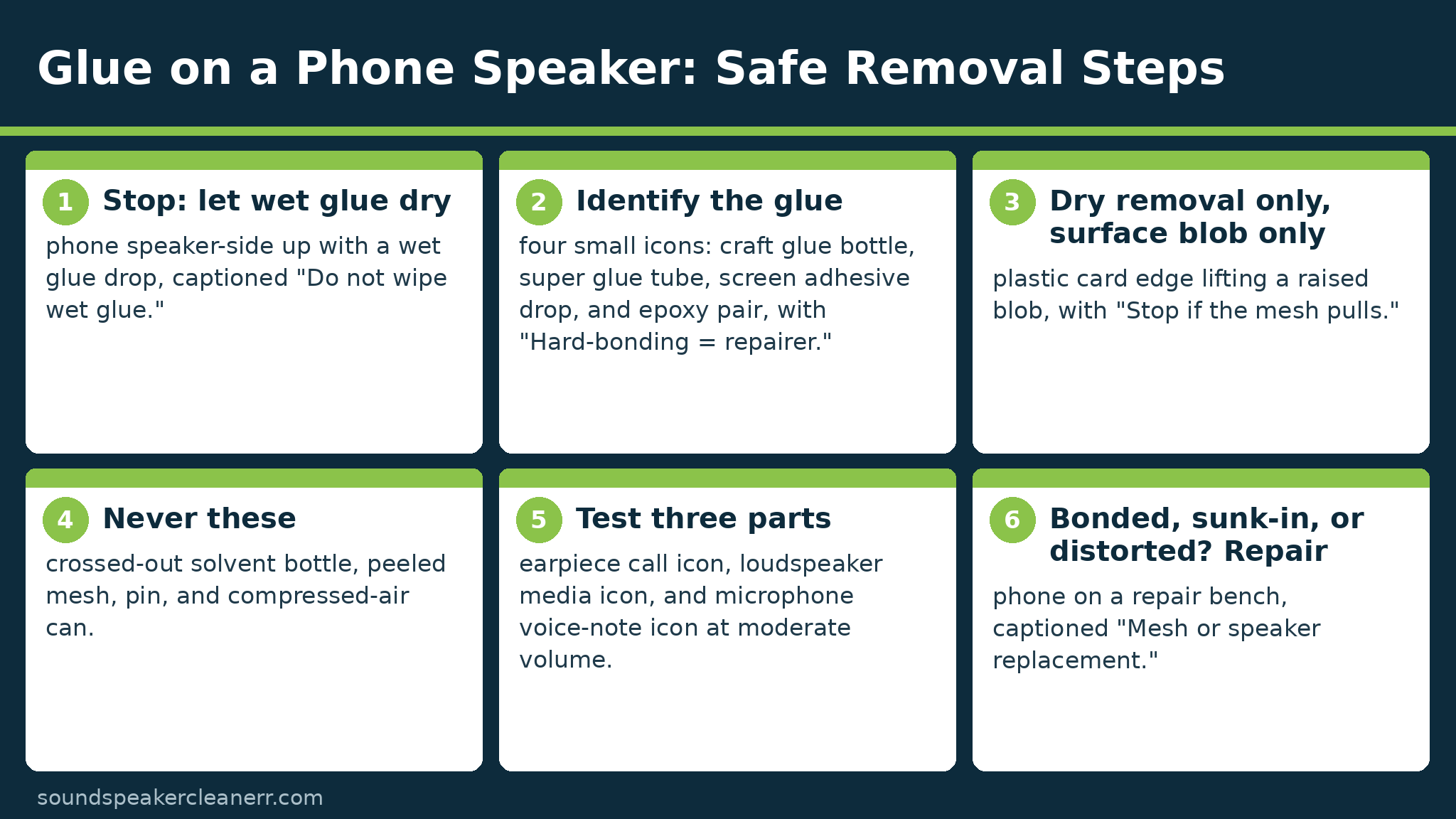
If glue is on your phone speaker, do not peel the mesh and do not pour solvent into the openings. Let the glue dry fully, remove only loose surface glue with gentle dry methods, and seek professional repair if the glue is bonded, thick, or inside the holes.
First, work out what kind of glue you are dealing with
Glue is not one substance, and the type matters for how much you can safely do at home. Craft glue and school glue are usually water-based, dry to a flexible film, and sometimes peel away from a smooth surface in one piece. They are the most forgiving kind of glue on a phone, but even they can block speaker holes if they dry across the mesh.
Super glue and nail glue are cyanoacrylate adhesives. They bond fast, hard, and thin, and they are designed not to peel. A thin layer of super glue across a speaker mesh is a serious problem, because the glue bonds to the mesh fibres themselves. Trying to peel it will likely tear the mesh or pull fibres loose.
Screen-repair adhesive, often called LOCA glue, is a liquid adhesive used under screen protectors and displays. If it reaches a speaker, it can flow into the mesh while still liquid and then harden inside, coating the speaker behind the mesh. That is a deeper problem than surface glue, and home methods rarely fix it.
Epoxy and other two-part adhesives harden into a rigid, chemical-resistant layer. They are the least forgiving of all: solvents that soften craft glue will not reliably soften cured epoxy, and force will damage the mesh long before it removes the glue.
If you do not know what kind of glue it is, treat it as the hard-bonding kind. That conservative assumption protects the speaker: you will stop sooner, use less force, and be more likely to seek repair before causing extra damage.
The dry-first method: what you can safely try
If the glue is still wet, do not wipe it. Wiping wet glue smears it across more speaker holes and pushes it into the mesh, exactly as with wet paint. Keep the phone still, speaker-side up so the glue does not run, and let it dry completely. Wipe wet glue only from solid surfaces — the back, the frame, the screen — where it cannot be pushed into an opening. If glue is on the frame near the speaker, wipe away from the holes, never toward them.
Once the glue is fully dry, work in good light and power the phone off, or at least stop playing sound through the speaker while you work. Remove the case, since glue may be trapped under its edges. Look closely at the grille: is the glue a raised blob sitting on top of the mesh, a thin film across several holes, or has it visibly sunk into the holes? A raised blob on the surface is the only case where gentle home removal has a reasonable chance. A thin film bonded across holes, or glue that has sunk in, should go straight to a repairer.
For a raised surface blob of craft-type glue, you may try to lift one edge very gently with a soft, dry tool — a plastic card edge or a soft dry brush — working outward and away from the holes, with minimal pressure. If the blob lifts cleanly and the mesh underneath looks intact, stop there, brush away loose flakes with a soft, dry brush using outward flicks, and wipe the surrounding frame with a dry, lint-free cloth. If the blob resists, stretches, or pulls the mesh with it, stop immediately. Do not pull harder, and do not try to peel the mesh itself. The mesh is not a sticker to be lifted; it is a delicate screen, and pulling it will tear it or detach it from the frame.
For the earpiece slot, use even less force than for the loudspeaker grille, because the earpiece mesh is smaller and more delicate. In practice, this often means: if glue is on the earpiece, skip home removal entirely and seek repair, unless the glue is a single loose flake sitting on the surface that brushes away with no resistance.
Do not use heat to soften glue on a speaker. A hair dryer or heat gun can soften adhesives elsewhere in the phone, warp the mesh, and stress the battery, and softened glue is more likely to flow into the holes than to lift cleanly. If glue needs softening to come off, that is a sign the job belongs to a repairer.
What never to do to a glued speaker mesh
Never pour, spray, or drip any solvent into the speaker mesh. That includes nail polish remover, acetone, paint thinner, strong adhesive removers, perfume, and cologne. Solvents can dissolve the adhesives that hold the mesh and internal parts together, damage coatings, and — most dangerously — they can partially dissolve glue just enough to carry it through the mesh and into the speaker chamber, where it can coat the driver and cause permanent distortion or silence. Some web advice suggests squirting alcohol into a glued speaker and playing loud music to work it out; do not follow that advice. It risks driving dissolved adhesive deeper into the speaker.
Never peel the mesh. The mesh may look like a thin film that could be lifted and replaced, but on most phones it is bonded to the frame or the speaker module, and peeling it can tear it, leave adhesive residue across the holes, or expose the driver to dust and damage. If a repairer needs to replace the mesh, they will do so with the right parts and tools; a home peel is not a shortcut to that repair.
Never use a sharp tool on the mesh. Pins, needles, craft knives, razor blades, and SIM tools can puncture the mesh or scratch the driver behind it. A plastic card edge is the firmest tool that should ever touch the area around a speaker, and even that should only be used on a raised surface blob, never pushed into holes.
Never use compressed air on a glued grille. Compressed air can drive glue flakes deeper into the mesh and the speaker chamber, and the force can damage the mesh itself. The same applies to blowing hard into the openings.
Never soak the phone or run it under water to remove glue. Water will not reliably dissolve super glue, screen adhesive, or epoxy, and it adds water damage to a glue problem. Craft glue may soften with water on a solid surface, but on a speaker mesh, any liquid risks carrying glue inward, so keep the phone dry throughout.
Testing the speaker after dry removal
Only test the speaker after you have finished cleaning, removed all loose flakes, and wiped the surrounding frame. Disconnect Bluetooth, remove any headphones, and play a short spoken-word clip at a comfortable, moderate volume through the loudspeaker. Listen for clear speech versus muffled, quiet, distorted, crackling, or rattling sound. Note whether the sound is better than before cleaning, the same, or worse.
Then test the earpiece separately with a call without speakerphone, if glue was near the top of the phone. The earpiece and the loudspeaker are different parts, and glue may affect one and not the other. Also test the microphone with a short voice note, since the microphone hole sits near the speaker and may have caught the same glue.
A cleaning tone at a moderate volume may help move loose, dry flakes from the grille after brushing, but it cannot dissolve bonded glue, remove glue inside the mesh, or repair a torn mesh or a coated driver. Use it only as a brief aid after dry cleaning, not as the main method, and stop if the sound does not improve. Loud, repeated playback will not clear bonded glue and can strain a speaker that is already partially blocked.
If sound is still muffled, quiet, distorted, or crackling after gentle dry removal, do not repeat the process with more force or a solvent. You have reached the limit of safe home cleaning. Further attempts risk tearing the mesh or pushing glue deeper, and the remaining glue needs professional removal or a mesh or speaker replacement.
When to seek professional repair
Seek professional repair promptly if any of the following apply: the glue is super glue, nail glue, screen adhesive, or epoxy; the glue forms a thin film bonded across the holes rather than a raised surface blob; glue has visibly sunk into the holes; dry removal removes nothing or pulls the mesh; the mesh looks torn, dented, or lifted; sound is still distorted after cleaning; or glue is on the earpiece. These are all signs that the problem is inside the mesh or bonded to it, not sitting loosely on top.
Tell the repairer what kind of glue it is, if you know, and whether it was wet or dry when you found it. That detail helps them decide whether the mesh can be cleaned or needs replacing, and whether the speaker driver itself is affected. Ask what the inspection covers and what it costs before work starts.
Keep in mind that glue damage is not usually covered by a standard warranty, but a mesh or speaker replacement is often straightforward for a repairer, and it is far cheaper than replacing a phone damaged by a solvent, a sharp tool, or a peeled mesh at home. If the phone is still under a repair plan or insurance, check whether accidental damage is covered before you pay for work yourself.
Preventing glue on a phone speaker
The simplest prevention is distance: keep the phone out of the room or off the table while you are gluing, crafting, or doing nail work. Put it in another room, in a closed drawer, or in a sealed bag before you open a glue tube. If you need music or a timer while crafting, use a separate speaker or a device that stays outside the work area.
If the phone must be nearby, cover the speaker area with a barrier that does not muffle sound permanently — for example, a zip-lock bag with the screen visible through the plastic — and remove the barrier only after your hands are clean and the glue is put away. Wash your hands before picking up the phone after any gluing task, since glue on your fingers transfers easily to the speaker area when you hold the phone to your ear or type with it in your hand.
After any crafting session, check the phone in good light before you put it in a pocket or a case. Look at the speaker grille, the earpiece slot, and the microphone hole, and brush off any dry flakes before they are pressed further in. A quick check after each session is far easier than a repair later.
FAQ
Can super glue on a phone speaker be removed at home?
Usually not safely. Super glue bonds hard and thin to the mesh fibres, so peeling it risks tearing the mesh. A raised surface blob of craft glue may lift gently, but bonded super glue should go to a repairer.
Should I use nail polish remover on a glued speaker?
No. Acetone and other solvents can dissolve adhesives and coatings, and they can carry dissolved glue through the mesh into the speaker, causing permanent damage. Keep solvents out of all speaker openings.
Can I peel the speaker mesh off to clean the glue underneath?
No. The mesh is bonded to the frame or speaker module on most phones, and peeling it can tear it or expose the driver to damage. Mesh replacement is a repairer's job, with the right parts and tools.
What if the glue is still wet on the speaker?
Do not wipe it. Wiping wet glue smears it across more holes and pushes it into the mesh. Keep the phone still, speaker-side up, let the glue dry fully, and then assess whether it is a loose surface blob or a bonded film.
Will a speaker cleaning tone dissolve or remove glue?
No. A moderate-volume tone may help move loose, dry flakes after brushing, but it cannot dissolve bonded glue, remove glue inside the mesh, or repair a torn mesh or coated driver.
Why does the speaker still sound muffled after I removed the surface glue?
Glue may have soaked through the mesh onto the driver, or residue may still coat the holes from the inside. If gentle dry removal does not restore clear sound, the speaker needs professional assessment.
Is glue on the earpiece more serious than glue on the loudspeaker?
It can be, because the earpiece mesh is smaller and more delicate, and home removal is riskier there. Unless the glue is a single loose flake that brushes away with no resistance, earpiece glue should go to a repairer.
How do I prevent glue getting on my phone speaker again?
Keep the phone out of the gluing area, or seal it in a bag during crafting and nail work. Wash your hands before handling the phone afterwards, and check the grille, earpiece, and microphone hole in good light after each session.
Leave a Reply