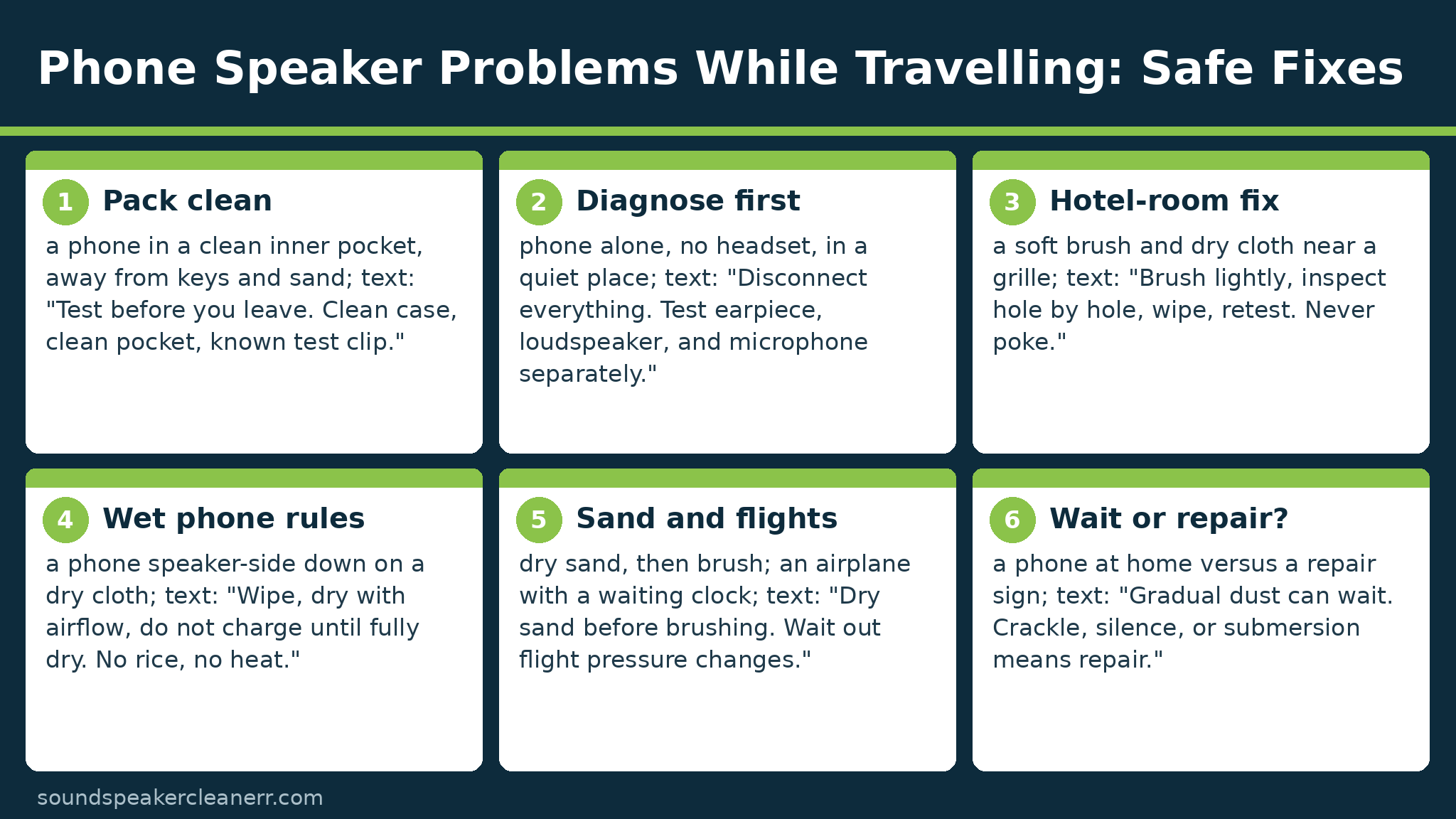
Travelling exposes a phone speaker to pocket lint, bag dust, rain, sand, spills, and pressure changes, often several in one day. Pack the phone clean and protected, test the speaker with a known clip on the road, and fix only what a soft brush, a dry cloth, and patience can fix.
That short answer matters because travellers often reach for the wrong fix at the wrong time: a loud cleaning tone in a quiet hotel room, a pin borrowed from a hotel desk, a hair dryer on a wet phone, or a repair attempt far from home for a problem that was only a blocked grille or a Bluetooth headset left connected. The order in this guide — pack, diagnose, hotel fix, flight check, home decision — keeps each step safe, quiet, and reversible.
Before you leave: pack for the speaker
Speaker protection starts before the trip, and it costs nothing. Clean the phone at home, where you have light, a soft brush, and a dry cloth, rather than discovering a blocked grille on the first day away.
- Test before packing. Play a short voice clip through the loudspeaker and listen to a voicemail through the earpiece. If either already sounds muffled, brush the grille lightly at home and retest. Do not start a trip with a known blockage and hope travel improves it.
- Check the case. Make sure speaker and microphone openings align, the case is clean inside, and no lint ring is trapped around the grille. A case that fits badly muffles sound by itself, and a dirty case carries dust onto the phone all trip.
- Choose a clean, dry pocket. Keep the phone in a clean inner pocket or a clean, dry compartment of a bag — not loose with keys, coins, sand, crumbs, or wet items. A small clean pouch helps only if it is clean and dry inside; a sandy or damp pouch makes things worse.
- Charge and download before leaving. A charged phone with offline maps, music, and tickets needs less fumbling on the road, which means less time with the phone exposed to rain, dust, and drops.
- Know your test clip. Keep one short voice note or song on the phone that you know well. Testing with the same clip all trip makes every comparison honest: you will hear a real change, not a difference between recordings.
If the trip involves beaches, boats, or rain, add a clean, dry inner bag for downpours and wet transfers. The bag is for protection during exposure, not for storage afterward — a phone left sealed in a damp bag stays damp.
On the road: the five-minute diagnosis
When sound goes wrong mid-trip, diagnose before cleaning. Find a quiet place — a hotel room, a parked car, a quiet corner — and work through these steps in order:
- Disconnect everything. Turn off Bluetooth, unplug earphones, and remove the phone from any dock or holder. A headset, earbuds in an open case, or a smartwatch can take over calls and make the phone seem silent or muffled. Play your test clip through the phone alone at a moderate volume.
- Separate earpiece, loudspeaker, and microphone. Listen to a voicemail through the earpiece for ordinary-call sound. Play the clip through the loudspeaker for music and speakerphone sound. Record a short voice note to test the microphone. Each opening has a different job, and each test points to a different opening. If only one mode fails, only that opening is the suspect.
- Separate apps from hardware. Play the same clip in two different apps, or compare stored media with a live call. If one app is quiet but stored media is clear, the app's own volume or settings are the suspect, not the speaker.
- Remove the case and retest. Travel cases collect lint and sand around the grille. If sound improves without the case, clean the case separately and check its alignment before putting it back.
- Check volume and mute settings. Media, call, ringtone, and alarm volumes are often separate, and travel modes, Do Not Disturb schedules, and focus modes can silence calls or notifications. Check each volume in turn before cleaning anything.
If the phone alone sounds clear in a quiet place, the speaker is likely fine. The fault may be a headset, an app, a network, or simply noise in a station, airport, or street. Do not clean a clear speaker.
The hotel-room fix: brush, cloth, and patience
Most travel muffling that is fixable on the road is dust or lint, and the hotel-room fix needs only three things: good light, a clean dry soft brush, and a dry soft cloth. A clean, dry, soft-bristled toothbrush kept for this purpose works; a hotel towel is usually too rough and may leave fibres, so use a soft cloth if one is available, or a clean lens cloth.
Brush the grille lightly, away from the phone, so loosened dust falls away rather than deeper. Inspect hole by hole in good light, because a single blocked hole changes the sound while the rest look clean. Wipe the outside with a dry, soft cloth. Retest with your known clip at a moderate volume. If sound improves, stop there; repeated brushing of a clean grille risks pushing dust deeper.
Do not borrow trouble in a hotel room. Do not use pins, needles, paper clips, tweezers, or any sharp object in the grille. Do not use a hair dryer, a radiator, or direct heat to dry or "clear" the speaker. Do not use compressed air on an iPhone, and on other phones use only short, gentle bursts from a distance if you must — never high-pressure air, which forces dust deeper. Do not pour water into the grille to flush travel dust out, and do not use cleaning sprays or household cleaners on the openings.
A cleaning tone can help only in one narrow case on a trip: moisture near a speaker opening after a minor splash, once the outside is dry. Run one short cycle at a moderate volume, speaker-side down on a dry cloth, and stop if sound does not improve. A tone cannot dry a charging port, remove packed lint, remove corrosion, or repair damage, and repeated loud cycles in a hotel room disturb neighbours without helping. If dust is the problem, brushing — not sound — is the fix.
After a splash, rain, or beach day
Travel adds water in many small ways: rain through an open window, a splash on a boat, a wet jacket pocket, a beach bag, or condensation from air conditioning. Treat any wet phone the same way, wherever you are:
- Disconnect cables and remove the case.
- Wipe the outside with a soft, lint-free cloth.
- Place the phone speaker-side down on a dry cloth in a room with good airflow.
- Do not charge through a wet port. Follow the phone maker's guidance and wait until the device is fully dry before charging or judging its sound.
- Do not use rice, heat, compressed air, or sharp objects. Rice dust can enter ports, and heat can damage seals and components.
Salt water, soapy water, and sugary drinks need extra care. Even after the phone looks dry, residue can stay on the grille and in the port and cause problems later. Wipe the outside promptly, dry fully, and note the exposure for a repair check at home if sound stays muffled or charging behaves oddly. Do not rinse a phone under a tap unless the phone maker specifically says that is safe for your model; a water-resistance rating describes laboratory tests on a new device, not a promise for every splash on a trip.
Sand needs the opposite order from water: dry first, then brush. Brushing wet sand packs it deeper into the grille. After a beach day, let the phone dry fully, shake it gently speaker-side down over a clean surface — never bang it against a hard surface — then brush lightly and inspect hole by hole.
Flights, altitude, and pressure changes
Some travellers notice sound changes after a flight: the earpiece or loudspeaker seems quieter, voices sound distant, or one ear feels blocked along with the phone sounding dull. Pressure changes during flights can affect both ears and a water-resistant phone's sealed openings, and the effect is often temporary.
Wait before cleaning for a flight effect. Give the phone time at ground level, retest with your known clip in a quiet place, and only then consider gentle brushing if dust is visible. Do not clean aggressively for a pressure effect, do not use loud tones repeatedly to "pop" the speaker, and do not judge sound while your own ears are still adjusting after landing — your hearing and the phone's sound can both seem dull for a while. If sound stays muffled hours after landing, with visible dust or a known splash on the trip, treat it as dust or moisture, not pressure.
In-flight rules matter too. Keep the phone in a clean pocket during the flight, not loose in a seat pocket with crumbs and dust, and follow crew instructions about device use. A phone left in a seat pocket is a common source of both dust and loss.
Public transport, streets, and noise confusion
Buses, trains, stations, and busy streets are loud, and loud surroundings make a healthy speaker seem quiet. Before concluding the speaker has failed on a trip, always compare the same clip in a quiet place with the same clip in noise. If the quiet test is clear, the speaker is likely fine, and the answer is a quieter place, a headset used safely, or waiting — not cleaning.
Also check the audio route on public transport. A headset paired for the journey, earbuds in a bag, or a previous Bluetooth connection to a rental car or hotel speaker can claim the audio without you noticing. Confirm the call or media output shows the phone itself before cleaning anything.
What can wait until home, and what cannot
Most travel speaker problems can wait until home if the phone still works for essential calls. Gradual dust muffling, a quiet ringtone caused by settings, a headset routing fault, and a temporary flight effect are all safe to manage on the trip and fix properly at home.
Seek help promptly — at a reputable local repair shop only if you must, otherwise at home — if any of these apply: the speaker crackles or distorts at low volume after brushing; sound cuts in and out when the phone is moved; one speaker mode is silent entirely; the phone was submerged or exposed to salt water; the phone gets unusually hot, restarts, or shows charging failures; or the screen, buttons, or charging behave oddly alongside the sound fault. Continuing to play loud tones through a damaged speaker will not repair it. If the phone is essential for travel — tickets, maps, contacts — back up what you can, keep the phone dry and cool, and use the earpiece or a headset for essential calls rather than forcing the loudspeaker.
When you return home, run the full check once more in quiet conditions: test clip through loudspeaker and earpiece, voice note for the microphone, case alignment, and charging behavior. Note any water or sand exposure from the trip for the repair shop if sound has not fully recovered. That return-home check turns a trip's worth of small exposures into one clear decision: clean, settings fix, or repair.
FAQ
Why does my phone speaker sound muffled on a trip?
Because travel adds pocket lint, bag dust, rain, sand, spills, and pressure changes in quick succession. Diagnose first — phone alone, earpiece versus loudspeaker, apps versus hardware — before cleaning, since headsets and noise also mimic speaker faults on trips.
What can I fix in a hotel room without tools?
Dust and lint, with good light, a clean dry soft brush, and a dry soft cloth. Brush lightly away from the phone, inspect hole by hole, wipe, and retest with a known clip. Do not use pins, hair dryers, or sprays.
Should I use a cleaning tone while travelling?
Only for moisture near a speaker opening after a minor splash, once the outside is dry, as one short cycle at moderate volume. It cannot dry a charging port, remove packed lint, remove corrosion, or repair damage, and it will not fix a dust blockage — brushing will.
Why does sound change after a flight?
Pressure changes can temporarily affect both your ears and a sealed phone's openings. Wait, retest in a quiet place after landing, and only then consider gentle brushing if dust is visible. Do not clean aggressively for a pressure effect.
My phone got wet on a trip. What should I do?
Disconnect cables, remove the case, wipe the outside with a soft lint-free cloth, and let it dry with good airflow, speaker-side down. Do not charge through a wet port, and do not use rice, heat, compressed air, or sharp objects. Follow the phone maker's guidance and wait until fully dry.
Can sand be brushed out while it is still wet?
No. Dry first, then brush. Brushing wet sand packs it deeper into the grille. Let the phone dry fully, shake it gently speaker-side down over a clean surface, then brush lightly.
What if the speaker crackles on a trip?
Stop loud playback and repeated cleaning tones. Crackling at low volume after brushing, sound that cuts in and out when the phone moves, or silence in one mode points to hardware, not dirt. Use the earpiece or a headset for essential calls and seek repair help.
How do I pack a phone to protect its speaker?
Test it before leaving, check case alignment, keep it in a clean dry inner pocket or compartment away from keys, sand, and wet items, and keep a known test clip on the phone for honest comparisons all trip.
Related tools on this site
Related guides on this site
- How to Clean Phone Speakers
- Clean Dust from Phone Speaker
- Clean Ear Speaker
- Phone Speaker Muffled
- Phone Speaker Crackling
- Phone Speaker Volume Low
- Phone Speaker Troubleshooting
- Phone Fell in Water
- Water in Charging Port
- Dry Phone Without Rice
- Phone Speaker After Rain: A Safe Drying Guide
- Phone Speaker After the Beach: Sand, Salt, and Water Guide
Leave a Reply