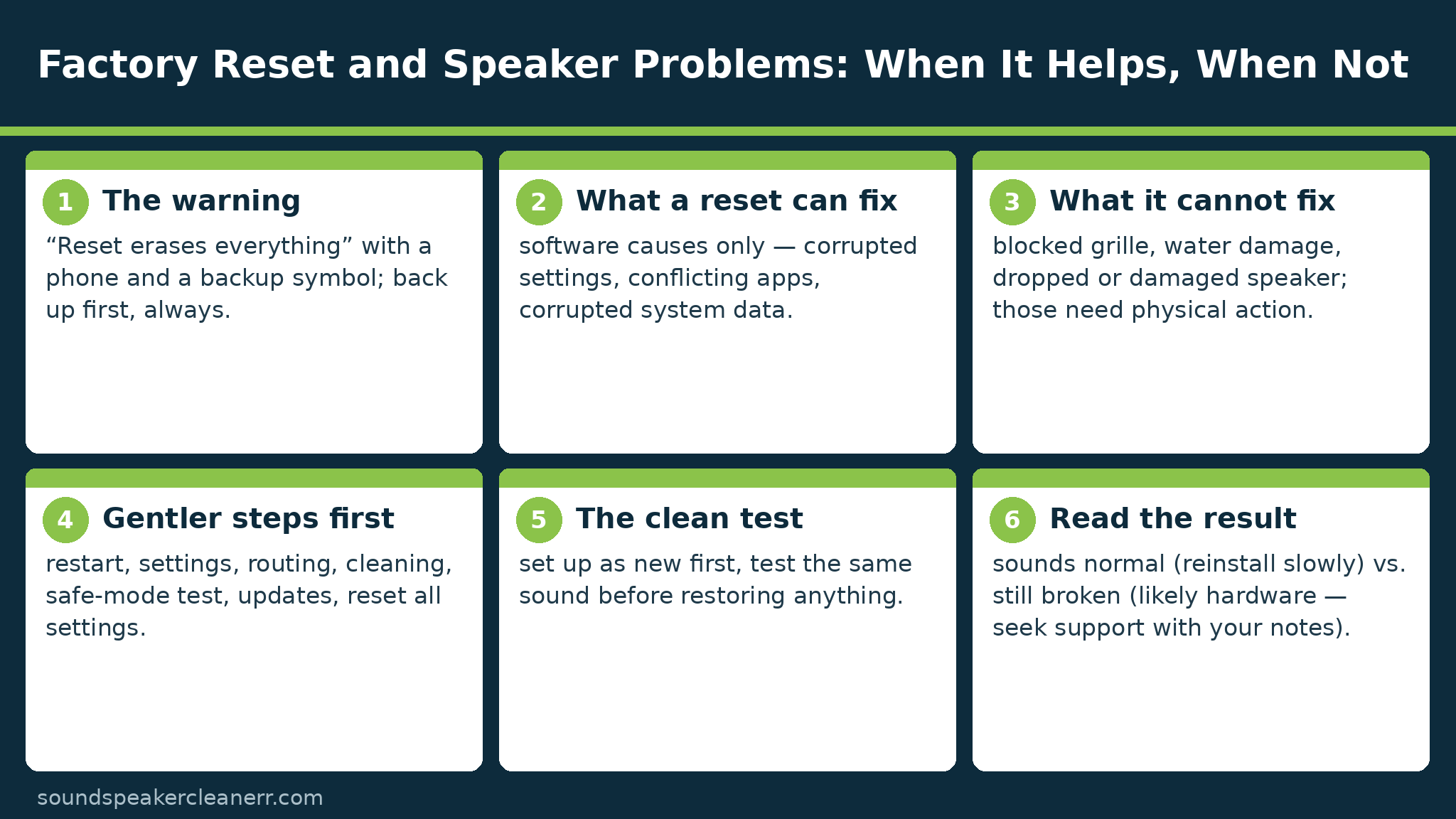
A factory reset helps speaker problems only when the cause is software, and it never fixes hardware damage or a blocked grille. Before you reset anything, back up all your data first, because a factory reset erases your phone completely.
That warning belongs at the top, because a factory reset is the most destructive step in speaker troubleshooting and also one of the most misunderstood. People reach for it when they are frustrated — the speaker crackles, or goes silent, and resetting feels like a fresh start. Sometimes a fresh start does help. But a reset only removes software: apps, settings, accounts, and corrupted system data. It cannot unblock a grille full of lint, dry out a wet phone, repair a blown speaker, or reconnect a loose internal part. If you reset for a hardware problem, you lose your data and keep the problem.
What a factory reset actually does
A factory reset, also called a factory data reset, returns the phone to the state it was in when it left the factory, as far as software is concerned. Personal data, downloaded apps, accounts, settings, messages, photos, and files stored on the phone are erased. The operating system itself is reinstalled or restored to its clean state, and the phone starts again with its initial setup screens.
That is very different from the gentler resets your phone offers. Restarting the phone clears temporary glitches without erasing anything. Resetting all settings restores preferences — sound, display, network, and similar options — to their defaults without deleting your files or apps. Resetting network settings only affects Wi-Fi, mobile, and Bluetooth configurations. A factory reset is the strongest of these, and it should come last, not first.
It is also different from a hardware repair in an important way: after a factory reset, the physical phone is unchanged. The same speaker, the same grille, the same internal parts. If the speaker was damaged before, it is damaged after. This is why the test after a reset is so informative: a problem that survives a proper reset, with the phone set up cleanly, points strongly toward hardware.
When a factory reset can help
A factory reset can help when the evidence points to software. The strongest signals are these.
The problem began after a software update, an app install, or a settings change, with no drop, water exposure, or visible damage. The speaker works in safe mode on Android but not in normal use, and removing recent apps one by one did not fix it. The problem affects sound across many apps rather than one app only, yet the speaker itself looks clean and undamaged. The phone shows other software symptoms alongside the sound problem, such as apps crashing, settings not sticking, or audio routing behaving strangely.
In those cases, something in the software stack may be corrupted or conflicted in a way that ordinary steps cannot clear. A reset removes the whole stack and rebuilds it. That is its real value: not as a magic fix, but as a way to rule software out completely.
Even then, a reset is not guaranteed to help. A corrupted system file can survive in a backup and return when you restore it, which is why the testing method after a reset matters so much, as described below.
When a factory reset will not help
A factory reset will not help — and should not be tried as a fix — in these situations.
The phone was dropped, soaked, or physically damaged. The grille is visibly blocked with dust, lint, sand, or debris. The speaker is distorted at every volume, or silent, in a way that began suddenly after an impact or liquid exposure. The problem affects only one speaker part in a way that matches physical damage, such as a torn or blocked grille. The phone shows swelling, overheating, or other signs of hardware trouble.
In all of these cases, resetting erases your data while the physical cause remains untouched. Worse, it can delay the right action: drying a wet phone properly, cleaning a blocked grille gently, or getting a damaged phone inspected. If any of these apply, skip the reset and deal with the physical cause first.
A reset also will not help if the real cause is a setting you have not found yet — a muted output, a Bluetooth device capturing audio, a mono-audio or balance setting, or a volume limit. Those are fixed by changing the setting, not by erasing the phone. Always rule settings out before resetting.
Before you reset: the backup checklist
Back up first. This is not optional advice; it is the step that protects you if anything goes wrong or if the reset does not help.
First, back up your photos, videos, contacts, messages, and important files to your maker's cloud backup, your computer, or another storage location you trust — ideally two places for anything irreplaceable. Check that the backup actually completed before you proceed; a backup that is still uploading is not a backup yet.
Second, note your accounts and sign-in details. After a reset, the phone will ask you to sign in again, and some phones require the previous account credentials before setup can complete. Make sure you know them, and that any two-step verification method is available to you on another device.
Third, list the apps and settings that matter to you, so you can reinstall deliberately afterward rather than restoring everything at once. This list becomes important in the testing phase: restoring a full backup immediately after a reset can bring the same problem straight back.
Fourth, make sure the phone is charged or connected to power, and that you have time to complete setup. A reset and the setup that follows take a while, and interrupting the process is a bad idea. Do not start a reset late at night on a nearly empty battery.
Finally, write down the speaker symptom in plain words before you reset: which speaker, what it sounds like, when it began, and what you have already tried. You will need that note to judge the result afterward.
Try these gentler steps first
Work through this order before any factory reset. Each step is less destructive than the next, and any of them may fix the problem without erasing anything.
Restart the phone and test the same sound again. Check volume, mute, Do Not Disturb, Bluetooth routing, and audio balance settings. Disconnect Bluetooth and wired audio devices and test the built-in speaker alone. Clean the grille gently with a soft, dry brush or cloth, and remove the case. On Android, run the safe-mode test to check whether a downloaded app is involved, and remove recent apps one at a time if it is. Check for a system software update on the phone's official update screen and install it if one is available. Reset all settings — not all data — and test again.
Only if the problem survives all of those steps, and the evidence still points to software, should a factory reset enter the conversation. If you have not done the safe-mode test or the settings checks, you have not yet earned the reset; you are guessing with your data.
How to reset safely, step by step
If you have backed up and worked through the gentler steps, the reset itself follows your phone maker's path. On most Android phones, it is under Settings, then a section such as General management or System, then Reset, then Factory data reset. On iPhones, it is under Settings, then General, then Transfer or Reset, then Erase All Content and Settings. Menu names vary by maker and software version, so follow your maker's official support page for your exact model rather than guessing at a menu.
Read every confirmation screen before tapping it. The phone will warn you that data will be erased; that warning is accurate. Confirm only when your backup is verified and you are ready. Do not reset a phone that is wet, damaged, or showing swelling — deal with the physical problem first.
After the reset, the phone restarts to its initial setup. Complete the basic setup, but do not restore a full backup yet. This restraint is the key to a useful test, and it is where most people go wrong.
The test after the reset: set up as new first
Test the speaker before restoring your apps and data. Set the phone up as a new device, or at least without restoring a full backup, and play the same sound you tested before, at moderate volume, through the same speaker part.
If the speaker now sounds normal, the problem was software-related, and something in your old setup — an app, a setting, or corrupted data — was behind it. Reinstall apps one at a time, or in small groups, testing the speaker as you go. If the problem returns after a particular reinstall, you have found your culprit, and you can leave it off.
If the speaker still sounds wrong on a clean setup, the problem is very likely hardware, blockage, or damage that software cannot fix. Do not restore a backup and hope it improves; it will not. Record the result and seek manufacturer support or a repair assessment, bringing your symptom notes and the fact that the problem survived a clean reset. That detail is valuable, because it tells the technician that software has already been ruled out.
After a reset that did not help
A failed reset is not a wasted effort, even though it is disappointing. It has given you a clear answer: software is not the cause. The next steps are physical, not digital. Re-examine the grille, consider whether water or dust exposure was underestimated, and stop repeating software steps that have already been ruled out.
Restore your backup only once you have decided on the next step, so that a restored app or setting does not confuse the picture. If the phone needs inspection, keep your symptom notes and the clean-reset result together; they save time and prevent a technician from repeating work you have already done.
Common mistakes to avoid
The most common mistake is resetting before backing up, and discovering afterward that photos or messages are gone. The second is restoring a full backup immediately, which can reintroduce the exact problem the reset removed, making the whole exercise pointless. The third is resetting for a clearly physical problem — a blocked grille or a dropped phone — and losing data for nothing. The fourth is resetting repeatedly: one clean reset is a diagnostic result, but resetting again and again without changing anything else is not a strategy, it is frustration. If one proper reset did not help, the answer lies elsewhere.
A factory reset is a powerful tool precisely because it is so thorough. Used in the right order — backup first, gentler steps first, clean test afterward — it can settle the software question once and for all. Used as a first resort, it costs you your data and teaches you nothing. The difference is not the reset itself; it is everything you do around it.
FAQ
Does a factory reset fix a broken phone speaker?
Only if the cause is software. A factory reset erases software and settings, so it can fix a corrupted setting, a conflicting app, or corrupted system data. It cannot repair a damaged speaker, clear a blocked grille, or dry a wet phone.
Will I lose my photos and files in a factory reset?
Yes. A factory reset permanently deletes personal data, apps, accounts, and settings from the phone. Back up everything important and verify the backup completed before you reset.
Should I try resetting all settings before a factory reset?
Yes. Resetting all settings restores preferences to defaults without deleting your files or apps, so it is a much safer step to try first. Only consider a factory reset if the problem survives that and the other gentler checks.
What should I test after a factory reset?
Test the speaker before restoring a backup. Set the phone up as new, play the same sound through the same speaker part at moderate volume, and compare with your notes. Testing after a full restore can hide whether the reset helped.
My speaker still sounds bad after a factory reset. What now?
The problem is very likely hardware, blockage, or physical damage. Stop repeating software steps, record that the problem survived a clean reset, and seek manufacturer support or a repair assessment with your symptom notes.
Can a factory reset fix a speaker damaged by water?
No. A factory reset changes software only. A wet phone needs to be dried fully following your maker's guidance, and a phone with liquid damage needs inspection. Do not reset a wet phone as a fix for water damage.
Do I need to remove my accounts before resetting?
Follow your phone maker's guidance for your model. At minimum, know your sign-in credentials and have your verification method available, because the phone may ask for the previous account details during setup after a reset.
Is one factory reset enough, or should I reset again?
One proper reset, tested on a clean setup, is enough to answer the software question. Resetting repeatedly without changing anything else will not produce a different result; if the first clean reset did not help, look to physical causes instead.
Leave a Reply