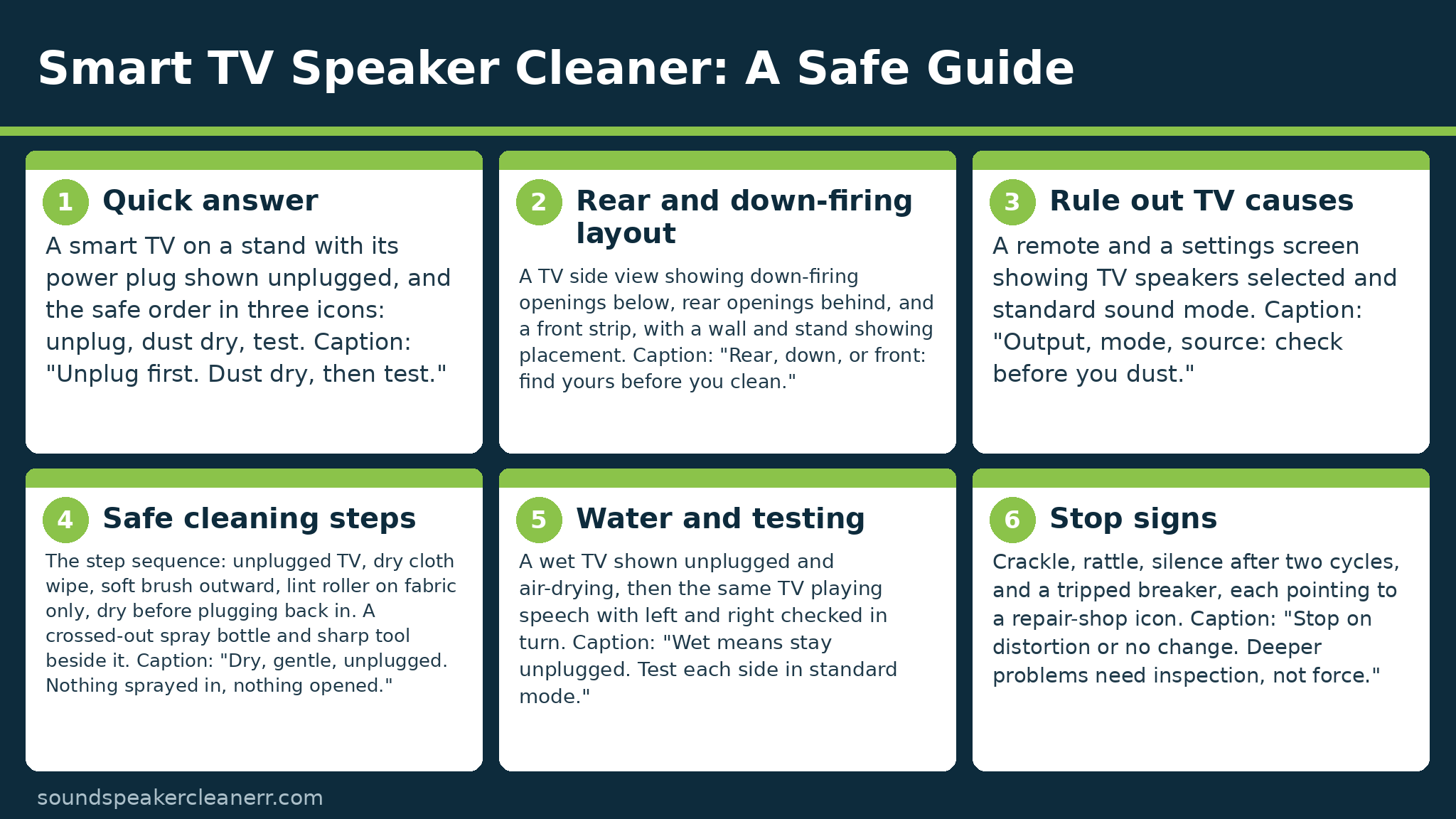
A muffled smart TV speaker is usually a dusty grille, a TV audio setting, or sound going to the wrong output, not a broken speaker. Power the TV off and unplug it before any physical cleaning, find the rear or down-firing openings, and dust them gently with a dry cloth and soft brush.
Test each side separately at a moderate volume, and stop if the sound crackles, rattles, or gets worse. That order matters on a TV. Built-in speakers are often hidden behind, below, or at the back of the screen, where dust collects unseen, and the screen itself is far more fragile than a speaker grille. Rushing in with a wet cloth, a vacuum at full power, or a sharp tool risks the screen, the grille, or the speaker behind it. A careful sequence does more, with less risk, than a forceful one.
Where smart TV speakers actually are
Smart TVs do not share one speaker layout, so start by finding yours. Many modern slim TVs have down-firing speakers: openings on the bottom edge that fire sound downward, where it reflects off the TV stand or wall unit. Others have rear-firing speakers on the back panel, which fire sound backward toward the wall. Some have front-firing speakers below or beside the screen, and a few have speakers hidden behind a fabric strip along the bottom edge. The exact layout varies by brand and model, so check your TV's manual or look carefully at the edges and back before you clean anything.
That hidden layout explains a common confusion. A TV can sound muffled simply because it sits too close to a wall, inside a closed cabinet, or on a soft surface that absorbs down-firing sound. A rear speaker with only a finger-width of space behind it, or a down-firing speaker blocked by a soundbar, a game console, or a pile of cables on the stand, will sound dull even when its grille is clean. Position is part of the diagnosis, not an afterthought.
TV speakers are also different from phone and soundbar speakers in what they are not. The built-in speakers are not the soundbar, even if a soundbar sits in front of the TV. The TV remote, the soundbar remote, and an external speaker system can all control volume and output, and they can disagree. Do not clean a soundbar grille as if it were a TV speaker, and do not clean a TV grille while sound is actually coming from the soundbar. The microphone in a voice remote is a separate opening too: keep it out of speaker cleaning entirely.
Also remember that a wall-mounted TV changes access: rear speakers may be almost unreachable without moving the TV, and moving a large TV alone is unsafe, so do not climb, lean, or pull a wall-mounted TV toward you to reach a rear grille; clean only what you can reach safely, or get help to move the TV properly.
Find which speaker is the problem
Start by looking, not cleaning, and only after the TV is powered off and unplugged if you will touch the back or bottom. Look along the bottom edge, the back panel, and any front strip in good light, using a flashlight if needed for rear openings. Note every grille, slot, or fabric strip you can see, and note any opening that looks caked with dust, pet hair, or cobwebs. Do not poke at them yet; this is only a map.
Next, plug the TV back in and play speech, not music, at a moderate volume. Speech makes a quiet side easier to hear than bass-heavy music. Stand in front of the TV, then move slightly left and right. If one side sounds clearly duller, note which physical side it is. If the whole TV sounds dull, note whether the problem is muffling, thinness, low volume, or distortion, since each points in a different direction.
Check position before you blame dirt. Pull the TV slightly forward on its stand, if it is safe to do so and it is not wall-mounted, and listen again. Move objects away from down-firing openings on the stand. If the sound improves dramatically with more space behind or below the TV, the problem may be placement, not a dirty grille. If one side stays quiet with clear space around it, that side is the suspect.
Rule out the easy TV causes first
Before any cleaning, check six easy causes with the remote. First, output: check the TV audio settings and make sure sound is set to TV speakers, not to a soundbar, Bluetooth speaker, headphones, or an external audio system. Disconnect Bluetooth audio and unplug headphones, then test again. A TV that sounds silent or strange is sometimes simply sending sound elsewhere.
Second, volume and mute: check the TV volume, mute, and any volume limit or night mode. Night mode and similar sound modes deliberately reduce bass and dynamic range, which can sound like muffling. Try the standard or normal sound mode for comparison.
Third, sound mode and equalizer: check whether a movie, music, sports, or custom sound mode, or an equalizer setting, is cutting treble or boosting bass in a way that sounds dull. Reset the sound mode to standard for the test, and note the original setting so you can restore it afterward.
Fourth, source: test with a second source, such as a different channel, app, or HDMI input. If only one app or input sounds quiet, the problem may be that source's own audio, not the TV speakers. A quick source comparison saves a cleaning that was never needed.
Fifth, external devices: if a soundbar, receiver, or game console is connected, check that it is not taking over audio, and test with it disconnected if you can do so safely. A soundbar that is on but silent, or a receiver set to the wrong input, can make TV speakers seem broken.
Sixth, software: check for TV software updates in settings, and restart the TV by unplugging it briefly, if the maker allows that method, then plugging it back in. An audio problem that appears after an update, or that disappears after a restart, is a software problem, not a cleaning problem. If any of these checks fixes the sound, stop there. Cleaning a working speaker will not improve it.
Clean a smart TV speaker, step by step
Work in this order, and stop as soon as the sound is clear. Physical cleaning happens only with the TV powered off and unplugged.
- Power off the TV with the remote, unplug it from the wall outlet, let it cool if it has been on for a long time, remove objects from the stand that block down-firing openings, and get help if the TV needs to be moved.
- Wipe the speaker grille area with a clean, dry, soft microfiber cloth, using light strokes along fabric or across plastic or metal grilles, and do not wipe the screen as part of speaker cleaning.
- Brush outward along the grille with a clean, dry, soft-bristled brush, using light strokes away from the openings.
- For fabric-covered grilles, roll a lint roller lightly across the surface once or twice, stopping if the fabric pulls or snags; do not use it as a substitute for brushing plastic grilles with tiny holes.
- If using a vacuum, use only a soft brush attachment on the lowest suction, held near the grille, not pressed hard against it; skip the vacuum if in doubt.
- Use compressed air only cautiously, if at all: hold the can upright, use short bursts from a distance, and angle air across the grille, not into it, never on a wet TV.
- For sticky residue on plastic or metal grilles only, wipe with a cloth very lightly dampened with distilled water, dry immediately, never wipe a fabric speaker net with a wet cloth, never use alcohol, solvents, or abrasive cleaners, and never spray liquid directly at the grille; let the grille dry completely before plugging the TV back in.
- Plug the TV back in, play the same speech at a moderate volume, and compare with your earlier note; if clear, stop, and if better but still dull, repeat dry dusting once more.
A browser tone is only a brief, moderate-volume test, never a substitute for physical dusting or a repair for a distorted speaker.
What to do after water or a spill
Water changes the order, and a TV is a mains-powered device, so safety comes first. If the TV was splashed, rained on through a window, or had a drink spilled on or near it, do not touch it with wet hands. Power it off with the remote if you can do so safely from dry hands, then unplug it from the wall outlet without touching wet parts. Do not plug it back in, do not charge anything through it, and do not test it until it is fully dry and, if there is any doubt, checked by a qualified technician.
Wipe only the outside with a soft, dry cloth, and let the TV air-dry in a dry place with airflow. Do not use external heat, a hair dryer, or a hot surface to speed drying. Do not run a cleaning tone through a wet TV speaker, and do not assume that sound will dry the inside of a TV. Sound may help move light water near a small phone grille, but it cannot repair liquid damage inside a TV, and it cannot undo corrosion.
If the TV will not turn on, trips a breaker, smells unusual, shows swelling or damage, or had a sugary or salt-water spill, stop. Do not keep testing it. Follow the TV maker's guidance for liquid exposure and seek qualified repair. No drying-time hour figure is given in this guide, because none was verified directly on a maker support site for this draft; follow the maker's current guidance instead.
Test each speaker separately
Testing is what turns cleaning into a result. Play the same speech clip you used at the start, at the same moderate volume, in the same room position, and listen from the front, then slightly left and right. A successful clean should make the previously dull side sound close to the other side, not merely louder overall.
Also test with a program with clear dialogue and some music, because speech alone can hide a rattle or distortion.
Troubleshooting
Quiet on one side only: Recheck audio output, balance if available, and sound mode.
Still muffled after two cycles: The dust may be packed into the grille, the grille may be damaged, or the driver may be at fault.
Crackling or rattling: Stop any tone at once.
Sound comes and goes: Check for a soundbar or Bluetooth device reconnecting and stealing audio, a loose HDMI or optical cable, or an object moving in front of a down-firing opening.
No sound at all: Check mute, volume, output, sound mode, and source before assuming damage.
Worse after cleaning: Stop.
What not to do
Do not use a pin, needle, or sharp tool in a TV speaker grille. Do not use a vacuum cleaner at full suction directly on a grille. Do not spray cleaning liquid, disinfectant, or water into the speaker. Do not use an abrasive cloth, a scouring pad, a hard brush, alcohol, solvents, or paint thinner on a TV speaker. Do not wipe a fabric speaker net with a wet cloth. Do not play a cleaning tone at maximum volume for a long session. Do not open the TV, remove its back panel, or pry off a grille yourself unless you are qualified, and never do so while it is plugged in.
Also do not chase extreme frequencies.
When to seek repair
Seek repair, or contact the TV maker or a qualified shop, if the TV was splashed or submerged, will not turn on, trips a breaker, stays distorted, rattling, or silent after two careful dusting cycles, shows swelling, heat, smell, or a damaged grille, or had a sugary or salt-water spill and still sounds wrong after full drying. Bring your note: which side, which symptom, what you tried, whether position, source, or sound mode changed anything, and whether sound is set to TV speakers or an external device. That note saves diagnostic time and prevents a shop from repeating a dusting you already did carefully.
Conclusion
Smart TV speaker cleaning is mostly diagnosis, then gentle work in the right order: find the rear, down-firing, or front openings, rule out output, sound mode, and source problems, then dust the grille dry with the TV powered off and unplugged. Test each side in standard mode, stop on distortion or no change, and get a speaker that stays muffled checked rather than pushing harder or opening the TV.
FAQ
Why does my smart TV speaker sound muffled?
Most often, dust has caked onto a rear or down-firing grille, or the TV sits too close to a wall, inside a cabinet, or on a soft surface that absorbs its sound. Less often, audio is set to a soundbar or Bluetooth device, a night or custom sound mode is cutting treble, or the speaker itself is damaged. Check output and mode, check position, then dust the grille gently.
How do I find my TV's built-in speakers?
Look along the bottom edge for down-firing openings, along the back panel for rear-firing openings, and along any front strip below or beside the screen. The layout varies by model, so check your manual if you cannot see an opening. Do not assume a soundbar in front of the TV is the TV speaker.
Can I clean TV speakers while the TV is on?
No. Power the TV off and unplug it before any physical cleaning, especially for rear or bottom openings. Plug it back in only to test after the grille is dry. This is a mains-powered device, so unplugging is a safety step, not an optional extra.
Is compressed air safe for TV speakers?
It can be risky if blasted straight into a grille. If used at all, hold the can upright, use short bursts from a distance, and angle air across the grille, not into it. Never use high-pressure air or use it on a wet TV. Most TV grilles can be dusted without it.
Can I use a speaker cleaner tone on my TV?
Only as a brief, moderate-volume test, not as the main cleaning method. A TV's problem is usually dust on a grille, which needs physical dusting with the TV off. Sound does not always remove dust, and it cannot repair a distorted or damaged TV speaker.
What should I do if my TV speaker got wet?
Do not touch it with wet hands. Power it off if safe, unplug it, do not plug it back in or test it until it is fully dry, and seek qualified help if there is any doubt. Do not run a tone through a wet TV, and do not use heat to speed drying. Sound cannot repair liquid damage inside a TV.
How is this different from cleaning a soundbar?
A soundbar is a separate external speaker with its own grille, placement, and remote. This guide covers speakers built into the TV itself, including rear and down-firing openings, TV remote settings, and wall-mount access. Clean the soundbar separately, following its own guide, and check which device is actually producing sound before you clean either one.
When should I stop cleaning and seek repair?
Stop if the sound crackles, rattles, or gets worse, if two careful dusting cycles change nothing, if the TV was splashed or submerged and still sounds wrong after drying, or if it will not turn on, trips a breaker, or smells unusual. Those signs point beyond surface dust.
Leave a Reply