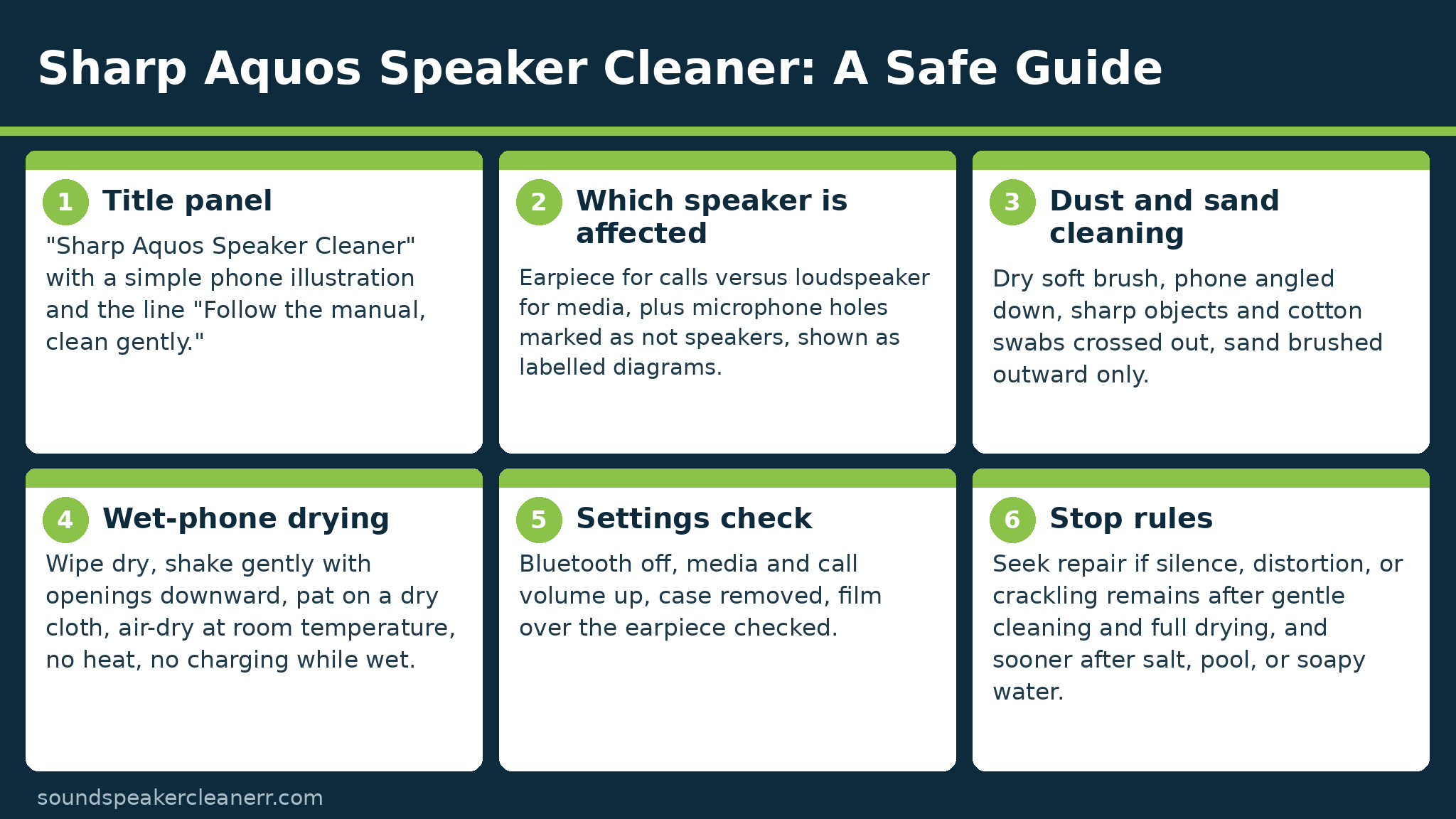
A Sharp Aquos phone speaker usually sounds muffled because dust, lint, sand, or water is blocking a small speaker opening, not because the speaker itself has failed. Start by removing the case and checking whether calls, media, or both are affected, then clean the grille gently with a dry soft brush. If the phone got wet, dry it exactly as its own manual directs where you can find that manual, or by the conservative air-drying steps below, and let it dry fully before charging. If sound stays distorted, silent, or crackling after careful cleaning and drying, stop and seek repair rather than pushing anything into an opening, because Aquos manuals warn explicitly against poking the earpiece, speaker, and microphone.
Which Aquos phones this guide covers, and what the manuals actually say
This is a parent guide for Sharp Aquos phones as a group, and it is written with a caution that other brand guides do not need: many Aquos phones were sold through Japanese carriers, and their manuals carry detailed water and dust warnings that differ from model to model. The manuals found in the 2026-10-28 searches are for specific older carrier models, and this guide cites them by name rather than treating them as a single Aquos rulebook. Where a manual step is quoted here, it belongs to that model. Where your model differs, your own manual wins.
Three manual warnings appear across the Aquos manuals cited above, and they are safe to treat as general Aquos caution, because they repeat in model after model. First, do not poke the microphone, earpiece, speaker, or recorder microphone with a sharp object or a cotton swab, because that may affect water and dust resistance. Second, volume may be low when the microphone, earpiece, or speaker is wet, so dry the handset before judging its sound. Third, sand, dirt, and residue from sea water, pool water, drinks, soap, or detergent should be rinsed off promptly with fresh or tap water in the temperature range your manual states, where your manual states one, because residue left to dry may cause malfunction. Those three warnings shape the whole guide below: no poking, dry before judging, and rinse residue promptly rather than letting it harden.
By contrast, two manual details are NOT generalized here. The AQUOS R compact drying sequence — shake about 20 times with the marked portion downward, pat against a dry cloth, and leave on a dry cloth for approximately 2 to 3 hours at room temperature — is that model's procedure, not a promise for every Aquos phone. Likewise, the fresh-or-tap-water range of 5 to 35 degrees Celsius appears only in the manuals that state it. No other Japan-market feature, carrier service, or region setting is claimed in this guide, because none was verified.
Speaker placement varies by model: some Aquos phones have a bottom loudspeaker only, some add a second speaker, and every phone has a separate earpiece near the top for calls, plus small microphone openings that are not speakers. Before cleaning, find each opening on your own phone in good light. A blocked earpiece makes calls sound faint while music sounds normal, and a blocked loudspeaker does the opposite.
Menu names vary by model, carrier software, and Android version, and a Japan-market Aquos phone may also show carrier-specific menus or Japanese-language labels that differ from an international Android phone. This guide therefore describes what to check — media volume, call volume, Bluetooth routing, and mute or do-not-disturb settings — rather than giving one exact tap sequence that may not match your phone. If a label on your phone differs, follow the label that matches the idea, and use your model's manual or carrier help page for the exact path.
First, diagnose before you clean
Play the same music track and then make or receive a short call, both at a moderate volume, and note what sounds wrong. Remove the case and test again before cleaning anything. A thick case, a case with a misaligned cutout, or lint trapped inside a case can block a grille and make a healthy speaker sound quiet. If sound improves without the case, the case was the problem. Try a different audio source as well. If only one app sounds muffled, that app's own volume or audio setting is more likely than a blocked speaker.
Check the simple causes next. Media and call volumes are separate on Android, so turn both up for testing. Disconnect Bluetooth headphones, earbuds, and speakers, because audio routed to another device makes the phone speaker seem dead. Check that no mute or do-not-disturb setting is suppressing the sound you are testing. Restart the phone after these checks. A restart clears temporary audio routing glitches, including audio stuck on a previous Bluetooth device, and gives you a clean comparison after cleaning. If sound improves after a restart or a software update, the cause may have been software rather than debris.
Dust, lint, and sand: the safe cleaning sequence
For a dry Aquos phone, power it off or stop all audio, then hold it with the grille angled downward so loosened dust falls away from the phone rather than deeper into it. Brush lightly across the grille with a clean, dry, soft-bristled brush, such as a soft toothbrush kept only for this job, using short outward strokes and almost no pressure. Wipe with a dry microfiber cloth and inspect the grille in bright light. Do not insert pins, needles, paper clips, cotton swabs, or any pointed object into the openings. Aquos manuals warn against poking the earpiece, speaker, and microphone for a specific reason beyond mesh damage: on a water-resistant model, poking can affect the water and dust resistance itself, so the cost of a slip is higher than on a non-resistant phone.
Sand needs extra patience. Aquos manuals warn that sand may penetrate the earpiece or speaker and cause low volume, and that sand, dirt, and residue should be rinsed off completely before use where the manual directs a rinse. For dry sand on the surface, brush gently outward first and inspect before doing anything else. Do not blow hard with your mouth, which adds moisture, and do not use a high-pressure air gun. If you use canned air at all, hold the can upright, keep it at a distance, and use short bursts only, aimed across the grille rather than straight into it. Stop if debris visibly moves inward rather than out. If sand grains remain lodged after gentle brushing, leave them for a professional rather than digging them out, since a grain pushed deeper can damage the mesh and affect resistance.
Stay dry for a dusty grille, except where your own manual directs a rinse for residue. Do not pour or spray liquid into a speaker opening as a routine cleaning step, and do not use chemical cleaners on the grille. A lightly damp cloth may be used on the phone's outer surface, but not pressed over a speaker opening, and never put a cloth or swab into an opening, as the AQUOS R compact manual warns. If a sticky residue remains after dry brushing, and your manual directs a prompt fresh-water rinse for that kind of residue, follow your manual's rinse instruction and then dry fully by the steps below. If your manual gives no such instruction, pause and consider professional cleaning rather than improvising a rinse at home.
If the phone got wet: dry first, test second, following the manual pattern
Water changes the order completely. If your Aquos phone got wet, do not charge it, do not plug anything into the port or jack, and do not play loud sound through it while it is still wet. The Aquos manuals cited above are explicit on this point: never charge a handset while it is wet, and do not use a jack while it is wet or obstructed by sand or dirt. Wipe the outside with a soft, dry cloth, remove the case, and dry every opening the manual names — earpiece, speaker, microphone, connection jack, and earphone jack — not just the loudspeaker you noticed.
The AQUOS R compact manual's drying sequence, cited above for that model, is a useful pattern for what careful drying looks like: wipe the handset surface with a dry cloth, hold the handset firmly by its sides and shake it about 20 times with the marked portion downward to drain water from all holes and gaps, pat it against a dry cloth to remove moisture from openings and grooves, and leave it on a dry cloth for approximately 2 to 3 hours at room temperature. If your own model's manual gives a different sequence or time, follow yours. If you cannot find your manual, use the conservative version of the same pattern: wipe dry, shake gently with openings downward while holding the phone firmly, pat against a dry cloth, and leave it on a dry cloth at room temperature with good airflow until it is fully dry, inside the ports as well as on the surface, before charging or judging the speaker. Do not use a hair dryer, a heater, or an oven, do not put the phone in rice, and do not use the phone in wet conditions while it is still drying, since the R compact manual warns that calls may fail and moisture may transfer or short-circuit a jack.
This guide gives no water-resistance rating across Aquos models and no universal drying hour figure, because neither was verified across Aquos models for this guide. The 2 to 3 hour figure above belongs to the AQUOS R compact manual only. Use the general rule instead where your manual is unavailable: the phone must be fully dry before charging or judging the speaker, and if your own model's official guidance gives a specific drying instruction, follow that instruction. If the phone was exposed to salt water, pool water, soap, detergent, or drinks rather than clean fresh water, rinse promptly only if your manual directs it, using fresh or tap water in the range your manual states, and seek professional advice sooner, because residue from those liquids can cause corrosion and malfunction even after the phone feels dry.
Only after full air-drying should you try a sound check at a moderate volume. A browser-based speaker tool can play a low tone that vibrates the speaker, and that vibration may help move remaining droplets near the grille. Treat this honestly: it may help with loose surface water, it does not guarantee that all water is ejected, and it cannot repair internal water damage. Run a short cycle at a moderate volume, pause between cycles, and stop if you hear crackling, distortion, or silence. Those sounds after full drying point to damage, not to a need for louder sound.
Settings checks that are often mistaken for damage
Before concluding that a speaker is broken, work through the settings that mimic a speaker fault. Confirm Bluetooth is off or disconnected from other audio devices. Confirm media, ring, and call volumes separately. Check that no silent or do-not-disturb mode is active, and check the in-app volume of the app you are testing. Check audio balance if your phone offers it, since a balance slider pushed to one side can mimic a one-sided fault. Also check the earpiece area for a screen protector or film covering it, since a misaligned film can muffle calls while leaving music untouched. Realigning or replacing that film is simpler than any cleaning step.
On a Japan-market Aquos phone, also check for a carrier-specific sound setting that may route audio differently, if your phone shows one, and compare the symptom with it on and off. If your phone's menus are in Japanese and you cannot identify a setting, do not change settings at random; use your model's manual or carrier help page.
When cleaning is not the answer
Stop home cleaning and seek professional or manufacturer support if the speaker is completely silent after drying and a restart; if sound is distorted or crackling at normal volume after gentle cleaning; if the phone was submerged, exposed to salt, pool, or soapy water, or shows condensation under the screen; if the phone will not power on, charges abnormally, or smells of burning; or if a grille is dented, torn, or pushed inward. Sound tools and dry brushing can move loose surface debris and surface water. Neither can fix a torn mesh, a damaged driver, corrosion, or a loose internal connection, and neither can restore water and dust resistance once it has been affected. Continuing to play loud tones into a damaged speaker can make the damage worse, so a persistent fault after careful cleaning is information, not a reason to try harder with the same method.
Prevention follows the manuals' own warnings. Keep the phone out of heavy rain and off sand where possible, do not use it in a bath, pool, or sauna, and do not expose it to soap, detergent, or hot water. Use a case whose cutouts line up with your model's speaker openings, and check each opening in good light occasionally rather than waiting until sound fades.
FAQ
Why does my Sharp Aquos phone speaker sound muffled?
Most often, dust, lint, sand, or water is blocking an opening, or a thin film of water is sitting across the mesh after a splash. Clean gently with a dry soft brush for dust, or dry the phone fully by its manual's pattern for water, then retest. If sound stays muffled after both, check settings, the case, and the earpiece-versus-loudspeaker distinction before concluding the speaker is broken.
Can I poke a cotton swab into my Aquos speaker opening?
No. Aquos manuals warn against putting a cotton swab, cloth, or pointed object into openings, because that may affect water and dust resistance as well as damage the mesh. Use only a dry soft brush and a dry microfiber cloth on the surface, and leave stubborn blockages to a professional.
My Aquos phone got wet. Should I charge it right away?
No. Never charge a handset while it is wet, and do not use a jack while it is wet or obstructed. Wipe the outside, drain openings downward, pat against a dry cloth, and let the phone dry fully at room temperature first. If your model's manual gives a specific drying sequence, follow that sequence.
What drying steps does the AQUOS R compact manual give?
For that model, the manual directs wiping with a dry cloth, shaking about 20 times with the marked portion downward to drain water from holes and gaps, patting against a dry cloth, and leaving the handset on a dry cloth for approximately 2 to 3 hours at room temperature. That sequence belongs to that model; follow your own model's manual where it differs.
Why are calls quiet but music sounds normal?
Calls use the earpiece and media uses the loudspeaker, so a blocked earpiece or a screen film covering it makes calls faint while music stays clear. Check the top earpiece area, the film alignment, and call volume separately from media volume.
Can a speaker cleaner tone repair my Aquos speaker?
No. A short tone at a moderate volume, after full drying, may help move remaining surface droplets near the grille, but it does not guarantee water ejection and cannot repair a damaged driver, corrosion, or internal water damage. Persistent distortion or silence after drying is a repair question.
What if my Aquos phone was in sea water, pool water, or soapy water?
Rinse promptly only if your manual directs it, using fresh or tap water in the range your manual states, because residue left to dry may cause malfunction. Then dry fully and seek professional advice sooner than for a clean fresh-water splash, since residue can cause corrosion even after the phone feels dry.
When should I take my Aquos phone to a repair shop?
When the speaker stays silent, distorted, or crackling after gentle cleaning, full drying, a restart, and a settings check, or when the phone was submerged, exposed to salt, pool, or soapy water, shows condensation, or will not charge normally. Bring your model's manual if you have it, since the shop will need the exact model's warnings.
Related tools on this site
Related guides on this site
- Phone Speaker Muffled
- Clean Dust from Phone Speaker
- How to Clean Phone Speakers
- How to Clean Your Phone Without Damaging It
- Phone Fell in Water
- Water in Charging Port
- Phone Speaker Troubleshooting
- Fix Speaker Android
- Phone Speaker Volume Low
- Does Speaker Cleaner Work?
- IP67 vs IP68: What Water Resistance Really Means for Your Phone
- Dry Phone Without Rice
Leave a Reply