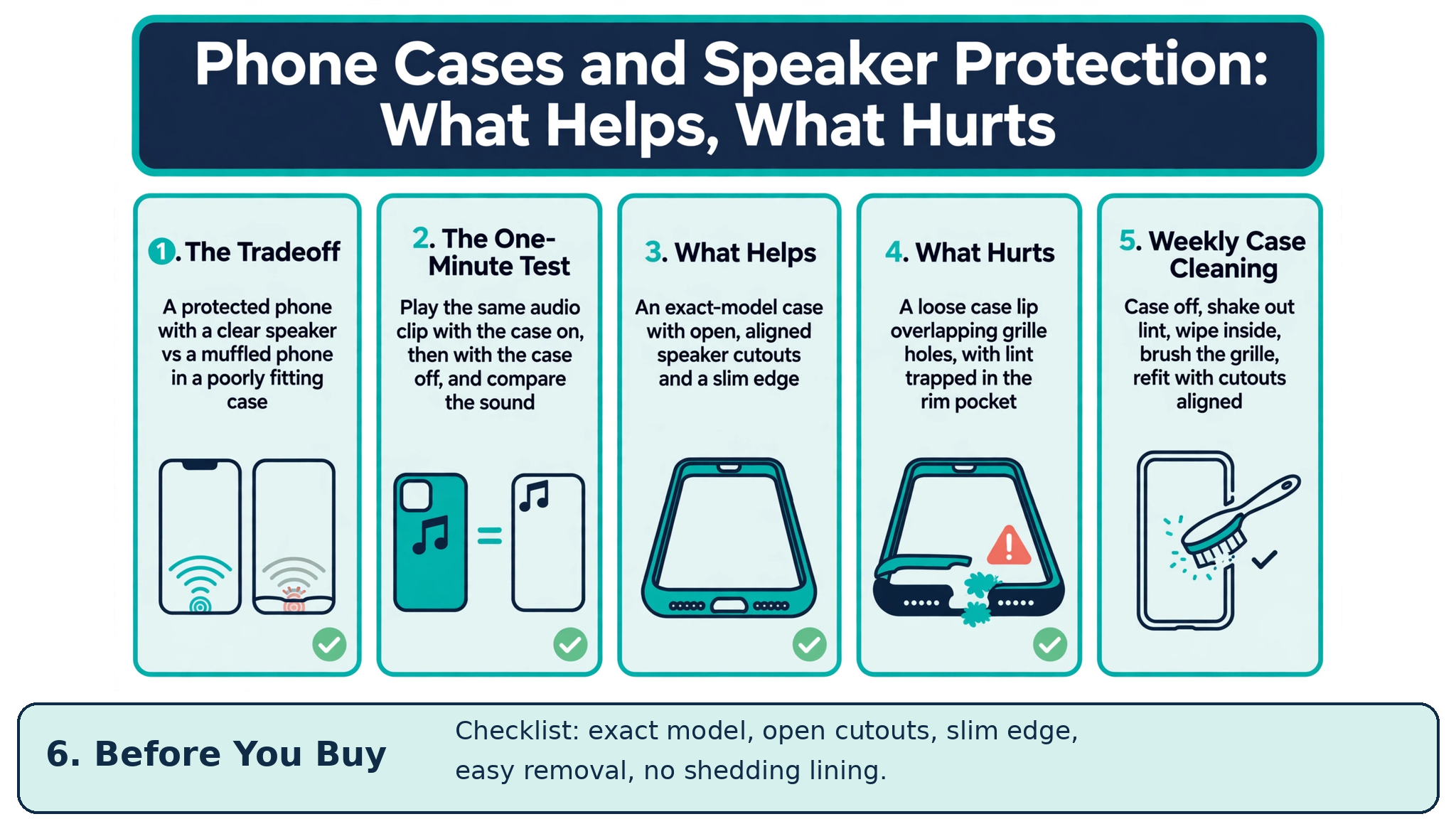
A phone case can protect your speaker, or it can be the reason it sounds muffled. A well-fitting case keeps lint and grit away from the grille and absorbs drops that might otherwise damage the speaker assembly. A loose, wrong-model, or badly cut case overlaps the speaker holes, traps lint against them, and absorbs sound before it reaches your ears. The difference is usually visible in seconds, once you know where to look.
How a case can muffle a speaker
Phone speakers work through small openings: the loudspeaker grille at the bottom edge and the earpiece slot at the top. Sound has to pass through those openings, and anything covering them changes the sound. A case muffles a speaker in three common ways.
First, direct overlap: the case edge or lip sits across part of the grille, physically blocking holes. Second, a pocket effect: the case rim forms a shallow well around the grille where lint and dust collect and sit against the openings. Third, material absorption: thick, soft material around the speaker area soaks up some sound energy, softening volume and clarity, especially for voices on speakerphone.
None of this means cases are bad for speakers. It means the fit and the cutouts matter more than the case style, and a case that fits poorly is worse for sound than no case at all.
The one-minute case test
If your speaker started sounding muffled after you fitted a new case, test the case before anything else. It takes under a minute and it prevents a lot of unnecessary cleaning:
- Play a short spoken-word clip at a comfortable volume with the case on, and note how clear it sounds.
- Take the case off and play the same clip at the same volume.
- If sound is clearly better without the case, the case is the problem — or a major part of it.
- If sound is the same with and without the case, the problem is dust, moisture, settings, or the speaker itself, not the case.
Test both the loudspeaker and the earpiece: make a brief call or play audio through the earpiece, then through the loudspeaker. A case usually affects the bottom loudspeaker most, but a case lip or a misaligned top edge can also sit near the earpiece.
What helps: the signs of a speaker-friendly case
A case that protects without hurting sound usually has these traits:
- Made for the exact model. Cutouts line up with that phone's speaker holes, buttons, microphones, and charging port. "Universal" or near-fit cases are the most common cause of partial grille coverage.
- Open, clean speaker cutouts. The openings over the speaker are clear holes, not a thin membrane, a flap, or a decorative mesh that was never designed for sound.
- A slim edge around the grille. The rim near the speaker is not so thick or raised that it forms a lint trap around the openings.
- Easy removal. You can take the case off weekly to clean underneath it. A case that is hard to remove tends to stay on for months, hiding whatever has collected.
- No loose lining shedding fibers. Some soft inner linings shed fluff directly onto the grille. If the inside of your case leaves fibers on the phone, it is working against you.
A case does not need to be expensive or rugged to meet these tests. Fit and cutouts matter far more than price or style.
What hurts: case problems to watch for
Watch for these warning signs, whether you are diagnosing a current case or shopping for a new one:
- Overlapping lips. The case edge crosses even one or two speaker holes. Partial coverage is enough to muffle sound noticeably.
- Wrong-model fit. A case for a similar-looking model with the speaker in a slightly different place will misalign every cutout, not just the speaker.
- Swollen or warped edges. Heat, age, or a loose fit can warp a case so a once-aligned cutout drifts over the grille.
- Built-up lint under the rim. If removing the case reveals a ring of lint around the speaker area, the case has been collecting debris against the grille.
- Screen protectors and add-ons drifting. Edge protectors and some full-coverage screen protectors can shift over time and sit near the earpiece, affecting call sound even when the case itself is fine.
If you find any of these, the fix is usually simple: replace the case with an exact-model one, or trim nothing yourself — cutting a case at home leaves rough edges that shed and can still overlap the grille.
Cases and drop protection: the genuine benefit
It is worth stating the other side plainly. A good case genuinely protects the speaker, just indirectly: it absorbs the shock of drops that could otherwise loosen or damage the speaker assembly, and it keeps the phone's edges and grille away from gritty surfaces when the phone is set down. A phone dropped grille-first onto concrete without a case risks more than a scuff; a case turns that impact into something the speaker usually survives.
The tradeoff is therefore not "protection versus sound" in general. It is "a fitting case versus a poorly fitting case." A fitting case gives you both. A poor one gives you neither, because it muffles sound while also fitting loosely enough to protect less well in a drop.
Cleaning the case as part of speaker care
A case that is never cleaned becomes part of the dust problem. Make case cleaning part of the weekly routine:
- Remove the case and shake out loose lint.
- Wipe the inside of the case, especially around the speaker cutouts, with a dry microfiber cloth.
- Brush the phone's speaker grille lightly with a dry soft brush, holding the phone grille-down so dust falls away.
- Check the cutouts still line up before putting the case back on.
If the case interior is sticky, gritty, or shedding material, wash it only if the case maker says it is washable, and let it dry completely before refitting. A damp case traps moisture against the phone, which is worse than dust.
Special cases: rugged, wallet, and waterproof designs
Rugged cases, wallet cases, and waterproof cases each add their own speaker tradeoff. Rugged cases add thick material around the edges, which is good for drops but can deepen the pocket effect around the grille — check the cutouts extra carefully. Wallet cases with flaps can fold over the speaker during calls if the flap is not secured, so test sound with the flap in its normal use position, not just with the case open on a table.
Waterproof cases are a separate category with a bigger sound effect, because a sealed layer sits over the speaker by design. If you use one regularly rather than only near water, expect some muffling and test calls and speakerphone before relying on it for important conversations. A companion guide covers waterproof cases and speaker sound in detail.
Choosing your next case: a short checklist
Before buying, run through this list:
- Is it made for my exact phone model, not a similar one?
- Are the speaker cutouts open holes that match my phone's grille position?
- Is the edge around the speaker slim, not a deep rim?
- Can I remove it easily for weekly cleaning?
- Does the inner lining shed fibers?
- If it is a waterproof or rugged design, have I tested how it sounds on a call?
If a seller cannot show a clear photo of the speaker cutouts, treat that as a warning sign. A case maker confident about sound will show the cutouts, not hide them.
When the case is not the problem
If the one-minute test shows no difference with the case off, do not keep swapping cases. Move on to the real cause: dust compacted in the grille, moisture, a blocked earpiece, audio settings, a Bluetooth device still connected, or speaker damage. Cleaning gently, checking settings, and testing with Bluetooth disconnected will narrow it down faster than buying another case. And if sound stays muffled, crackly, or distorted after gentle cleaning, get the phone inspected rather than repeating aggressive cleaning that risks the grille.
A case should be the easiest part of phone audio to get right. Fit it correctly, keep it clean, test it when sound changes, and it will protect your speaker instead of silencing it.
FAQ
Can a phone case really make the speaker sound muffled?
Yes. A case that overlaps the speaker holes, traps lint against the grille, or uses thick sound-absorbing material around the openings can muffle sound noticeably. Removing the case and comparing the same audio clip is the fastest way to confirm it.
How do I test whether my case is blocking the speaker?
Play a short spoken-word clip at a comfortable volume with the case on, then take the case off and play the same clip at the same volume. Clearly better sound without the case means the case is blocking or muffling the speaker.
Should I buy a case without speaker cutouts for better dust protection?
No. A case without open speaker cutouts blocks sound by design. Dust protection should come from a fitting case with clean cutouts plus a weekly brush, not from sealing the speaker holes shut.
Do rugged cases hurt speaker sound more than slim cases?
They can, because thicker edges deepen the pocket where lint collects around the grille. A rugged case with precise, open cutouts can still sound fine, so check the cutouts rather than judging by thickness alone.
Does a wallet case flap affect the speaker?
It can, if the flap folds over the speaker during calls or media playback. Test sound with the flap in its normal position during use, not just with the case lying open.
How often should I clean under my phone case?
About once a week. Remove the case, shake out lint, wipe the inside around the speaker cutouts with a dry microfiber cloth, and brush the grille lightly before refitting.
What if my speaker still sounds muffled without the case?
Then the case is not the cause. Check for compacted dust, moisture, audio settings, or a connected Bluetooth device, and clean gently. If muffling persists, get the phone inspected rather than cleaning harder.
Can I cut a bigger speaker hole in my case myself?
It is not recommended. Home cutting leaves rough edges that shed material and may still overlap the grille. A replacement case made for your exact model is safer and usually sounds better.
Leave a Reply