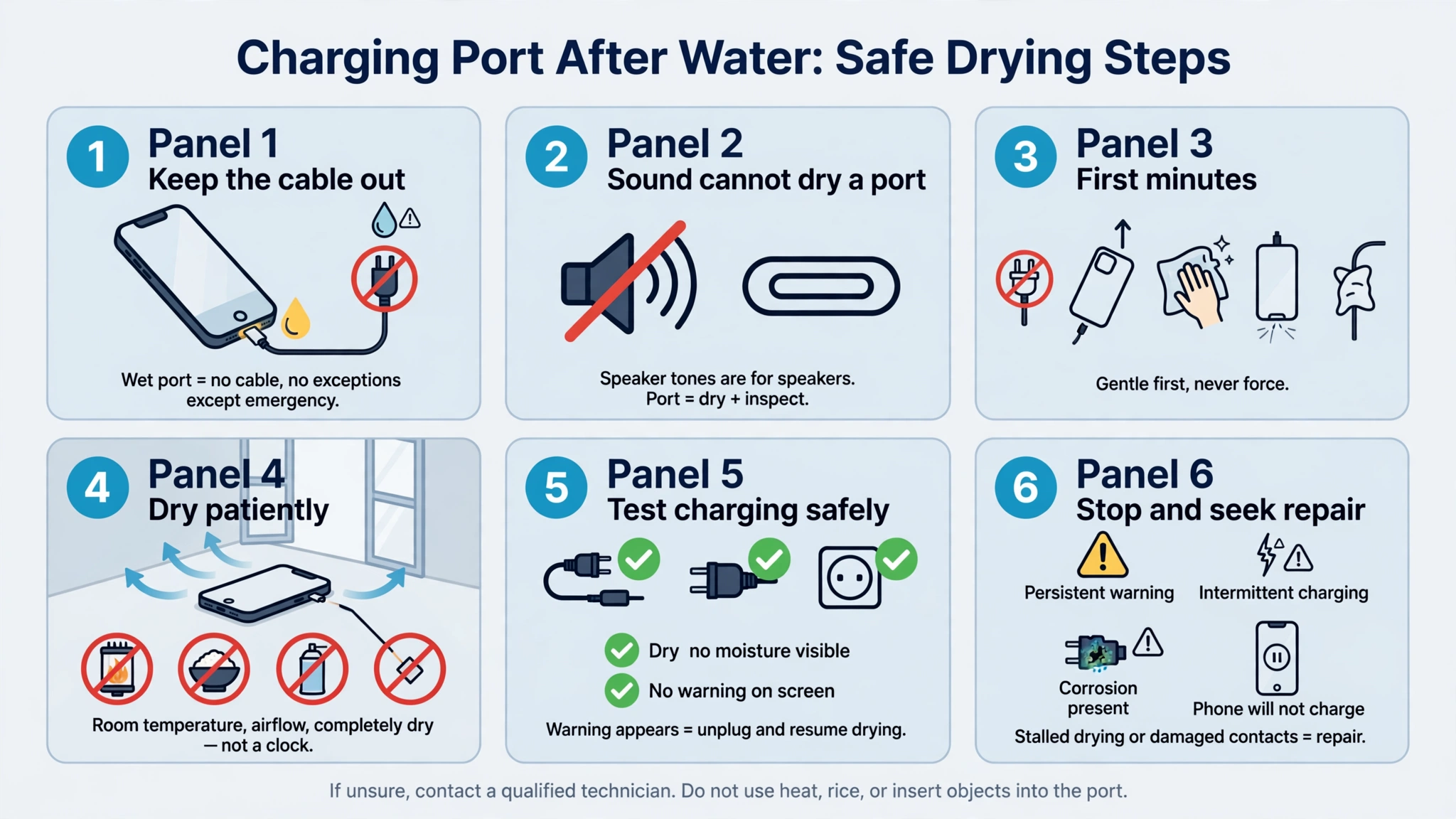
If your phone's charging port got wet, keep every cable out until the phone and the port are completely dry. Unplug, wipe the outside with a soft cloth, hold the phone port-down and tap it gently, then air-dry it in a ventilated place. Sound does not dry a charging port — no speaker tone or vibration reaches into it — so do not rely on a tone to make charging safe; rely on drying, inspection, and the phone's own liquid warning.
That warning is worth stating plainly because it contradicts a tempting shortcut. Speaker-cleaner tones move a speaker driver, which moves air in front of a speaker grille. A charging port is a separate opening with electrical contacts inside, and the speaker driver cannot reach into it. Playing a tone may make the loudspeaker vibrate, but it does not dry the contacts, and it can create a false sense that the port is ready when it is still wet. Charging a wet port risks corrosion of the pins on both the phone and the cable, and in some cases permanent damage — which is why the safe rule is simple: dry first, charge later, and let the phone's warning overrule your impatience.
First steps in the first minutes
Act quickly but gently. Unplug any charging cable and remove any wired accessory immediately, and take the case off, because a case can trap water against the port. Wipe the outside of the phone with a soft, lint-free cloth, including around the port opening, without pushing cloth, tissue, or any material into the port. Hold the phone with the charging port facing down and tap it gently against your palm a few times so gravity can help loose drops leave. Do not shake it violently.
Check the cable end too. If the cable connector is wet, wipe it dry with a soft cloth and set it aside to dry separately; a wet cable plugged into a dry phone, or a dry cable plugged into a wet phone, defeats the drying you just did. Do not try a different cable "just to see if it works" while the port is still wet — that test is itself the risky action.
If the phone will not turn on, shows swelling or heat, was submerged for a long time, or shows damage to the port, stop here and follow your phone maker's guidance for liquid exposure, including seeking inspection. This guide is for a phone that is otherwise working but has a wet port and a charging-safety question — not for a phone with signs of internal liquid damage.
How to dry the charging port safely
Drying is slow, and the port is slower than the outside of the phone. Leave the phone in a dry area with airflow at room temperature, with the port facing down where practical, so any remaining moisture can drain and evaporate rather than pool against the contacts. The outside of the phone can feel dry while the inside of the port is still damp, because the port is a sheltered recess. Judge dryness by inspection and by the phone's warnings, not by touching the screen or the back.
Cool air from a fan at a distance can help ventilation, but do not use a hair dryer, radiator, oven, or direct sunlight, and do not use compressed air into the port. Heat can damage seals and components, and compressed air can push water deeper into the port or against the contacts. Do not put the phone in rice: rice particles and starch dust can enter the port and add to the blockage, and rice does not reliably dry the inside of a sealed phone. Do not insert cotton swabs, paper towels, tissues, pins, or any object into the port to soak up water; objects can bend the contacts, leave fibers behind, or push water deeper. Maker guidance for a wet connector stops at wiping the exterior with a soft cloth and inspecting it — it does not ask you to clean inside the port yourself.
Do not open the SIM tray to "let the port dry" while the phone is still wet, unless your maker's guidance tells you to. Opening trays while wet can let water travel further inside. Leave the phone alone to dry, and resist checking it every few minutes by plugging in a cable: each premature cable test reintroduces the risk you are trying to avoid.
How long drying takes depends on how much water entered, which liquid it was, and how humid the room is, so this guide gives no fixed hour count as a charging clearance. A light splash on the outside may clear relatively quickly; submersion, or a liquid warning that keeps returning, means a longer wait. Follow your maker's guidance and the phone's own warnings rather than a clock. In particular, no specific Apple hour figure is stated here, because third-party summaries of Apple guidance differ by situation, and any such figure should be verified on the maker's own support page before it is quoted. The principle that matters is not a number: completely dry, warning cleared, then charge.
Salt water, pool water, and sugary drinks are different
Clean tap water or rain usually leaves nothing behind once it evaporates, so a port wet with clean water often recovers fully with drying alone. Salt water, pool water, and sugary drinks are different: as the water evaporates, salt, chlorine residue, or sugar can stay behind on the contacts, and that residue can keep interfering with charging after the port feels dry. Sweat and soapy water can leave a similar film.
If your phone is water-resistant and your maker's guidance allows a brief fresh-water rinse after salt or pool exposure to remove residue, follow that guidance exactly — rinse only as the maker describes, then dry fully as above. Do not improvise a rinse on a phone that is not rated for it, do not soak the phone, and do not pour liquid into the port to "wash" it. If charging problems persist after full drying following salt, pool, or sugary exposure, that is a professional-inspection question, not a reason to scrub inside the port at home. Tell the shop what liquid it was; that detail changes what they need to check.
When is it safe to charge again?
Charge again only when three conditions are all true: the phone and the port are completely dry, a visual inspection shows no visible moisture or debris in the port, and no liquid warning appears when you connect a cable. If any one of those fails, keep waiting. A phone that charges once without a warning is not proof the port is fully dry if moisture is still present in a sheltered corner — but a warning that appears is definite proof it is not ready, and you should unplug immediately and resume drying.
Wireless charging can be a temporary option on some phones because it does not use the wet contacts — but only once the back of the phone is dry and your maker's guidance allows it. It does not dry the port or clear a port warning, so port drying is still required, and do not use it if the phone shows heat or swelling.
In a genuine emergency, some phones allow overriding a liquid warning to charge with a cable. That override exists for emergencies, not for convenience, and it carries the corrosion and damage risk described above. If you are not in an emergency, do not use it. If you are, understand that you are accepting that risk, and let the phone dry completely afterward before normal charging resumes.
How to test charging safely
Test in stages, with known-good accessories. First, inspect the port with a bright light: look for visible moisture, debris, or discoloration, and look at the contacts if you can see them without inserting anything. If you see moisture, keep drying. If you see packed lint that was already there before the water, do not try to dig it out of a wet port — that is a separate, dry-port job, and mixing it with a wet port risks pushing wet lint against the contacts.
When the port looks dry and no warning is present, connect a known-working cable, adapter, and wall socket — not a cable you suspect is faulty — and watch for a normal charging indicator. If charging starts normally and stays normal, the port has passed its first test, but keep an eye on it for the next few charges: intermittent charging, charging only at one angle, or a cable that will not seat fully can all point to residue or debris that drying alone did not clear.
If a liquid warning appears when you connect, unplug at once and resume drying with airflow. Do not override the warning repeatedly to "test" whether it has cleared; each override attempt while wet is a charging attempt while wet. If the warning keeps returning after a long drying period, or if charging stays intermittent after the port is dry, seek inspection. The port may need professional cleaning or repair, and repeated home attempts will not fix contacts that are corroded or bent.
Also test speaker and microphone separately if the same splash wet them; fixing the port does not automatically fix them.
What not to do
Do not play a speaker-cleaner, water-eject, or dust-sweep tone to dry a charging port. It does not reach into the port, and relying on it risks charging while wet. Do not charge with a cable while the port is wet, and do not override a liquid warning except in a genuine emergency. Do not use heat, rice, compressed air into the port, liquids inside the port, or any object inserted into the port to soak up water or dig out debris while it is wet. Do not blow hard into the port with your mouth; breath moisture adds water to a wet-port problem. Do not use a wet or damaged cable to test a drying port.
Do not clean a wet port as if it were a linty port. Lint removal belongs to a dry port, with its own careful method, and only after the water problem is resolved. Mixing the two — digging at wet lint — can push wet debris against the contacts and turn a drying job into a repair job.
Troubleshooting
Liquid warning appears, port looks dry: Trust the warning. The sensor may detect moisture you cannot see in a sheltered part of the port. Unplug, resume air-drying, and retest later.
No warning, but charging is intermittent or only at one angle: Suspect residue or packed lint that drying did not clear, or a cable or adapter fault. Test with a known-working cable, adapter, and socket. If the problem follows the phone, not the accessories, seek inspection.
Cable will not seat fully: Do not force it. Forcing a cable onto debris can bend contacts. Inspect with a light; if packed lint is visible after the port is fully dry, that is a dry-port cleaning question for a careful method or a professional, not a reason to push harder.
Port dry, charging normal, but speaker or mic still muffled: Those are separate parts from the same event. Dry and test each one on its own; a working port does not prove the speaker or mic is dry.
Phone will not turn on or charge at all after water: Stop home testing. Follow maker guidance for liquid exposure and seek inspection. A dead phone after water is not a port-drying problem alone.
When to seek repair
Seek repair, or contact the maker or a qualified shop, if a liquid warning will not clear after a long drying period, if charging stays intermittent or fails after the port is dry, if you see corrosion, discoloration, or bent contacts, if the phone was submerged or exposed to salt, pool, or sugary liquid and charging problems persist, or if the phone will not turn on or charge at all. Do not open the phone yourself unless qualified. Bring the details: what liquid it was, how long it was wet, whether a warning appeared, and what happened on each charging test. That history helps the shop distinguish a still-wet port from residue, lint, or damaged contacts quickly.
Conclusion
A wet charging port needs drying and patience, not sound. Unplug everything, wipe the exterior, hold the port down, air-dry with airflow until completely dry, and only then test charging with known-good accessories — unplugging at once if a liquid warning appears. Do not rely on a speaker tone, heat, rice, compressed air, or anything inserted into the port to make charging safe. When drying and careful testing do not restore normal, warning-free charging, repair is the next step — not a forced cable, not an override, and not a louder tone.
FAQ
Can a water-eject tone dry my charging port?
No. A water-eject tone vibrates a speaker driver; a charging port is a separate electrical opening that the speaker cannot reach. The tone does not dry the contacts. Dry the port with airflow and time, and test only when it is completely dry.
How long should I wait before charging after water?
There is no single safe hour count for every phone and every splash. Wait until the phone and port are completely dry, inspection shows no moisture, and no liquid warning appears. If a warning keeps returning, keep drying. Any specific maker hour figure should be checked on the maker's own support page before it is quoted.
What should I do if a liquid warning appears?
Unplug immediately and resume air-drying with the port facing down in a ventilated place. Do not override the warning repeatedly to test it, and do not charge with a cable while the warning is present except in a genuine emergency.
Is wireless charging safe while the port is wet?
It can be a temporary option on some phones because it does not use the wet contacts, but only once the back of the phone is dry and your maker's guidance allows it for your model. It does not dry the port or clear a port warning, so port drying is still required.
Should I put my phone in rice to dry the port?
No. Rice particles and dust can enter the port, and rice does not reliably dry the inside of a sealed phone. Air-drying in a ventilated place is safer and more effective.
Can I clean lint out of a wet charging port?
No. Lint removal is a dry-port job. Dry the port fully first, and only then judge whether lint remains. Digging at wet lint risks pushing it against the contacts.
Why does my cable not seat fully after the port dried?
Packed lint or residue may still be in the port, or a contact may be bent. Do not force the cable. Inspect with a light after the port is dry, and seek professional cleaning or inspection if the cable still will not seat.
When should I seek repair for a wet charging port?
Seek repair if a liquid warning will not clear after a long drying period, if charging stays intermittent or fails after drying, if you see corrosion or bent contacts, or if the phone will not turn on or charge at all.
Leave a Reply