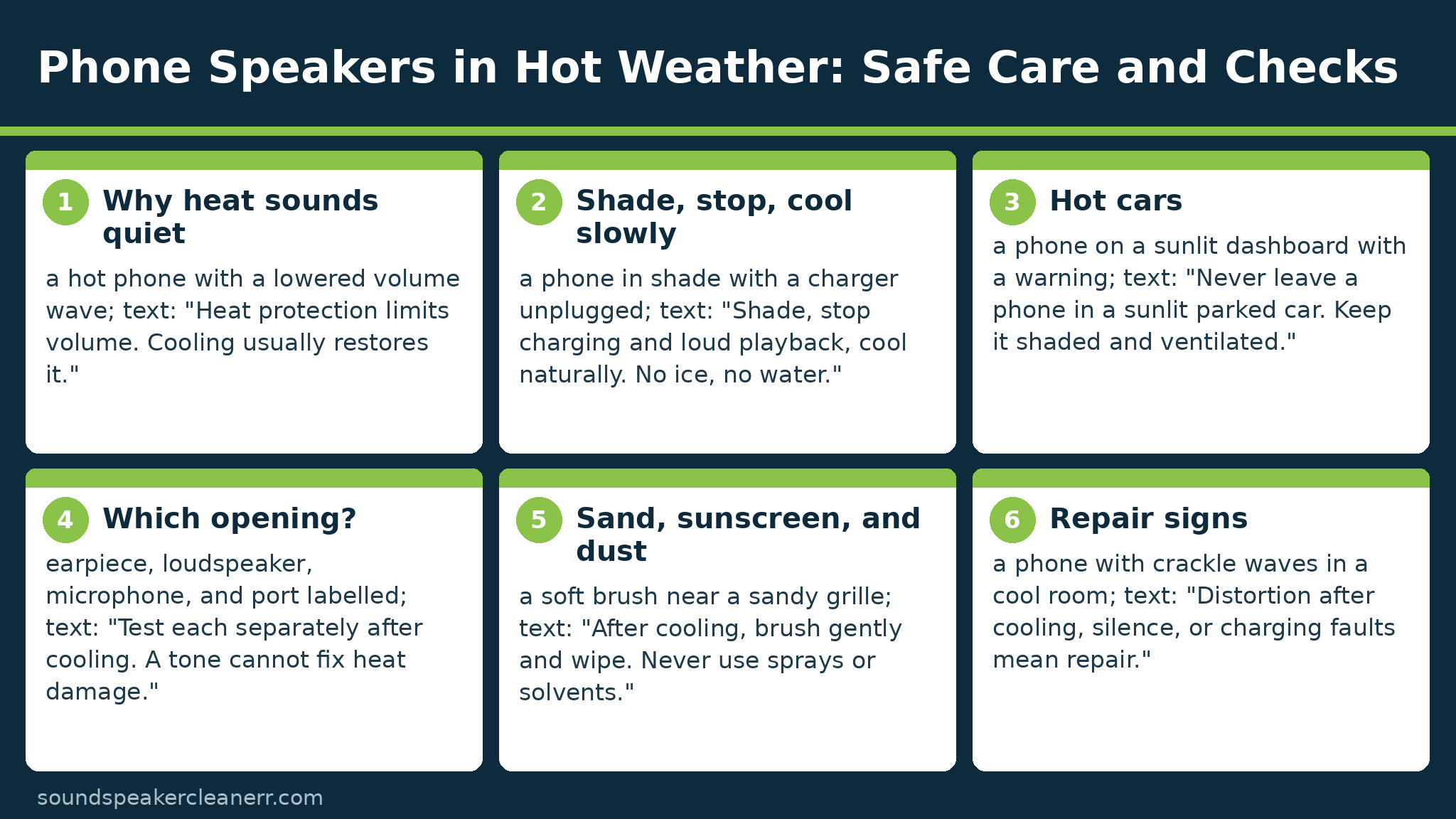
Hot weather makes phone speakers sound quiet, distorted, or cut out, usually because the phone is protecting itself from heat — not because the speaker is blocked. Move the phone to shade, stop charging and loud playback, let it cool naturally, and do not judge its sound until it is back to a normal temperature.
That short answer matters because the most common summer mistake is forcing the issue: playing music louder through a hot phone, charging it while it is already hot, or cooling it rapidly with ice or cold water. Each of those adds stress or condensation instead of fixing the sound. The order in this guide — shade, stop, cool slowly, test, then decide — separates temporary heat protection from genuine damage.
What heat actually does to a phone speaker
Heat affects a phone speaker through three separate routes, and telling them apart decides the fix.
First, thermal protection. When a phone gets hot, it may reduce performance to protect the battery and components, and that can include reducing speaker volume or limiting loud playback. Sound seems quieter or flatter because the phone is limiting itself, not because the grille is blocked. Cooling the phone usually restores normal volume. Do not judge speaker volume while the phone feels hot or shows a temperature warning; retest only after cooling.
Second, heat plus playback. Playing audio at high volume increases the speaker's power use and generates heat of its own, on top of sun and ambient heat. Loud playback in a hot car or in direct sun therefore heats the phone faster than either factor alone. The result can be distortion that sounds like a damaged speaker but clears after cooling and a volume reduction.
Third, heat damage to materials over time. Prolonged high temperatures can degrade speaker materials, adhesives, and housings, and can warp parts around the speaker and charging port. This is a long-term effect of repeated heat exposure, not a single warm afternoon, and it does not reverse with cooling. A speaker that stays distorted after full cooling, at moderate volume, in a cool room, is the pattern that suggests damage rather than protection.
Sweat, sunscreen, sand, and dust add a fourth, seasonal complication. Summer hands leave sunscreen and sweat residue around the grille, beach trips add sand, and dusty summer roads add fine dust. Those blockages are real, but they need brushing and wiping — not heat, and not loud tones. Check for them only after cooling, so heat protection is not mistaken for dirt.
The safe cooling routine
When a phone feels hot or shows a temperature warning, follow this routine before anything else:
- Move it to shade. Take the phone out of direct sun, off a hot dashboard, off a sunlit rock or beach surface, and out of a hot car if possible. Shade alone removes the largest heat source.
- Stop charging and heavy use. Unplug the charger, pause loud music and video, close demanding apps, and lower screen brightness. Charging and loud playback both add heat while the phone is already hot.
- Remove a thick case if it traps heat. A thick case can insulate a hot phone. Remove it to improve airflow, and check whether the case itself is hot or warped. Do not put the phone back into a hot case.
- Let it cool naturally at room temperature. Place the phone on a dry, shaded surface with good airflow and wait until it no longer feels hot. Do not set a timer from a generic article; wait until the phone feels normal and any temperature warning has cleared.
- Retest with a known clip. Play a short voice clip you know well through the loudspeaker at a moderate volume, then listen to a voicemail through the earpiece. Compare with how the same clips sounded in cool conditions. Only this retest, after cooling, tells you whether a real fault remains.
Never speed up cooling. Do not put a hot phone in a freezer, on ice, or into cold water, and do not blow air-conditioning directly into its openings. Rapid temperature change causes condensation inside the phone, which creates a wet-device problem on top of a heat problem. Do not use a wet towel on the phone to cool it; moisture around the grille and port is exactly what the drying rules warn against.
Hot cars: the worst summer place for a phone
A parked car in sun is the most dangerous common place for a phone, because the cabin heats far beyond the outside air. A phone left on a dashboard, a seat, or a console can become too hot to handle, and heat can warp parts around the speaker, the charging port, and the battery.
Never leave a phone in a parked car in sun if you can avoid it. If you must keep it in the car, keep it shaded, out of direct sun through glass, and away from the dashboard and windshield. While driving with air conditioning on, keep the phone shaded and ventilated rather than mounted in direct sun on the windshield. If the phone feels hot after a drive, run the cooling routine before judging its sound or charging it.
A hot car also adds dust and crumbs from consoles, cup holders, and dashboards. After a hot-car trip, once the phone has cooled, inspect the grille in good light and brush lightly if dust is visible. Do not clean a hot phone; wait for cooling first, so you are not brushing a grille while the phone is still thermally stressed.
Direct sun, beaches, and pools
Direct sun on a beach, by a pool, or on a walk heats the phone even when the air feels pleasant. Keep the phone shaded: in a pocket, under a towel, in a bag compartment out of direct sun — not face-up on a sunlit surface. A towel over the phone helps only if it is dry and does not trap heat; a dark, damp towel in sun can make things worse.
Beach and pool trips combine heat with sand, water, and sunscreen. After such a trip, once the phone has cooled, wipe the outside with a soft, dry cloth, brush sand or dust lightly with a clean, dry, soft-bristled brush, away from the phone, and inspect hole by hole. If the phone got wet, follow the wet-device rules separately: disconnect cables, remove the case, wipe with a soft, lint-free cloth, dry with good airflow, speaker-side down, and do not charge through a wet port until fully dry, following the maker's guidance. A cleaning tone may help move moisture near a speaker opening only after the outside is dry, as one short cycle at moderate volume; it cannot dry a charging port, remove corrosion, or repair damage, and it must never be presented as a heat fix.
Sunscreen and sweat residue need a gentle wipe only. Do not use cleaning sprays, household cleaners, or water poured into the grille to remove residue, and do not poke the grille with sharp objects. If residue has hardened around the grille and gentle brushing does not clear it, seek repair advice rather than using solvents or tools.
Charging, volume, and playback while hot
Three habits make summer speaker problems worse, and all three are easy to change.
First, charging while hot. Charging generates heat of its own. Charging a hot phone, especially while playing loud audio, stacks heat on heat and increases the chance of thermal volume reduction or a temperature warning. If the phone is hot, wait until it cools before charging, and charge in shade with good airflow.
Second, maximum volume for long sessions. Loud playback at maximum volume for a long time increases speaker power use and heat. Keeping volume slightly below maximum during long sessions reduces that load while still giving strong sound. If distortion appears only at maximum volume on a hot phone, lower the volume, cool the phone, and retest at a moderate volume before concluding the speaker is damaged.
Third, stacked loads. Navigation, video, bright screens, charging, and loud speaker playback together generate more heat than any one alone. On a hot day, reduce the stack: lower brightness, pause video, charge separately from playback, and use the earpiece or a headset for calls rather than the loudspeaker when the phone is already hot.
Earpiece, loudspeaker, microphone, and charging port in heat
Heat affects each opening differently, so test each one separately after cooling.
The earpiece near the top handles ordinary call audio. If ordinary calls are quiet after heat exposure but speakerphone is clear, the earpiece is the suspect — possibly heat-related volume limiting, or residue around the opening.
The loudspeaker at the bottom handles speakerphone, music, and ringtones. If speakerphone and music are distorted after heat exposure but ordinary calls are clear, the loudspeaker is the suspect — possibly heat distortion, or sand and dust from a summer trip.
Microphone openings are separate from both speakers. If other people cannot hear you on hot-weather calls but you hear them clearly, a microphone opening may be blocked by sunscreen residue, sand, or a case. Test with a voice recording. A cleaning tone through the speaker will not fix a blocked microphone.
The charging port is the summer trap. A port can be warped by heat, or left wet after a pool or beach trip while the speaker has dried. Inspect it in good light after cooling, and do not force a cable into a hot or warped port. If charging behaves oddly after heat exposure — warnings, intermittent charging, or no charging — stop and seek repair advice rather than forcing the cable.
Dust, sand, and sunscreen after cooling
Once the phone has cooled, check for the seasonal blockages that heat alone does not explain. Brush the grille lightly with a clean, dry, soft-bristled brush, away from the phone, then wipe with a dry, soft cloth. Inspect hole by hole in good light, because a single grain of sand can block one hole while the rest look clean. Do not use compressed air on an iPhone, and on other phones use only short, gentle bursts from a distance if you must — never high-pressure air, which forces grains deeper. Do not use heat to "melt" sunscreen residue off the grille, and do not use solvents.
If sand and water mix — wet sand in a grille after a beach trip — dry first, then brush. Brushing wet sand packs it deeper, so patience in the drying step saves the cleaning step.
When heat muffling needs repair
Seek repair help if any of these apply after full cooling: the speaker crackles or distorts at low or moderate volume in a cool room; sound cuts in and out when the phone is moved; one speaker mode is silent entirely; the phone was left in extreme heat and now shows charging failures, restarts, or unusual heat during ordinary use; or the case, port, or housing looks warped. Continuing to play loud cleaning tones through a heat-damaged speaker will not repair it and may make distortion worse.
If the phone is still under warranty or covered by the maker, describe the exposure accurately — sun, hot car, or prolonged heat — and the steps already taken: shade, no charging while hot, natural cooling, no rapid cooling. Accurate notes help a technician distinguish thermal protection from genuine damage, and they avoid a repair attempt based on a wrong cause.
A summer routine you can repeat
Before going out in heat, test the speaker in cool conditions with a known clip and check case alignment. While out, keep the phone shaded, out of hot cars, and away from direct sun. On returning inside, move it to shade, stop charging and loud playback, remove a heat-trapping case, let it cool naturally, and only then charge or retest. That routine — shade, stop, cool slowly, test — prevents most summer speaker complaints and keeps a temporary heat limit from becoming real damage.
FAQ
Does hot weather damage a phone speaker?
Heat usually causes temporary protection — the phone limits volume to protect itself — rather than immediate damage. Damage is suggested when distortion persists after full cooling, at moderate volume, in a cool room, or when it comes with charging or restart faults.
Why does my phone sound quieter when it is hot?
Because a hot phone may reduce performance, including speaker volume, to protect the battery and components. Cool the phone naturally in shade, stop charging and loud playback, and retest only after it feels normal and any temperature warning has cleared.
How should I cool down a hot phone safely?
Move it to shade, unplug the charger, pause loud music and video, lower brightness, remove a thick heat-trapping case, and let it cool naturally with good airflow. Never use a freezer, ice, cold water, or air-conditioning blown into the openings.
Can I charge a hot phone?
Wait until it cools. Charging adds heat, and charging a hot phone while playing loud audio stacks heat on heat. Charge in shade with good airflow, only after the phone feels normal.
Why does sound cut out in a hot car?
Because the cabin heats far beyond the outside air, the phone may limit playback or warn about temperature, and the speaker and port can be heat-stressed. Keep the phone shaded and ventilated in the car, never on a sunlit dashboard, and cool it before judging its sound.
Should I use a cleaning tone for a hot phone speaker?
No — not as a heat fix. A tone cannot cool a phone, restore thermal-limited volume, or repair heat damage. It fits only for moisture near a speaker opening after a minor splash, once the outside is dry, as one short moderate-volume cycle.
Can sunscreen or sand block a phone speaker in summer?
Yes. After cooling, wipe residue gently with a dry soft cloth and brush sand or dust lightly with a clean dry soft brush, inspecting hole by hole. Do not use sprays, solvents, heat, or sharp objects on the grille.
When does heat muffling need repair?
When distortion persists after full cooling at moderate volume in a cool room, sound cuts in and out when the phone moves, one speaker mode is silent, or heat exposure is followed by charging failures, restarts, or a warped port or housing.
Related tools on this site
Related guides on this site
- How to Clean Phone Speakers
- Clean Dust from Phone Speaker
- Phone Speaker Muffled
- Phone Speaker Crackling
- Phone Speaker Volume Low
- Phone Speaker Troubleshooting
- Phone Speaker After the Beach: Sand, Salt, and Water Guide
- Phone Speaker After a Swimming Pool: Safe Steps to Take
- Phone Speaker After Rain: A Safe Drying Guide
Leave a Reply