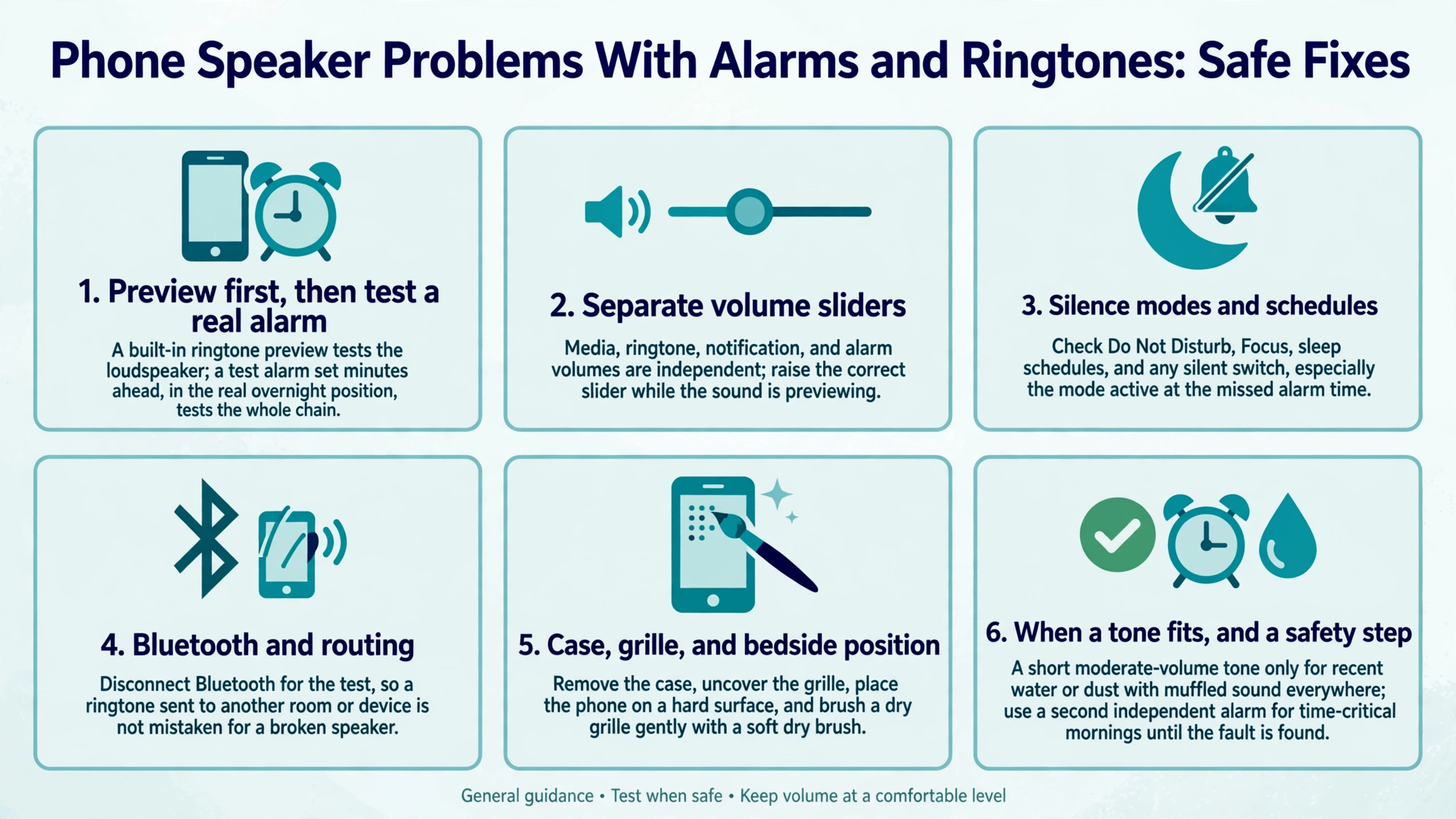
A missed alarm or a silent ringtone does not always mean a broken speaker. Alarms and ringtones use different volume sliders, silence modes, and audio routes from music, so a phone can play songs loudly while an alarm stays quiet, or ring clearly while an alarm is silenced by a scheduled mode.
The checks below separate those causes in order, starting with the fastest tests, and they include a safety step for important alarms, because a test that only fixes tomorrow's alarm is not enough if tonight's alarm matters.
First test: preview the ringtone, then test a real alarm
Open the phone's sound settings and preview a built-in ringtone. If the preview plays clearly through the phone speaker, the loudspeaker itself can produce sound, and the fault is more likely a setting, a ringtone file, a schedule, or an audio route. If the preview is silent, muffled, or distorted, the speaker, a blockage, or a system setting is more likely.
Next, set a test alarm one or two minutes ahead, with a built-in alarm sound, and leave the phone exactly as it will be overnight: same case, same position, same Bluetooth state, same silence mode. Do not test only with the screen on and the phone in your hand if the real alarm runs while the phone is face-down on a bedside table. If the test alarm sounds but the real alarm did not, compare the two alarms setting by setting: sound, volume, repeat, and any schedule or mode that was active at the real alarm time.
Change one setting at a time, and retest with the same preview and the same test alarm. If you change volume, silence mode, Bluetooth, and ringtone together, you will not know which one helped, and the fault may return the next night.
Separate volumes: media, ringtone, and alarm are not one slider
The most common alarm surprise is a volume slider that is not the one you checked. Media, ringtone, notification, and alarm volumes are often independent, so music can be loud while the alarm is low, or the ringtone can be loud while media is muted. Checking only the volume buttons on the home screen may check only one of them.
While an alarm or ringtone is previewing, raise its volume with the phone's volume controls, and check the sound settings for separate sliders. Set the alarm and ringtone volumes to a comfortable, clearly audible level for the test, not to maximum. If the sound returns when the correct slider is raised, the speaker was never broken; the wrong slider was low.
Also check the ringtone and alarm sound choices themselves. A sound set to "None," a silent file, or a damaged third-party file can produce silence even when every volume slider is up. Switch to a built-in ringtone and a built-in alarm sound for the test. If the built-in sound plays but the custom sound does not, the file, not the speaker, was the fault. Keep the built-in sound until you have tested a replacement file separately.
Silence modes, Focus, sleep schedules, and the silent switch
Silence features are designed to override sound, and they can be scheduled, so they may be off when you test during the day and on when the alarm should sound at night. Do Not Disturb, Focus modes, sleep schedules, bedtime modes, and a physical silent switch can each silence calls, notifications, or alarms, and their behavior differs by phone and by operating-system version, so check the phone's own settings rather than assuming one rule covers every device.
For the test, turn off scheduled silence modes temporarily, and check whether any mode has exceptions for alarms, repeat callers, or favorite contacts. Some modes allow alarms through and silence calls, while others silence more broadly, and an exception list can explain why one person's call rings but another's does not. Note the mode that was active at the missed alarm time, not only the mode that is active now.
Also check the physical silent switch or mute control, where the phone has one, and any "mute all sounds" or accessibility mute setting. A phone can be muted for ringtones while still playing media, or muted for alerts while still vibrating, so a vibration without sound is itself a clue: it suggests the alarm fired, but its sound was silenced or routed elsewhere, rather than the alarm never firing at all.
Bluetooth, earphones, and the wrong audio route
A paired Bluetooth headset, earbuds, car system, or speaker can take a ringtone or alarm away from the phone speaker. This is easy to miss at night, because the paired device may be in another room, switched off, or out of range, while the phone still treats it as the audio destination.
Disconnect Bluetooth temporarily for the test, and check that no wired earphones are plugged in. Preview the ringtone and run a test alarm through the phone speaker alone. If the sound is clear on the phone speaker but silent or quiet on Bluetooth, the Bluetooth route or the paired device is the likely focus. If the sound is silent on both, the speaker, a setting, or the alarm itself is the likely focus. Keep those two outcomes separate when you describe the problem.
The same check applies to any "separate app sound" or per-app audio-output setting, where the phone supports it. If one app's sound is sent to a different device, that app's alarm or notification may not come from the phone speaker even when other sounds do. Turn such routing off for the test, and retest the same alarm.
Case, grille, and where the phone sleeps
Alarms are often heard from another room, through a closed door, or from under bedding, so a small reduction in speaker output matters more for an alarm than for music listened to at arm's length. A case that partly covers a grille, a phone face-down on a soft surface, or a phone inside a bag or drawer can muffle a ringtone enough to miss it, even when the same ringtone sounds clear in the hand.
For the test, remove the case, place the phone on a hard, flat surface with the speaker openings uncovered, and run a test alarm from the distance where you normally need to hear it. If the sound improves immediately, the speaker was not broken; it was covered or muffled by position. Look at the grille under a bright light for lint or dust, and if the phone is dry and you can see surface lint, brush it gently with a clean, soft, dry brush. Do not insert pins, needles, or other objects into the grille, and do not use liquids or high-pressure air.
Also check whether the phone's position changes overnight. A phone that slides off a hard surface onto bedding, or that is covered by a blanket, will sound quieter in the morning than it did during a daytime test on a table. A stable, uncovered bedside position is part of alarm reliability, not just a comfort choice.
When the ringtone is distorted, not just quiet
A ringtone that plays but sounds crackling, buzzing, or distorted needs a different test from a silent ringtone. Play a familiar song and a voice memo through the same loudspeaker at the same comfortable volume. If music and voice are also distorted, the speaker, a blockage, or a system enhancement is more likely. If only the ringtone is distorted, the ringtone file or its enhancement processing is more likely, and switching to a built-in ringtone is the decisive test.
Check sound enhancements one at a time. Equalizers, bass boosts, and manufacturer sound effects can distort a loud ringtone even when the speaker is healthy, especially if several enhancements are active at once. Temporarily turn off enhancements and return to a flat or default setting, then preview the same ringtone. If the sound clears, an enhancement conflict, not a broken speaker, was the likely cause.
Do not force maximum volume to test a distorted ringtone. If distortion appears only at high volume but the sound is clean at a moderate volume, lower the volume and retest. Sustained maximum volume on a blocked or already damaged speaker can worsen distortion, and a ringtone does not need to be at maximum to be audible from the next room if the grille is clear and the route is correct.
A safety step for important alarms
Until the fault is found, do not rely on a single phone alarm for anything time-critical, such as work, travel, or medication. Use a second, independent alarm — a second device, a clock, or another person — while you test. This is not an admission that the phone is broken; it is protection against a setting that may only fail at a scheduled time, such as a night-time Focus mode that is off during daytime tests.
Keep a short note of each test: the alarm time, the sound chosen, the silence mode active, the Bluetooth state, the case and position, and whether the test alarm sounded. A pattern across several nights — for example, alarms failing only when a sleep schedule is active, or only when Bluetooth was left on — is far more useful than a single failed alarm, and it is what a repair shop or support helper needs if the problem persists.
If the phone was wet, follow the manufacturer's guidance first, and do not charge a wet phone. Do not assume the speaker is dry because the outside feels dry, and do not use an alarm test as a drying method. Wait until the phone is fully dry, then run the preview and test-alarm checks again.
When a cleaning tone fits, and when it does not
A cleaning tone fits an alarm or ringtone problem only in a narrow case: the phone recently got wet or dusty, the loudspeaker sounds muffled or distorted for ringtones and for music at a normal volume, and you can see or suspect loose material near the grille. In that case, after drying a wet phone fully and inspecting a dry grille, a short, moderate-volume tone may help move loose material near the grille, followed by a retest with the same ringtone preview and the same test alarm.
A cleaning tone does not fit most alarm problems. It does not fix a scheduled silence mode, a low alarm slider, a silent ringtone file, a Bluetooth route, a network or app fault, or a microphone problem. It does not repair a torn diaphragm or corrosion. If you have already tried a few short, moderate-volume cycles and the sound has not improved, more cycles at higher volume are not the next step. Stop, recheck settings and routing, and consider repair advice if distortion persists everywhere.
When to seek repair
Seek repair advice if: the ringtone preview is silent or distorted at a moderate volume across built-in sounds, music, and calls; there is no sound at all after settings, Bluetooth, and grille checks; the grille or mesh is visibly torn or pushed in; the phone got wet and audio problems persist after full drying; or the phone overheats quickly, restarts, or has charging or screen problems alongside audio problems.
When you seek help, bring the pattern, not just a complaint: does the preview play, does a test alarm sound, which silence mode was active at the missed time, which sliders were up, was Bluetooth on, and does the fault affect ringtones, alarms, music, or all of them? That pattern is what separates a settings or routing issue from a hardware issue, and it helps a shop diagnose the phone without replacing a speaker that was never the problem.
FAQ
Why does my alarm vibrate but make no sound?
Vibration without sound suggests the alarm fired but its sound was silenced or routed elsewhere. Check the alarm volume slider, silence and Focus modes active at that time, the alarm sound choice, and Bluetooth routing.
Why is my ringtone loud but my alarm is quiet?
Ringtone, media, notification, and alarm volumes are often independent. Raise the alarm volume while previewing an alarm sound, and check for a sleep schedule or Focus mode that affects alarms differently from calls.
Can Do Not Disturb silence my alarm?
It depends on the phone, the operating-system version, and the mode's exceptions, so check the phone's own settings and the mode active at the missed alarm time. Do not assume one rule covers every device; test an alarm with the mode on and with it off.
Why does my phone not ring when Bluetooth is connected?
A paired headset, earbuds, car system, or speaker can take the ringtone away from the phone speaker. Disconnect Bluetooth for the test and preview the ringtone through the phone speaker alone to separate a routing fault from a speaker fault.
Should I use a speaker cleaner for a missed alarm?
Only in a narrow case: recent water or dust, and muffled or distorted sound from the same loudspeaker in music as well as ringtones. A cleaning tone does not fix a silence mode, a low alarm slider, a silent ringtone file, or a Bluetooth route.
Why does one ringtone sound fine but another is silent?
The silent ringtone may be set to "None," may be a damaged third-party file, or may be processed differently by an enhancement. Switch to a built-in ringtone for the test; if it plays, the file, not the speaker, was the fault.
Why is my ringtone muffled overnight but clear during the day?
Check the phone's overnight position and case, and any scheduled silence mode that is only active at night. A phone face-down on bedding, or a sleep schedule that starts at night, can both change the morning result without any change to the speaker.
When should I stop troubleshooting and seek repair?
Stop and seek repair advice if the ringtone preview is silent or distorted at a moderate volume across built-in sounds, music, and calls after settings, Bluetooth, and grille checks, or if the phone was wet and problems persist after full drying.
Related tools on this site
Related guides on this site
- Volume Booster Safety: When Louder Hurts Your Speaker
- Phone Speaker No Sound: A Step-by-Step Diagnosis
- Phone Speaker Volume Low
- Phone Speaker Muffled
- Phone Speaker Troubleshooting
- Do Not Disturb and Silent Phone Speakers: Safe Checks
- Bluetooth Audio Routing Problems: A Phone Speaker Guide
- iPhone Speaker Settings: A Safe Troubleshooting Guide
- Android Speaker Settings: A Safe Troubleshooting Guide
- Loudspeaker Dust: A Safe Deep-Clean Guide
Leave a Reply