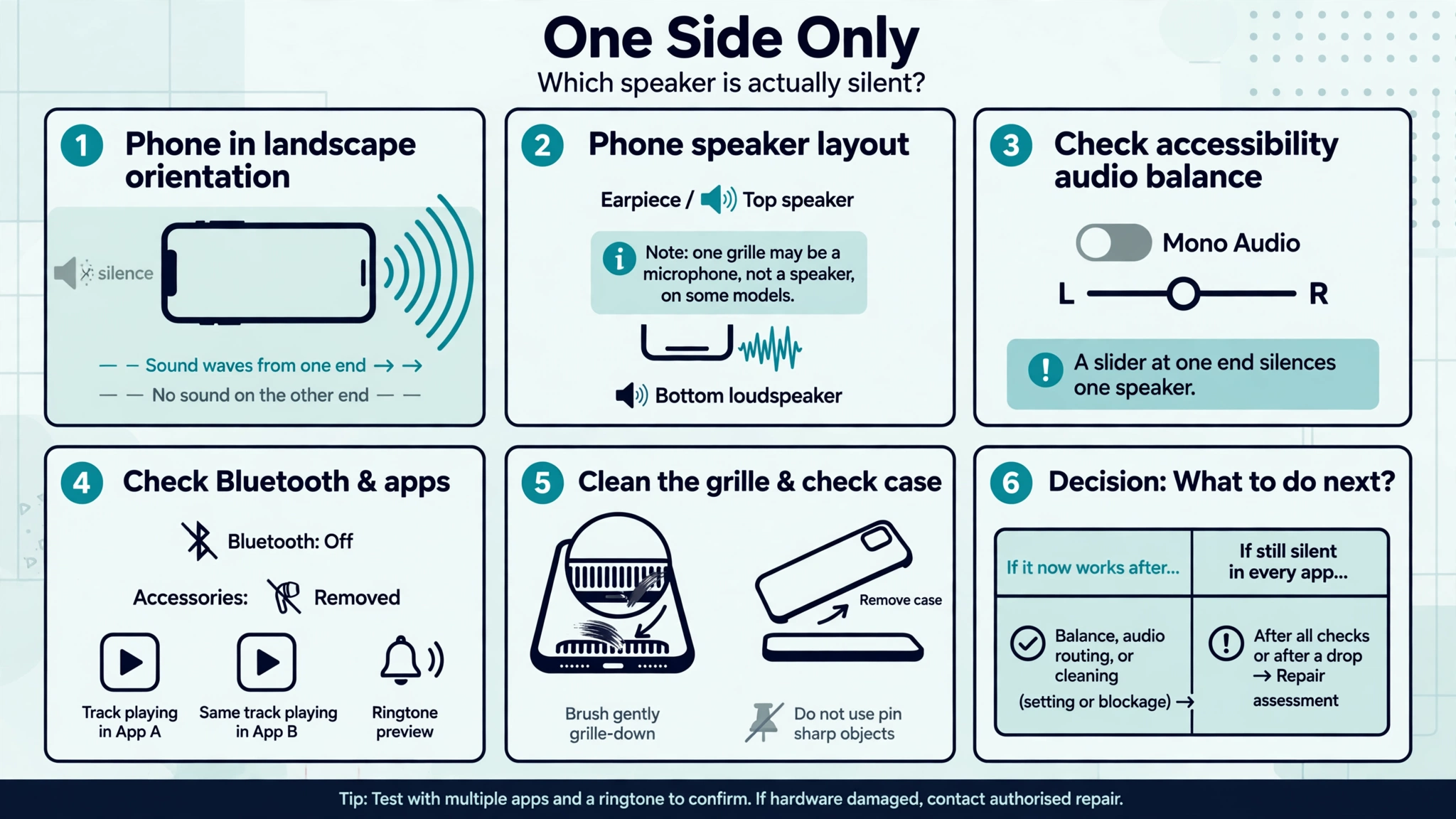
If sound comes from only one phone speaker, first check the left-right balance slider in accessibility settings and center it. Then test with stereo music, check whether the silent side is actually a speaker on your model, and inspect that grille for blockage. If one side stays silent after settings, Bluetooth, case, and cleaning checks, repair is the next step.
First, confirm which side is actually silent
Before changing settings, establish the facts. Play stereo music or a stereo video on the phone's own speakers — not through Bluetooth or headphones — at a moderate volume, and hold the phone in landscape orientation so both ends are clear of your hands. Note which end produces sound: the bottom, the top (earpiece area), or both at unequal volume. Then repeat with a ringtone preview and a second app, so you know whether the imbalance is constant or app-specific.
This step matters because not every phone has two equal speakers. On many models, the "stereo" pair is the bottom loudspeaker plus the earpiece, and the earpiece is naturally quieter than the bottom speaker — that is a design difference, not a fault. On some models, one bottom grille is a microphone opening, not a speaker at all, so sound coming from "only one side" at the bottom is normal. Check your manufacturer's specifications or support pages for your exact model to confirm how many speakers it has and where they are. If the top speaker is simply quieter than the bottom one on stereo content, but both produce sound, you are likely hearing normal imbalance, not a dead speaker.
Also separate this symptom from nearby ones. One-sided headphones or earbuds involve fit, balance, and earbud hardware, not phone speakers. A quiet earpiece during calls, with normal media sound, is an earpiece problem, not a stereo problem. Keeping those apart prevents applying headphone fixes to a speaker fault and vice versa.
Step 1: Center the balance slider and check mono audio
The single most common cause of one-sided phone sound is the accessibility balance setting. On many Android phones it lives under Settings, Accessibility, Hearing Enhancements, Left/right sound balance; on iPhones under Settings, Accessibility, Audio/Visual, Balance. If the slider is pushed fully to one side, media sound emerges from only one speaker. Manufacturer support pages describe exactly this pattern and give the same first step: center the slider.
While you are in accessibility settings, check two more toggles. First, mono audio: when mono audio is on, both channels are mixed, which can mask a balance problem or, on some devices, change how stereo content is distributed. Turn it off for testing so you hear true left-right separation. Second, "Mute all sounds" or similar mute toggles, which can silence outputs in ways that look like a one-sided fault. Center the balance, turn mono audio off, verify mute toggles are off, and replay the same stereo track. If both speakers return, you have found the cause — and it is worth noting how the slider got moved, since accidental changes in accessibility settings are a common recurrence.
Step 2: Rule out routing — Bluetooth, accessories, and apps
If balance settings are correct, check routing. A phone connected to earbuds, a car system, or an external speaker may send one channel elsewhere or switch output entirely, producing one-sided or missing sound on the phone itself. Turn Bluetooth off completely, remove any wired accessory, and replay the test track on the phone's own speakers. If both sides return, a connected device was the cause; reconnect devices one at a time to find the trigger and remove pairings you no longer use.
Next, test across apps. If only one app plays from one side, the cause may be that app's audio settings, its downloaded content, or a mono source file — not the speakers. Play the same content in a second app and test a ringtone preview, which bypasses app processing. If ringtones and other apps play in stereo but one app does not, the app is the problem. Also restart the phone and check for software updates: audio routing bugs after updates can present as one-sided sound and are often fixed by a later patch.
Step 3: Inspect and clean the silent grille only
If settings and routing are correct, inspect the silent side's grille in bright light. Compare it with the working side: a grey, dull, or visibly filled grille next to a clean one is a strong clue that debris is blocking that speaker. Check for a case, screen protector flap, grip, or magnetic accessory covering that grille, and remove the case for a test — some cases look aligned but partially block one speaker opening.
Clean only the blocked grille, gently, with a clean, dry, soft-bristled brush, using light outward strokes with the grille facing down so loosened debris falls away from the phone. Do not push pins or sharp objects into the grille, do not use compressed air at close range, and do not apply liquids directly to the speaker. A gentle sound-based check afterward may help move loose surface debris, but it does not guarantee water or dust ejection and cannot repair a damaged driver, so use moderate volume and stop if nothing improves. If the grille was clearly blocked and sound returns after cleaning, the diagnosis is complete. If the grille was clean and the speaker is still silent, move on — further brushing will not help.
Step 4: Test each speaker separately, if your phone allows it
Some phones offer a speaker test in diagnostics, support apps, or service menus, and the site's own speaker test tool can play tones while you listen to each end of the phone. Use a moderate volume and listen to each end in turn: cover one end lightly with a finger (without sealing it) while listening to the other, or simply move your ear closer to each end. The goal is to confirm whether the silent side produces no sound at all, very quiet sound, or distorted sound — three different results. No sound at all after settings and cleaning checks points more toward a dead driver or connection. Very quiet sound may still be blockage or a balance issue. Distorted sound points toward driver damage rather than a setting.
Do not rely on a single test tone at maximum volume for this. Maximum-volume testing can damage a struggling driver and can make a partially working speaker sound worse than it is. Moderate volume, stereo content, and a second app are more reliable than one loud tone.
Step 5: Consider water, drops, and the repair decision
If one speaker went silent immediately after a drop, submersion, or heavy water exposure and never recovered, physical damage is likely: a displaced speaker module, a loose internal connection, or a damaged driver. The same applies if one side is silent across all apps and content after balance, routing, case, and cleaning checks, or if the silent side crackles or cuts out when the phone is moved or tapped. These patterns point to hardware, not settings.
For a wet phone, follow your manufacturer's guidance for that model: dry the outside with a soft cloth, hold the affected speaker facing down so water can drain outward, let the phone air-dry in a dry room with airflow away from direct heat, and do not charge a wet phone. This guide gives no specific waiting-hour figure, because manufacturer guidance differs by model. If sound returns gradually as the phone dries, moisture was likely the cause. If one side stays silent after thorough drying and all other checks, book a repair assessment. Do not open the phone to inspect the connection yourself; internal speaker replacement requires disassembly and is best left to a qualified technician.
A safe check sequence in order
Work through these steps and stop when both speakers return. First, confirm which side is silent using stereo music in landscape orientation, and check your model's speaker layout. Second, center the balance slider, turn mono audio off, and verify mute toggles are off. Third, turn Bluetooth off, remove accessories, and test across apps and ringtones. Fourth, remove the case, inspect the silent grille, and brush it gently if blocked. Fifth, restart the phone and check for software updates. Sixth, if one side is still silent after all of that, seek a repair assessment rather than forcing tools into the grille or opening the phone.
FAQ
Is it normal for one phone speaker to be quieter than the other?
Often, yes. On many phones the stereo pair is the bottom loudspeaker plus the earpiece, and the earpiece is naturally quieter. Both sides producing sound at unequal volume is usually normal design. One side producing no sound at all, after balance and routing checks, is the pattern that suggests a fault.
Where is the balance setting on my phone?
On many Android phones: Settings, Accessibility, Hearing Enhancements, Left/right sound balance. On iPhones: Settings, Accessibility, Audio/Visual, Balance. Center the slider so sound is distributed equally. Menu names vary by model and software version, so use your phone's settings search for "balance" if the path differs.
Can mono audio make only one speaker work?
Mono audio mixes both channels together, which usually makes both speakers play the same sound rather than silencing one. However, testing with mono audio on can mask a true balance problem, so turn it off while diagnosing, center the balance slider, and retest with stereo content.
Why does only one speaker work on some apps but not others?
That pattern points to the app or its content, not the speakers: an app's audio settings, a mono source file, or a corrupted download. Test the same content in another app and play a ringtone preview. If other apps play in stereo, the problem is in the first app.
Can a case block just one phone speaker?
Yes. A case, grip, or protector flap can partially cover one speaker opening while leaving the other clear. Remove the case and retest without it. If both speakers return, replace the case with one made for your exact model and check its cutouts before fitting it.
Should I clean a silent speaker grille with a pin?
No. Pins and sharp objects can puncture or deform the fine mesh and push debris deeper. Use only a clean, dry, soft-bristled brush with light outward strokes, grille facing down, and stop if the grille looks clear or cleaning does not help.
When does one silent speaker mean repair?
Seek repair if one side produces no sound across all apps and content after balance, mono, Bluetooth, case, cleaning, restart, and update checks, if the silence began immediately after a drop or submersion and never recovered, or if the silent side crackles or cuts out when the phone is moved. Those patterns point to a dead driver or loose connection.
Leave a Reply