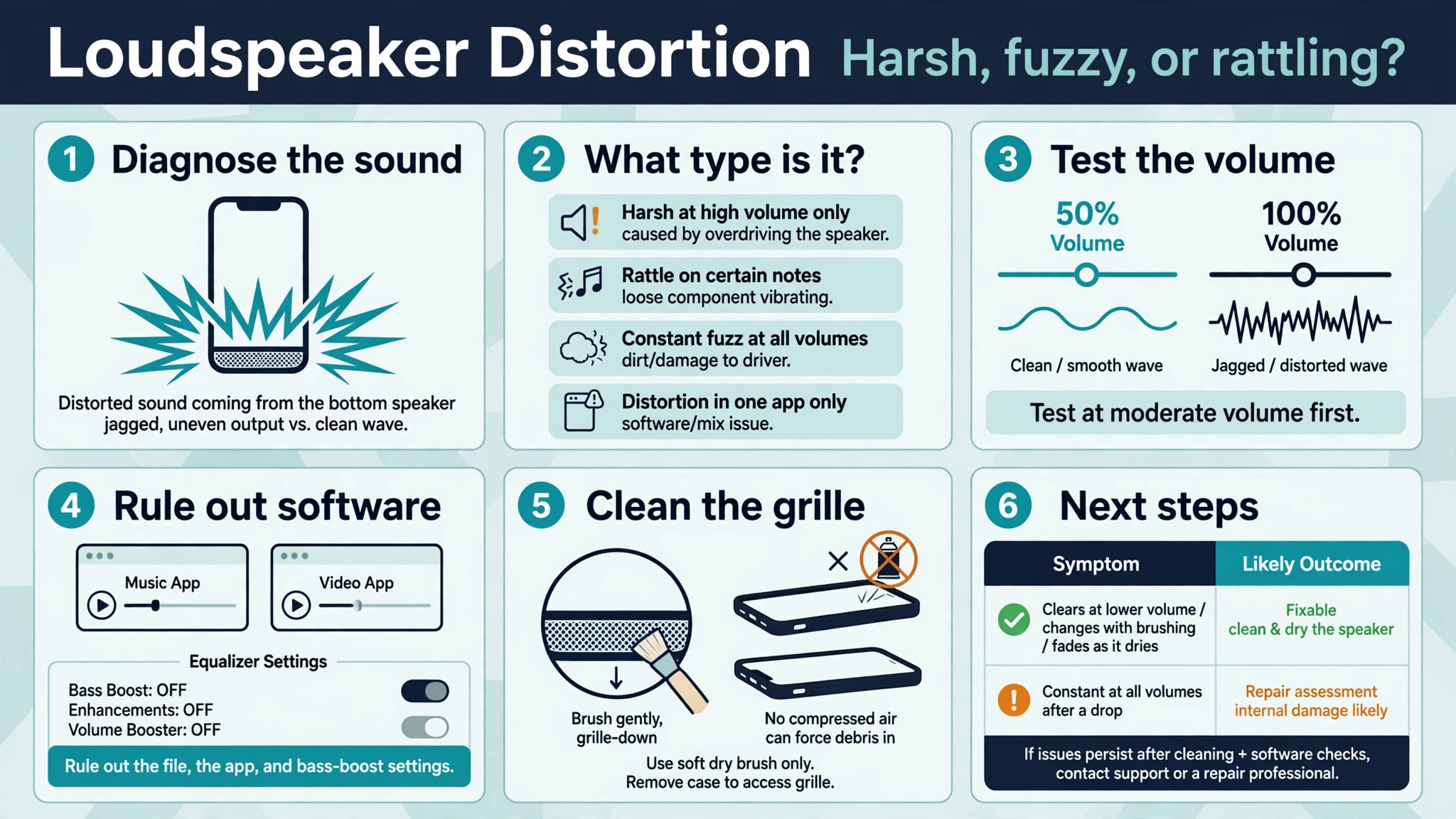
If your loudspeaker sounds harsh, fuzzy, or rattling, first turn the volume down to about half and replay the same audio. If it clears up, the cause is probably volume or settings, not damage. If it stays distorted at moderate volume across apps and files, check debris, case, and moisture; constant distortion at every volume points to a damaged driver.
What distortion actually sounds like
Distortion is a broad word, and narrowing it down is half the diagnosis. Listen carefully and note which description fits best. Harshness or fuzz on loud passages, especially bass notes, that disappears at lower volume usually points to the amplifier or equalizer pushing the small speaker beyond what it can reproduce cleanly. A rattle or buzz that comes and goes with certain notes often points to loose debris vibrating against the grille or membrane. A constant fuzzy edge on every sound at every volume, including ringtones and system sounds, points more toward a damaged driver. A warble that appears only in one app or one file points to the source, not the speaker.
Write down when the distortion appears: at high volume only, at all volumes, in one app only, in all apps, after water exposure, or after a drop. That pattern, more than any single test, separates the fixable causes from the damaged ones. A speaker that is only harsh at maximum volume is behaving differently from a speaker that is fuzzy at a whisper, and the two should not get the same treatment.
Step 1: Lower the volume and test the same audio
Small phone speakers have limited headroom. At maximum volume, the amplifier can clip — it cannot reproduce the loudest peaks cleanly — and the result sounds harsh even on a healthy speaker. Equalizer presets that boost bass make this worse, because bass demands the most movement from a tiny driver.
Turn the volume down to about half and replay the exact track or video that sounded distorted. If it now sounds clean, you have your answer: keep volume at a moderate level for that content, and check equalizer or sound-enhancement settings (see below). Avoid running the speaker at maximum volume for long periods, since sustained overdriving is one of the ways drivers get damaged over time. This step also protects the speaker while you continue diagnosing: there is no benefit in blasting a possibly damaged driver at full volume to "test" it.
Step 2: Rule out the source file and the app
Before touching the phone, rule out the audio itself. Play a different track, a different video, and a system sound such as a ringtone preview. If only one app sounds distorted, the cause may be that app's downloaded audio, its settings, or a corrupted download — not the speaker. Try the same content from a different source, and reinstall the app only after confirming your account and downloads are backed up.
Low-quality or heavily compressed files can also sound rough through a healthy speaker, especially at higher volume. If the distortion follows one file across devices but other files sound fine on the phone, the file is the problem. Testing with a ringtone preview is useful here because it bypasses streaming quality and app processing entirely: a clean ringtone with distorted streaming audio points to the app or the stream, not the driver.
Step 3: Check settings, enhancements, and routing
Several settings can make a healthy loudspeaker sound distorted. First, turn off equalizer presets and sound enhancements temporarily and replay the same audio. Presets that boost bass or apply virtual surround effects can push the small driver into distortion at volumes that would otherwise be fine. If sound clears with enhancements off, re-enable them one at a time to find the culprit, or leave the offending one off.
Second, disconnect Bluetooth and any wired accessory, and turn Bluetooth off briefly. A phone may be routing audio to a nearby earbud, car system, or external speaker that is barely in range, and the resulting breakup can be misread as loudspeaker distortion. Third, restart the phone. A restart clears temporary software conflicts affecting audio routing and app processing. Fourth, check for operating-system and app updates: audio bugs can appear after an update and are often fixed by a later patch. If distortion started right after an update and affects all apps, software is a stronger suspect than hardware.
Step 4: Inspect the grille and remove blockages
With the phone powered off or at least silent, inspect the bottom speaker grille under bright light. Pocket lint, dust, makeup, and dried residue can restrict sound and make it seem as though the speaker is damaged. Loose debris can also vibrate against the membrane at certain frequencies, producing a rattle that mimics driver damage.
Use a clean, dry, soft-bristled brush to loosen visible debris gently, holding the phone so the grille faces down and particles fall away from the device. Remove the case and any accessory, grip, or magnetic attachment that could cover the audio opening, and retest without it; some cases look aligned but partially block a bottom-firing speaker. Do not force anything into the grille holes, do not use compressed air at close range, and do not apply liquids directly to the speaker — those shortcuts can push debris deeper or damage the mesh. A gentle sound-based check afterward may help move loose surface debris, but it does not guarantee water or dust ejection and cannot repair a damaged driver, so use moderate volume and stop if nothing improves.
Step 5: Consider moisture and physical damage honestly
If distortion began after water exposure, moisture on the membrane or in the grille can muffle and distort sound temporarily. Follow your manufacturer's guidance for that model: dry the outside with a soft cloth, hold the speaker facing down so water can drain outward, and let the phone air-dry in a dry room with airflow, away from direct heat. Do not charge a wet phone, and do not use rice. This guide gives no specific waiting-hour figure, because manufacturer guidance differs by model. If distortion fades steadily as the phone dries, moisture was likely the cause. If it stays constant after thorough drying, the cause lies elsewhere.
If distortion began immediately after a drop and never improved, physical damage is a real possibility: a displaced speaker module, a torn membrane, or damage to internal audio components can all produce constant distortion, and none of them can be fixed from outside the phone. The same applies to distortion that is present at every volume, from every source, including ringtones, after all the checks above. In both cases, further home treatment — especially repeated maximum-volume playback — risks worsening a damaged driver. A repair assessment is the correct next step.
How to tell "dirty" from "damaged"
Use this summary pattern to decide. Distortion only at high volume, clearing at moderate volume: volume or equalizer overdrive — lower volume and disable enhancements. Distortion only in one app or one file: source or app problem — test other sources. Rattle on certain notes that changes when you brush the grille or remove the case: debris or a vibrating accessory. Distortion that fades as the phone dries after water exposure: moisture. Distortion at all volumes, from all sources, unchanged by cleaning, settings, and restart, or starting right after a drop: likely driver or internal damage — seek repair. When two patterns overlap, trust the most persistent one: a speaker that is distorted at a whisper is not suffering from a volume problem.
Prevention without overpromising
Keep volume moderate for everyday listening, disable bass-heavy equalizer presets if they consistently distort, and keep the grille clear with an occasional gentle dry brushing when you can see buildup. Store the phone where lint does not collect around the bottom grille, and remove the case periodically to check for trapped grit. These habits reduce the common causes of distortion, but they do not make a small phone speaker indestructible, and they do not reverse damage that has already happened.
FAQ
Is distortion always a sign of a blown speaker?
No. A blown or damaged driver typically distorts at all volumes and from all sources, including ringtones. Distortion that appears only at high volume, only in one app, or only on certain notes is more likely volume overdrive, a source problem, or debris. Work through the ordered checks before assuming hardware failure.
Why does my speaker sound fine at half volume but harsh at full volume?
Small phone speakers have limited headroom, and at maximum volume the amplifier may clip loud peaks, producing harshness on a healthy speaker. Bass-boosting equalizer presets worsen this. Lowering volume to a moderate level and disabling enhancements usually clears it; if it does not, continue with the debris and settings checks.
Can dust really sound like a damaged speaker?
Yes. Debris on or near the membrane can vibrate at certain frequencies and produce a rattle or buzz that mimics driver damage. The difference is that debris-related rattle often changes with brushing, case removal, or the note being played, while true driver damage stays constant across volumes and sources.
Should I use compressed air on a distorted speaker?
No, not at close range. Forced air can push debris deeper into the grille or damage the mesh. Use a clean, dry, soft-bristled brush with light strokes, holding the phone grille-down so loosened particles fall away from the device.
Does a sound cleaner fix a distorted loudspeaker?
A sound tool may help move loose surface debris after physical cleaning, but it does not guarantee water or dust ejection and cannot repair a damaged driver. Use moderate volume, not maximum, and treat a lack of improvement after gentle cycles as information pointing toward settings, source, or hardware causes.
When should I get a distorted speaker repaired?
Seek repair if distortion is constant at every volume from every source after cleaning, settings, restart, and update checks, if it started immediately after a drop and never improved, or if you see physical damage around the grille. Those patterns point to driver or internal damage rather than debris or software.
Can a case cause distortion?
Yes. A case, grip, or accessory that partially covers the bottom speaker opening can muffle sound and, if grit is trapped between case and phone, can vibrate against the body at certain frequencies. Test without the case; if the distortion disappears, the case or trapped grit was the cause.
Leave a Reply