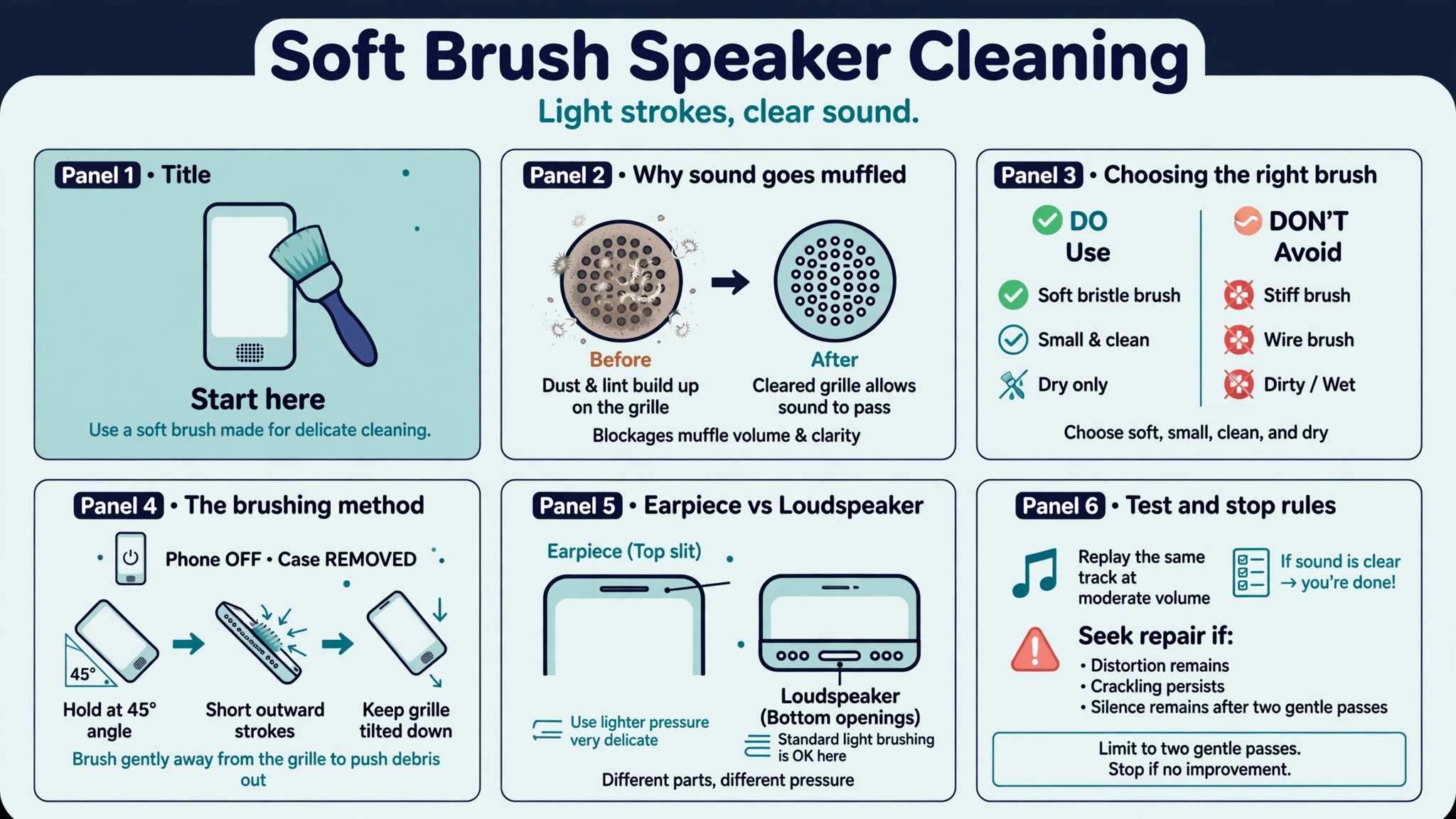
A dry, soft-bristled brush is the safest first physical method for cleaning a phone speaker grille. Turn the phone off, remove the case, and brush lightly across the grille at an angle so loosened dust falls out rather than being pushed in. Work in short, outward strokes, check your progress in good light, and test the sound at a moderate volume. If the sound stays distorted, crackles, or disappears after gentle brushing, stop and seek repair advice instead of pressing harder or switching to a sharp tool.
Why a soft brush works when other tools do not
A phone speaker sits behind a fine mesh or a row of tiny holes. Dust, pocket lint, and skin oil collect on that surface over time, and the layer blocks sound, so music sounds distant, calls sound muffled, and volume seems lower than it used to be. A soft brush matches the scale of the problem: its bristles are fine enough to reach into the surface texture, yet soft enough to lift debris without gouging the mesh.
That balance is why this method appears again and again in cleaning guidance. Sharp objects can puncture or deform the mesh, and a punctured mesh cannot be un-punctured. Liquids can wick inside the phone, and strong air can drive debris deeper rather than out. A dry brush, used lightly, does neither of those things. It is also easy to control: you can see what you are doing, feel how much pressure you are using, and stop the moment the grille looks clear.
It is worth being honest about the limit, too. Brushing removes loose surface debris. It does not repair a torn speaker cone, fix corrosion from a liquid, or restore a speaker that has failed for an electrical reason. If brushing helps, the problem was debris. If it does not, the problem may be something else, and more force will not change that answer.
Choosing the right brush
Not every brush qualifies. The right brush is small, clean, dry, and soft. A new, unused soft toothbrush kept only for cleaning electronics is a practical choice, as is a small, clean artist's paintbrush with soft natural or synthetic bristles. A brush sold for cleaning camera lenses or small electronics can also work, provided its bristles are genuinely soft and it has never been used with paint, glue, or cleaning chemicals.
Avoid anything stiff, wiry, or metal. A wire brush, a stiff scrub brush, and a brush with hard plastic bristles can scratch the housing and damage the mesh. Avoid a brush that is damp, dirty, or previously used with toothpaste, because residue can transfer onto the grille and harden there. Avoid a large brush, too: a big brush head hides the grille from view and makes it hard to control pressure on a small opening.
Before you start, inspect the brush in good light. The bristles should be even, flexible, and free of bent or broken tips. Tap the brush over a cloth to shake out any loose bristles. If bristles shed easily, choose a different brush, because a shed bristle left in the grille is a new blockage.
Before you brush: check first, clean second
Cleaning is not always the cause, so a short check saves wasted effort. Play the same track or voice recording through the loudspeaker at a moderate volume and note whether the sound is muffled, quiet, or distorted. Then check the simple settings causes: make sure the phone is not connected to a Bluetooth speaker or earbuds, that Do Not Disturb or a silent mode is not muting alerts, and that the media volume is actually turned up. These checks take a minute and prevent a reader from brushing a clean grille while the real problem is a connected Bluetooth device.
Next, prepare the phone. Turn it off and disconnect any charger or cable. Remove the case, because a case edge can cover part of the grille and trap lint against it. Hold the phone under a bright light and look at each speaker opening: the loudspeaker, usually along the bottom edge, and the earpiece, the narrow slit or row of holes near the top of the screen used for calls. The earpiece and the loudspeaker are different parts, and they can be blocked independently. A phone can have clear music playback but muffled calls, or the other way around, depending on which opening is blocked.
Work on a clean, dry surface. Keep the phone's openings facing so that gravity helps you: tilt the grille slightly downward while you brush, so loosened dust falls away from the phone rather than settling back into the holes.
The brushing method, step by step
Hold the brush like a pencil, with a light grip. Rest the bristle tips on the grille surface without pressing the brush head down. Use short, outward strokes in one direction, lifting the brush at the end of each stroke, rather than scrubbing back and forth. Scrubbing back and forth tends to push debris from one side of the grille to the other and can work particles deeper into the holes.
Angle matters. Hold the brush at roughly 45 degrees to the grille surface, as the guidance cited above recommends, so the bristle tips flick debris outward and away. Work across the full width of the grille, then rotate the phone a quarter turn and repeat, so you approach the holes from a second angle. After a few strokes, tilt the phone grille-down and tap it very gently against your palm or over a cloth, so loosened dust drops out.
Pause and look. Use a flashlight or bright light at an angle to see whether the grille still looks coated. If it looks clearer, stop brushing that opening and move to the next one. Brushing a clean grille again and again adds wear without adding benefit. If the grille still looks blocked after one careful pass, repeat the pass once, with the same light pressure. Do not increase pressure to compensate for stubborn debris; pressure is the variable that turns a safe method into a damaging one.
For the earpiece, use even less pressure and shorter strokes. The earpiece slit is narrow, and its mesh sits close to the screen. Brush across the slit, not along it with force, and keep the bristle tips on the surface. If the earpiece has a row of small holes rather than a slit, treat each hole the same way: light surface strokes, no poking the bristle tips into the holes.
What to do after brushing
Turn the phone back on and replay the same track or recording at a moderate volume. Compare the sound with what you noted before cleaning. If the sound is clearer and louder, the job is done. Resist the urge to brush again "just to be sure." A clean grille does not need a second pass.
If the sound improved only slightly, you may repeat the gentle brushing sequence once more, then test again. Two careful passes are reasonable. Beyond that, further brushing is unlikely to help, and the remaining problem is probably not loose surface dust. It may be debris packed deeper inside, a settings issue, or hardware damage, and each of those needs a different response.
If the sound is unchanged, distorted, crackling, or absent after careful brushing, stop. Check the settings causes once more, including Bluetooth connections and volume balance, and consider professional diagnosis. In particular, if the phone was dropped, exposed to water, or previously cleaned with a sharp object, do not keep brushing in hopes of a different result. A repair shop can inspect the speaker without risking further mesh damage.
Mistakes that turn brushing into damage
The most common mistake is pressure. A soft brush pressed hard behaves like a stiff brush: bristles bend, tips dig into holes, and the mesh can deform. Keep the grip light enough that you could brush the back of your hand without discomfort. If your hand tires, you are pressing too hard.
The second mistake is a wet or dirty brush. Water, toothpaste residue, and cleaning chemicals have no place on a speaker grille. They can leave deposits, affect coatings, and, in the case of liquid, travel inside the phone. The brush must be dry, and it must stay dry through the whole job.
The third mistake is brushing the wrong part aggressively. The charging port, the microphone hole, and the speaker grille look similar at a glance, but they are different components. Brushing a charging port with a soft brush is less risky than poking it, but it is still not the same job, and lint pushed into a port can cause charging problems. Identify each opening before you brush it, and clean only the speaker openings in this procedure.
The fourth mistake is impatience: brushing for a long time in one session, or brushing every day. A speaker grille does not need daily brushing. Clean it when you can see debris or hear muffling, and otherwise leave it alone. Frequent brushing wears the mesh over time, even with soft bristles.
How often to brush, and how to prevent buildup
For most people, checking the grille once a month is plenty, and brushing only when it looks or sounds blocked is better than brushing on a schedule. People who carry a phone loose in a pocket with lint, work in dusty conditions, or use a case that sheds fibers may need to check more often. The check itself is simple: look at the grille in bright light, and listen to a familiar track.
Prevention is simpler than cleaning. Keep the phone in a clean pocket or bag rather than loose with keys and tissues. Choose a case whose edges line up with the speaker holes instead of covering them, and wipe the case edge occasionally so lint does not accumulate there. Wipe the outside of the phone with a dry microfiber cloth after dusty days. These habits reduce how often the grille needs brushing at all, which is the best protection for a fragile mesh.
Where sound tools fit after brushing
After physical cleaning, a listening test helps confirm the result. Play a familiar track, or use the site's speaker test at a moderate volume, and compare left, right, earpiece, and loudspeaker output as applicable. Treat this as a test, not as a second cleaning stage that must be forced. Sound-based cleaning tools can move loose droplets or dust in some situations, but they do not guarantee that water or dust is ejected, and they cannot repair damage. Do not run a cleaning tone at maximum volume through earbuds worn in your ears, and do not repeat loud cycles to compensate for a grille that brushing did not clear. If the test shows the same problem after two careful brushing passes, that result is useful information pointing toward settings or hardware, not toward louder sound.
FAQ
Can I use any toothbrush to clean a phone speaker?
Use only a clean, dry, soft-bristled toothbrush that has never been used with toothpaste, and keep it only for electronics cleaning. A medium or hard toothbrush, a worn brush with bent bristles, or a brush that sheds bristles is not suitable. A small, soft artist's paintbrush is an equally good choice.
Should the brush be wet or dry?
Dry, always, for the speaker grille itself. A wet brush can leave residue and let liquid travel into the phone. If you wipe the phone's outer housing, a dry microfiber cloth is the safer choice there too, and any damp cleaning should stay on the housing, away from the openings.
How hard should I press?
Very lightly. Hold the brush like a pencil and let the bristle tips skim the grille. If you can feel the brush head pressing into the surface, or your hand tires quickly, you are pressing too hard. Pressure is the main way a safe brush method becomes damaging.
Can I brush the earpiece the same way as the loudspeaker?
The motion is the same — short, light, outward strokes — but use even less pressure on the earpiece, because its slit or holes are narrower and closer to the screen. Brush across the earpiece opening, not into it, and never poke bristle tips into the holes.
What if brushing does not fix the muffled sound?
Repeat the gentle sequence once, then re-check settings such as Bluetooth connections, silent modes, and volume. If the sound is still muffled, distorted, crackling, or absent, stop and seek professional diagnosis. Further brushing, or switching to a sharp tool, will not fix a deeper blockage or a hardware fault.
Is compressed air a good follow-up after brushing?
This guide does not recommend it. Guidance cited above warns that compressed air can drive debris deeper into the phone. After brushing, tilt the phone grille-down and tap it gently instead, so loosened dust falls out on its own.
How often should I brush my phone speaker?
Check the grille about once a month, and brush only when you can see debris or hear muffling. Brushing a clean grille on a daily or weekly schedule adds wear without benefit. Prevention — a clean pocket, a well-fitting case, and occasional dry wiping — matters more than frequent brushing.
Can brushing damage a water-resistant phone?
Brushing itself, done lightly with a dry brush, is a surface method, but water resistance is not permanent and can weaken with age, drops, and wear. Follow your manufacturer's guidance for your model, and if the phone has been exposed to water, follow the manufacturer's wet-device guidance rather than treating brushing as a drying method.
Leave a Reply