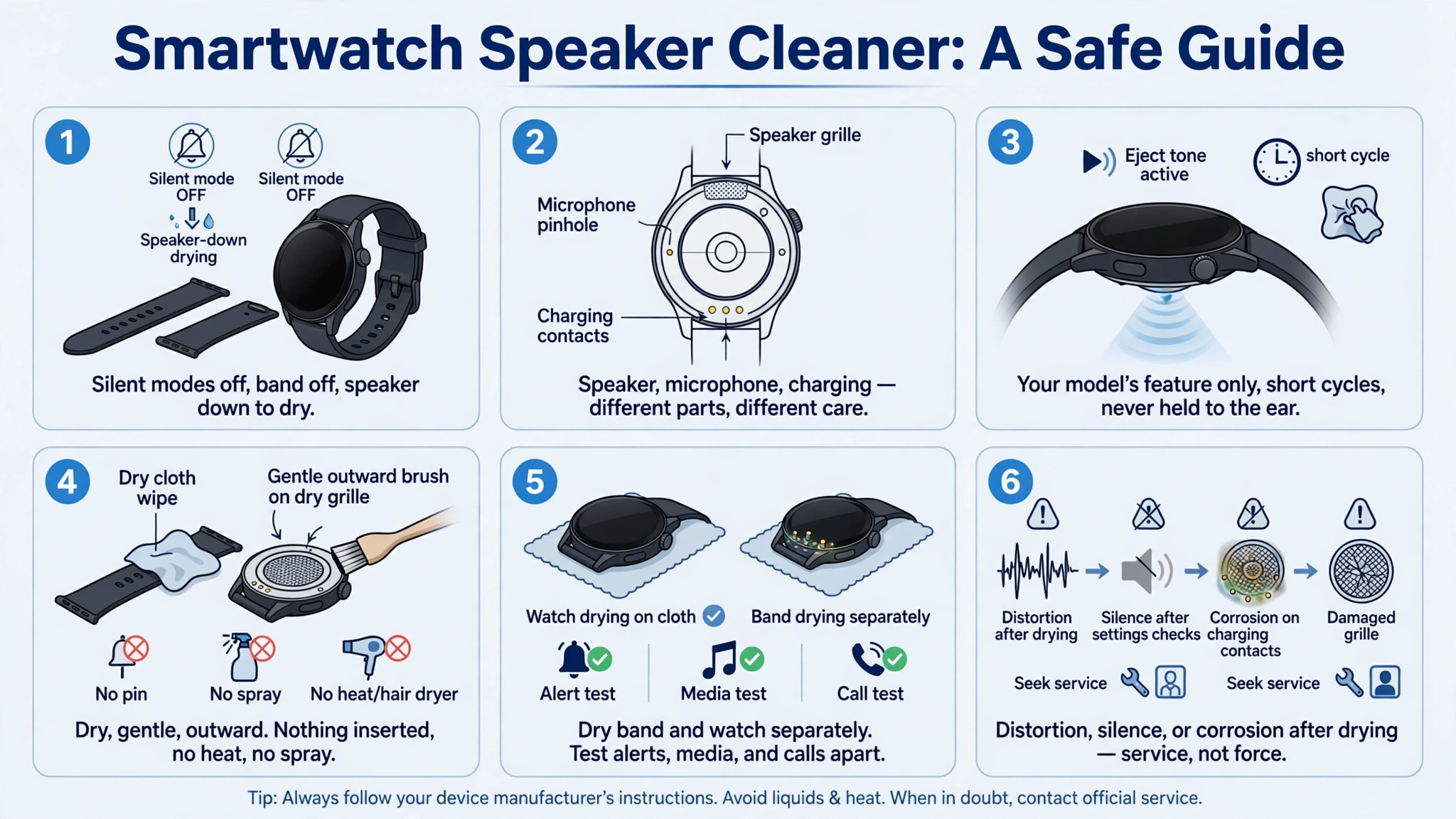
A muffled smartwatch speaker is usually water trapped in a tiny grille, sweat or dust on that grille, a silent mode, or a band trapping moisture — not a broken speaker. Check silent modes and volume first, use the built-in water-eject feature if present, otherwise air-dry speaker-down, and brush the grille gently with a dry soft brush.
Never poke the grille or charge a wet watch.
That sequence matters because a watch speaker is tiny: its grille is a few small slots, its driver is small, and its mesh can hold a drop of water or film of sweat that would barely affect a phone speaker. A forceful clean can tear watch mesh or push debris into a nearby microphone hole, while gentle, patient steps do more than any forceful method.
Why a smartwatch speaker is different
A smartwatch lives on skin, collecting sweat, sunscreen, lotion, and dust daily, and is worn during workouts, showers, swims, and rain in ways a phone is not. Its band, especially silicone or fabric, traps moisture against case and grille long after the watch looks dry, so a watch muffled after a swim may simply still be damp under the band.
Size is the second difference. A watch speaker has a small driver, grille, and acoustic chamber, so a single drop of water or a thin film of sweat changes sound more noticeably, and a cleaning tone must be moderate and short; a loud, long tone on a tiny wet driver is more likely to distort than to clear. Third, a watch speaker serves three jobs — calls, alerts, and media or voice replies — so a problem affecting only calls may be microphone or routing, and one affecting only alerts may be a silent mode. Test each job separately. Finally, water resistance is not permanent: seals age, and soaps, detergents, hot water, and steam weaken them faster than plain cold water. A rating is a laboratory result for a new device, not a guarantee for an aging one, so dry the watch after every swim, shower, or sweaty session.
Speaker, microphone, and charging contacts are not the same
Before cleaning, locate three different parts, because confusing them causes most cleaning mistakes. The speaker grille is usually a row of small slots or holes on the side or edge and produces sound. The microphone hole is usually a single small pinhole, often on a different edge, and captures sound. Charging contacts or a wireless charging surface transfer power; they are not speakers and must not be cleaned as if they were. Sound cannot push water out of a microphone as it can help move water near a speaker grille, and charging contacts must be dry and clean before charging. If unsure which opening is which, check your maker's diagram before touching any grille.
Back sensors also collect sweat and lotion but are not speakers: wipe them with a barely damp cloth only if the maker allows, dry fully, and do not let liquid enter any opening.
Check silent modes and volume first
Many "dead speaker" watches are simply silenced. Check these settings before any cleaning.
First, check silent modes — Do Not Disturb, Theater, Bedtime or Sleep, and Mute all sounds, if present. Each can silence alerts, calls, or all sounds, and can be turned on accidentally by a gesture, schedule, or paired-phone setting; turn the mode off for the test. Second, check volume settings separately: Sounds and vibration, alert, media, and call volume can be muted independently, so set each to normal, not maximum. Third, check the paired phone: call audio may route to the phone, headset, or car instead of the watch, so disconnect Bluetooth audio for the test. Fourth, check band and fit: a tight band, case cover, or screen protector overlapping an edge can muffle or cover a grille. Remove band and cover for the test; if sound returns, the band or cover was the problem.
Only when silent modes, volume, routing, and band are ruled out should you move to water ejection and cleaning.
Use the built-in water-eject feature correctly, if you have one
Many modern smartwatches have a built-in water-eject feature, but the name and steps differ by brand. On an Apple Watch, the feature is tied to Water Lock: turn on Water Lock before swimming, then turn the Digital Crown to unlock, and a series of tones plays to clear water from the speaker. On Samsung Galaxy Watch models that offer it, a speaker water-ejection setting plays tones to clear the speaker. Some Garmin models offer a similar feature. Other watches have no built-in eject feature at all.
Use your own model's feature, following your maker's manual, not another brand's sequence. Common principles are the same: the watch should be out of the water, the speaker facing down or outward, and the cycle may need repeating two or three times with a wipe and test between cycles. Do not hold the watch to your ear during a cycle, and do not run cycles continuously; a few cycles with testing are more useful than a long loud session. On an Apple Watch, Water Lock locks the screen against accidental touches; it does not physically seal the watch, and turning it off does not by itself dry it — the tones are the clearing step, and drying afterward is still needed. If your watch has no eject feature, do not imitate one with a maximum-volume phone tone held against it; use gravity and drying instead, and only consider a gentle tone after the watch is dry. When in doubt, drying alone is safer.
Clean a smartwatch speaker, step by step
Power off if safe, especially after water, remove the band, and do not charge a wet watch.
- Remove the band and any case or cover. Wipe the case, including around the speaker grille, with a soft, dry, lint-free cloth. If the watch was exposed to salt water, and the maker allows a fresh-water rinse, rinse briefly with fresh water as the maker directs, then wipe dry. If the maker does not allow rinsing, or you are unsure, do not rinse; wipe and dry instead.
- Hold the watch with the speaker grille facing down, over a dry towel or cloth, and tap it very gently on your palm or the towel. Gravity and gentle tapping help loose water leave the grille. Do not shake vigorously, do not blow into the grille, and do not use compressed air, which can force water deeper.
- Place the watch speaker-down on a dry towel in a ventilated room, and let it air-dry. For a watch that was only splashed or sweaty, 30 to 60 minutes may be enough for the grille to clear, but for a watch that was submerged or swum with, allow several hours, and for a watch that still sounds muffled, allow up to a day before concluding the problem is not moisture. Do not use heat, a hair dryer, or direct sunlight to speed drying.
- If your watch has a built-in eject feature, run it now, after the initial wipe and gravity step, following your maker's steps. Wipe the grille again after each cycle, and test after each cycle. Stop when sound is clear.
- For dust or sweat film on a dry grille, brush very gently with a clean, dry, soft-bristled brush, such as a soft toothbrush, stroking outward along the grille and away from the openings. Use light pressure only. The goal is to lift surface dust, not to scrub through the mesh. Do not insert bristles into the holes, and do not use tape or putty pressed into the holes, because residue in a tiny grille can muffle sound worse than dust.
- Wipe the case again with a dry cloth, refit a clean dry band, and test. If sound is clear, stop. If it is better but still dull, you may repeat the eject or brush step once. If it is unchanged after drying and two careful cycles, further cleaning is unlikely to help.
For routine cleaning, the same dry method applies: band off, dry cloth, gentle outward brush if needed, dry fully before refitting. Do not use soap on the case or let liquid enter any opening; use soap only on a removable band if the maker allows, rinsed and dried before refitting.
Bands, sweat, and skin
Bands are the most common cause of recurring muffling: silicone traps sweat and water against the case, fabric absorbs sweat and stays damp, and leather can be damaged by water and hold moisture. After a workout, swim, or shower, remove the band, clean it as the maker allows, and let band and watch dry separately before refitting; a damp band refitted too soon keeps the grille wet. Sweat, sunscreen, and lotion can also leave a film on the grille and sensors and irritate skin under a tight band. If skin under the band is red or itchy, remove the watch, clean band and case as directed, let skin breathe, and do not wear it again until skin and band are clean and dry. Clean bands weekly for everyday wear and after every swim, intense workout, or salt or chlorinated water exposure, following the band maker's instructions, without harsh cleaners or bleach.
Test calls, alerts, and media separately
A smartwatch speaker test must cover all three jobs, because each can fail independently.
First, test alerts: set a timer for a few seconds ahead, at normal volume, with silent modes off, and note whether the alert is clear, muffled, quiet, or silent. Second, test media or a voice-assistant reply at moderate volume for clarity and distortion. Third, test calls if supported: if calls are muffled but alerts are clear, the problem may be microphone, routing, or call volume, not the grille; test the microphone separately by recording a voice note and playing it back elsewhere if possible. Test in a quiet room, band off or loose, and note which jobs are affected — that note separates a speaker clean from a settings fix.
Troubleshooting
Muffled after swimming or showering: This is usually trapped water. Run the built-in eject feature if you have one, then air-dry speaker-down. Give it hours, not minutes, before concluding it is damaged. Do not charge until dry.
Muffled after a workout: Often sweat and band moisture. Remove the band, wipe the case dry, brush gently if dry dust is present, and let band and watch dry separately before refitting.
Quiet on alerts but normal on media: Check silent modes, Do Not Disturb schedules, and alert volume separately from media volume.
Quiet on calls but normal on alerts: Check call routing, Bluetooth headsets, and call volume, and test the microphone separately.
Crackling or distorted: Stop eject cycles and loud tests. A gentle dry brush is the most to try; if crackling stays at moderate volume, seek service.
No sound at all: Check silent modes, volume, routing, and band coverage, restart if the maker allows, and test again. If every job is silent after those checks and drying, seek service.
Worse after cleaning: Stop, let the watch dry fully, retest once with a clean dry band, and seek service if the worsening persists.
What not to do
Do not poke a grille with a pin, needle, toothpick, or SIM tool. Do not use compressed air, a hair dryer, an oven, or direct sunlight. Do not use soap, disinfectant, or liquid cleaner on the case or into any opening, except a maker-allowed fresh-water rinse after salt water and a barely damp cloth on outer surfaces as directed. Do not charge a wet watch, or wear a wet watch with a tight band to "dry it by wearing it." Do not open the watch yourself unless qualified, and do not play a cleaning tone at maximum volume or chase extreme frequencies above normal hearing as a stronger cleaner; a typical watch speaker cannot reliably reproduce them.
When to seek service
Contact the maker or an authorized provider if the speaker stays muffled, distorted, or silent after full drying and two careful cycles, if the watch will not turn on or charge after drying, if charging contacts show corrosion, if it was exposed to salt water, soap, or a sugary drink and still sounds wrong, or if case, grille, or band attachment is damaged. Bring your note — which jobs are affected, what liquid, whether an eject feature was used, and how long you dried it — so a technician need not repeat a risky test.
Conclusion
Smartwatch speaker cleaning is small-scale, patient work: check silent modes and routing, use your own model's eject feature if it has one, otherwise dry speaker-down and brush only gently and dry. Manage band and sweat as carefully as the grille, because a damp band undoes a clean grille. Test calls, alerts, and media separately, stop on distortion or no change, and let service handle a speaker that stays wrong, rather than pushing a tool into a grille never made for one.
FAQ
How do I clean a smartwatch speaker safely?
Remove the band, wipe the case with a dry soft cloth, use your watch's built-in water-eject feature if it has one, otherwise air-dry speaker-down, and brush the grille only gently with a dry soft brush, stroking outward. Never poke the grille, never use compressed air or heat, and never charge a wet watch.
Why is my smartwatch speaker muffled after swimming?
Water is trapped in the tiny speaker grille or behind its mesh. Run the built-in eject feature if your model has one, then air-dry speaker-down for several hours. Do not assume damage after a few minutes; drying takes time, and a damp band refitted too soon can keep the grille wet.
Can I use a phone speaker cleaner tone on a smartwatch?
Only with great care, and preferably not at all. A phone tone is not tuned for a tiny watch driver, and a loud tone on a wet watch can distort. Use your watch's own eject feature if it has one, or drying alone. If you use any tone, keep it moderate and short, after the watch is dry, and stop on distortion.
What is Water Lock, and does it make my watch waterproof?
On an Apple Watch, Water Lock locks the screen against accidental touches while swimming; it does not physically seal the watch. The tones that play when you turn it off help clear water from the speaker, but drying afterward is still needed. A water-resistance rating is a laboratory result for a new device, not a permanent guarantee.
Why is my smartwatch quiet on calls but loud on alerts?
Calls, alerts, and media have separate volumes and routing. Check call volume, Bluetooth headsets, and call-audio routing, and test the microphone separately. A call-only problem is often routing or microphone, not the speaker grille.
Should I clean my smartwatch band too?
Yes, separately. Remove the band, clean it as its maker allows, and let both band and watch dry fully before refitting. A damp band traps moisture against the grille and can cause recurring muffling and skin irritation, even when the speaker itself is clean.
When should I seek service for a smartwatch speaker?
Seek service if sound stays muffled, distorted, or silent after full drying and two careful cycles, if the watch will not turn on or charge after drying, if charging contacts show corrosion, or if the case or grille is damaged. Do not open the watch yourself to fix a speaker.
Leave a Reply