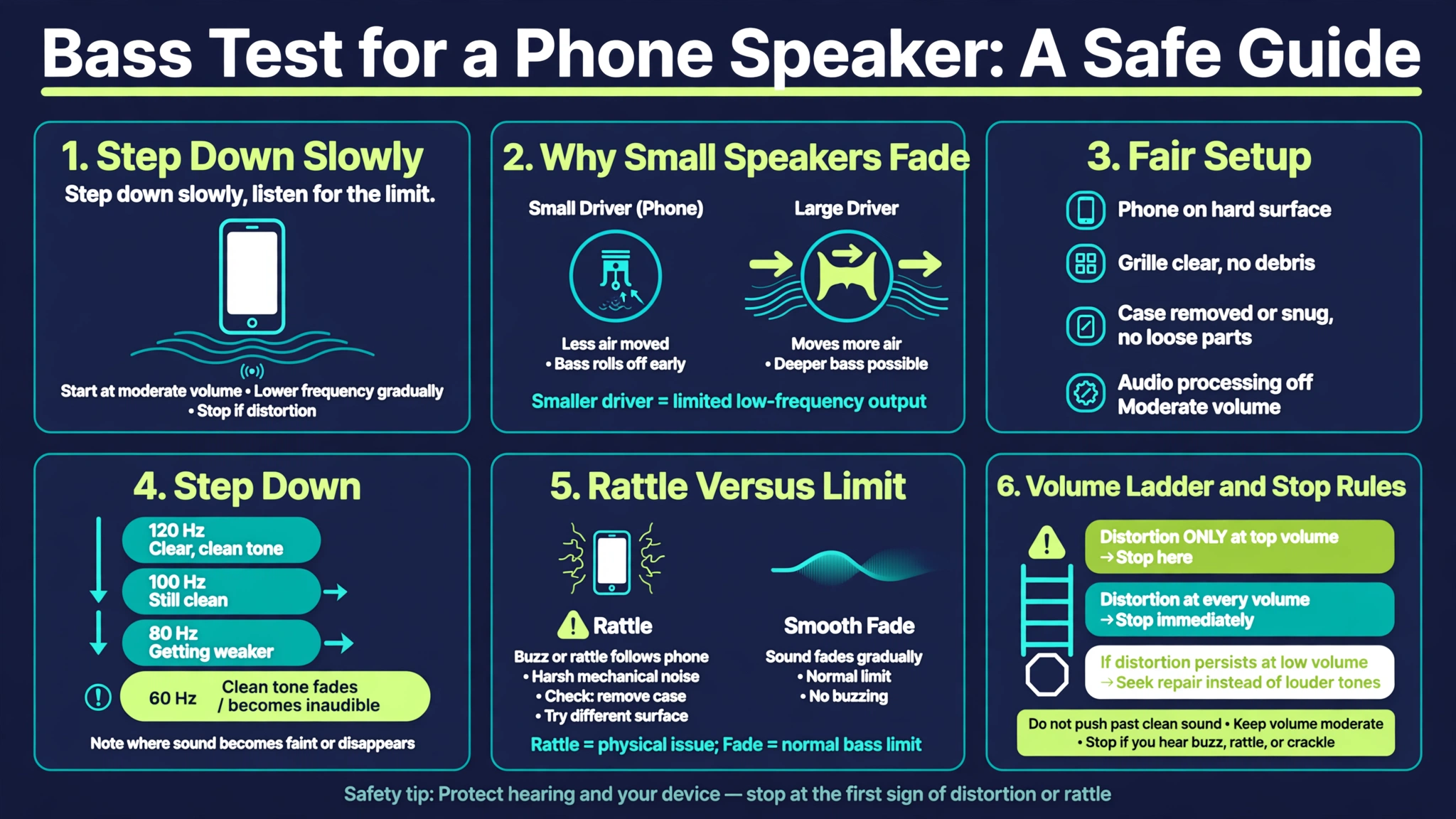
A bass test for a phone speaker plays low tones, stepping down from higher bass toward lower bass, so you can find the point where the tone fades, distorts, or turns into a rattle. Start at a moderate volume around 120 Hz, step down slowly, and note where clean tone stops — that point is the speaker's honest low limit, not a fault. If bass is weak only below that limit, the speaker is behaving normally for its size; if bass rattles, distorts, or is missing where it used to be strong, check the grille, settings, and placement before concluding the speaker is damaged.
Why phone bass is limited by physics, not by effort
Low bass in open air requires moving a large volume of air, and a phone speaker's driver is only a few millimeters across. It simply cannot move as much air as a large speaker or a subwoofer, so its output falls away as pitch drops. That roll-off is normal and expected, not a sign that the phone is broken or that a setting is wrong. A phone that plays voices and midrange clearly but fades on the lowest tones is usually behaving exactly as designed.
Earbuds and headphones are a different case, and comparing them directly to a phone speaker is misleading. By sealing the ear canal, earbuds create a small enclosed volume that lifts low frequencies, which is why earbuds can sound bassier than a phone speaker of similar driver size. A phone speaker plays into open air with no such enclosure, so it will always sound thinner at the low end than sealed earbuds at the same volume. Judge a phone speaker against other phone speakers in open air, not against earbuds or a large speaker.
Before you test: set up for a fair result
Start at a moderate volume, well below maximum, and keep it there for the whole test. Low tones at high volume are the hardest on small speakers: the driver moves furthest at low pitches, and driving it hard for a long time risks distortion or damage. A test tone also concentrates all its energy at one pitch, unlike music, which spreads energy across many pitches, so a tone that feels comfortable in music can feel harsh or tiring as a steady tone. Take breaks between passes and stop immediately if you feel pain, ringing, or discomfort.
Place the phone on a hard, flat surface with the speaker grille unobstructed, and do not cover the grille with your hand. A hand over the grille, a case that covers the speaker opening, or a phone lying face-down on soft fabric can all muffle bass and mimic a fault. Turn off equalizer presets, bass boost, and surround processing for the test, and note what you changed so you can restore it afterward. Test in a quiet room, since room noise easily masks the quiet low tones near the speaker's limit.
Step 1: Start high and step down
Start at around 120 Hz, a pitch most phone speakers reproduce clearly, and confirm you hear a clean, steady tone. Then step down in small steps — for example, 100 Hz, then 80 Hz, then 60 Hz — pausing at each step to listen. At each step, ask three questions: Can I hear the tone clearly? Does it sound clean, or does it buzz, rattle, or distort? Is it getting quieter smoothly, or did it vanish suddenly?
A smooth, gradual fade as you step down is the normal pattern: the tone gets quieter and quieter until it is barely audible, and that fade point is the low limit. A sudden disappearance between two close steps is worth repeating, since it may be a room effect — a pitch cancelled by reflections at your listening position — rather than a speaker limit. Move the phone or your seating position slightly and repeat that step; if the tone returns, the room was the cause.
Step 2: The rattle check at low volume
Once you have found the approximate low limit, repeat the lowest clean steps at a low volume with the phone held still on a hard surface. Listen for buzzing, rattling, ticking, or fizzing that rides on top of the tone. A rattle that appears only on low tones and disappears when you lift the phone off the surface may come from the surface itself or from something nearby vibrating, not from the speaker. Move nearby objects away and repeat. A rattle that follows the phone to a different surface and a different room is more likely to come from the phone — a loose grille, a case vibrating, or a driver problem.
Try removing the case and repeating the rattle check. A loose or ill-fitting case can vibrate against the phone body on low tones and sound exactly like a damaged speaker. If the rattle disappears without the case, the case was the cause. If the rattle persists without the case, on a hard surface, in a quiet room, at low volume, then the speaker or its mounting is the likely source, and further testing at higher volume will not fix it.
Step 3: The volume ladder
Play the same low tone at three volumes: low, medium, and moderately high — never maximum for a prolonged tone. Distortion that appears only at the highest volume is different from distortion at every volume. Distortion only at the top may mean the small driver is being driven past its comfortable range on that pitch, which is a limit, not necessarily damage; the practical answer is to avoid that pitch at that volume. Distortion at every volume, including low volume, is more concerning and points to a damaged driver, a blocked grille, or debris interfering with the driver's movement.
Compare the result with a midrange tone at the same volumes. If midrange tones are clean at all volumes and only low tones distort, the problem is specific to low-frequency movement. If every tone distorts at every volume, the problem is broader — a damaged driver, a general blockage, or a software fault — and a bass test alone will not narrow it further. In that case, a general speaker test and a cleaning check are the next steps, not louder bass tones.
Step 4: Check the earpiece and loudspeaker separately
Many phones have two sound outputs that are easy to confuse: the earpiece used for calls, at the top of the phone, and the loudspeaker used for media and speakerphone, usually at the bottom. A bass test through the loudspeaker says nothing about the earpiece, and the earpiece is not designed to reproduce bass at all — it is a small, quiet driver meant for speech close to the ear. If you cover the bottom speaker with a finger during the test, you should hear the tone drop substantially; if you still hear it clearly, you may be hearing the earpiece or a second speaker, depending on the model.
Test each output separately if your phone plays media through both. Cover one grille gently, listen, then cover the other. A difference between the two sides is useful information: a blocked bottom grille will weaken bass from that side while the other side sounds normal. Do not press hard on a grille or insert anything into it during this check; a gentle finger cover is enough, and anything sharper risks pushing debris deeper or damaging the mesh.
Common causes of weak or rattly phone bass
A blocked grille is the most common reversible cause. Dust, lint, pocket debris, or dried residue over the speaker opening muffles sound and can make bass sound thin or distorted. If blockage is visible, clean the grille gently with a dry soft brush, brushing outward so debris falls away from the speaker, and do not use sharp objects, compressed air at close range, or liquids poured onto the grille. Retest after cleaning; if bass returns, the grille was the cause.
Settings are the second common cause. A bass-reducing equalizer preset, a "voice clarity" or mono audio mode, or a volume limiter can all thin out low frequencies. Turn such processing off for the test, and check that the media volume — not just the ringtone or call volume — is at the level you expect, since phones often keep separate volume levels for different uses. Placement is the third cause: a phone in a pocket, a bag, or a soft case will sound bass-light compared with the same phone on a hard table, because the surface and the enclosure change how low frequencies radiate.
Water exposure is a separate case with its own rules. If bass went weak or rattly after the phone got wet, dry the outside with a soft cloth, let the device air-dry completely in a dry room with airflow before charging, and follow the manufacturer's guidance for your model. Do not charge a damp device and do not use direct heat. A bass test after full drying tells you whether low-frequency sound has returned; it does not prove the inside is dry, and a tone does not guarantee that water has been ejected.
What a bass test cannot tell you
A bass test by ear cannot measure exact loudness, exact frequency limits, or distortion levels. Your ears, your room, and your distance from the phone all change perceived volume, and a tone that sounds quiet in a noisy room may be perfectly normal. It also cannot tell you whether a speaker is "good" compared with another model, because different phones have different driver sizes, enclosures, and tuning, and a fair comparison needs the same room, the same position, and the same volume. Use the test to answer a narrower, more useful question: has this phone's bass changed, is one side different from the other, and does the problem survive grille, settings, and placement checks?
When to stop and seek repair
Seek manufacturer support or a repair shop when bass distortion or rattling persists at every volume after grille cleaning, case removal, settings checks, and position changes; when one speaker side loses bass that the other side still plays; when sound cuts out or crackles on low tones; or when the phone was dropped, crushed, or exposed to salt water, soapy water, or another liquid beyond a light splash. Also stop if a tone causes pain or ringing. A listening test has done its job when it narrows the problem to the speaker itself; louder or longer tones after that point add risk without adding information.
FAQ
What is a bass test for a phone speaker?
It is a listening check that plays low tones, stepping down from higher bass toward lower bass, to find where clean tone fades, distorts, or turns into a rattle. That fade point is the speaker's low limit.
Why does my phone speaker have weak bass?
Mostly because a small driver in open air cannot move as much air as a large speaker, so low bass naturally rolls off. A blocked grille, a bass-reducing setting, a case covering the speaker, or soft placement can make it worse, so check those before blaming the speaker.
At what frequency do phone speakers usually stop?
It varies by model, and a home test by ear cannot give an exact figure. As a rough guide from the research for this draft, small speakers and earbuds often stop reproducing clean tone well below about 80 Hz, while larger speakers reach lower. Judge your phone by whether its bass has changed, not by a single number.
What does a rattle during a bass test mean?
It can mean something loose vibrating — a case, the surface, or nearby objects — or a speaker problem. Move the phone, remove the case, clear nearby objects, and repeat at low volume; a rattle that follows the phone everywhere is more likely a speaker issue.
Should I run a bass test at maximum volume?
No. Start moderate and never hold a low tone at maximum volume for a long time. Low tones move the driver furthest, and prolonged maximum-volume tones risk distortion or damage, especially on small speakers. Distortion only at the top is a limit; distortion at every volume is a fault clue.
Can a bass test clean water out of a speaker?
No, not reliably. A tone may help you check whether sound has returned after drying, but it does not guarantee that water or dust has been ejected, and it does not repair damage. Dry the device fully first and follow the manufacturer's guidance for wet devices.
Why does bass sound different on a table versus in my hand?
Placement changes how low frequencies radiate and reflect. A hard table can reinforce bass, while a hand covering the grille or soft fabric absorbing sound can weaken it. Test on a hard, flat surface with the grille unobstructed for a fair result.
When is weak bass a repair problem?
When distortion or rattling persists at every volume after grille cleaning, case removal, settings, and placement checks; when one side loses bass the other side keeps; or when the phone was dropped or exposed to salt or soapy water. Those signs point to hardware damage.
Leave a Reply