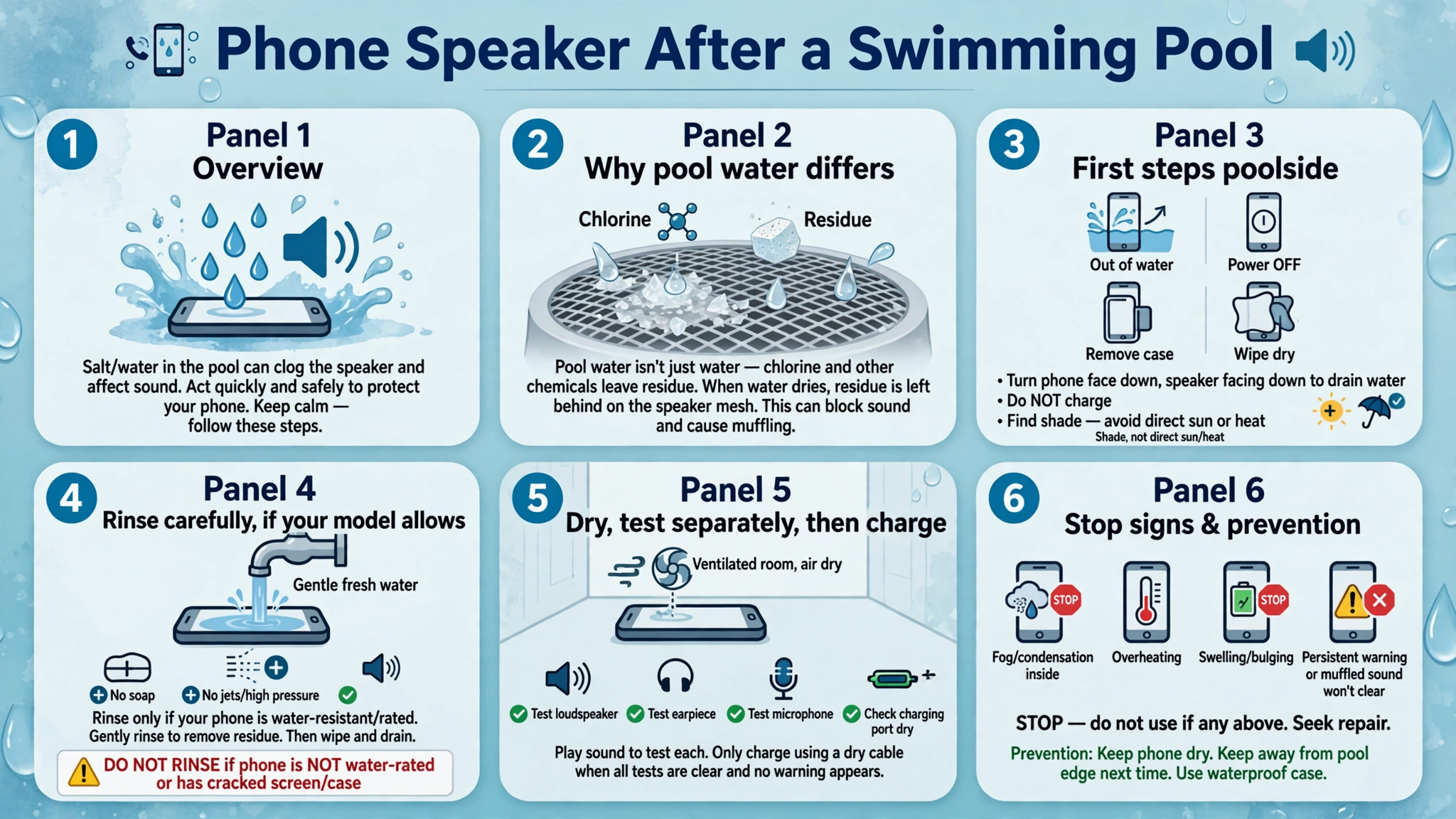
After a swimming pool, a muffled phone speaker needs more than drying: pool water leaves chlorine and other residues that can keep affecting the speaker and port after the water is gone. For a water-resistant phone, follow your manufacturer's guidance on a gentle fresh-water rinse, then air-dry fully and do not charge until no warning appears.
That sequence — rinse only if your model allows it, then dry, then test, then charge — is the whole guide in one sentence, and the order matters. Rinsing after drying is too late to prevent residue from setting. Charging before drying risks the port. Playing loud tones through a wet speaker does not replace either step. Pool accidents also tend to be messy in ways a sink splash is not: the phone may have been splashed several times, sat in a wet case, or been handled with wet, sunscreen-coated hands. Each of those details changes what you should check.
Why pool water is different from tap water
Pool water is treated water, not plain water. It contains chlorine-based disinfectants and other pool chemicals, and in practice it also picks up sunscreen, body oils, and sweat from everyone in the pool. When pool water dries on a speaker mesh, it can leave a thin residue that stiffens or coats the mesh, so sound stays muffled even after the phone feels dry. The same residue can sit in the charging port and around seals, where it may contribute to corrosion over time if it is not removed.
That is why manufacturer and audio-device guidance found for this draft repeatedly makes the same point: after pool or ocean use, rinse with fresh water and dry thoroughly, rather than simply letting pool water dry in place. The point is not that pool water is dramatically more dangerous in the first minute; it is that what it leaves behind matters after the first hour. A phone that sounds fine after a pool splash but was never rinsed or wiped properly can develop a duller speaker or a charging warning days later, and the reader may not connect the later symptom to the pool.
Water-resistance ratings add another wrinkle. A rating describes laboratory behavior with fresh water for a new device. Pool chemicals, repeated splashing, and an older or previously dropped phone can all behave differently from that laboratory case. Do not treat a rating as proof that pool water cannot affect your phone, and do not treat it as permission to swim with the phone or to charge it while wet.
First steps at the poolside
Get the phone out of the water right away and keep it away from further splashes. Turn it off if you can do so safely, remove the case, and wipe the outside with a soft, dry, lint-free cloth. Poolside cases often trap a layer of pool water against the back and edges, so a phone that looks dry in its case may still be wet underneath. Remove any wet accessories, and set the wet case aside to dry separately rather than putting the phone back into it.
Hold the phone with the speaker and charging port facing down and tap it very gently against your palm so droplets can fall out. Do not shake it hard, do not blow into openings, and do not use a hair dryer or place it in direct sun on a hot poolside surface to "bake" it dry. Heat can damage seals and the battery, and direct sun on a dark phone can raise its temperature quickly. Move to shade, keep the phone in a dry spot with airflow, and resist the urge to test it repeatedly while it is still wet.
Do not plug in a charger at the poolside, even if the battery is low and a poolside outlet is nearby. A wet port, wet hands, and a wet cable are a risky combination, and a moisture warning at this point is the phone protecting itself. Unplug any cable that is already connected, dry your hands, and wait.
The rinse question, handled carefully
For a water-resistant phone, manufacturer guidance generally describes rinsing with clean fresh water after exposure to liquids other than fresh water, including pool water, and then drying thoroughly with a dry soft cloth. That guidance is model-specific, so check your own manufacturer's instructions before rinsing. The rinse should be gentle: clean, cool fresh water, briefly, without pressure, jets, or submersion beyond what your model allows. The goal is to remove pool residue from the outside, grille, and port rim, not to give the phone a second swim.
Do not rinse if your phone was never rated as water-resistant, if the screen is cracked, if a seal is damaged, or if your manufacturer's guidance for your model says not to. In those cases, wipe the outside thoroughly with a soft cloth lightly dampened with clean fresh water if your manufacturer allows even that, or simply wipe dry, keep the phone off and unplugged, and seek advice. When in doubt, do not add more water to a phone you are unsure about. A repair technician can clean residue safely, and that is better than turning a splash into a submersion.
After any rinse, wipe the phone dry with a soft, lint-free cloth, drain it speaker-down and port-down with gentle taps, and remove the case again if water collected under it. Do not use soap, cleaning sprays, or pool chemicals to "clean" the phone after a pool accident. Soap adds its own film to the mesh and port, and harsh cleaners can damage coatings and seals.
Drying after a pool exposure
Place the phone in a dry, well-ventilated room at normal room temperature, speaker facing down on a dry cloth, away from direct sun and heaters. A gentle room fan at a distance can help airflow. Do not place the phone in rice: manufacturer guidance warns against it, and rice dust can enter the grille and port. Do not seal the wet phone in a bag, a pocket, or its wet case, since trapped humid air slows drying.
Plan on a longer drying period than for a clean-water splash. A brief pool splash with a prompt rinse may clear within hours, but a phone that went under, or that was splashed repeatedly, should be given at least a full day of air-drying before you rely on it, and longer if any symptom remains. Test the speaker briefly at a moderate volume after that period, then re-test the next day. A speaker that improves steadily is a good sign; a speaker that stays muffled, crackly, or quiet after full drying, or that improves and then worsens, needs further attention.
Check the parts separately. The loudspeaker at the bottom, the earpiece at the top, the microphone, and the charging port are different openings. Play a familiar recording through the loudspeaker, make a short test call or voice recording for the earpiece and microphone, and only attempt charging after the port is dry and no warning appears. A clear loudspeaker does not prove the port is dry, and a successful charge does not prove the speaker has recovered.
A short, moderate tone check — and its limits
After wiping, draining, and some air-drying, a short moderate-volume tone through the phone's own speaker can sometimes shake loose droplets from the grille. Keep the speaker facing down, keep the volume moderate rather than maximum, run only a short cycle, wipe the grille, and listen. If sound improves, that is useful information. If nothing changes after two or three short cycles, stop. Repeated loud cycles will not remove chlorine residue, dry the port, or repair a damaged driver, and they drain a battery you may need.
Do not run a tone while the phone is still dripping, while it is charging, or with the earpiece held to your ear. Do not use a tone as a substitute for the rinse and drying steps above. The tone moves water in the grille; it does not dissolve residue, evaporate water inside the phone, or make a wet port safe to charge.
Charging after a pool accident
Only charge when the phone and charging port are fully dry and no liquid or moisture warning appears. Use a dry cable and a dry adapter, and check that the cable itself was not left in pool water or on a wet surface. Watch the first minutes of charging for any warning, unusual heat, or strange behavior, and unplug immediately if anything appears. Wireless charging is not a shortcut for a wet phone: manufacturer guidance says to dry the device thoroughly before placing it on a wireless charger, and a soaked or otherwise abnormal phone should finish drying and be checked before any charging method is used.
If a charging warning returns after a long drying period, stop testing with cables and seek repair or manufacturer support. Pool residue in the port can cause a persistent warning even when the outside looks dry, and repeated insertion attempts can push residue deeper or damage contacts.
When pool exposure needs professional help
Seek help promptly if the phone will not turn on after drying, shows fog or condensation inside the screen or camera, becomes unusually hot, swells, or smells unusual, restarts repeatedly, or loses battery much faster than before. The same applies if sound stays distorted, intermittent, or absent after full drying, if a charging warning persists, if the phone was submerged for more than a brief moment, or if the screen or seal was already damaged before the pool. Tell the technician it was pool water, how long the phone was wet, and whether it was rinsed, since that history changes what they check for residue and corrosion.
Back up important data as soon as the phone can be used safely. Pool exposures can develop delayed symptoms, and a backup made while the phone works is worth more than a perfect drying routine attempted after it stops.
Poolside prevention for next time
The simplest prevention is also the most reliable: keep the phone away from the pool edge, in a dry spot, and out of wet hands and wet cases. If you need the phone nearby for photos or music, use a separate waterproof pouch or a separate device rated for the job, and keep the phone itself dry. After any poolside day, even without a drop in the water, wipe the phone with a dry cloth and check the speaker and port for splashes, sunscreen, or dampness before charging. A minute of wiping at the end of the day prevents most of the residue problems this guide describes.
Pool water does not have to ruin a phone speaker, but it does ask for one extra step that tap water does not: remove the residue, then dry fully, then test and charge in that order. Skip the rinse, and residue can linger. Skip the drying, and charging can harm the port. Skip the separate tests, and a clear speaker can hide a wet port. Do the steps in order, and a pool accident becomes a manageable incident rather than a slow-developing fault.
FAQ
My phone fell in the pool and the speaker sounds muffled. What do I do first?
Get it out, turn it off if you can, remove the case, wipe it dry, and drain it speaker-down with gentle taps. Do not charge it. For a water-resistant phone, follow your manufacturer's guidance on a gentle fresh-water rinse to remove pool residue, then air-dry fully before testing or charging.
Should I rinse my phone after pool water?
For a water-resistant model, manufacturer guidance generally describes a gentle fresh-water rinse after pool exposure, followed by thorough drying. Do not rinse a phone that was never rated as water-resistant, or one with a cracked screen or damaged seal, and never use soap, jets, or harsh cleaners.
How long should I dry a phone after the pool?
Longer than for a clean-water splash. A brief splash with a prompt rinse may clear within hours, but a phone that went under or was splashed repeatedly should get at least a full day of air-drying, with a re-test the next day. Judge by sound, charging behavior, and the absence of warnings, not by the clock alone.
Can I charge my phone after the pool if the speaker sounds fine?
Not until the charging port is also dry and no warning appears. A clear speaker does not prove the port is dry. Use a dry cable, watch the first minutes of charging, and unplug immediately if a warning or unusual heat appears.
Is wireless charging safe after a pool accident?
Only after the phone is thoroughly dry on the outside and shows no warning or other symptom. Wireless charging does not use the port contacts, but it still sends energy into the phone, so it is not a shortcut for a soaked or abnormal phone.
Why does my speaker still sound dull days after the pool?
Pool residue can dry on the mesh and keep sound dull even after water is gone, and corrosion can develop slowly. If sound stays muffled, crackly, or quiet after full drying, or if it improves and then worsens, seek a professional inspection and mention the pool exposure.
Can a water-eject tone fix a pool-water speaker?
A short moderate-volume tone may help move droplets from the grille after wiping and draining, but it does not remove chlorine residue, dry the port, or repair damage. Use it as a brief check, not as a substitute for rinsing and drying.
How can I protect my phone at the pool next time?
Keep it away from the pool edge in a dry spot, out of wet cases and wet hands, and use a separate pouch or device if you need music or photos poolside. Wipe the phone at the end of the day and check the speaker and port before charging, even if it never went in the water.
Leave a Reply