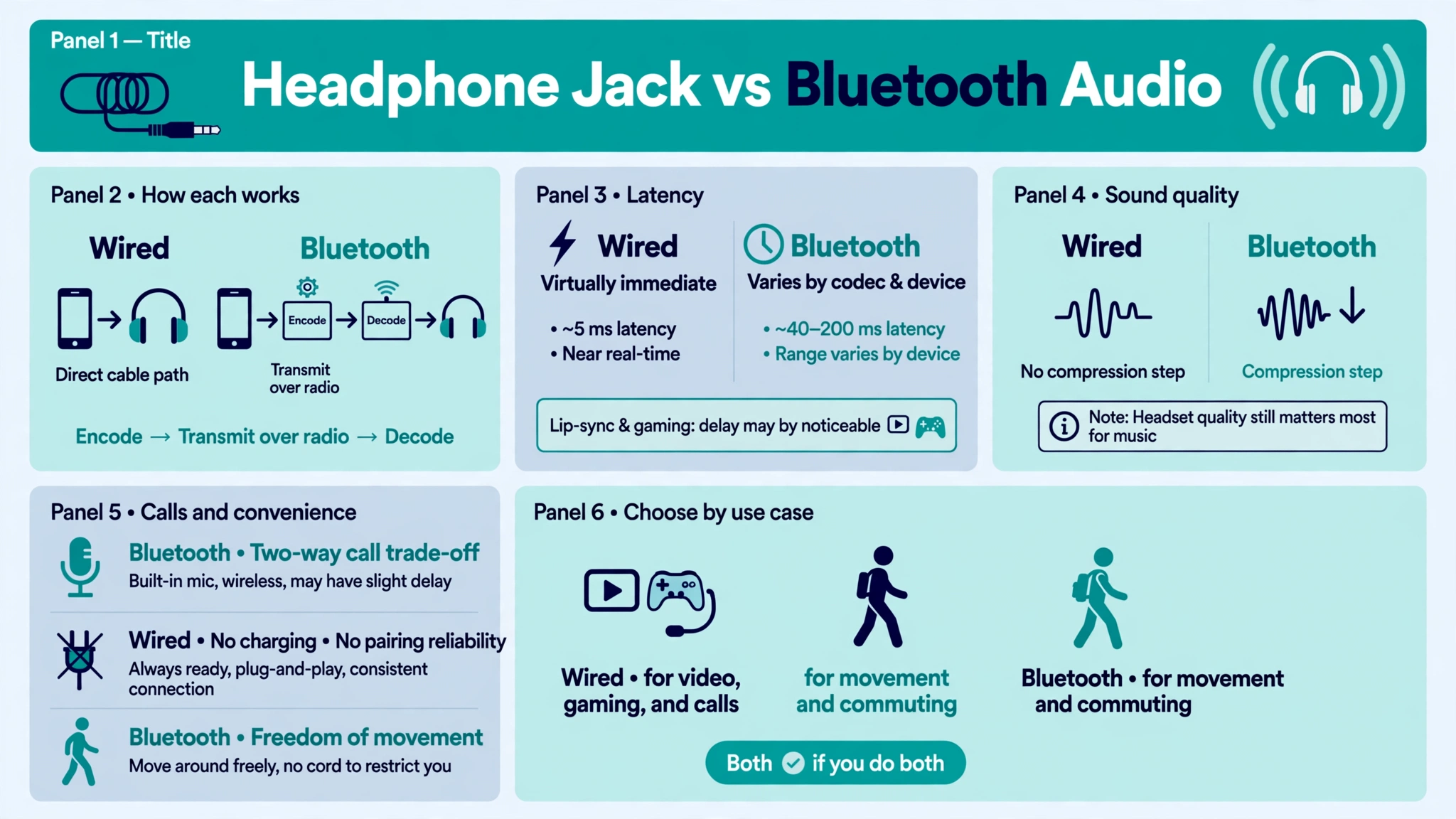
For everyday music listening, a good Bluetooth headset and a good wired headset can sound very close, and the headset itself matters more than the cable. For video, gaming, and calls, the connection matters more: wired audio is usually immediate and stable, while Bluetooth adds delay, compresses the signal, and can drop call quality when the microphone is active. Choose wired when timing and reliability matter most, and Bluetooth when freedom of movement matters most.
How each connection actually works
A wired headphone jack carries an analog audio signal directly through a cable to the headphones. The 3.5 mm connector is the familiar example; some newer phones use a USB-C digital connection instead, which still avoids a wireless radio link. Because the path is physical, there is no pairing step, no battery in the headphones is required for basic playback, and nearby wireless devices do not interfere with the signal itself.
Bluetooth sends audio as data over a short-range radio link. The phone encodes the audio with a codec, transmits it, and the headphones decode it back into sound. Common codec names readers will see include SBC, AAC, aptX, and LDAC. A codec only improves quality if both ends support it; if they do not share a higher-quality codec, they fall back to a common one. That negotiation is invisible to most listeners, which is why two people with the same headphones can report different results on different phones.
Latency: the difference you can feel
Latency is the delay between audio being sent and heard. For music alone, a small delay does not matter, because nothing on screen needs to match the sound. For video, gaming, and live monitoring, it does. A delay that is easy to ignore in a song becomes visible as lip-sync error in a film, or as a mistimed footstep in a game.
Secondary sources found in research for this draft report Bluetooth latency roughly in the 30–200 ms range depending on codec and conditions, with wired latency described as virtually immediate or around a few milliseconds. Those ranges are not measurements from this site, and they vary widely: some codecs and devices compensate for video delay, while others do not. The practical test is simple. Play a video with clear speech, watch the speaker's lips, and note whether sound and picture match. If they do not, try the wired connection on the same video. If the mismatch disappears, latency — not the headphones' sound quality — was the problem.
Gamers and musicians should treat this as the deciding factor. Competitive gaming and live monitoring need timing the ear can trust. Bluetooth low-latency modes can reduce delay, but they still depend on both devices supporting the mode, and they do not turn a wireless link into a wired one.
Sound quality: compression, not just the cable
Wired audio does not need to compress the signal for transmission, so it can carry the source faithfully up to the limits of the headphones and the phone's audio output. Bluetooth must compress audio to fit the wireless link, and compression can reduce fine detail, especially in complex passages. Higher-quality codecs reduce that loss, but they do not remove the step entirely, and they require support on both ends.
That does not mean every wired headset beats every Bluetooth headset. A well-tuned wireless headset with a good driver and a good seal will usually sound better than a poorly made wired headset, because the driver, tuning, fit, and seal shape the sound far more than the transmission method alone. In a quiet room, at moderate volume, with a good headset, many listeners will struggle to identify the connection in a blind comparison. In that situation, comfort, fit, and battery life are better reasons to choose than a theoretical quality gap.
Where wired quality shows most clearly is in a stable, controlled setup: a quiet room, a good source file, and headphones capable of revealing detail. Where Bluetooth quality suffers most is at the edge of range, in a room full of competing wireless signals, or when the connection falls back to a basic codec without the listener noticing.
Calls: why Bluetooth voices can sound worse
Calls expose a Bluetooth weakness that music hides. When the microphone is active, the wireless link must carry audio in both directions at once. On many headsets this forces a lower-quality, two-way mode, and the other person's voice can sound thinner or more compressed than music did a moment earlier. A wired headset with a dedicated microphone path does not face the same trade-off, which is one reason wired headsets remain popular for long calls and meetings.
If call quality matters, test both connections on the same call app before deciding. Note whether the other person hears you clearly, whether your own voice sounds natural in a recording, and whether switching to wired removes a "phone call" quality from the audio. Also check microphone placement: a microphone blocked by hair, clothing, or debris will sound poor on either connection, and cleaning guidance for the microphone opening should be followed before blaming the codec.
Battery, convenience, and reliability
Bluetooth wins on convenience. No cable means no tangles, no snagging on a bag strap, and freedom to move around a room. That freedom has costs: headphones need charging, pairing can fail, firmware can change behavior, and a low battery can end a session at the worst moment. Wired headsets need no charging and no pairing, but the cable can tangle, fray at the connector, or pick up handling noise when it rubs against clothing.
Reliability also differs by environment. A wired connection is immune to wireless interference. A Bluetooth connection can stutter near crowded wireless networks, microwave ovens, or other Bluetooth devices, and it weakens with distance and obstacles such as walls and bodies. If audio drops only when you walk to another room, range — not sound quality — is the issue.
Which should you choose?
Choose wired if you mainly watch video, play games, record or monitor audio, take long calls, or want a connection that simply works without charging or pairing. Choose Bluetooth if you mainly listen to music or podcasts while moving, exercising, or commuting, and you value freedom from a cable more than the lowest possible latency.
Many listeners end up with both: Bluetooth for daily movement, wired for video, gaming, and important calls. That split is sensible. It avoids paying for a single headset to be perfect at everything, and it gives you a quick way to test whether a problem is the headset, the connection, or the source app.
Simple tests before you buy or replace anything
First, test the same headset, the same track, and the same volume on both connections if your headset supports both. Second, test lip-sync with a talking-head video rather than music. Third, record your voice on a call app with each connection and listen back. Fourth, move to the far end of your normal listening range and note whether Bluetooth stutters. Write down what changed at each step. If nothing changes, the headset or the source is the limiting factor, not the connection. If only Bluetooth lags or stutters, you have your answer without buying anything new.
Care notes that apply to both
Keep the headphone jack clean and dry, and do not force a plug that resists; lint in a jack can cause one-sided sound or a loose fit. Keep Bluetooth headset charging contacts clean and dry, and let wet headsets air-dry fully before charging. Keep volume moderate on either connection, take breaks during long sessions, and use well-fitting or noise-cancelling models in noisy places so you do not need to raise volume to compete with background noise. A connection choice never justifies listening louder than is comfortable.
FAQ
Does Bluetooth always sound worse than wired?
No. A good Bluetooth headset can sound better than a poor wired headset, because driver quality, tuning, and fit matter more than the connection alone. Wired has a technical advantage in latency and freedom from compression, but that advantage is not always audible in everyday music listening.
Why does Bluetooth audio lag during videos?
Bluetooth encoding, transmission, and decoding take time, and the delay varies by codec and device. Research sources for this draft report roughly 30–200 ms for Bluetooth versus a virtually immediate wired path. Some video apps compensate for the delay; if yours does not, a wired connection usually removes the mismatch.
Why do calls sound worse than music on Bluetooth?
When the microphone is active, the link must carry audio both ways, and many headsets switch to a lower-quality two-way mode. A wired headset keeps a dedicated microphone path, so calls often sound clearer on a wired connection.
Do I need a special codec for good Bluetooth sound?
A higher-quality codec helps only if both your phone and your headphones support it. Check both specifications before assuming a codec name on the box guarantees better sound, and test with your own phone rather than trusting the label alone.
Is a headphone jack better for gaming?
Usually yes, because timing matters in gaming and wired latency is far lower and more stable. Bluetooth can work for casual play, especially with a low-latency mode supported on both ends, but competitive or rhythm-sensitive play favors wired.
Can Bluetooth interference cause dropouts?
Yes. Crowded wireless environments, distance, walls, and bodies between phone and headphones can cause stuttering or dropouts. Moving closer, reducing obstacles, and disconnecting unused Bluetooth devices often helps before replacing the headset.
Should I keep both wired and Bluetooth headsets?
For many readers, yes. Bluetooth suits movement and commuting, while wired suits video, gaming, calls, and any session where charging or pairing would be a problem. Owning both is a practical split, not a luxury, if you use audio for both purposes.
Does the connection affect hearing safety?
Not directly. Hearing risk comes from volume and duration, not from wired versus Bluetooth. Keep volume moderate, take breaks, and do not raise volume to overcome background noise on either connection.
Related tools on this site
Related guides on this site
- How to Fix Bluetooth Audio Delay (Lip Sync Lag)
- Bluetooth Audio Routing Problems: A Phone Speaker Guide
- How to Fix a Bluetooth Speaker With Muffled or No Sound
- Headphones Only Working on One Side? 8 Ways to Fix It
- How to Clean Headphones: Pads, Mesh and Cable
- Safe Headphone Volume
- Using a Sound Meter to Check a Phone Speaker Safely
- How to Test Speakers
Leave a Reply